Hello! Welcome to our next lesson on functional programming in Java.
In our previous lessons, we've journeyed from creating streams to performing transformations with map, filter, and flatMap. You've mastered how to change the shape and content of a stream, and even how to flatten nested collections into a single, processable sequence. Now, we'll focus on the final step in many data processing pipelines: aggregation. How do you take a flat stream of data and organize it into meaningful groups?
Today, we'll focus on a powerful capability that is frequently a topic in technical interviews. Our goal is to learn how to group and partition collection data effectively using built-in collectors like groupingBy and partitioningBy. Think of this as the Java equivalent of SQL's GROUP BY clause, allowing you to perform sophisticated data analysis and summarization directly in your code.
1. Grouping Data with Collectors.groupingBy
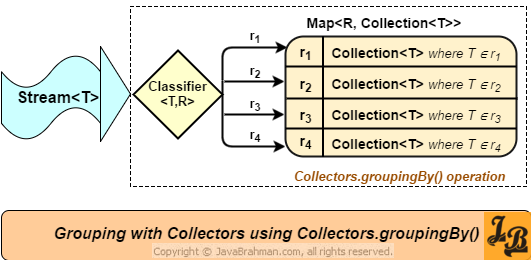
The groupingBy collector is the primary tool for classifying stream elements into categories. It takes a stream of objects and returns a Map, where the keys are the result of a classification function you provide, and the values are Lists of the objects that fall into that category.
Let's consider a classic interview scenario: you have a list of Employee objects and you need to group them by their department.
// Let's assume this Employee class for our examples
class Employee {
    private int id;
    private String name;
    private String department;
    private double salary;

    // constructor, getters, etc.
}

List<Employee> employees = //... a list of employees

Map<String, List<Employee>> employeesByDept = employees.stream()
    .collect(Collectors.groupingBy(Employee::getDepartment));
In this simple, yet powerful, one-liner:
Employee::getDepartmentis the classifier function. For each employee in the stream, this function is called, and its return value (the departmentString) is used as the key in the resulting map.- The
groupingBycollector then gathers allEmployeeobjects that produce the same key into aList.
The result is a Map<String, List<Employee>>, exactly what we need.
The Overloads of groupingBy
The real power of groupingBy, and a key area for senior-level interviews, lies in its overloaded methods. These allow you to customize both the values in the map and the map's implementation itself.
To see how this works in practice, let's watch a video that walks through a similar problem: grouping employees by age.
Java 8 Stream Collectors groupingBy Example | Java 8 coding Interview Questions & Answer|Code Decode
The video 'Java 8 Stream Collectors groupingBy Example' by Code Decode is an excellent resource that covers the three main ways to use groupingBy. It starts with the basic case and progressively builds up to the more advanced uses you'd be expected to know in an interview.
First, watch from 02:38 to 04:05. This part demonstrates the basic, single-argument groupingBy collector, which groups employees by age into a Map<Integer, List<Employee>>. This is the foundation for everything else.
Level 2: groupingBy with a Downstream Collector
What if you don't want a List<Employee> as the value? Maybe you just want the count of employees per department, or a Set of their names. This is where the second argument, the downstream collector, comes in. It allows you to perform a further reduction on the elements within each group.
Example 1: Counting elements in each group
Map<String, Long> countByDept = employees.stream()
    .collect(Collectors.groupingBy(
        Employee::getDepartment,
        Collectors.counting() // Downstream collector
    ));

// Output: {HR=5, Engineering=12, Marketing=3}
Example 2: Mapping elements to another type within each group
Let's group by department, but the value should be a List of just the employee names.
Map<String, List<String>> namesByDept = employees.stream()
    .collect(Collectors.groupingBy(
        Employee::getDepartment,
        Collectors.mapping(Employee::getName, Collectors.toList()) // Downstream collector
    ));

// Output: {HR=[Alice, Bob, ...], Engineering=[Charlie, David, ...]}
Here, Collectors.mapping() acts as a nested collector, first applying the Employee::getName function to each employee in the group and then collecting those names into a List.
Now, let's see how you can change the collection type from a List to a Set to store unique elements.
Java 8 Stream Collectors groupingBy Example | Java 8 coding Interview Questions & Answer|Code Decode
Continuing with the same video, let's see how a downstream collector (toSet()) is used to handle duplicates.
Watch from 06:47 to 10:33. This segment explains how to use the two-parameter groupingBy method to collect the values into a Set instead of the default List. This is a common requirement to eliminate duplicates within a group.
Level 3: Specifying the Map Implementation
By default, groupingBy uses a HashMap. What if your interviewer asks for the results to be sorted by the key (e.g., department name)? You can use the third overload of groupingBy to provide a Supplier for the map implementation you want, such as a TreeMap.
Map<String, List<Employee>> sortedEmployeesByDept = employees.stream()
    .collect(Collectors.groupingBy(
        Employee::getDepartment,
        TreeMap::new, // Map supplier
        Collectors.toList() // Downstream collector
    ));
Now, the resulting map will have its keys (departments) sorted alphabetically.
Java 8 Stream Collectors groupingBy Example | Java 8 coding Interview Questions & Answer|Code Decode
Finally, let's look at the third overload of groupingBy which gives you full control.
Watch from 10:56 to 15:24. This section demonstrates the three-parameter version of groupingBy, allowing you to specify the map implementation (like TreeMap for sorted output). It also neatly summarizes how the simpler overloads are just conveniences that call the more complex ones internally.
Test your understanding!
Given the List<Employee> employees, write a stream pipeline to produce a Map<String, Double> where the key is the department and the value is the average salary for that department.
Hint: Look for a downstream collector that can calculate summary statistics.
Show answer
import java.util.stream.Collectors;
import java.util.Map;
import java.util.List;

// ... Assuming Employee class is defined

Map<String, Double> avgSalaryByDept = employees.stream()
    .collect(Collectors.groupingBy(
        Employee::getDepartment,
        Collectors.averagingDouble(Employee::getSalary)
    ));

System.out.println(avgSalaryByDept);
Explanation: We group by department. The downstream collector, Collectors.averagingDouble(), is applied to the employees in each group. It takes a function to extract the double value (the salary) from each employee and calculates the average.
2. Partitioning Data with Collectors.partitioningBy
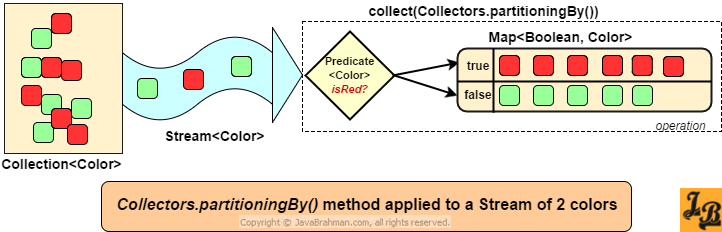
partitioningBy is a special case of groupingBy. While groupingBy can create many groups based on a classifier function, partitioningBy is used when you only need to split the stream into two groups based on a Predicate (a condition that returns true or false).
The result is always a Map<Boolean, List<T>>: one list for elements that satisfy the predicate (true), and one for those that don't (false).
Let's read a concise guide to understand partitioningBy.
Java 8 Streams: Definitive Guide to partitioningBy()
The article 'Java 8 Streams: Definitive Guide to partitioningBy()' from StackAbuse provides a clear and focused explanation of this collector.
Read the sections 'Guide to Collectors.partitioningBy()' and 'Collectors.partitioningBy() using a Predicate'. Focus on how it always returns a Map<Boolean, List<T>> and how the predicate is used to divide the stream.
Example: Partitioning employees by salary
Let's partition our employees into two groups: high earners (salary > 100,000) and everyone else.
Map<Boolean, List<Employee>> partitionedBySalary = employees.stream()
    .collect(Collectors.partitioningBy(e -> e.getSalary() > 100_000));

List<Employee> highEarners = partitionedBySalary.get(true);
List<Employee> otherEarners = partitionedBySalary.get(false);
Just like groupingBy, partitioningBy also has an overload that accepts a downstream collector. For instance, we could partition employees and get just the count in each group.
Java 8 Streams: Definitive Guide to partitioningBy()
Now let's see how to add a downstream collector to partitioningBy.
Read the section 'Collectors.partitioningBy() using a Predicate and a Downstream Collector'. Pay attention to the examples using Collectors.mapping() and Collectors.counting() to perform further aggregation on the partitioned groups.
3. Interview Corner: groupingBy vs. partitioningBy
A common interview question is to explain the difference between these two collectors. Being able to articulate this clearly shows a solid grasp of the Stream API.
Here’s your cheat sheet:
- Input Function:
groupingBytakes aFunction(the classifier).partitioningBytakes aPredicate. - Number of Groups:
groupingBycan create an arbitrary number of groups, one for each unique key returned by the classifier.partitioningByalways creates exactly two groups, represented by the boolean keystrueandfalse. - Output Keys: The keys in the map from
groupingByare of typeK(the return type of the classifier). The keys frompartitioningByare alwaysBoolean. - Completeness:
partitioningBywill always return a map with entries for bothtrueandfalse, even if one or both of the corresponding lists are empty.groupingByonly creates entries for keys that are actually present in the data.
Java 8 Streams: Definitive Guide to partitioningBy()
To solidify this understanding, read the direct comparison in the StackAbuse article.
Read the section 'Similarities and Differences Between partitioningBy() And groupingBy()'. This section summarizes the key distinctions, which is perfect for interview preparation.
In short: if you need to classify data into more than two categories (e.g., by department, city, or status), use groupingBy. If you need to split data into two buckets based on a simple yes/no condition (e.g., passing/failing, active/inactive), partitioningBy is the more specific and potentially more efficient choice.
Conclusion
You have now mastered two of the most powerful collectors in the Java Stream API. These tools allow you to move beyond simple transformations and perform complex, SQL-like aggregations with clean, functional code.
Key Takeaways for Your Interview:
groupingByis for multi-way classification. Use it when you need to group data by properties like department, category, or type.partitioningByis for a two-way split. Use it for simple boolean conditions likeisEven,isPassing, orisActive.- Downstream collectors are key. Show your depth by using downstream collectors like
counting(),mapping(),summarizingDouble(), andreducing()to perform advanced aggregations within each group. - Be ready to explain the difference. Clearly articulate that
groupingByuses aFunctionto create N groups, whilepartitioningByuses aPredicateto create exactly two (true/false) groups.
Preview of the Next Lesson:
So far, our streams have always contained data. But in real-world systems, built with Spring Boot and microservices, data is often missing or null. How do you handle this gracefully without littering your code with null checks? In our next lesson, we will learn how to write idiomatic, null-safe code using the Optional class, a core concept in modern Java development.