Hello! Welcome to the final lesson in our Advanced Java Concurrency module.
In our previous lessons, we've explored powerful concurrency tools, but they largely followed a blocking model. Threads would wait for locks, or for items in a queue. This model is simple to reason about but can be inefficient, especially in I/O-bound applications like microservices that spend much of their time waiting for network responses.
Today, we shift to a more modern, efficient, and scalable paradigm: non-blocking, asynchronous programming. Your learning outcome is to implement asynchronous, non-blocking operations using CompletableFuture. This is a cornerstone of modern Java development and a frequent topic in interviews for senior roles, as it demonstrates your ability to design responsive and resource-efficient systems.
1. From Blocking Future to Non-Blocking CompletableFuture
Before Java 8, asynchronous programming was primarily handled by the Future interface, introduced in Java 5. You could submit a task to an ExecutorService and get a Future object back, which represented a promise for a result that would be available later.
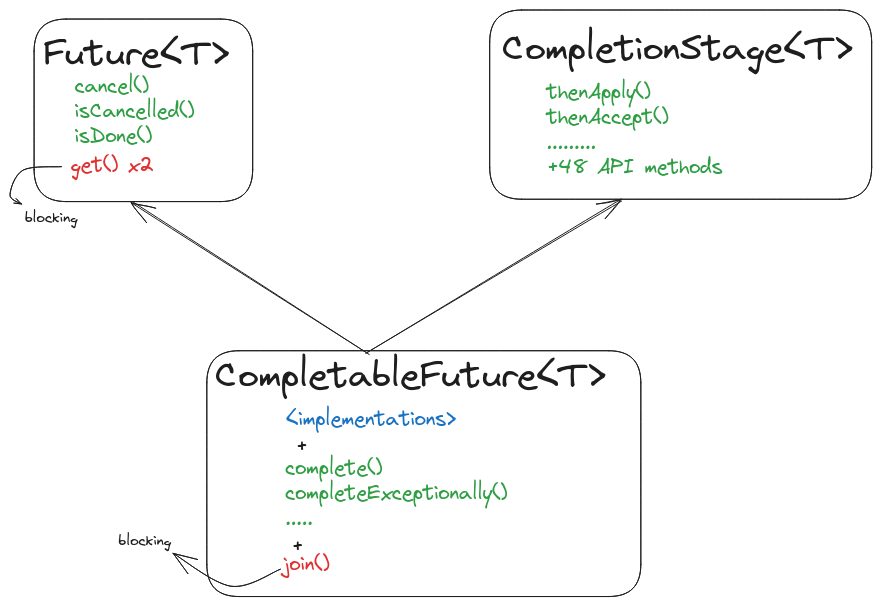
The problem? The only way to get that result was to call future.get(), a blocking operation. Your main thread would freeze until the result was ready. This made composing multiple asynchronous steps awkward and inefficient.
To understand the conceptual leap from the old way to the new, it's helpful to see the distinction between synchronous, multi-threaded, and asynchronous execution.
Asynchronous programming in Java 8: how to use CompletableFuture by José Paumard
This video from a Devoxx conference talk provides an excellent conceptual foundation. It clearly explains the limitations of the old Future API and sets the stage for why CompletableFuture was a necessary evolution.
Watch from 00:50 to 07:41. Focus on the comparison between synchronous, multi-threaded, and asynchronous execution models, and pay close attention to the critique of Future.get() being a blocking call.
Java 8's CompletableFuture solves these problems by implementing the CompletionStage interface. This interface provides a rich, fluent API for defining pipelines of computation that execute in a non-blocking fashion.
Think of it as building a dependency graph. Instead of saying "run this, wait, then run that," you say, "when this task completes, use its result to run that task, and when that one completes, use its result to run another." The system handles the execution flow automatically as data becomes available.
2. Creating Asynchronous Tasks
The simplest way to create a CompletableFuture is by using one of its static factory methods. These are ideal for offloading a long-running task from the main thread.
CompletableFuture.supplyAsync(Supplier<T>): Use this when your asynchronous task needs to return a value. TheSupplieris a functional interface that takes no arguments and returns a result.CompletableFuture.runAsync(Runnable): Use this for "fire-and-forget" tasks that perform an action but don't return a value.
import java.util.concurrent.CompletableFuture;
import java.util.concurrent.ExecutionException;

public class CreationExample {
    public static void main(String[] args) throws ExecutionException, InterruptedException {
        // Use supplyAsync for a task that returns a value
        CompletableFuture<String> future = CompletableFuture.supplyAsync(() -> {
            // Simulate a long-running task like a network call
            try {
                Thread.sleep(1000);
            } catch (InterruptedException e) {
                throw new IllegalStateException(e);
            }
            return "Result of the asynchronous computation";
        });

        System.out.println("Main thread is not blocked and continues execution.");

        // The old way: block and wait for the result
        String result = future.get(); // This line will block for ~1 second
        System.out.println(result);
    }
}
By default, these async methods run on the common ForkJoinPool, a shared thread pool. You can also provide your own Executor as a second argument to have more control over your thread resources, which is a best practice in large applications.
3. Building a Non-Blocking Pipeline
The real power of CompletableFuture comes from chaining operations. Instead of blocking with get(), you attach callback functions that will be executed automatically when the future completes.
Let's explore the core chaining methods. For a quick, practical overview of these methods, the following video is excellent.
A Guide To CompletableFuture in Java with Examples | Asynchronous Operations in Java | Geekific
This guide from Geekific walks through the most common methods for creating and chaining CompletableFutures with clear code examples.
Watch from 03:32 to 05:52. This section covers runAsync and supplyAsync for creation, and then demonstrates the core chaining methods: thenApply, thenAccept, and thenRun.
Here's a breakdown of those key methods:
-
thenApply(Function<T, U>): Transforms the result. It takes the result of the previous stage (T), applies a function to it, and returns a newCompletableFuturewith the new result (U). This is analogous toStream.map(). -
thenAccept(Consumer<T>): Consumes the result. It takes the result of the previous stage, performs an action with it (like printing to the console or saving to a database), but doesn't return anything. It returnsCompletableFuture<Void>. This is analogous toStream.forEach(). -
thenRun(Runnable): Runs an action after the previous stage completes, but doesn't use its result. It's useful for triggering a final action regardless of the output. It also returnsCompletableFuture<Void>.
CompletableFuture.supplyAsync(() -> "John Doe") // Stage 1: Fetches a user's name
    .thenApply(name -> "Hello, " + name)      // Stage 2: Transforms the name into a greeting
    .thenAccept(greeting -> System.out.println(greeting)) // Stage 3: Consumes the greeting
    .thenRun(() -> System.out.println("Greeting pipeline finished.")); // Stage 4: Final action

// The main thread is free to do other work while this pipeline executes.
// To see the output in a simple main method, we need to prevent the app from exiting.
// In a real server app, the main thread would be busy handling other requests.
Thread.sleep(2000);
4. thenApply vs. thenCompose: The "flatMap" of Futures
This is a critical distinction and a common interview question. It's parallel to the map vs. flatMap difference in the Stream API.
thenApply: Use this when your transformation function returns a plain value.thenCompose: Use this when your transformation function itself returns anotherCompletableFuture.thenComposewill "flatten" the result, so you don't end up with aCompletableFuture<CompletableFuture<T>>.
Imagine you have two functions:
getUserById(id)which returnsCompletableFuture<User>getPermissions(user)which returnsCompletableFuture<Permissions>
If you use thenApply to chain them, you'll get a nested future:CompletableFuture<CompletableFuture<Permissions>> nestedFuture = getUserById(1).thenApply(user -> getPermissions(user));
This is awkward to work with. thenCompose solves this by composing the two asynchronous steps into a single, flat pipeline.
The Baeldung guide has a dedicated section that clearly explains this crucial difference with concise code examples. Understanding this is key to correctly building complex asynchronous workflows.
Read Section 7, 'Difference Between thenApply() and thenCompose()'. Focus on how thenCompose is used to chain functions that themselves return a CompletableFuture.
Here’s the correct way to chain our example methods:CompletableFuture<Permissions> permissionsFuture = getUserById(1).thenCompose(user -> getPermissions(user));
Test your understanding!
You have two methods:CompletableFuture<String> findOrder(int orderId)CompletableFuture<String> getCustomerDetails(String orderJson)
You need to write a function findCustomerForOrder(int orderId) that returns a CompletableFuture<String> containing the customer details. Which chaining method should you use and why? Write the one-line implementation.
Show answer
You should use thenCompose. The first step, findOrder, returns a CompletableFuture. The function you need to apply to its result, getCustomerDetails, also returns a CompletableFuture. Using thenCompose correctly flattens the result.
public CompletableFuture<String> findCustomerForOrder(int orderId) {
    return findOrder(orderId).thenCompose(orderJson -> getCustomerDetails(orderJson));
}
5. Combining Multiple Futures
You often need to run several asynchronous operations in parallel and then combine their results.
-
thenCombine(other, BiFunction): Use this when you have two independent futures and want to do something with both of their results when they are complete. -
allOf(futures...): Use this to create a singleCompletableFuturethat completes only when all of the provided futures have completed. A key gotcha is thatallOfreturnsCompletableFuture<Void>. To get the results, you must manually collect them from the original futures.
CompletableFuture<String> future1 = CompletableFuture.supplyAsync(() -> "Hello");
CompletableFuture<String> future2 = CompletableFuture.supplyAsync(() -> "Beautiful");
CompletableFuture<String> future3 = CompletableFuture.supplyAsync(() -> "World");

// Wait for all three to complete
CompletableFuture<Void> allFutures = CompletableFuture.allOf(future1, future2, future3);

// The allFutures.join() call will block until all three are done.
allFutures.join();

// Now collect the results
String result = Stream.of(future1, future2, future3)
                      .map(CompletableFuture::join) // join() is like get() but throws unchecked exceptions
                      .collect(Collectors.joining(" "));

System.out.println(result); // Prints "Hello Beautiful World"
6. Graceful Error Handling
What happens if a stage in your pipeline throws an exception? The exception propagates down the chain, and any subsequent .get() or .join() call will throw it. CompletableFuture provides methods to handle this gracefully within the pipeline itself.
Handling errors asynchronously is crucial. This detailed guide explains the key methods for recovering from exceptions within a chain.
First, read the subsections on exceptionally and handle within Section 5 ('Transformations'). Then, skim Section 7 ('Exception Handling') for a confirmation of how exceptions propagate.
-
exceptionally(Function<Throwable, T>): This is yourcatchblock. It lets you catch an exception from an upstream stage and provide a default/fallback value, allowing the pipeline to continue successfully. -
handle(BiFunction<T, Throwable, U>): This is yourfinallyblock. This stage is always executed, whether the previous stage completed successfully or with an error. YourBiFunctionreceives two arguments: the result (which will benullif an error occurred) and the throwable (which will benullif it succeeded). This is perfect for logging or for mapping both success and failure to a common result type.
String name = null;

CompletableFuture<String> greetingFuture = CompletableFuture.supplyAsync(() -> {
    if (name == null) {
        throw new RuntimeException("Name is null!");
    }
    return "Hello, " + name;
}).exceptionally(ex -> {
    System.err.println("An error occurred: " + ex.getMessage());
    return "Hello, Stranger!"; // Provide a fallback value
});

System.out.println(greetingFuture.join()); // Prints "Hello, Stranger!"
Conclusion
You've now covered the fundamentals of one of the most important concurrency utilities in modern Java. Mastering CompletableFuture is essential for building scalable, responsive applications and is a strong indicator of seniority in technical interviews.
Key Takeaways:
- Shift in Paradigm: Move from blocking (
get()) to non-blocking composition by building a pipeline of dependent actions. - Creation: Use
supplyAsyncfor tasks with return values andrunAsyncfor fire-and-forget tasks. - Chaining: Use
thenApplyfor simple transformations (map) andthenComposefor chaining asynchronous functions (flatMap). - Combining: Use
thenCombinefor a pair of futures andallOfto wait for a group of futures to complete. - Error Handling: Use
exceptionallyto recover from errors andhandleto process any outcome, success or failure. get()vs.join(): Both block for a result, butget()throws checked exceptions whilejoin()throws unchecked exceptions, making it more convenient in functional pipelines.
Preview of the Next Lesson:
This lesson concludes our deep dive into advanced concurrency. In the next lesson, we will explore another core Java topic often asked in interviews: explaining the Java serialization mechanism, including the roles of the Serializable interface and the transient keyword.