Hello! Welcome back.
In our last lesson, we established the theoretical foundation for Java concurrency by exploring the Java Memory Model (JMM) and the thread lifecycle. You learned why concurrency is complex—due to visibility and reordering issues—and how the JMM provides guarantees through the happens-before relationship.
Today, we transition from theory to practice. Your learning outcome is to implement thread creation using Runnable, Callable, and ExecutorService, explaining the benefits of thread pools. This lesson is fundamental for writing robust, scalable, and high-performance concurrent applications, a core expectation for any senior engineering role. We'll start with the basic building blocks and build up to the modern, preferred framework for managing threads in Java.
1. Defining a Task: Runnable and Callable
Before a thread can do any work, we need to define the task it will execute. Java provides two primary interfaces for this.
Runnable: The Original Task Definition
Runnable has been in Java since version 1.0. It's a functional interface with a single method: void run(). It represents a task that does not return a result and cannot throw a checked exception.
// Using a lambda since Runnable is a functional interface
Runnable myFirstTask = () -> {
    System.out.println("Executing task in thread: " + Thread.currentThread().getName());
};

// The "old" way of running this task
Thread thread = new Thread(myFirstTask);
thread.start();
The Problem with Manual Thread Management
The code above is simple, but what happens in a real-world application like a web server that needs to handle thousands of requests per second? Creating a new Thread() for every request is highly problematic:
- High Overhead: Creating and destroying OS-level threads is an expensive operation. It consumes significant CPU time and memory.
- Resource Exhaustion: There is no limit to the number of threads you can create. An application creating threads uncontrollably can easily consume all available memory and crash with an
OutOfMemoryError. - Poor Management: Manually managing the lifecycle of thousands of threads, coordinating their shutdown, and handling results is complex and error-prone.
Java ExecutorService - Part 1 - Introduction
This video from Defog Tech clearly demonstrates the problem with scaling manual thread creation and introduces the concept of a thread pool as a solution.
Watch the first 3 minutes and 16 seconds of the video. Pay close attention to: The basic new Thread().start() pattern. The visualization of what happens when you try to scale this to thousands of tasks. The introduction of a 'pool' of threads as a more efficient alternative.
Callable: A More Powerful Task Definition
Introduced in Java 5, Callable<V> is a more flexible and powerful alternative to Runnable. It is also a functional interface with a single method: V call() throws Exception.
Key differences from Runnable:
- Returns a value: The type parameter
Vspecifies the return type. - Can throw checked exceptions: This allows for better error handling, as you don't need to wrap checked exceptions in a
RuntimeException.
Since a Callable is executed asynchronously, how do we get its result? This is where the Future interface comes in.
Future: A Promise for a Result
When you submit a Callable to be executed, you don't get the result immediately. Instead, you get a Future<V> object. Think of it as a receipt or a placeholder for a result that will be available in the future.
You can use the Future object to:
- Check if the task is complete (
isDone()). - Cancel the task (
cancel()). - Wait for the task to complete and retrieve its result (
get()). Theget()method is blocking; it will pause the current thread until the result is available.
Creating Threads and Executing Tasks | Thread, Runnable, Callable, Future, Executors | Geekific
The following video from Geekific provides a concise explanation of Callable and Future, showing how they work together to handle asynchronous tasks that return values.
Watch from 03:55 to 05:38. Focus on the distinction between Runnable and Callable, and how the Future.get() method is used to retrieve the result from an asynchronous computation.
Test your understanding!
Imagine you need to write a task that reads data from a file, parses it, and returns a List<String>. The file reading process can throw an IOException. Would Runnable or Callable be a better choice for this task? Why?
Show answer
Callable<List<String>> is the better choice for two main reasons:
- Return Value: The task needs to return a
List<String>, whichCallablesupports directly. WithRunnable, you would need to use a shared, mutable object to store the result, which is more complex and less safe. - Exception Handling: The task can throw an
IOException, which is a checked exception.Callable'scall()method is declared tothrow Exception, so you can propagate it naturally. WithRunnable'srun()method, you would have to catch theIOExceptionand wrap it in an unchecked exception likeRuntimeException, which is less clean.
2. The Solution: ExecutorService and Thread Pools
The problems of manual thread management led to the development of the Executor Framework in Java 5. At its heart is the ExecutorService interface, which provides a high-level API for managing and executing asynchronous tasks. Its primary implementation uses thread pools.
A thread pool is a managed collection of pre-created threads. Instead of creating a new thread for each task, you submit tasks to a queue, and the threads in the pool pick them up and execute them.
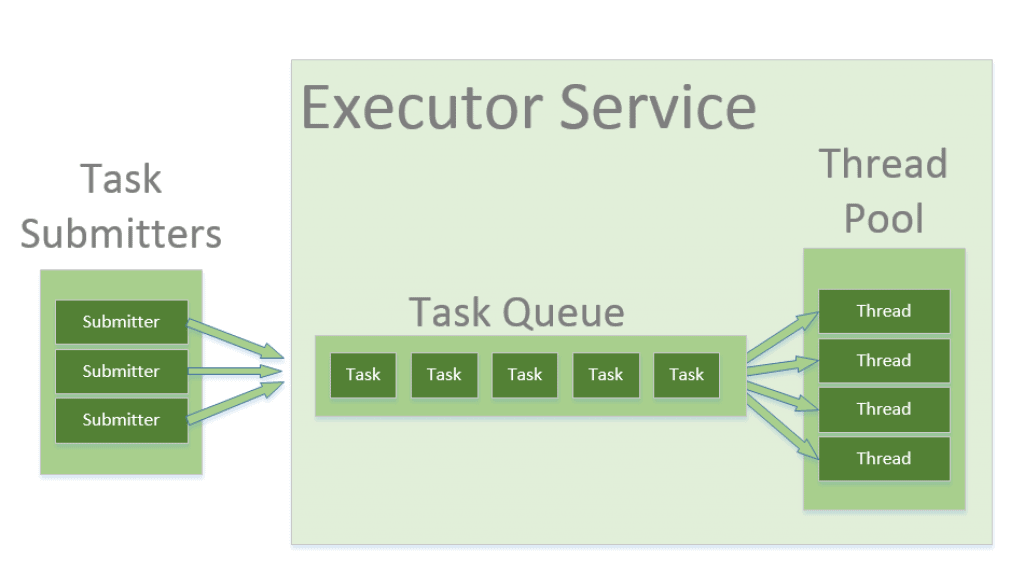
The key benefits of using a thread pool are:
- Improved Performance: It eliminates the overhead of thread creation and destruction by reusing existing threads.
- Resource Control: It allows you to limit the maximum number of concurrent threads, preventing your application from running out of memory or overwhelming the system.
- Simplified Management: It provides a simple API to submit tasks, manage the lifecycle, and retrieve results.
3. Implementing with ExecutorService
You typically don't create an ExecutorService directly. Instead, you use the factory methods on the Executors utility class. For senior-level interviews, it's crucial to know the main types of thread pools and their specific use cases.
Java ExecutorService: The Complete Guide for Beginners
This guide from Prithu Kathet on Medium is an excellent, comprehensive resource. The following section details the most common types of thread pools, their behavior, and when to use them.
Read section '3. Types of Thread Pools'. For each type (Fixed, Cached, Single, Scheduled), make sure you understand: How it works (e.g., fixed number of threads, creates new threads as needed). Its primary use case (e.g., CPU-intensive tasks, many short-lived tasks).
Here is a summary of the most important types:
| Factory Method | Pool Behavior | Best For |
|---|---|---|
newFixedThreadPool(int n) |
Creates a pool with a fixed number of threads. If all threads are busy, tasks wait in a queue. | CPU-intensive tasks; predictable workloads where you want to cap resource usage. |
newCachedThreadPool() |
Creates new threads as needed but reuses idle ones. Threads are terminated if idle for 60 seconds. | Many short-lived, asynchronous tasks, typically I/O-bound operations. |
newSingleThreadExecutor() |
Creates a pool with only one thread. Guarantees that tasks execute sequentially in the order they were submitted. | Event processing, logging, or any task that requires strict FIFO execution. |
newScheduledThreadPool(int n) |
A fixed-size pool that can schedule tasks to run after a delay or periodically. | Running recurring tasks like health checks or batch jobs. |
A word of caution for production code: While Executors factory methods are convenient, a common best practice in production systems (and a good point to make in an interview) is to create a ThreadPoolExecutor instance directly. This gives you full control over all parameters, such as the queue type and size, and rejection policies, preventing issues like unbounded queues that can occur with newFixedThreadPool. The Alibaba Cloud article (ID: LINK) discusses this in section "2. How to Create a Thread Pool Object Correctly".
Submitting Tasks: execute() vs. submit()
You can add tasks to an ExecutorService in two ways:
void execute(Runnable command): This method is "fire-and-forget." It takes aRunnableand doesn't return anything. If an exception is thrown inside theRunnable, it will be passed to the thread's uncaught exception handler and will likely terminate the thread.Future<?> submit(Runnable/Callable task): This method returns aFutureobject. Any exception thrown by the task is caught and stored within theFuture. It will be re-thrown, wrapped in anExecutionException, when you callfuture.get(). This is the preferred way to handle tasks where you care about the outcome or potential failures.
Managing the ExecutorService Lifecycle
An ExecutorService will not terminate on its own; it will keep the application alive waiting for new tasks. You must shut it down explicitly.
shutdown(): Initiates a graceful shutdown. It stops accepting new tasks but allows previously submitted tasks to complete.shutdownNow(): Initiates an abrupt shutdown. It attempts to interrupt all actively executing tasks and returns a list of tasks that were waiting in the queue.
In a robust application, you should always shut down your executors in a finally block to ensure it happens even if an error occurs. The following pattern is considered a best practice:
ExecutorService executor = Executors.newFixedThreadPool(5);
try {
    // Submit tasks...
    executor.submit(() -> { /* ... do work ... */ });
} finally {
    executor.shutdown(); // Disable new tasks from being submitted
    try {
        // Wait a while for existing tasks to terminate
        if (!executor.awaitTermination(60, TimeUnit.SECONDS)) {
            executor.shutdownNow(); // Cancel currently executing tasks
            // Wait a while for tasks to respond to being cancelled
            if (!executor.awaitTermination(60, TimeUnit.SECONDS))
                System.err.println("Pool did not terminate");
        }
    } catch (InterruptedException ie) {
        // (Re-)Cancel if current thread also interrupted
        executor.shutdownNow();
        // Preserve interrupt status
        Thread.currentThread().interrupt();
    }
}
4. Interview Focus: How to Size a Thread Pool
A very common senior-level interview question is: "How do you determine the optimal size for a thread pool?" The answer depends entirely on the nature of the tasks.
-
CPU-Intensive Tasks: These are tasks that perform heavy computation (e.g., complex calculations, data transformation). For these tasks, having more threads than CPU cores provides no benefit and can even hurt performance due to context-switching overhead.
- Rule of Thumb: Set the pool size to
NorN+1, whereNis the number of available CPU cores. You can get this programmatically withRuntime.getRuntime().availableProcessors().
- Rule of Thumb: Set the pool size to
-
I/O-Intensive Tasks: These are tasks that spend most of their time waiting for I/O operations to complete (e.g., reading/writing to a database, calling a REST API). While a thread is waiting, it's in the
BLOCKEDorWAITINGstate and not using the CPU. Therefore, you can have many more threads than CPU cores to keep the CPU busy.- Formula: A well-known formula to estimate the optimal pool size is:
Wait Time / Compute Timeis the ratio of time a task spends waiting vs. computing. If tasks spend 90% of their time waiting, this ratio is 9.
Java ExecutorService - Part 1 - Introduction
The Defog Tech video you started earlier has an excellent section explaining the logic behind sizing thread pools for CPU-bound vs. I/O-bound tasks.
Watch from 04:21 to the end. This part clearly explains: Why the pool size for CPU-intensive tasks should match the number of cores. Why I/O-intensive tasks benefit from a much larger pool size. A summary of the trade-offs.
Conclusion
In this lesson, you've moved from the theory of concurrency to the practical tools for managing it. Mastering ExecutorService is non-negotiable for building modern, performant Java applications.
Key Takeaways for Your Interview:
- Clearly distinguish
Runnable(fire-and-forget, no return value) fromCallable(returns a value via aFuture, can throw exceptions). - Articulate the core benefits of thread pools: thread reuse reduces overhead, and resource control prevents system exhaustion.
- Be ready to describe the main types of
ExecutorService(Fixed,Cached,SingleThread) and their ideal use cases. - Emphasize the importance of proper shutdown procedures to prevent resource leaks.
- Confidently answer the thread pool sizing question by differentiating between CPU-bound and I/O-bound workloads.
Preview of the Next Lesson:
Now that you know how to create and manage pools of threads, the next logical question is: what happens when these threads need to access the same shared data? In our next lesson, you will solve race conditions using the 'synchronized' keyword and ReentrantLock, and explain their differences. We will dive into the mechanisms that ensure data integrity when multiple threads are in play.