Hello! Welcome back.
In our last lesson, we established why application-level caching is a critical performance tool, defining concepts like cache hits, misses, and the all-important hit ratio. We saw that using a fast, in-memory data store like Redis is the key to making caching effective.
Today, we're going to pull back the curtain on Redis itself. This lesson directly addresses the learning outcome: Describe Redis as an in-memory data store and its primary data structures (strings, hashes, lists, sets).
Given your goal to understand backend systems from the root level, we won't just look at what these data structures do. We'll also explore how they are implemented internally, which is the secret to Redis's remarkable performance and flexibility.
By the end of this lesson, you will understand:
- Why being "in-memory" makes Redis orders of magnitude faster than a traditional database.
- The fundamental Redis data structures: Strings, Lists, Hashes, Sets, and Sorted Sets.
- The common use cases for each data structure.
- The underlying C data structures Redis uses to implement them, providing a deeper level of insight.
Redis: The In-Memory Advantage
The single most important thing to understand about Redis is that it keeps the entire dataset in your server's RAM. Your Django application, which runs in memory, can talk to Redis, which also runs in memory. This avoids the two biggest bottlenecks of a traditional database: disk I/O and, often, network latency.
Just how much faster is RAM than a disk? The difference is staggering.
Why Is Redis Extremely Fast? Redis Internals Explained | DevMonk
To grasp the performance difference, let's watch the first part of this video from DevMonk. It provides a crystal-clear breakdown of the latency differences between RAM, SSDs, and HDDs.
Watch from the beginning to 02:12. Pay close attention to the latency numbers cited for RAM vs. SSD vs. HDD. This is the core reason for Redis's speed.
As the video highlights, RAM access is measured in nanoseconds, while disk access is in microseconds or even milliseconds—a difference of 1,000x to 100,000x. By keeping everything in RAM, Redis can perform read and write operations at incredible speeds.
Redis is often called a "key-value" store, but that's an oversimplification. While you do store data under a unique key, the value is not just a simple string. The value is a data structure in itself. This is what makes Redis a "data structure server."
The Building Blocks: Redis Data Structures
Redis provides a set of core data structures that you can use as the value for any given key. Understanding these is fundamental to using Redis effectively.
The following video from Redis's official channel gives a fantastic tour of these structures. We'll refer back to it as we examine each one.
Redis Data Structures for Non-Redis Users
This video, 'Redis Data Structures for Non-Redis Users,' will be our guide. It introduces the concept of keys and then walks through each of the primary data types.
For now, watch from 02:15 to 07:37. This section covers the general concept of Redis types and provides crucial details about keys, including naming conventions and expiration.
As you just saw, choosing a good, consistent key naming convention (e.g., object:id:field) is vital for keeping your keyspace organized. The ability to set an expiration time on a key with commands like EXPIRE is also a cornerstone of using Redis as a cache.
Now, let's dive into the structures themselves. For each one, we'll discuss its concept, use cases, and its internal implementation—the "root level" detail you're looking for.
1. Strings
- Concept: The simplest Redis type. It maps a key to a single binary-safe string value. "Binary-safe" means you can store anything from a simple text string to a JPEG image or a serialized JSON object. The maximum size is 512 MB.
- Common Use Cases:
- Caching HTML fragments or entire pages.
- Storing serialized objects (e.g., a JSON string representing a user profile).
- Implementing counters with atomic operations like
INCR.
- Internal Implementation: Redis doesn't use standard C strings. It uses a custom structure called a Simple Dynamic String (SDS). Unlike null-terminated C strings, an SDS stores the string's length explicitly. This makes getting the length an O(1) operation (instead of O(N)) and allows for efficient, O(1) appends by pre-allocating extra space.
You can get more details on Strings in the Redis video from 07:37 to 09:59 and in the excellent Stack Overflow answer by Redis's creator, antirez.
What are the underlying data structures used for Redis?
This Stack Overflow thread is a treasure trove of information. I want you to read two answers. The first is a high-level overview of use cases from Redis's creator, antirez. The second is a deep dive into the internal structures.
First, read antirez's answer, focusing on his description under the 'Strings' heading. Then, read the highly-voted community wiki answer below it. Focus on section '1. Strings' and '2. Dictionary' in that answer to understand SDS and how Redis implements its key-space.
2. Lists
- Concept: A list of strings, sorted in insertion order. You can push and pop elements from either the head (left) or the tail (right).
- Common Use Cases:
- Implementing a queue: one service
LPUSHes tasks, another serviceRPOPs them for processing. - Activity streams:
LPUSHa new user action and useLTRIMto keep the list capped at a certain size (e.g., "latest 100 actions").
- Implementing a queue: one service
- Internal Implementation: Originally, Lists were doubly-linked lists. This makes adding/removing elements from the ends an O(1) operation, regardless of list size. In modern Redis, they are implemented as a quicklist, which is a linked list of
ziplists(a memory-optimized, non-pointer-based list format). This provides a great balance of performance and memory efficiency.
Watch the Redis video from 09:59 to 13:19 for a practical look at Lists.
3. Hashes
- Concept: A collection of field-value pairs stored at a single key. Think of it as a mini key-value store within a larger one, similar to a Python dictionary or a JavaScript object.
- Common Use Cases:
- Representing objects. Instead of serializing a user object to a JSON string, you can store it in a hash with fields like
username,email, andlast_login. This allows you to read or update individual fields atomically without retrieving the entire object. - Storing many small related values efficiently.
- Representing objects. Instead of serializing a user object to a JSON string, you can store it in a hash with fields like
- Internal Implementation: For small hashes, Redis uses a
ziplistto save memory. For larger hashes, it automatically converts to a standard hash table, which gives O(1) access to any field.
The Redis video explains Hashes from 16:30 to 18:57.
4. Sets
- Concept: An unordered collection of unique strings. Adding the same element multiple times will result in only one copy being stored.
- Common Use Cases:
- Tracking unique items, like the unique visitors to a webpage (
SADD visitors user:123). - Representing relationships, like the tags for a blog post.
- Performing powerful set operations like
SINTER(intersection),SUNION(union), andSDIFF(difference) on the server. For example, finding mutual friends between two users.
- Tracking unique items, like the unique visitors to a webpage (
- Internal Implementation: Like Hashes, Sets are implemented using a hash table to ensure uniqueness and provide O(1) for add, remove, and membership checks. For sets containing only integers, Redis uses a highly optimized encoding called an intset (a sorted integer array).
The Redis video covers Sets from 13:19 to 14:58.
5. Sorted Sets (ZSETs)
- Concept: A collection of unique strings where each member is associated with a floating-point score. The collection is ordered by this score.
- Common Use Cases:
- Leaderboards: The score is the player's point total, and the member is the player's ID. You can efficiently query for the top 10 players.
- Priority Queues: The score can represent a task's priority.
- Rate-limiting: The score could be a timestamp, allowing you to quickly discard events older than a certain time.
- Internal Implementation: This is arguably the most sophisticated Redis data structure. To provide both fast updates and fast range queries, it's implemented using a combination of a hash table and a skip list.
- The hash table maps members to their scores, allowing for O(1) score lookups and updates.
- The skip list (a probabilistic structure similar to a balanced tree) keeps the members sorted by score, enabling O(log N) range queries (e.g., "get top 10").
The Redis video discusses Sorted Sets from 14:58 to 16:30.
Visualizing the Internals
To tie all this together, let's look at a visual map of how the Redis data types you use map to their internal implementations.
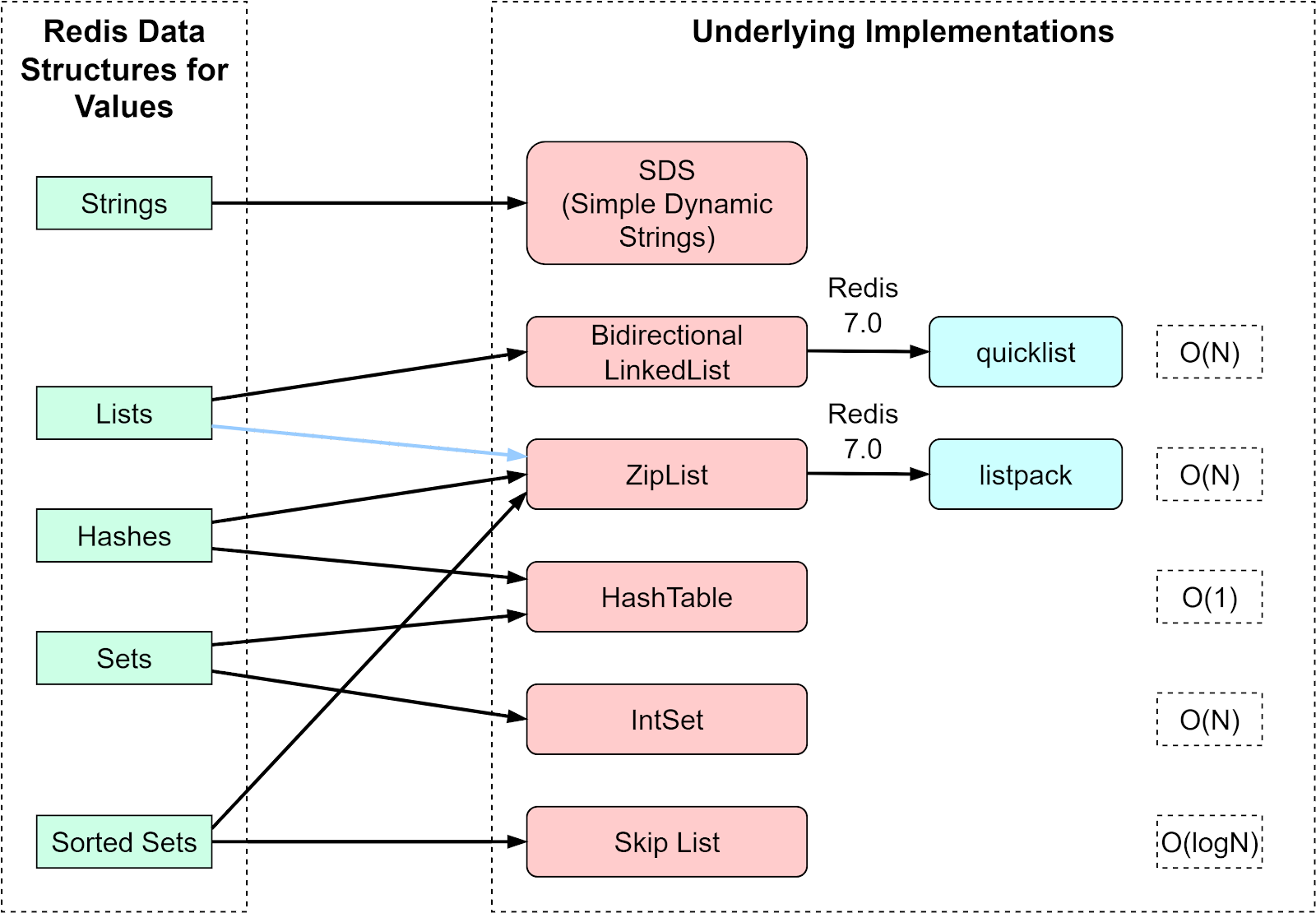
This diagram is a perfect summary for understanding Redis at a deeper level. When you use ZADD to add to a sorted set, you're interacting with both a hash table and a skip list under the hood. This dual structure is a brilliant piece of engineering that optimizes for different access patterns.
Conclusion
In this lesson, we moved from the "why" of caching to the "what" and "how" of Redis. You now have a solid foundation in the tool we'll be using throughout this module.
Let's recap the key takeaways:
- Redis is an in-memory data store: Its speed comes from keeping all data in RAM, which is orders of magnitude faster than disk.
- Redis is a data structure server: Its power lies in its five primary data types:
- Strings: For simple key-value caching and counters.
- Lists: For queues and ordered collections (O(1) head/tail access).
- Hashes: For representing objects and updating individual fields efficiently.
- Sets: For unordered, unique elements and performing set logic.
- Sorted Sets: For ordered collections like leaderboards (O(log N) range queries).
- Each data type has an optimized internal implementation: Redis uses structures like Simple Dynamic Strings, quicklists, hash tables, and skip lists to provide excellent performance and memory efficiency.
Preview of the Next Lesson
You now understand the building blocks Redis provides. But how do you orchestrate the logic of reading from and writing to the cache within your application? Do you check the cache first? Do you update the cache whenever you write to the database?
These questions are answered by caching patterns. In our next lesson, we will compare caching patterns: cache-aside, write-through, and read-through. We'll explore these different strategies to understand their trade-offs in terms of performance, consistency, and complexity.