Hello! In our previous lesson, we established the fundamental difference between scaling up (vertical) and scaling out (horizontal). We concluded that for high availability and handling large traffic volumes, horizontal scaling is the dominant strategy for modern web services.
This immediately raises a critical question: if you have multiple identical servers running your application, how does an incoming user request know which server to go to? This is where a load balancer comes in.
This lesson will focus on the role of the load balancer as the "traffic cop" of a distributed system. We'll explore how it distributes requests and delve into the most common algorithms it uses to make those routing decisions. By the end of this lesson, you will be able to explain how load balancers distribute traffic and compare common algorithms like Round Robin and Least Connections.
What is a Load Balancer?
A load balancer is a dedicated component—either hardware or software—that sits in front of your backend servers and distributes incoming network traffic across them.
Its primary goals are to:
- Increase Availability: If one of your backend servers fails, the load balancer detects this (through a process called health checking) and stops sending traffic to it. This ensures your application remains online, a property known as fault tolerance.
- Improve Scalability: As traffic grows, you can simply add more servers to the backend pool. The load balancer will automatically start distributing traffic to these new servers, allowing your application to scale horizontally with demand.
- Enhance Performance: By distributing the load, it prevents any single server from becoming a bottleneck, leading to faster response times for all users.
To make intelligent routing decisions, load balancers can operate at different layers of the network stack. This is a crucial concept to understand.
Layer 4 vs. Layer 7 Load Balancing
The OSI model, which we touched upon in our networking module, provides a framework for understanding how data travels. Load balancers are often categorized by the layer at which they operate. The two most common types are Layer 4 and Layer 7.
-
Layer 4 (L4) Load Balancer: Operates at the Transport Layer. It makes routing decisions based on information from TCP or UDP packets, such as the source/destination IP addresses and ports. It's like a mail sorter that only looks at the address on the envelope. It doesn't know anything about the content of the letter inside (e.g., if it's an HTTP request). This makes L4 load balancers very fast and efficient.
-
Layer 7 (L7) Load Balancer: Operates at the Application Layer. It can inspect the actual content of the request, such as HTTP headers, the requested URL path, cookies, or query parameters. This allows for much more sophisticated routing. For example, an L7 load balancer could route requests for
/api/v1/to one group of servers and requests for/images/to a different group of servers (like a CDN).

To go deeper, let's explore how an L4 load balancer works internally. The following video provides an excellent explanation of the OSI model context and the two main operational modes of L4 load balancers.
What are L4 Load Balancers and how do they work?
This video from Arpit Bhayani introduces the distinction between L4 and L7 load balancers and sets the stage for a deeper technical discussion.
Watch the first part of the video, from the beginning to 03:38. Focus on understanding what information an L4 load balancer has access to and how that differs from an L7 load balancer.
Now that you understand what a load balancer is and the different levels it can operate at, let's explore how it decides where to send each request.
Load Balancing Algorithms
Load balancers use various algorithms to select a backend server. We can broadly group these into static algorithms, which don't consider the current state of the servers, and dynamic algorithms, which do.
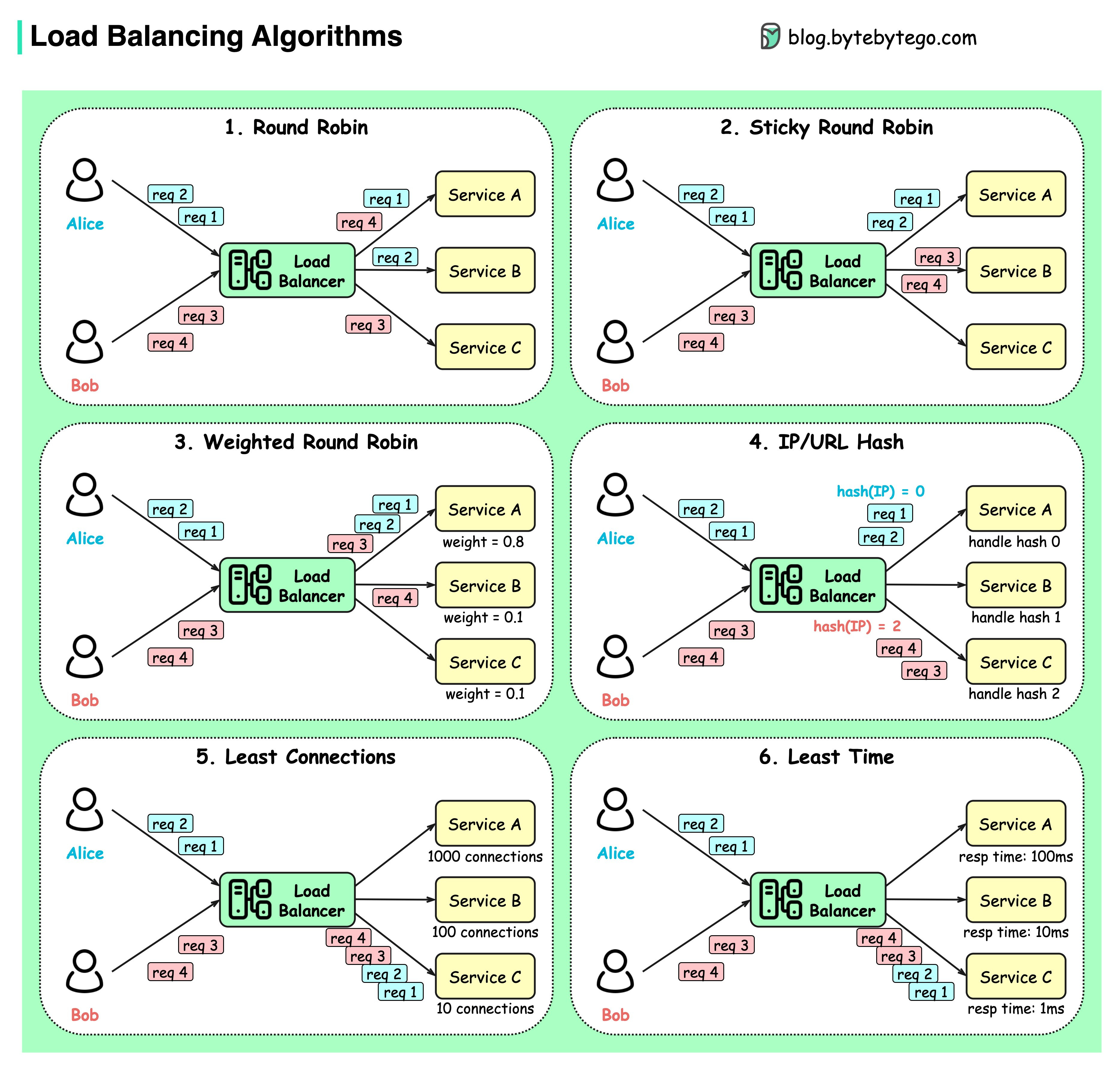
The following video gives a concise overview of the most common static and dynamic algorithms.
Top 6 Load Balancing Algorithms Every Developer Should Know
The channel ByteByteGo provides a quick, animated tour of the most important load balancing algorithms.
Watch from 00:07 to 04:16. Pay attention to the distinction between static and dynamic algorithms and the basic logic behind Round Robin, Weighted Round Robin, Hash-based, and Least Connections.
To solidify your understanding and get into the technical details you're looking for, let's dive into the specifics of these algorithms, using NGINX (a popular web server and load balancer) as a practical example.
NGINX Load Balancing: Complete Guide to Algorithms & Setup
This guide from 'NGINX Load Balancing' details the primary algorithms, their configuration, and even their internal workings. It's a great resource for seeing how theory translates to practice.
Read the sections titled 'NGINX Load Balancing Algorithms,' 'Round-Robin (Default),' 'Weighted Round-Robin,' and 'Least Connections.' As you read, focus on the 'How it works internally' and 'When to use' subsections for each algorithm.
Let's synthesize what you've learned from these resources.
Static Algorithms
These algorithms distribute traffic based on a fixed configuration, without considering real-time server load.
-
Round Robin: This is the simplest algorithm. It forwards requests to servers in a cyclical order (Server A -> Server B -> Server C -> Server A...).
- Pros: Very simple to implement and understand. Distributes load evenly if all servers are identical and all requests have a similar processing cost.
- Cons: Doesn't account for differences in server capacity or if some requests take much longer to process than others. A long-running request can cause subsequent requests to pile up on other servers, while the first server sits idle after finishing its long task.
-
Weighted Round Robin: An improvement on Round Robin where you can assign a
weightto each server. A server with a higher weight will receive proportionally more requests.- Pros: Useful when your server fleet is heterogeneous (i.e., not all servers have the same capacity). You can give more powerful servers a higher weight.
- Cons: The weights are static. It doesn't adapt to transient changes in server load or health.
-
IP Hash: The load balancer computes a hash of the client's IP address to determine which server receives the request.
- Pros: Ensures that requests from the same client are always sent to the same server. This creates session persistence or "stickiness," which is useful for stateful applications that store session data locally on the server.
- Cons: Can lead to an uneven load distribution if many clients are behind a single IP address (like a corporate proxy). Also, if you add or remove a server from the pool, the hash results change for almost all clients, breaking their sessions.
Dynamic Algorithms
These algorithms are more intelligent, as they consider the current state of the backend servers when making routing decisions.
- Least Connections: The load balancer tracks the number of active connections to each server and sends the next request to the server with the fewest active connections.
- Pros: This is a very effective dynamic algorithm. It adapts to the real-time load and is ideal for scenarios where request processing times vary significantly. If one server is busy with a long-running request, new (and likely faster) requests will be routed to less-busy servers.
- Cons: Requires the load balancer to actively monitor connections to every backend server, which adds a small amount of overhead.
Deeper Dive: L4 Load Balancer Operational Modes
You've seen that L4 load balancers are fast because they don't inspect application data. But how do they physically route the packets? There are two main modes, and understanding them is key to grasping the low-level mechanics.
-
Pass-through Mode (or Direct Server Return - DSR): The load balancer changes the destination IP address on the incoming packet to a backend server's IP and forwards it. The source IP remains the original client's IP. The backend server then processes the request and responds directly to the client, bypassing the load balancer on the return path. This is extremely fast but gives the load balancer less control.
-
Proxy Mode: The load balancer acts as a full proxy. It establishes a TCP connection with the client. Then, it establishes a separate TCP connection with the chosen backend server. It shuttles data back and forth between these two connections. This gives the load balancer complete control and visibility, enabling it to use dynamic algorithms like Least Connections. Most modern software load balancers (like NGINX or HAProxy) operate in this mode.
Let's return to the video from Arpit Bhayani to see a detailed breakdown of these two modes.
What are L4 Load Balancers and how do they work?
Now we'll watch the main part of the video, which provides a fantastic deep dive into the technical implementation of pass-through and proxy modes for L4 load balancers.
Watch from 05:55 to 15:33. Focus on the fundamental difference in how TCP connections are handled in each mode. Note how proxy mode gives the load balancer more control, which is what allows for dynamic routing algorithms.
As a final point on going to the "root level," it's worth knowing that some L4 load balancing can be done directly inside the operating system's kernel. A technology called IPVS (IP Virtual Server), part of the Linux kernel, is an example. It hooks directly into the kernel's networking stack (netfilter) to perform packet rewriting at extremely high speeds, avoiding the context-switching overhead of user-space applications like NGINX. This is what platforms like Kubernetes can use for internal service load balancing.
Conclusion
In this lesson, we demystified the role of the load balancer as a cornerstone of scalable architecture. You now understand not just its purpose but also the mechanics behind its routing decisions.
Key Takeaways:
- Load balancers are essential for horizontal scaling, providing high availability and distributing traffic across a pool of backend servers.
- L4 load balancers operate at the transport layer (TCP/UDP) and are fast but simple, while L7 load balancers operate at the application layer (HTTP) and are slower but more intelligent.
- Static algorithms like Round Robin and IP Hash distribute traffic based on fixed rules. They are simple but don't adapt to real-time server load.
- Dynamic algorithms like Least Connections monitor the state of backend servers to make smarter routing decisions, leading to better load distribution.
- The choice of algorithm is a trade-off. Round Robin is a good default for simple, stateless services. Least Connections is often superior for workloads with varying request costs. IP Hash is a way to handle stateful applications but introduces its own challenges.
Preview of the Next Lesson
We noted that IP Hash is a solution for "sticky sessions" when applications are stateful. However, this creates a dependency between the client and a specific server, which complicates scaling. A much better architectural approach is to design your services to be stateless. In the next lesson, we will explore exactly what that means, why stateless services are so much easier to scale, and discuss common strategies for externalizing state so that any server can handle any request.