Hello! Welcome to the fifth lesson in our module on Web Servers and Application Runtimes.
In our last lesson, we explored how a reverse proxy like Nginx can manage incoming traffic, providing benefits like load balancing and SSL termination. We saw how it forwards requests to backend application servers like Gunicorn. This left us with a critical question: how does a generic web server like Gunicorn know how to communicate with a specific Python framework like Django in a standardized way? There must be a contract or an interface that allows them to connect seamlessly.
Today, we will uncover that "glue." Our learning outcome is to explain the WSGI and ASGI specifications and how they bridge a web server to a Python application. These specifications are fundamental to the entire Python web ecosystem, enabling the portability and flexibility that allows developers to mix and match components.
The Problem: From Static Files to Dynamic Applications
To understand why these specifications are so important, let's step back in time. The earliest web servers were simple: they received a request for a file path (e.g., /about.html), read that file from the disk, and sent its contents back.
But what if you wanted to generate content dynamically, like showing the current time or fetching user data from a database? The first solution was the Common Gateway Interface (CGI).
The CGI Approach
With CGI, the web server would receive a request and, instead of serving a file, it would execute a script (e.g., a Python script).
- The server would start a brand new process and run the entire Python interpreter for every single request.
- It passed request details (like the URL, headers, etc.) to the script using operating system environment variables.
- The script would print its output (the HTML response) to standard output, which the web server would capture and send back to the client.
This worked, but it was incredibly inefficient. The overhead of starting a new process and a new Python interpreter for every request severely limited performance. We needed a better way: a long-running Python application process that a web server could communicate with repeatedly without restarting it.
The following video segment provides a great historical overview of this problem and how it leads directly to the solution we're about to discuss.
WSGI for Web Developers (Ryan Wilson-Perkin)
In this talk, Ryan Wilson-Perkin explains the evolution from static servers to CGI and highlights the performance limitations that created the need for a new standard.
Please watch from 00:07:58 to 00:10:29. Focus on understanding the CGI model (invoking a script per request) and its primary drawback (restarting on every request).
WSGI: The Web Server Gateway Interface
The solution to CGI's performance problem was WSGI (Web Server Gateway Interface). Pronounced "whiskey," WSGI is not a library or a server; it is a specification, defined in PEP 3333. It standardizes the communication protocol between a "web server" (like Gunicorn or uWSGI) and a "Python application" (like Django or Flask).
This standardization is powerful. As long as both sides adhere to the WSGI spec, you can swap them out. You can run your Django application with Gunicorn, uWSGI, or any other WSGI-compliant server without changing your application code.
The WSGI Callable
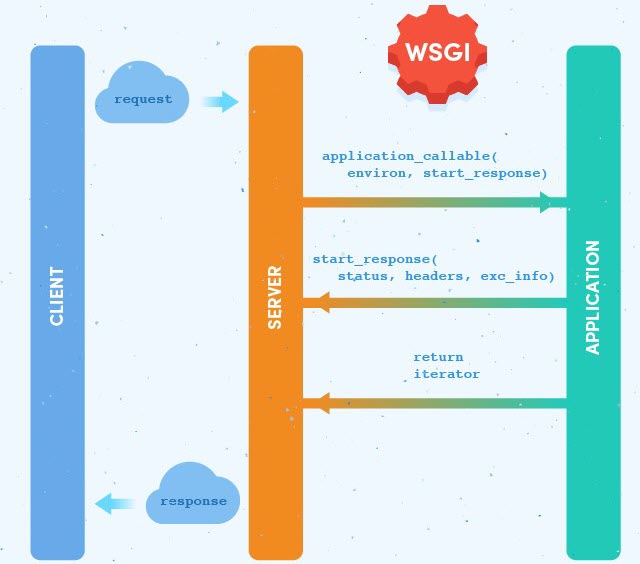
The core of the WSGI specification is a simple, yet powerful concept: the application callable. A WSGI application must provide a callable object (usually a function or a class instance) with the following signature:
application(environ, start_response)
Let's break down the components:
environ: A dictionary containing all the request data, modeled after the old CGI environment variables. It includes the HTTP method, path, query string, headers, and more. The server packages the raw HTTP request into this Python dictionary and passes it to your application.start_response: A callable (a function) provided by the server to the application. The application must call this function to send the HTTP status code (e.g.,'200 OK') and the response headers (e.g.,[('Content-Type', 'text/plain')]) back to the server.- Return Value: The application callable must return an iterable of bytestrings. This iterable represents the body of the response. The server will iterate over it and send each chunk to the client. Using an iterable is crucial because it allows for streaming large responses without loading the entire body into memory at once.
The following diagram perfectly illustrates this flow:
Now, let's connect this to the stack we've been building.

If you have ever looked inside a Django project, you've seen a wsgi.py file. This file contains the application callable that Gunicorn (or another WSGI server) uses as the entry point to your app.
This next video segment will solidify your understanding of the WSGI callable and how it fits into your work as a developer.
WSGI for Web Developers (Ryan Wilson-Perkin)
Let's return to the "WSGI for Web Developers" video. The speaker now explains the WSGI specification itself, including the callable signature and its purpose.
Watch from 00:06:15 to 00:07:58. Pay close attention to the application(environ, start_response) signature and the roles of each argument.
ASGI: The Asynchronous Successor
WSGI was a revolutionary standard, but it has one fundamental design characteristic: it's synchronous. A WSGI server typically handles one request at a time within a single worker process. For most traditional request-response cycles, this is perfectly fine.
However, web applications have evolved. Modern applications need to handle long-lived connections for things like:
- WebSockets: For real-time, bidirectional communication (e.g., chat apps, live notifications).
- Long-polling: Where a client holds a connection open, waiting for the server to send data.
- Server-Sent Events (SSE): Where a server streams updates to a client over a single connection.
The synchronous, one-shot, request-response model of WSGI is a poor fit for these use cases. This led to the creation of ASGI (Asynchronous Server Gateway Interface).
ASGI is the spiritual successor to WSGI, designed from the ground up to work with Python's async and await syntax. It allows a single process to handle many concurrent I/O-bound operations efficiently.
The ASGI Application
Like WSGI, ASGI is a specification that defines an application interface. However, its structure is fundamentally different and event-driven. An ASGI application is an async callable with this signature:
async application(scope, receive, send)
scope: A dictionary containing information about the incoming connection. Unlike WSGI'senviron, which is per-request,scopeis created when a connection is first established and lasts for the connection's lifetime. This is essential for protocols like WebSockets that persist beyond a single request.receive: Anawaitablecallable that the application uses to receive event messages from the server (e.g., an incoming HTTP request body or a WebSocket message).send: Anawaitablecallable that the application uses to send event messages back to the server (e.g., HTTP response headers, response body chunks, or WebSocket messages).
Instead of a single function call that returns a response, an ASGI interaction is a conversation through events. The server and application communicate by passing message dictionaries back and forth using receive and send. For an HTTP request, the typical flow is:
- Server calls
applicationwith the connectionscope. - Application
awaitsreceive()to get anhttp.requestevent containing the request body. - Application
awaitssend()with anhttp.response.startevent containing the status and headers. - Application
awaitssend()one or more times withhttp.response.bodyevents containing the response body.
This event-driven model is what makes ASGI so flexible and powerful for modern web protocols.
The following video provides an excellent, from-the-ground-up explanation of the ASGI interface.
Asynchronous Web Apps in Python
The mCoding channel provides a fantastic deep dive into building an ASGI application from scratch. This will give you a concrete understanding of the scope, receive, and send model.
Please watch two segments from this video: 00:03:09 to 00:05:18: This introduces the ASGI callable signature (scope, receive, send) and explains their roles. 00:09:17 to 00:12:09: This demonstrates how to construct and send an HTTP response using the send callable with response.start and response.body events. It shows the practical side of the event-driven model.
WSGI vs. ASGI in Practice
- Django: By default, Django is a WSGI application. To run it in an asynchronous context (e.g., to support async views), an ASGI server like Uvicorn runs Django through an ASGI-to-WSGI adapter. Modern Django versions have native ASGI support. The
asgi.pyfile in a Django project serves the same entry-point role aswsgi.py. - Flask: A classic WSGI framework.
- FastAPI: A modern framework built directly on top of ASGI. It is asynchronous from the ground up.
For a deeper dive into how an ASGI server is built, I recommend this article which walks you through creating one from scratch using sockets. It perfectly aligns with your goal of understanding backend systems at the root level.
Writing an ASGI server from scratch and using it with FastAPI
This Medium article by Rahul Salgare is an excellent, in-depth tutorial on building a basic ASGI-compliant server in Python. It's a great practical exercise to see how the specification is implemented.
Read the sections titled 'ASGI specification', 'Execution flow of an HTTP request with ASGI', and review the complete code in the final section. Focus on how the scope, receive, and send concepts from the ASGI spec are implemented as methods in the server code that will eventually call a FastAPI application.
Conclusion
You now understand the crucial role of WSGI and ASGI as the standardized interfaces that connect Python web servers and applications. They are the invisible but essential layer that makes the rich Python web ecosystem possible.
Key Takeaways:
- CGI was an early but inefficient method for running dynamic scripts, starting a new process for every request.
- WSGI (Web Server Gateway Interface) is the synchronous standard for Python web applications. It defines a simple
application(environ, start_response)callable, enabling portability between servers (like Gunicorn) and frameworks (like Django, Flask). - ASGI (Asynchronous Server Gateway Interface) is the modern, asynchronous successor to WSGI. It uses an
async application(scope, receive, send)interface and an event-driven model to efficiently handle I/O-bound tasks and long-lived connections (like WebSockets). - These specifications are the "contract" or "glue" that allows components of a Python web stack to communicate without being tightly coupled.
Preview of the Next Lesson:
Now that we have a complete picture of the request flow—from Nginx to Gunicorn (via HTTP reverse proxy) and from Gunicorn to Django (via the WSGI interface)—we can start looking at performance optimizations. In our next lesson, we will focus on HTTP caching mechanisms controlled by the server, including Cache-Control headers and ETags, which can dramatically reduce the load on your application servers.