Hello and welcome to the first lesson of our Capstone Project module! Over the next few lessons, we'll be building a complete, portfolio-ready Product Customizer App from the ground up. This project will integrate everything you've learned about authentication, APIs, and webhooks into a real-world solution for merchants.
Our first task is to tackle a fundamental design challenge. Imagine a merchant wants to sell a watch and offer custom engraving, or sell a t-shirt and let customers upload a custom logo. Shopify's built-in variants are meant for inventory-tracked options like size and color, but they can't handle this kind of dynamic personalization. Our app needs to fill this gap.
Today's lesson focuses on the very first step: designing a data model to store these custom product options. We'll be using one of Shopify's most powerful features for this: metafields. You'll learn how to extend Shopify's core data structures to store the unique configuration for your product customizer.
The Problem: Extending the Product Model
Shopify's Product object has standard fields like title, price, and images. For options that affect inventory, it has variants. But to build a customizer, we need to associate a product with a set of rules that define the available customizations. For example:
- An "Engraving" option, which is a text field with a 20-character limit.
- A "Font Style" option, which is a dropdown with three choices.
- An "Upload Logo" option, which is a file input that accepts PNG or JPG files.
This data doesn't fit into Shopify's default model. We need to add our own custom fields to the Product object. This is precisely what metafields are for.
What are Metafields? A Structured Overview
Metafields allow you to add custom data to almost any Shopify resource (products, customers, orders, etc.). They are the primary mechanism for developers to extend Shopify's schema.
To get a solid grasp of the fundamentals, let's review what metafields are and how they are created.
Shopify Theme Development - Metafields Tutorial
The video 'Shopify Theme Development - Metafields Tutorial' from Stacking Context provides an excellent introduction to what metafields are and why they are necessary. It also demonstrates the creation process in the Shopify admin.
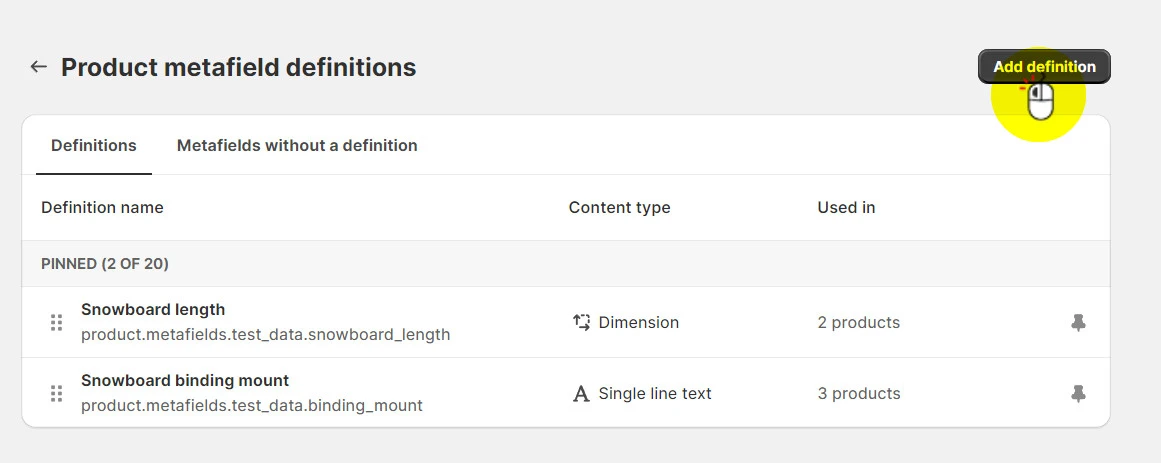
Watch from the beginning to 09:08. Focus on understanding: The core purpose of metafields (adding extra information). The components of a metafield definition: name, namespace, key, type. The variety of available data types (text, integer, product, file, etc.).
As the video showed, every metafield is defined by a structure containing its name, a namespace and key, and a specific data type. This structure provides a schema for your custom data.
Architectural Patterns: How to Store Our Customizer Options
Now for the core task: how should we structure our metafields to store the settings for our product customizer? Let's explore a few architectural patterns, from naive to sophisticated.
Pattern 1: The Flat (and Flawed) Approach
Your first instinct might be to create a separate metafield for every single property of every option.
product.metafields.custom.option1_name = "Engraving"product.metafields.custom.option1_type = "text"product.metafields.custom.option1_char_limit = 20product.metafields.custom.option2_name = "Font Style"product.metafields.custom.option2_type = "dropdown"- ...and so on.
This approach quickly becomes unmanageable. It pollutes the product's metafield namespace and is inefficient to read or update, as it requires multiple API calls.
Shopify Database Optimization: Advanced Metafield Strategies
The article 'Shopify Database Optimization' from SpeedBoostr discusses this exact issue. Let's see why this pattern is considered a poor approach.
Read 'Pattern 1: Hierarchical Product Data' to see the critique of using dozens of individual metafields. Then, read 'Pitfall 1: Over-Normalization' to understand the negative performance impact.
Pattern 2: The Self-Contained Approach with JSON Metafields
A much better solution is to group all related data for a product's customizations into a single, structured metafield using the JSON type.
You would create one metafield, say capstone.custom_options, on the product. Its value would be a JSON object that looks like this:
[
  {
    "id": "opt_engraving",
    "label": "Engraving Text",
    "type": "text",
    "price": 5.00,
    "required": true,
    "config": { "maxLength": 20 }
  },
  {
    "id": "opt_font",
    "label": "Font Style",
    "type": "dropdown",
    "price": 0,
    "required": true,
    "config": { "choices": ["Script", "Serif", "Modern"] }
  }
]
This is a huge improvement. All the customization data is encapsulated in one place, making it easy to read and manage with a single API call.
Shopify Theme Development - Metafields Tutorial
The 'Shopify Theme Development' tutorial we watched earlier also covers the JSON metafield type. Let's revisit it to see how this is implemented.
Watch the segment on JSON metafields from 31:06 to 35:23. Pay attention to how a schema can be defined for validation and how nested data is accessed.
This pattern is powerful, but it has one drawback: the data is not easily reusable. If 50 different products all offer the same "Gift Wrapping" option, you'd have to copy and paste that JSON snippet into the metafield for all 50 products. Updating it would be a nightmare. This brings us to the most scalable pattern.
Pattern 3: The Relational Approach with Metaobjects
Shopify introduced Metaobjects to solve this problem of reusability. Think of a Metaobject as a custom, reusable data structure—like defining your own table in a database. You can then use a metafield to simply reference an entry from that "table."
For our customizer, the design would be:
- Define a Metaobject called
Customizer Option. This object would have fields likelabel,type,price, andconfig. - Create Entries for this metaobject. For example, you'd create one entry for "Engraving," another for "Font Style," and a third for "Gift Wrapping." Each entry is a reusable component.
- Use a Metafield to Link them. On the product, you would create a single metafield of type
list of metaobject references. This metafield would simply hold a list of links to theCustomizer Optionentries that apply to that specific product.
This is the most powerful and scalable approach. If you need to change the price of "Gift Wrapping," you update the single metaobject entry, and that change is instantly reflected on all 50 products that reference it.
The following video is essential for understanding this relationship. It clearly distinguishes when to use a metafield, when to use a metaobject, and how to combine them.
How to use Shopify Metaobjects
The video 'How to use Shopify Metaobjects' from Coding with Jan is the perfect resource to understand this advanced pattern. It walks through the exact process we need for our data model.
Please watch from 01:31 to 09:37. This is the most important part of today's lesson. Focus on: The conceptual difference between extending a model (Metafield) and creating a new one (Metaobject). The key idea: a Metafield that holds a reference to a Metaobject. The practical steps of defining a Metaobject, creating the product metafield that references it, and then assigning the references on a product page.
Test your understanding!
You are building a customizer for a jewelry store. The merchant wants to offer 100 different necklaces, and each one can be engraved. Using a JSON metafield (Pattern 2) would require you to add the JSON for the "engraving" option to all 100 products.
How does the Metaobject pattern (Pattern 3) solve the problem of having to update the engraving price across all 100 products?
Show answer
With the Metaobject pattern, you would create a single Metaobject Entry called "Engraving" that contains the price ($5.00). Each of the 100 necklace products would have a metafield that simply references this one "Engraving" entry.
To update the price, you only need to edit the "Engraving" Metaobject Entry once (e.g., change the price to $7.00). Since all 100 products are just pointing to this single source of truth, the price is automatically updated for all of them.
Our Capstone Data Model
For our capstone project, we will adopt the most robust and scalable solution: Pattern 3, the relational approach using Metaobjects and Metafields. This demonstrates a professional, forward-thinking architecture that is ideal for a portfolio piece.
Here is the specific data schema we will use:
-
Metaobject Definition:
- Name:
Customizer Option - Fields:
label:Single line text, required. (e.g., "Engraving Text")type:Single line text, required. (This will be our internal identifier, e.g., "TEXT_INPUT" or "DROPDOWN")price:Money, optional. (The additional cost for this option)configuration:JSON, optional. (For type-specific settings like character limits or dropdown choices)
- Name:
-
Product Metafield Definition:
- Name:
Customizer Options - Namespace and key:
capstone.options(We use a custom namespace to identify it as part of our app) - Type:
List of metaobject references - Reference: This metafield will be configured to accept references to our
Customizer Optionmetaobject.
- Name:
This structure gives us the best of both worlds: the reusability of metaobjects for common options and the flexibility to assign any combination of these options to any product.
Conclusion
Today, we've laid the critical data foundation for our Product Customizer app. You've gone beyond the basics of metafields to understand the architectural trade-offs between different data modeling patterns.
Key Takeaways:
- Metafields are essential for extending Shopify's core data models to store custom data.
- A flat structure with many individual metafields is inefficient and should be avoided.
- JSON metafields are excellent for encapsulating structured data that is specific to a single resource.
- Metaobjects combined with reference metafields provide the most scalable and reusable pattern for data that is shared across multiple resources.
- For our capstone project, we have chosen a relational model using a
Customizer Optionmetaobject and alist of metaobject referencesproduct metafield.
Next Steps
We now have a blueprint for our data. In the next lesson, "Build an embedded app UI for merchants to define customization options for specific products," we will start building the backend and user interface of our app. The merchant will need a way to create and manage the Customizer Option metaobject entries, and we will build that interface using Shopify's Polaris component library and App Bridge.