Hello! Welcome back to our journey of building your AI writing assistant.
In the last two lessons, we handled the essential setup for connecting to the Gemini API. You learned how to manage your API key securely using environment variables and installed the google-genai Python library, which is the toolkit that lets our application communicate with Google's AI.
Now that the technical plumbing is in place, we can focus on the most important part of using an AI model: telling it what to do. This lesson is all about mastering our next learning outcome: constructing a prompt for a specific text generation task (e.g., summarization). A "prompt" is simply the instruction you give to the AI. Learning to write good prompts is the key to getting high-quality, relevant, and useful results.
What is a Prompt, and Why Does It Matter?
At its core, a prompt is a conversation starter. You provide the AI with a question or a command, and it generates a response based on its training and the information you've given it. Think of it less like a search engine query and more like giving instructions to a very capable but very literal assistant.
A vague instruction leads to a vague result. A clear, detailed instruction leads to a precise, high-quality result. This process of carefully crafting instructions is often called prompt engineering.

The Core Components of an Effective Prompt
A great prompt usually contains a few key ingredients that guide the AI toward the desired output. Let's explore the fundamental building blocks.
How to Write Effective Google Gemini AI Prompts
The article 'How to Write Effective Google Gemini AI Prompts' provides an excellent breakdown of what makes a prompt work. We'll start by looking at its definition of the core components.
Read the section titled 'Core Components of an Effective Prompt'. Pay close attention to the four key components it identifies: Clear Instructions, Necessary Context, Format Guidance, and Tone or Style. Notice the 'Vague' vs. 'Clear' examples for each.
As you just read, a strong prompt typically includes:
- Clear Instructions (The Task): What do you want the AI to do? Start with a strong action verb like "Summarize," "Translate," "Write," "Explain," or "List."
- Necessary Context: What background information does the AI need to complete the task successfully? This could be the text you want summarized, details about your target audience, or the overall goal.
- Format Guidance: How should the output be structured? Should it be a paragraph, a bulleted list, a table, or a JSON object?
- Tone or Style (The Persona): What voice should the AI adopt? Should it be formal, casual, witty, or professional? Assigning a role, like "You are an expert copywriter," is a powerful way to set the tone.
To see these concepts explained in a dynamic, visual way, let's watch a short video that presents a very similar framework.
Master the Perfect ChatGPT Prompt Formula (in just 8 minutes)!
The video 'Master the Perfect ChatGPT Prompt Formula' by Jeff Su breaks down prompt engineering into six key elements. You'll notice they overlap significantly with the components we just read about.
Watch the video from 00:29 to 07:06. Pay attention to the six components: Task, Context, Exemplars (Examples), Persona, Format, and Tone. Think about how these map to the four components from the article.
The video introduces two extra ideas:
- Exemplars: Providing examples of the output you want ("few-shot prompting"). This is an advanced but very powerful technique.
- Persona: This is a more explicit version of setting the "Tone or Style."
Here's how the concepts from the video and the article relate:
| Article Component (LINK) | Video Component (LINK) | Description |
|---|---|---|
| Clear Instructions | Task | The specific action you want the AI to perform. |
| Necessary Context | Context | The background information needed for the task. |
| Format Guidance | Format | The desired structure of the output. |
| Tone or Style | Persona & Tone | The voice and style of the response. |
| (Not explicitly named) | Exemplars | Providing examples of good output to guide the AI. |
A Practical Template for Building Prompts
Knowing the components is great, but a template can make the process much more straightforward. It acts as a checklist to ensure you've provided all the necessary information.
Write AI Gemini Prompts That Actually Work
The resource 'Write AI Gemini Prompts That Actually Work' offers a simple but powerful fill-in-the-blanks template that incorporates these components.
Look at the section 'Try a Structured AI Gemini Prompt'. Familiarize yourself with the fill-in-the-blanks template provided. We will use this structure to build our own prompt.
This template gives us a fantastic starting point:
- ROLE: You are a [role].
- TASK: Help me with [goal].
- CONTEXT: My audience is [describe audience], and the content will be used for [use case].
- CONSTRAINTS: Use [tone], length about [word count], include [specifics].
- OUTPUT FORMAT: Return the answer as [format].
Applying the Template: Constructing a Summarization Prompt
Let's use this template to build a high-quality prompt for one of your app's core features: text summarization. Your app will take a user's text and provide a condensed version.
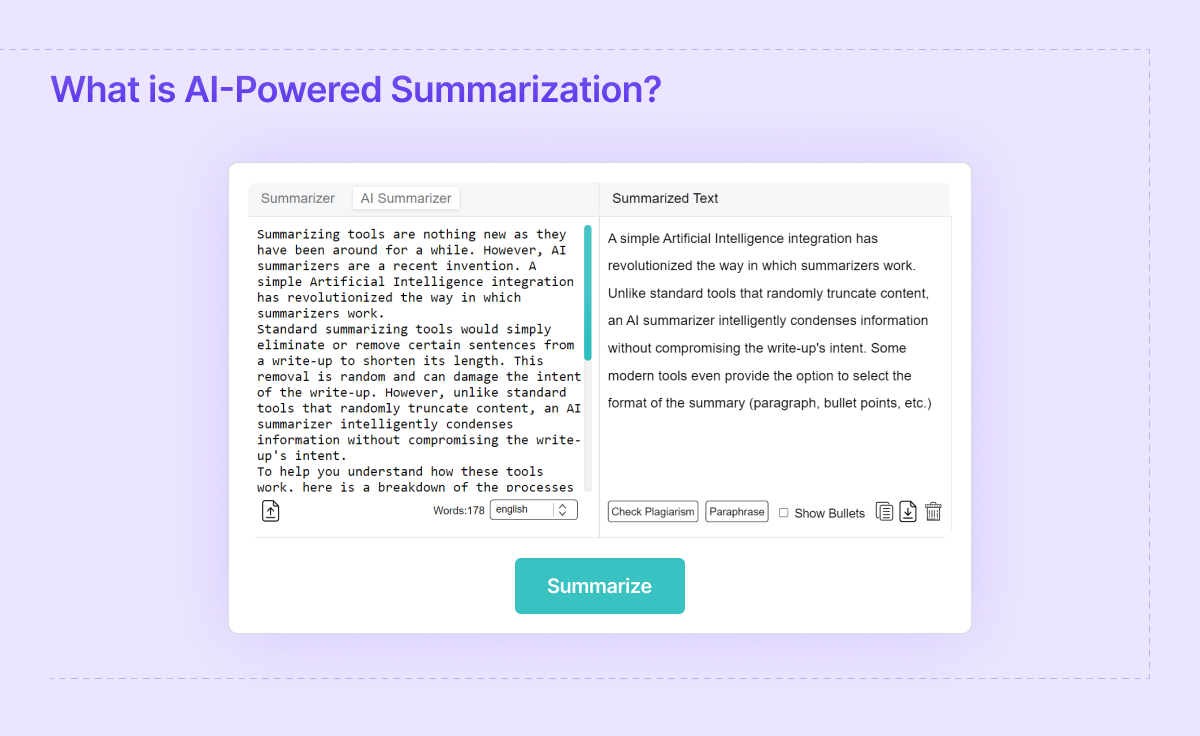
First, let's consider a basic, less effective prompt:
Bad Prompt: "Summarize this text: [User's text would be inserted here]"
This might work, but the result will be generic. The AI has to guess the desired length, tone, and focus.
Now, let's use our template to build a structured, effective prompt.
- ROLE: You are an expert editor specializing in creating concise and clear summaries.
- TASK: Summarize the provided text.
- CONTEXT: The summary is for a busy professional who needs to quickly grasp the main points of the document.
- CONSTRAINTS: The summary should be approximately 3-4 sentences long. It must be written in a formal and professional tone. Focus only on the key findings and conclusions, ignoring introductory material.
- OUTPUT FORMAT: Provide the summary as a single paragraph of text.
Putting it all together into a single prompt string that we could send to the API:
Good Prompt: "Act as an expert editor specializing in creating concise and clear summaries. Summarize the following text for a busy professional who needs to quickly grasp the main points. The summary should be approximately 3-4 sentences long and written in a formal, professional tone. Focus only on the key findings and conclusions. Provide the summary as a single paragraph. Here is the text: [User's text would be inserted here]"
See the difference? By providing clear instructions and constraints, we are guiding the AI to produce a result that is far more likely to be useful.
Test your understanding!
Imagine another feature for your app: Grammar and Spelling Correction. Using the ROLE, TASK, CONTEXT, CONSTRAINTS, OUTPUT FORMAT template, how would you construct an effective prompt for this task?
Original User Text: "i think their is a misstake in this sentence, can u fix it"
Show answer
Here is one possible effective prompt. Yours might be slightly different, but it should contain similar elements.
- ROLE: You are an expert proofreader with a strong command of English grammar and spelling.
- TASK: Correct all spelling and grammar errors in the provided text.
- CONTEXT: The user wants a polished version of their sentence for a professional email.
- CONSTRAINTS: Only correct the errors. Do not change the original meaning of the sentence. Do not add any new information.
- OUTPUT FORMAT: Return only the corrected sentence, with no additional explanation or introductory text.
Combined Prompt:
"Act as an expert proofreader. Correct all spelling and grammar errors in the following sentence, but do not change its original meaning. Return only the corrected sentence. Here is the sentence: 'i think their is a misstake in this sentence, can u fix it'"
Expected AI Output:
"I think there is a mistake in this sentence; can you fix it?"
Conclusion
In this lesson, you've learned the art and science of communicating with an AI. You've moved beyond simple questions and can now construct detailed, effective prompts that guide Gemini to produce high-quality results for specific tasks.
Key Takeaways:
- Prompt Engineering is the practice of designing clear and effective inputs for AI models.
- A good prompt contains clear instructions (task), necessary context, guidance on format, and a specified tone/persona.
- Using a structured template (like ROLE, TASK, CONTEXT, CONSTRAINTS, OUTPUT FORMAT) is a practical way to ensure your prompts are comprehensive.
- The difference between a basic prompt and a structured prompt is the difference between a generic guess and a tailored, high-quality result.
You now have a powerful prompt designed for text summarization. In our next lesson, we will finally connect all the pieces. We'll create a Flask endpoint that takes this prompt, sends it to the Gemini API using the library we installed, and gets the AI-generated summary back. This is where your application will truly come to life