Hello! Welcome to the third lesson in our "How the Web Works" module.
Introduction
In our last lesson, we learned that HTTP is the language of the web, and that every HTTP request has a target—the specific resource the client wants from the server (e.g., /about.html). But how does the client know which server to send that request to in the first place?
That's where the URL comes in. Today, you'll learn to identify the different components of a URL, or Uniform Resource Locator. Think of it as the complete street address for any resource on the internet. Mastering this is fundamental, as every API call you'll ever make will be directed to a specific URL.
By the end of this lesson, you will be able to dissect any URL into its core parts: the protocol, domain, path, and query parameters.
What is a URL?
At its simplest, a URL is a unique address used to locate a resource on the web. That resource could be a webpage, an image, a video, or—most importantly for us—a collection of data exposed by an API.
A great way to think about a URL is to compare it to a postal address. Each part of the address gives you a more specific piece of information, guiding your letter from the postal service, to the city, to the street, to the exact house number. A URL does the same for a web request.
Let's start with a short, clear video that introduces this concept.
Internet Tips: Understanding URLs
This video from LearnFree uses the street address analogy to give a great high-level overview of the parts of a URL.
Please watch the entire video (it's about 2 minutes and 30 seconds). It will introduce all the key components we are about to discuss in more detail.
The Anatomy of a URL
As the video showed, a URL is made of several distinct parts, each with a specific purpose. Let's break down a typical URL you might see when interacting with an API:
https://api.example.com/v1/products?category=electronics#stock
Here is a visual breakdown of a similar structure:
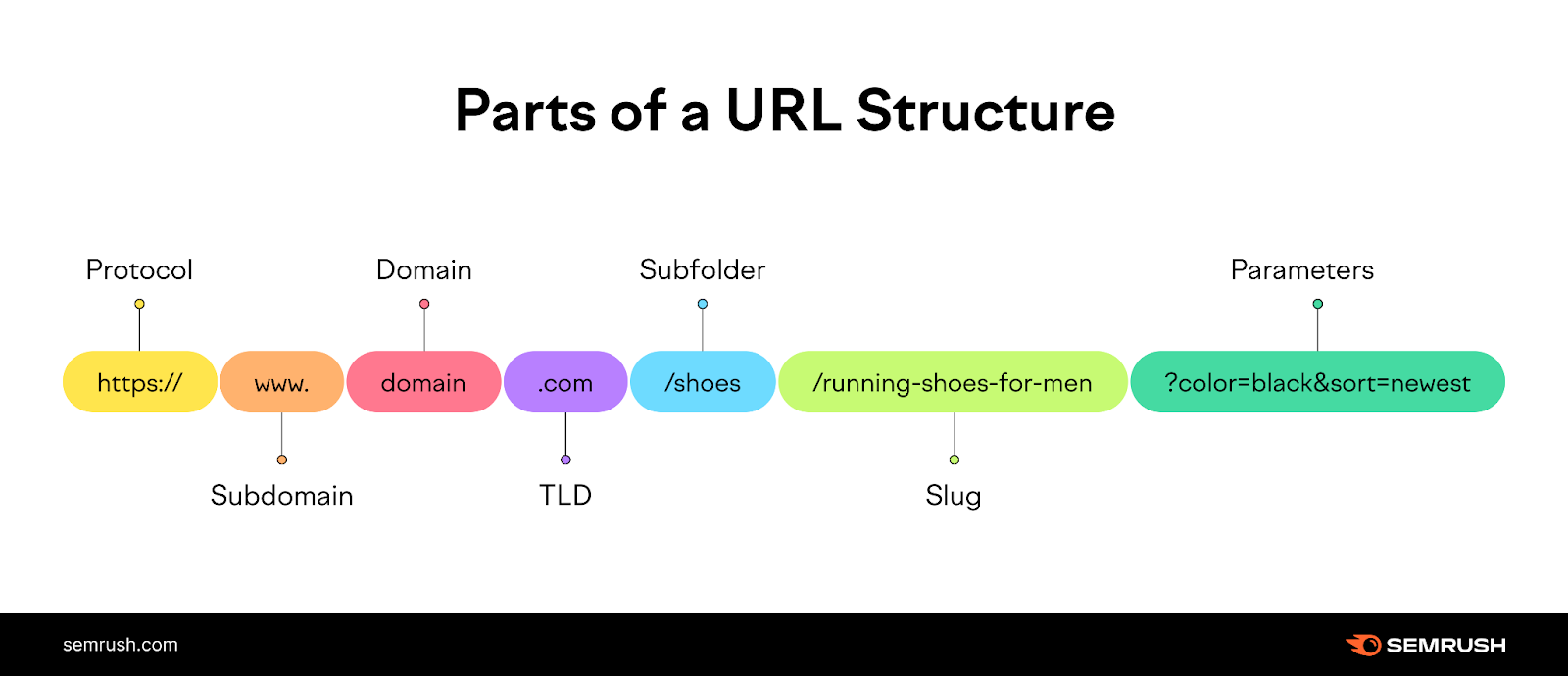
Let's go through each component, using our example https://api.example.com/v1/products?category=electronics#stock.
1. Protocol (or Scheme)
Component: https
The protocol specifies how the browser should communicate with the server. It's the set of rules for the conversation.
https://(HyperText Transfer Protocol Secure): This is the standard for modern web traffic. The 'S' means the connection is encrypted, so data exchanged between the client and server is private and secure.http://: The original, unsecured version. You will still see it, but it's being phased out in favor ofhttps.
2. Domain
Component: api.example.com
The domain is the human-readable name of the server where the resource lives. It identifies the "city and town" of our address analogy. The domain itself has a few parts:
- Top-Level Domain (TLD):
.comis the TLD. Others include.org,.gov, and country codes like.caor.uk. - Second-Level Domain:
exampleis the main name of the site. - Subdomain:
apiis the subdomain. Subdomains are used to organize a site.wwwis a very common subdomain for the main website, whileapiis often used for the site's API, andblogfor its blog.
3. Path
Component: /v1/products
The path points to the specific resource you want on that server. It's like the street address and building number.
- Paths always start with a
/. - They can have multiple segments separated by slashes, creating a hierarchy (e.g.,
/v1/products/123could refer to the product with ID 123). - In the context of REST APIs, the path is often called the endpoint. Each endpoint corresponds to a specific resource or collection of resources.
4. Query Parameters
Component: ?category=electronics
Query parameters are used to pass extra information to the server. They are key-value pairs that come after the path.
- The query string starts with a question mark (
?). - Each parameter is a
key=valuepair (e.g.,category=electronics). - Multiple parameters are separated by an ampersand (
&), like?category=electronics&sort=price. - For APIs, query parameters are extremely common for filtering, sorting, or paginating results. For instance, you might use them to get only active users or to sort products from lowest to highest price.
5. Fragment (or Anchor)
Component: #stock
The fragment is an optional part that comes at the very end, starting with a hash (#). It's a "bookmark" to a specific section within the resource. For example, on a long webpage, it tells the browser to scroll down to that section.
Crucially, the fragment is for the client (browser) only and is never sent to the server in the HTTP request. Therefore, it's less relevant for server-side API interactions but is still good to recognize.
For a detailed and authoritative reference on these components, the Mozilla Developer Network (MDN) is an excellent resource.
What is a URL? - Learn web development | MDN
The article 'What is a URL?' from MDN provides a comprehensive written explanation of each component we've just discussed. It's a great page to bookmark for future reference.
Read the sections titled 'Scheme', 'Authority' (which covers the domain), 'Path to resource', 'Parameters', and 'Anchor'. This will solidify the definitions of each part.
Let's Practice
Now, let's test your understanding. Try to identify the protocol, domain, path, and query parameters for each of the following URLs.
URL 1: http://api.openweathermap.org/data/2.5/weather?q=London&units=metric
Click to see the breakdown
- Protocol:
http - Domain:
api.openweathermap.org - Path:
/data/2.5/weather - Query Parameters:
q=Londonandunits=metric
URL 2: https://www.google.com/search?q=what+is+an+api
Click to see the breakdown
- Protocol:
https - Domain:
www.google.com - Path:
/search - Query Parameters:
q=what+is+an+api
URL 3: https://github.com/torvalds/linux
Click to see the breakdown
- Protocol:
https - Domain:
github.com - Path:
/torvalds/linux - Query Parameters: (None)
Conclusion
Great job! You can now look at any web address and understand what each part of it means. This skill is indispensable for working with APIs, as you'll constantly be reading documentation and constructing URLs to fetch or manipulate data.
Let's recap the key takeaways:
- A URL is the unique address of a resource on the web.
- The protocol (
httporhttps) defines how to communicate. - The domain identifies the server. It consists of a top-level domain, a main domain name, and often a subdomain.
- The path specifies the exact resource on the server, often called an endpoint in APIs.
- Query parameters (starting with
?) provide extra options to the server, like filters or search terms.
In our previous lesson, you learned how to structure an HTTP request. Now you know where to send it. In our next lesson, we will explore the different HTTP methods (GET, POST, PUT, DELETE), which define what action you want to perform on the resource identified by the URL.