Hello! Welcome to your next lesson in our 3D Math Fundamentals module.
In the previous lesson, we covered the foundational vector operations: addition, subtraction, and scalar multiplication. These are the tools we use to move objects and calculate simple displacements. However, to build a dynamic 3D world, we need to answer more complex geometric questions:
- How can we tell if an enemy is in front of or behind a player?
- Is a polygon on a 3D model facing a light source?
- Given a flat surface, what direction is "straight up" from it?
Answering these questions requires two powerful new forms of vector multiplication: the dot product and the cross product. This lesson will teach you how to compute them and, more importantly, how to interpret their geometric meaning for practical use in game development.
The Dot Product: A Measure of Alignment
The first type of vector multiplication we'll explore is the dot product. Unlike the operations you've learned so far, the dot product takes two vectors and returns a single number—a scalar. This scalar value tells us something incredibly useful about the relationship between the two vectors.
Calculating the Dot Product
The calculation is straightforward: you multiply the corresponding components of the two vectors and then sum the results.
For two 3D vectors and , the dot product is:
Let's start with a formal definition and a few examples.
Vectors - 3D Math Primer for Graphics and Game Development
The book '3D Math Primer for Graphics and Game Development' provides a clear, concise definition of the dot product and how to calculate it.
Please read Section 2.11.1, 'Official Linear Algebra Rules'. This section covers the algebraic formula for the dot product.
Geometric Interpretation of the Dot Product
The calculation is simple, but the real power of the dot product comes from its geometric meaning. It essentially measures how much one vector "points along" the other.
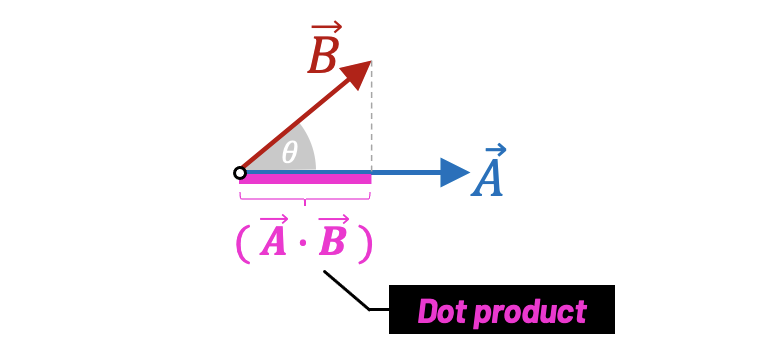
The sign of the dot product gives us a quick way to classify the angle between two vectors:
- If , the vectors are pointing in a similar direction (the angle between them is less than 90°).
- If , the vectors are perpendicular (the angle is exactly 90°). This is a very important property.
- If , the vectors are pointing in generally opposite directions (the angle is greater than 90°).
This interpretation is directly related to another definition of the dot product:
Here, and are the magnitudes (lengths) of the vectors, and (theta) is the angle between them. This relationship is the key to finding the angle between any two vectors.
The following reading explains these geometric concepts in detail.
Vectors - 3D Math Primer for Graphics and Game Development
Let's return to the '3D Math Primer' to understand the geometric significance of the dot product. This is the most important part of the topic.
Read Section 2.11.2, 'Geometric Interpretation'. This section is divided into two parts. The first part explains the dot product as a projection. Focus on how the sign of the result tells you about the vectors' relative directions. The second part connects the dot product to the cosine of the angle between the vectors. Pay close attention to the formula for calculating the angle heta.
To see a practical worked example of finding the angle between two vectors, watch the following video clip.
Dot and Cross Product | 3D Graphics Overview
The video 'Dot and Cross Product' by Geoffrey Datema demonstrates how to use the dot product formula to calculate the angle between two vectors.
Watch from 02:08 to 04:55. Notice how rearranging the formula \mathbf{a} \cdot \mathbf{b} = \|\mathbf{a}\| \|\mathbf{b}\| \cos( heta) allows you to solve for heta.
Application: The Dot Product in C
In C, we can write a simple function to compute the dot product, which we'll add to our growing math library.
// Calculates the dot product of two vectors
float vec3_dot(Vec3 a, Vec3 b) {
    return a.x * b.x + a.y * b.y + a.z * b.z;
}
We'll use this function frequently for tasks like:
- Basic AI: To check if an enemy is in a character's cone of vision.
- Lighting: To determine how much light hits a surface by comparing the surface normal to the light direction. This is a fundamental concept we'll explore in detail in Module 6.
The Cross Product: Creating a Perpendicular Vector
Where the dot product gives us a scalar, the cross product is an operation between two 3D vectors that produces a new 3D vector. The key property of this new vector is that it is perpendicular (orthogonal) to both of the original vectors.
This operation is only defined for 3D vectors.
Geometric Interpretation of the Cross Product
Understanding the geometry of the cross product is essential. The 3Blue1Brown channel has a video that provides excellent intuition.
Cross products | Chapter 10, Essence of linear algebra
This video from 3Blue1Brown's 'Essence of linear algebra' series offers a fantastic geometric explanation of the cross product.
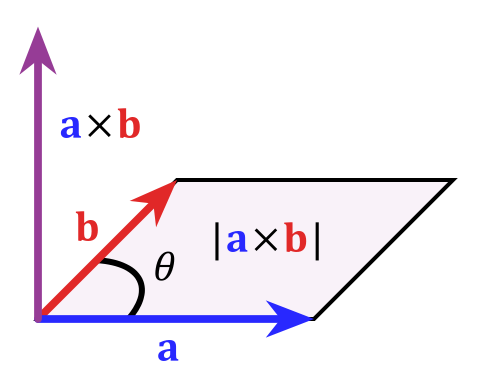
Watch the segment from 05:05 to 06:36. Focus on these two key takeaways: The direction of the resulting vector is perpendicular to the plane formed by the two input vectors. The length (magnitude) of the resulting vector is equal to the area of the parallelogram they form.
As the video explained, the cross product gives a new vector with two defining properties:
- Direction: It is perpendicular to both and . We determine which of the two perpendicular directions it points in using the right-hand rule. If you point your index finger along and your middle finger along , your thumb will point in the direction of .
- Magnitude: Its length, , is equal to the area of the parallelogram formed by and . This is also given by the formula . This means if the vectors are parallel ( or ), the cross product is the zero vector
[0, 0, 0].
Calculating the Cross Product
The formula for the cross product is a bit more involved than for the dot product. For two vectors and :
Note that the cross product is not commutative. In fact, it is anticommutative: . The resulting vector points in the exact opposite direction.
The following reading provides the formula and discusses its primary application.
Vectors - 3D Math Primer for Graphics and Game Development
Let's consult the '3D Math Primer' again for the algebraic formula and its geometric interpretation. Note that this book uses a left-handed coordinate system, so its 'hand rule' is different. We will be using the right-hand rule, which is standard for OpenGL.
Read Sections 2.12.1 ('Official Linear Algebra Rules') and 2.12.2 ('Geometric Interpretation'). Focus on the formula for the cross product. Pay close attention to the discussion about the resulting vector being perpendicular and its magnitude being the area of the parallelogram. This is the main application we care about.
Application: Calculating Surface Normals
The most important use of the cross product in 3D graphics is to calculate a normal vector. A normal vector is a vector that is perpendicular to a surface. For a flat triangle defined by three points P1, P2, and P3, we can create two vectors along its edges:
The cross product will give us the normal vector for that triangle. Normal vectors are crucial for calculating how light should reflect off a surface.
Dot and Cross Product | 3D Graphics Overview
This short clip summarizes the importance of the cross product for calculating polygon normals.
Watch from 08:09 to 09:13. This connects the idea of the cross product directly to calculating the direction a polygon is facing.
Application: The Cross Product in C
Here is the C function for the cross product. It's a direct translation of the formula.
// Calculates the cross product of two vectors
Vec3 vec3_cross(Vec3 a, Vec3 b) {
    Vec3 result = {
        .x = a.y * b.z - a.z * b.y,
        .y = a.z * b.x - a.x * b.z,
        .z = a.x * b.y - a.y * b.x
    };
    return result;
}
Conclusion
In this lesson, we've added two incredibly useful tools to our 3D math toolkit. While their calculations seem abstract, their geometric interpretations are what make them indispensable for game development.
Key Takeaways:
-
The dot product takes two vectors and returns a scalar. It measures their alignment.
result > 0: similar direction.result = 0: perpendicular.result < 0: opposite directions.- Primary Use: Calculating the angle between vectors, and for relational checks (e.g., lighting, AI).
-
The cross product takes two 3D vectors and returns a new 3D vector.
- The resulting vector is perpendicular to both input vectors.
- Its magnitude is the area of the parallelogram formed by the input vectors.
- Primary Use: Calculating surface normals and creating orthogonal coordinate axes.
In our next lesson, we will focus on vector magnitude (length) and the process of normalization—creating a vector with a length of 1. This is a crucial step that builds on today's concepts, allowing us to work with pure directions, which is fundamental to almost every aspect of 3D graphics.