Hello! Welcome to the fifth lesson in our "3D Math Fundamentals" module.
In the last lesson, we dug into the mechanics of matrix multiplication. You learned how to multiply a matrix by a vector to transform it, and how to multiply two matrices together to combine their effects. We established that for our purposes, we'll be using the column vector convention (v' = M * v), which is standard in OpenGL.
Today, we'll shift our focus from the how to the what. If matrix multiplication is the engine, then the matrices themselves are the controls. You'll learn how to construct the specific matrices needed to perform the four fundamental transformations in 3D graphics: identity, scaling, rotation, and translation. This is the foundational toolkit you will use to place, orient, and size every object in your game world.
A Visual Guide to Transformations
Before we dive into the math, let's get a high-level visual of what we're trying to achieve. Each of the transformations we'll discuss has a distinct geometric effect.
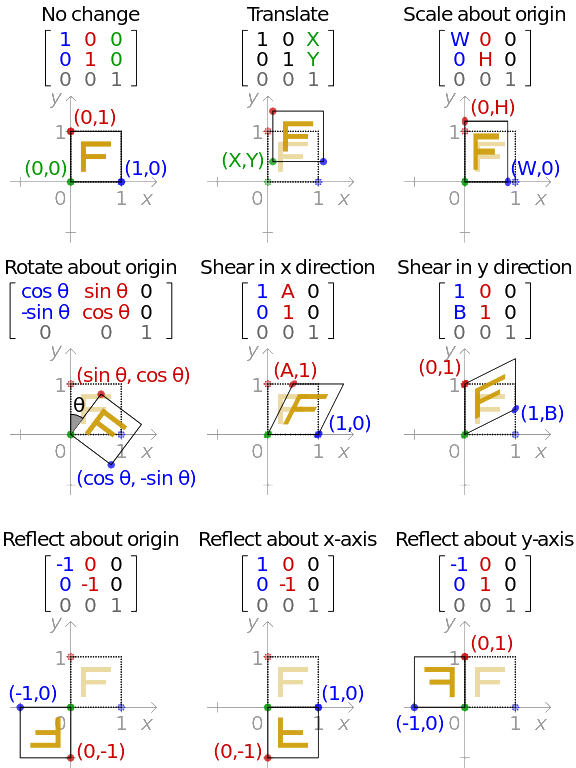
The Geometric Meaning of a Matrix
The most intuitive way to understand a transformation matrix is to see it as a description of a transformed coordinate system. A matrix's columns tell you exactly where the original basis vectors (i-hat, j-hat, and k-hat) land after the transformation.
To transform any other vector, the matrix simply tells you how to combine these new, transformed basis vectors. This is a powerful idea that demystifies why matrices look the way they do.
Matrices and Transformations - Math for Gamedev
The video 'Matrices and Transformations' by FloatyMonkey provides an excellent explanation of this core concept. It visually demonstrates how tracking the basis vectors is all you need to define a transformation.
Watch the first 3 minutes and 30 seconds of this video. Focus on the connection between the final landing spots of the basis vectors and the columns of the resulting matrix.
With this foundation, let's examine our four key matrices.
1. The Identity Matrix
The identity matrix is the "do-nothing" transformation. Multiplying any vector by the identity matrix gives you the exact same vector back. It represents an untransformed coordinate system where the basis vectors are unchanged:
i-hat= (1, 0, 0)j-hat= (0, 1, 0)k-hat= (0, 0, 1)
Putting these into the columns of a 4x4 matrix gives us the identity matrix.
The LearnOpenGL article on Transformations provides a clear definition of the identity matrix and its properties. We will use 4x4 matrices from the start, as they are standard in modern graphics.
Read the section titled 'Identity matrix'. Note its structure: ones on the main diagonal and zeros everywhere else.
The 4x4 identity matrix looks like this:
While it doesn't change anything on its own, it serves as the perfect starting point for building other, more complex transformation matrices.
2. The Scaling Matrix
A scaling matrix non-uniformly changes the size of an object. You can stretch or squash it along the X, Y, and Z axes independently.
Following our rule, if we want to scale a vector by (sx, sy, sz), our new basis vectors will be:
i-hat'= (sx, 0, 0)j-hat'= (0, sy, 0)k-hat'= (0, 0, sz)
Placing these into a matrix gives us the scaling matrix.
Let's refer back to the LearnOpenGL article to see the formal structure of the scaling matrix.
Read the section on 'Scaling'. Notice how the scaling factors simply replace the '1's on the diagonal of the identity matrix.
The 4x4 scaling matrix is:
When you multiply a vector (x, y, z, 1) by this matrix, the result is (x*Sx, y*Sy, z*Sz, 1), which is exactly what we want.
3. The Rotation Matrix
Rotation matrices reorient an object around a specific axis. In 3D, we typically define separate matrices for rotation around the X, Y, and Z axes. The construction of these matrices involves some trigonometry.
Let's use the basis vector concept again. To rotate a point around the Z-axis by an angle :
i-hat'(the new X-axis) lands at(cos(θ), sin(θ), 0).j-hat'(the new Y-axis) lands at(-sin(θ), cos(θ), 0).k-hat'(the Z-axis) doesn't change, so it stays at(0, 0, 1).
Putting these into the columns of a matrix gives us the Z-rotation matrix.
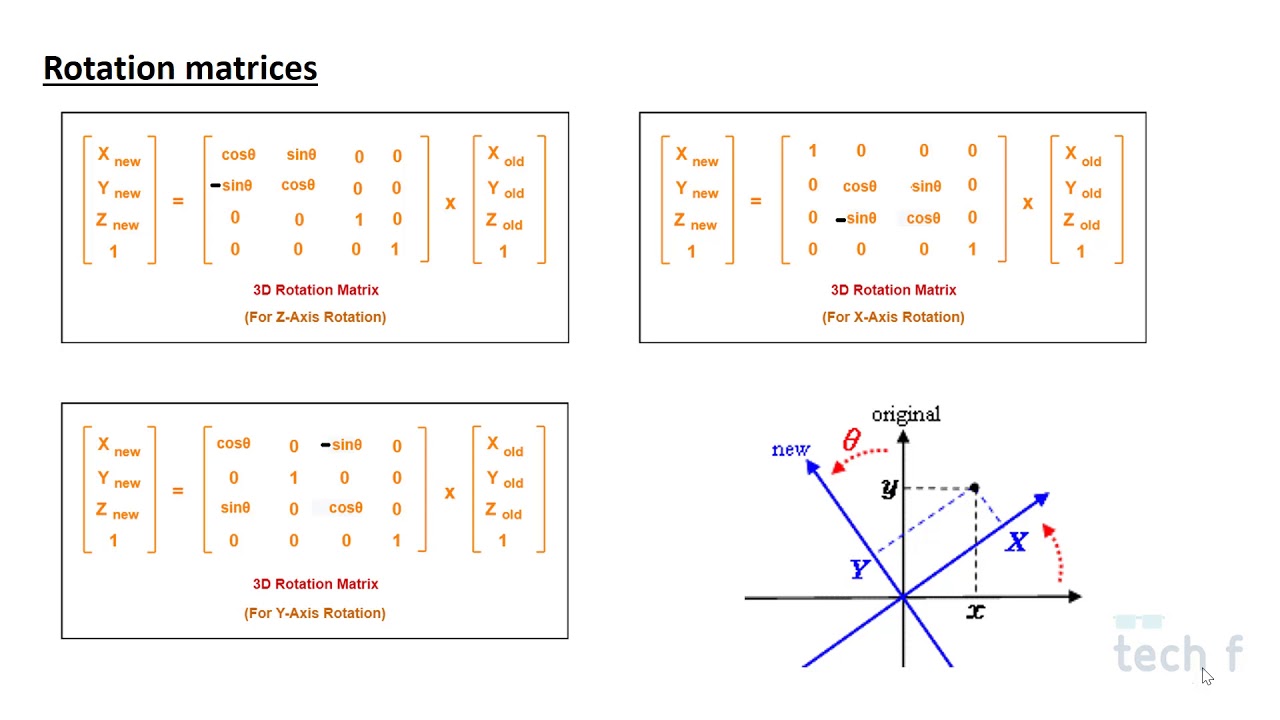
The matrices for all three axes are:
Rotation around X-axis:
Rotation around Y-axis:
Rotation around Z-axis:
As a side note, you might see these matrices written differently in various resources. As we discussed in the last lesson, this is often due to a difference in convention (row-major vs. column-major). The matrices above are for a column-major system like OpenGL. The Scratchapixel resource has an excellent, in-depth discussion on this.
How Does Matrix Work: Part 1 - Geometry
If you are curious about the derivation and the impact of different conventions, the Scratchapixel article on matrices is an excellent deep dive.
Optionally, read the section 'Understanding the Rotation Matrix'. Pay special attention to the part where it compares its matrices to Wikipedia's and explains that the difference comes down to row-major vs. column-major ordering. This reinforces what we learned in the previous lesson.
4. The Translation Matrix (and Why We Use 4D)
This brings us to our final, and most interesting, transformation: translation, or moving an object. You might be surprised to learn that it's impossible to translate a 3D point using a 3x3 matrix multiplication.
Matrix multiplication with a 3x3 matrix is a linear transformation, which has a key property: the origin (0,0,0) always stays at (0,0,0). Since translation must move the origin, it is not a linear transformation. It's an affine transformation.
So, how do we do it? We use a brilliant mathematical "trick": we represent our 3D points in 4D space by adding a w component and setting it to 1. This is called using homogeneous coordinates. By moving to 4D, we can create a 4x4 matrix that can perform translation.
Math for Game Developers: Why do we use 4x4 Matrices in 3D Graphics?
This is a crucial concept. The video 'Why do we use 4x4 Matrices in 3D Graphics?' by pikuma gives one of the best explanations available, providing both the mathematical and geometric reasons.
Please watch this video carefully from the beginning to 17:46. It covers: Why scaling and rotation work with 3x3 matrices, but translation doesn't. The mathematical proof of how a 4x4 matrix allows for addition (translation) via multiplication. The amazing geometric intuition: a translation in 3D is equivalent to a shear transformation in 4D.
As the video explained, by adding the w=1 component to our vector (x, y, z), we can use the fourth column of the 4x4 matrix to add translation values.
The 4x4 translation matrix looks like this:
When you multiply a vector (x, y, z, 1) by this matrix, the result is (x+Tx, y+Ty, z+Tz, 1). We've successfully moved our point!
Conclusion
You've now learned about the four fundamental transformation matrices that form the basis of all 3D object manipulation.
Key Takeaways:
- A matrix can be understood as a collection of transformed basis vectors in its columns.
- The Identity matrix has
1s on the diagonal and does nothing. It's a starting point. - The Scaling matrix places scaling factors
(Sx, Sy, Sz)on the diagonal to stretch or squash an object. - Rotation matrices use
sinandcosto reorient an object around the X, Y, or Z axis. - Translation is not a linear transformation and requires a move to homogeneous coordinates (4D vectors and 4x4 matrices). The translation values
(Tx, Ty, Tz)are placed in the fourth column.
In our previous lesson, you learned how to multiply matrices. In this lesson, you learned what matrices to use for specific jobs. In our next lesson, we will put it all together. You will learn how to combine these individual matrices through multiplication to create a single, efficient matrix that can, for example, scale, then rotate, and finally translate a model into its final position in the game world.