Hello! Welcome to your fourth lesson in the C programming module.
In our last lesson, we mastered dynamic memory allocation with malloc and free. You learned how to manage memory on the heap, giving you the power to create data whose lifetime isn't tied to a single function call. We ended with a promise: combining this power with a way to create our own custom data types.
So far, we've worked with C's built-in types like int, float, and char, as well as arrays of those types. But how would you represent a game object, like a player? A player isn't just one number. It has a position, health, a name, and maybe an inventory. Storing these as separate variables (player_x, player_y, player_health) quickly becomes unmanageable, especially when you have multiple players or enemies.
Today, we'll solve this problem. Our goal is to define and use structs to create our own custom data types for game objects. A struct is a powerful feature in C that lets you bundle multiple variables into a single, logical unit. This is the foundation for creating organized, complex data structures in your game engine.
From Clutter to Cohesion: The Power of Structs
Imagine you need to track the positions of several objects in your game. Without structs, you might create parallel arrays:
// Not ideal! Data is disconnected.
float positions_x[10];
float positions_y[10];
This is clumsy. The x and y coordinates for a single object are stored in different places. struct lets us group them together. To see a clear demonstration of this problem and how structs solve it, let's start with a short video.
Structs in C | What you Need to Know
This video from Caleb Curry's channel provides an excellent motivation for using structs by first showing the awkwardness of managing related data in separate arrays.
Watch from 00:44 to 03:49. Focus on the contrast between using two separate integer arrays for coordinates and using a single array of Point structs. This clearly shows the organizational benefit.
Defining, Declaring, and Using Your First Struct
As you saw, a struct acts as a blueprint for a new data type. Let's formalize the syntax. To represent a 2D vector, which is fundamental in game development, we could define a struct like this:
struct Vector2D {
    float x;
    float y;
}; // Don't forget this semicolon!
structis the keyword.Vector2Dis the tag or name of our struct blueprint.xandyare the members of the struct.
Once the blueprint is defined, you can create variables, or instances, of this type:
// Declares a variable 'position' of type 'struct Vector2D'
struct Vector2D position;
To access the members, you use the dot operator (.):
position.x = 100.0f;
position.y = 50.0f;

printf("Player is at (%.1f, %.1f)\n", position.x, position.y);
You can also initialize a struct when you declare it using curly braces. The values are assigned to members in the order they are defined:
struct Vector2D velocity = {0.0f, -9.8f}; // x=0.0, y=-9.8
This next video segment will walk you through this core syntax, show how to create arrays of structs, and introduce the concept of nesting one struct within another.
Structs in C | What you Need to Know
Let's continue with the Caleb Curry video to see these concepts in action.
Watch from 03:49 to 13:38. This covers: The basic syntax for defining a struct and accessing members (03:49). Creating and iterating over an array of structs (06:13). Nesting structs, for example, putting a point struct inside a city struct to represent its location (07:44). This is a key technique for building complex game objects.
A more modern and readable way to initialize structs is with designated initializers, which let you name the members you're initializing. This is especially useful for structs with many members, as it doesn't depend on order.
// Using designated initializers
struct Vector2D position = { .x = 100.0f, .y = 50.0f };
Cleaner Code with typedef
You might have noticed that you have to write struct Vector2D every time you declare a variable. This can get verbose. C provides the typedef keyword to create an alias, or a new name, for a type. It's standard practice to use typedef with structs to make your code cleaner.
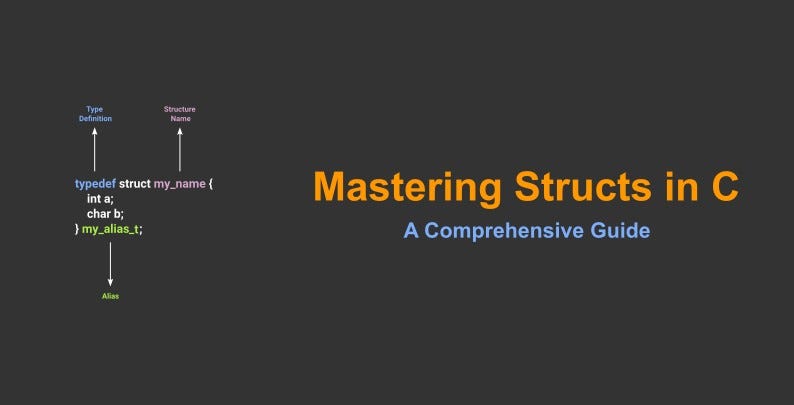
Here's the pattern in action:
typedef struct {
    float x;
    float y;
} Vector2D;

// Now you can just write 'Vector2D' instead of 'struct Vector2D'
Vector2D position;
position.x = 100.0f;
This is much more readable and feels more like the type systems you've seen in Python or C#.
Structs in C | What you Need to Know
This final segment from the video explains typedef in detail.
Watch from 15:11 to 18:12. This explains how to use typedef to create a convenient alias for your struct type, eliminating the need to type the struct keyword repeatedly.
Structs and Pointers: A Powerful Combination
In the last lesson, you learned to allocate memory on the heap with malloc. Now we can combine that with structs to dynamically create complex objects.
#include <stdlib.h>

typedef struct {
    int health;
    int ammo;
} Player;

// Allocate memory for one Player object on the heap
Player *player1 = (Player*)malloc(sizeof(Player));

// ALWAYS check for allocation failure
if (player1 == NULL) {
    // Handle error
    return 1;
}
But how do you access the members of a struct through a pointer? You could use the dereference operator * and the dot operator .:
(*player1).health = 100;
The parentheses are necessary due to operator precedence. However, this is clumsy. C provides a much cleaner syntax for this exact situation: the arrow operator (->).
// The arrow operator is syntactic sugar for (*pointer).member
player1->health = 100;
player1->ammo = 30;

printf("Player health: %d\n", player1->health);

// Remember to free the memory when you're done!
free(player1);
player1 = NULL; // Good practice to avoid dangling pointers
Passing pointers to structs into functions is also far more efficient than passing large structs by value, as it avoids copying all the data.
An Essential Pitfall: Structs with Pointer Members
This brings us to a critical concept where pointers and structs intersect. What happens when you assign one struct to another, and that struct contains a pointer?
Consider this:
typedef struct {
    int *data;
} Container;

Container a, b;
a.data = (int*)malloc(sizeof(int));
*a.data = 10;

// What does this line actually do?
b = a;
When you write b = a;, C performs a member-wise copy. For simple members like integers, this is straightforward. But for the data pointer, it copies the memory address, not the data the pointer points to. This is called a shallow copy.
After the assignment, a.data and b.data both point to the same block of memory on the heap. Modifying data through one pointer will affect the other, and freeing one will make the other a dangling pointer. This can lead to very confusing bugs.
struct Basics | C Programming Tutorial
This is a more advanced but absolutely crucial topic. The Portfolio Courses video has one of the clearest explanations of this shallow copy behavior and its consequences.
Watch this section carefully, from 17:36 to 24:38. It demonstrates what happens when you assign structs that contain dynamically allocated pointers, showing how both structs end up pointing to the same memory. Understanding this is key to avoiding major memory management errors.
Putting It All Together: A Game Object Struct
Let's design a struct that could represent a basic entity in our game. It will combine several of the concepts we've learned.
// First, a component for position (using our typedef'd Vector2D)
typedef struct {
    float x;
    float y;
} Vector2D;

// Now, the main GameObject struct
typedef struct {
    char name[50];       // A fixed-size array for the object's name
    Vector2D position;   // A nested struct for position
    int health;
    int is_active;       // Use 1 for true, 0 for false
} GameObject;
With this GameObject struct, you can now represent any entity in your world—a player, an enemy, a pickup item—in an organized way. You can create an array of them to represent all objects in a level, and you can create them dynamically as needed.
Practice Exercise
Let's solidify these concepts with a coding exercise.
Task:
Create a program that defines and manages a Player and an Enemy.
- Include
<stdio.h>,<stdlib.h>, and<string.h>. - Define a
Vector2Dstruct usingtypedef. It should havefloat xandfloat ymembers. - Define a
Playerstruct usingtypedef. It should contain:char name[100]int healthVector2D position
- Write a function:
void print_player_status(const Player *p);- It should take a constant pointer to a
Playerstruct. - It should print the player's name, health, and position in a formatted way. Use the arrow
->operator.
- It should take a constant pointer to a
- In your
mainfunction:- Stack Allocation: Create a
Playervariable namedplayer1on the stack. Usestrcpyto set its name to "Hero" and use designated initializers to set its health to 100 and position to{0.0f, 0.0f}. - Heap Allocation: Create another
Playerpointer namedenemy1. Usemallocto allocate memory for it on the heap. Check ifmallocwas successful. - If successful, use the
->operator andstrcpyto set the enemy's name to "Goblin", health to 50, and position to{150.0f, 200.0f}. - Print Status: Call your
print_player_statusfunction for both&player1andenemy1. - Cleanup:
freethe memory allocated forenemy1and set the pointer toNULL.
- Stack Allocation: Create a
This exercise will give you practice with definition, initialization (stack and heap), nested structs, and using both the . and -> operators.
Conclusion
You've just learned one of the most important organizational tools in C. Structs are the backbone of data-oriented design, a paradigm that is central to high-performance game engines. By grouping related data, you make your code cleaner, more intuitive, and easier to manage.
Key Takeaways:
- Structs bundle variables of different types into a single, custom data type.
typedefis used to create a convenient alias for a struct type, making code more readable.- Access members of a struct variable with the dot operator (
.). - Access members of a struct pointer with the arrow operator (
->). - Structs can be nested to create complex, hierarchical data models (like a
GameObjectcontaining aTransform). - You can dynamically allocate structs on the heap using
malloc(sizeof(MyStruct)). - Assigning structs with pointer members performs a shallow copy, which can lead to aliasing bugs. Be mindful of who "owns" the pointed-to memory.
In our next lesson, we'll ask: what if a GameObject could hold not just data, but also its own behavior? We will explore function pointers, which will allow us to store functions inside our structs. This will enable us to create truly flexible and modular game objects, bringing us another big step closer to a real game engine architecture.