Welcome to the final lesson of our first module on Linux internals. In our last session, we looked at the essential syscalls—read, write, execve, mprotect—that form an exploit developer's toolkit. We established that the goal of many exploits is to force a vulnerable program to execute one of these syscalls with arguments you control. A call to execve("/bin/sh", NULL, NULL), for example, is the classic way to get a shell.
Today, we'll answer a crucial follow-up question: what if the program you exploit is running with elevated privileges? This lesson introduces SUID and SGID binaries, a fundamental concept in the Linux permission model that is also one of the most common vectors for privilege escalation. Understanding how to identify and exploit these binaries is a critical skill for CTF challenges and real-world penetration testing.
The Foundation: Linux File Permissions
Before diving into special permissions, let's quickly formalize the standard Linux file permission model. You're likely familiar with this from your general Linux usage, but it's important to be precise. Every file and directory has permissions assigned to three classes of users:
- User (Owner): The specific user who owns the file.
- Group: The group that owns the file.
- Others: Everyone else.
For each of these classes, three primary permissions can be granted or denied:
- Read (r): Permission to view the contents of a file or list the contents of a directory.
- Write (w): Permission to modify a file or create/delete files within a directory.
- Execute (x): Permission to run a file as a program or enter a directory (with
cd).
These are often represented symbolically (e.g., rwxr-xr--) or numerically in octal, where read=4, write=2, and execute=1.
Special Permissions: SUID, SGID, and the Sticky Bit
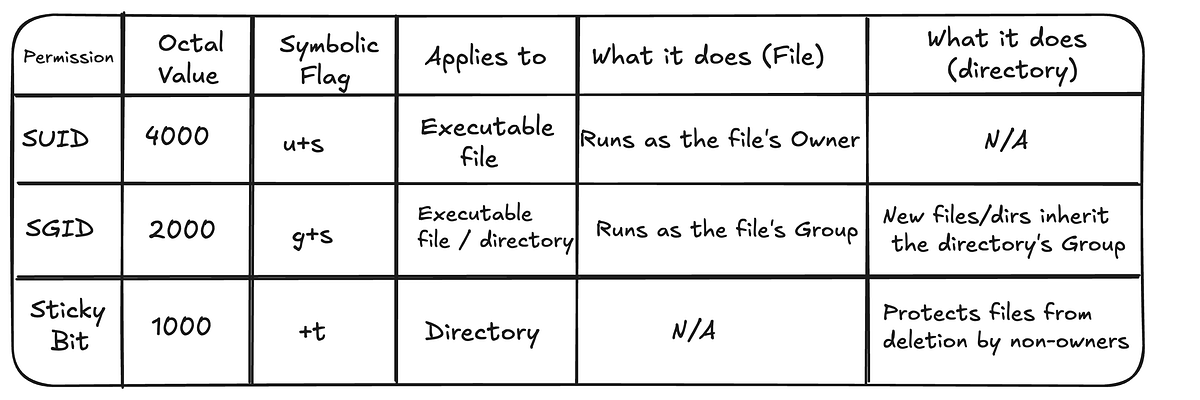
Beyond the standard rwx permissions, Linux provides three "special" permission bits that alter the system's behavior when interacting with files and directories.

-
SUID (Set User ID): This is the most important special permission from an exploitation perspective. When the SUID bit is set on an executable file, the process runs with the privileges of the file's owner, not the user who launched it. The 's' in the owner's execute permission slot (
rwsr-xr-x) indicates SUID. -
SGID (Set Group ID): This bit has two effects. When set on an executable file, the process runs with the privileges of the file's group. When set on a directory, any new files or subdirectories created within it will inherit the group ownership of that parent directory. This is useful for shared project folders. The 's' in the group's execute slot (
rwxrwsr-x) indicates SGID. -
Sticky Bit: When set on a directory, it restricts file deletion. Only the file's owner, the directory's owner, or the root user can delete or rename files within that directory, even if other users have write permissions. This is commonly seen on the
/tmpdirectory to prevent users from deleting each other's temporary files. It is indicated by a 't' in the others' execute slot (rwxrwxrwt).
To understand the legitimate purpose and the security implications of SUID, let's explore it through a classic example and a deeper look at the process user IDs. The following video provides an excellent explanation.
This video from the hexdump channel provides a clear introduction to SUID exploitation. It starts by explaining the core concepts using the passwd utility and then dives into the different user IDs that a process maintains.
Please watch the first two sections of the video: SUID Introduction: Pay close attention to the explanation of the passwd command from the beginning. This utility allows a normal user to change their password, which involves writing to the /etc/shadow file—a file only writable by root. This demonstrates why SUID is a necessary feature. Security and User IDs: The next segment, from here, discusses the security implications and introduces three key concepts: Real User ID (who you are), Effective User ID (who you are for permission checks), and Saved User ID (for temporarily dropping privileges). This distinction is crucial for understanding how SUID works at a system level.
As the video explains, when a root-owned SUID binary is executed by a normal user, the process's Real UID remains that of the normal user, but its Effective UID becomes 0 (root). Since the kernel checks the Effective UID for authorization, the process is granted root's capabilities.
This is the entire basis for SUID-based privilege escalation. If you can find a flaw in a root-owned SUID binary that allows you to hijack its execution, you can force it to perform actions as root. For example, a successful buffer overflow that leads to execve("/bin/sh", NULL, NULL) will result in a root shell.
Finding and Exploiting SUID Binaries
In a CTF or a system assessment, your first step is to find these potentially vulnerable binaries. You can do this with a simple find command that searches the entire filesystem for files with the SUID permission bit set.
find / -perm -u=s -type f 2>/dev/null
This command breaks down as:
find /: Start searching from the root directory.-perm -u=s: Find files where the permission for the user (u) includes the SUID bit (s).-type f: Look only for files, not directories.2>/dev/null: Redirect any error messages (like "Permission denied" for unreadable directories) to/dev/nullto keep the output clean.
This command will produce a list of all SUID binaries. Many of these will be standard system utilities like passwd, su, mount, which are generally secure. Your goal is to spot unusual, custom, or misconfigured common binaries that shouldn't have the SUID bit. The go-to reference for checking if a standard binary can be abused is GTFOBins.
There are several common patterns for exploiting SUID binaries:
1. Direct Command Execution
Some programs are designed to execute other commands or shell code. If such a program is SUID, you've found a direct path to a root shell.
find: Thefindcommand itself can be an attack vector if it has the SUID bit. The-execoption can be used to run any command, which will execute as root:find . -exec /bin/sh -p \;(The-pflag tells the shell not to drop privileges).- Text Editors: Editors like
vim,emacs, andnanooften have a feature to run shell commands from within the editor (e.g.,:!/bin/shinvim). - Interpreters: If an interpreter like
python,perl, orbashis SUID (a major misconfiguration), running it immediately gives you a root shell.
2. File Overwrite
If a SUID binary allows you to write to arbitrary files, you can escalate privileges by modifying critical system files.
- /etc/passwd: You can add a new user with UID 0, effectively creating a new root account.
- /etc/sudoers: You can grant your own user passwordless
sudoprivileges. - /etc/cron.d/: You can write a cron job that runs a reverse shell back to you as the root user.
The RangeForce article provides a clear walkthrough of how to add a new user to /etc/passwd.
Linux privilege Escalation using the SUID Bit
This article from RangeForce clearly lays out several exploitation techniques.
Please read the sections "Exploitation with command execution" and "Exploitation with file writing". This will reinforce the two patterns we just discussed with concrete examples.
3. Environment Variable Abuse (PATH)
This is a more subtle but powerful technique. If a SUID binary calls another program using system() or a similar function but does not provide the absolute path (e.g., system("ps") instead of system("/bin/ps")), the system searches for the ps executable in the directories listed in the PATH environment variable.
An attacker can exploit this by:
- Creating a malicious script or binary with the same name as the program being called (e.g.,
ps). This script would typically just spawn a shell (/bin/sh). - Prepending a directory they control (like
/tmp) to thePATHvariable:export PATH=/tmp:$PATH. - Executing the vulnerable SUID binary. When the binary tries to run
ps, the system will find the attacker's malicious version in/tmpfirst and execute it with root privileges.
The RangeForce article you just read also has an excellent section on this.
Linux privilege Escalation using the SUID Bit
Let's continue with the same article to understand PATH abuse.
Read the section titled "Exploitation with the PATH variable". The C code example makes the vulnerability very clear, and the exploitation steps are straightforward. Your CSE background will make this pattern immediately intuitive.
4. Shared Library Hijacking
This advanced technique applies when a SUID binary dynamically loads shared libraries (.so files). If the binary allows you to specify a library to load, you can craft a malicious shared library containing code that spawns a shell. When the SUID binary loads your library, your code executes with root privileges.
The hexdump video you started earlier demonstrates this and other techniques with several practical examples.
Let's return to the hexdump video to see these exploitation patterns in action.
Watch the following two segments: Code Demonstration: This short section from here uses a simple C program to demonstrate the difference in effective user ID when a program is run normally versus when it's run as a root-owned SUID binary. Exploitation Examples: This is the core practical section. From this point, the video demonstrates a series of real-world SUID exploits using wget, xstamp, ssh-keygen (a shared library hijack), emacs, and vim. Pay close attention to how each exploit is specific to the logic of the binary being attacked.
Conclusion
This lesson completes our foundational survey of Linux internals for pwn. We've connected the dots from process memory layout and syscalls to a concrete, high-impact privilege escalation vector. Exploiting SUID binaries is a staple of CTF challenges and a skill you will use repeatedly.
Key Takeaways:
- SUID (Set User ID) and SGID (Set Group ID) are special permissions that allow an executable to run with the privileges of its owner or group, respectively.
- The
passwdutility is a classic example of a legitimate SUID binary, using root privileges temporarily to write to/etc/shadow. - A
root-owned SUID binary with a vulnerability (in its own code or its logic) is a prime target for privilege escalation. - Exploitation involves first enumerating SUID binaries with the
findcommand and then analyzing them for exploitable behavior, often with help from resources like GTFObins. - Common exploitation patterns include direct command execution, file overwrites, PATH hijacking, and shared library loading.
You now have the essential theoretical knowledge about the low-level Linux environment. In our next module, we will shift gears and begin building your practical toolkit. The first lesson will introduce the GNU Debugger (GDB), the most important tool for analyzing how binaries work, finding vulnerabilities, and crafting exploits.