Welcome to your first lesson on the path to mastering binary exploitation. Your journey into pwn, from userland to the kernel, begins with understanding the very structure of the programs you'll be analyzing. This lesson focuses on the Executable and Linkable Format (ELF), the standard binary file format on Linux and many other Unix-like systems. Think of it as learning to read the architectural blueprints of a building before you try to find its secret passages.
Today, we will dissect the ELF format. You'll learn about its fundamental components: the main ELF header, the distinction between sections and segments, and the headers that describe them. This knowledge is the bedrock upon which all future exploitation techniques are built, as it tells you where code and data reside and what their properties are in the file and in memory. Given your background in computer science and assembly, we can dive straight into the structural details that govern how a compiled program is organized.
The Two Faces of an ELF File: Linking vs. Execution
At its core, an ELF file presents two different "views" of its contents, each tailored for a specific purpose. This is one of the most crucial concepts to grasp.
- The Linking View: This view is organized into sections and is used by the linker during the compilation process. Sections are blocks of data or code like executable instructions (
.text), initialized global variables (.data), or symbol table information. They provide a logical organization that allows the linker to combine different object files into a single executable or shared library. - The Execution View: This view is organized into segments and is used by the operating system's loader when the program is run. Segments tell the loader how to map parts of the file into the process's virtual memory space. A segment typically groups one or more sections and assigns memory permissions to them (e.g., Read-Only, Read-Write, Read-Execute).
For an exploit developer, both views are important. The linking view (sections) helps us locate interesting code and data statically in the file, while the execution view (segments) tells us where they will be in memory and what permissions they will have at runtime.

To get a clear and concise explanation of this fundamental difference, please watch the beginning of the following video.
In-depth: ELF - The Extensible & Linkable Format
This video by stacksmashing provides an excellent, in-depth look at the ELF format. We will be referencing it throughout the lesson.
Please watch the introduction from the beginning, where the distinction between segments (for runtime) and sections (for link time) is clearly explained.
The Anatomy of an ELF Binary
An ELF file is a highly structured binary file. Its layout is defined by a series of headers that act as a map to the rest of its contents. Let's break down the main components.
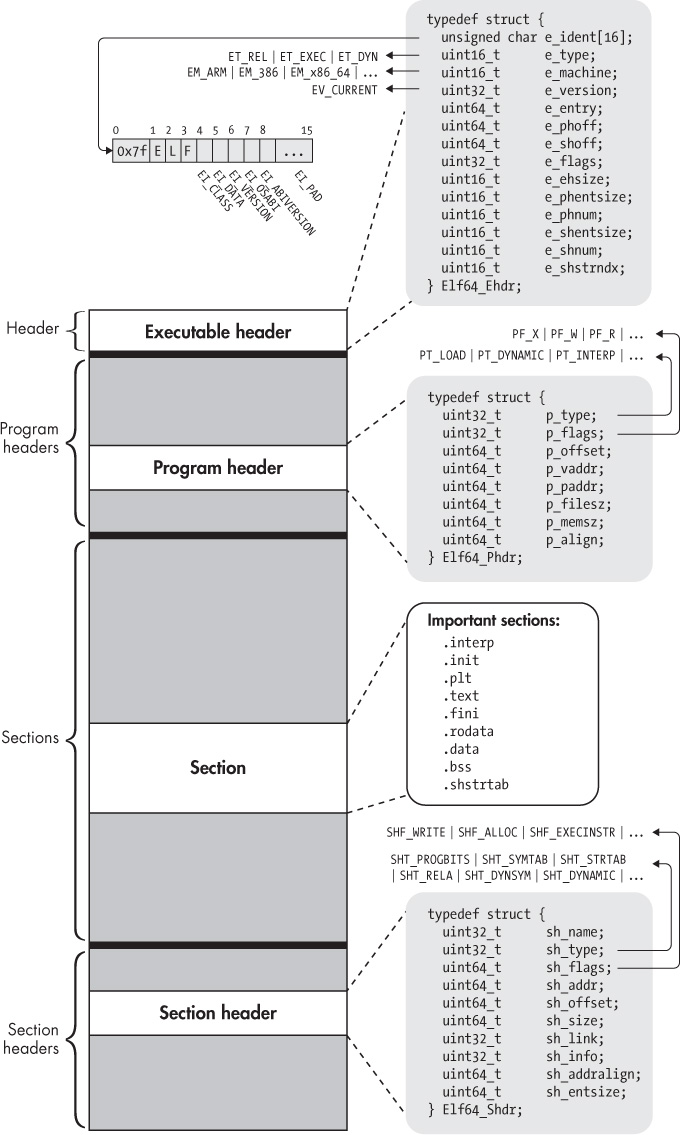
As you can see, the file starts with an ELF Header, which is followed by the data for the program itself. This data is described by two key structures: the Program Header Table, which points to segments, and the Section Header Table, which points to sections.
To explore these structures, we will primarily use the readelf command-line utility. It's an essential tool for parsing and displaying the information inside ELF files.
1. The ELF Header (Elf64_Ehdr)
The ELF Header is located at the very beginning of the file and acts as a roadmap. It provides essential metadata, such as the file's architecture, its type, the entry point for execution, and the locations of the program and section header tables.
The "Secret of Binary ELF" article provides a fantastic, detailed look at the C structures that define the ELF format. This should be very intuitive given your CSE background.
Secret of Binary ELF | NutCrackersSecurity
This article breaks down the ELF file structure by explaining the C struct definitions from the header files. It's a great way to understand the format from a programmer's perspective.
Please read the section on the ELF header. Pay close attention to the Elf64_Ehdr struct and the descriptions of its key fields: e_ident: The "magic number" that identifies the file as an ELF binary, plus architecture class (32/64-bit) and data encoding. e_type: The file type (e.g., ET_EXEC for an executable, ET_DYN for a shared library). e_machine: The target architecture (e.g., EM_X86_64). e_entry: The virtual address of the program's entry point, where execution begins. e_phoff, e_shoff: The file offsets to the Program Header Table and Section Header Table, respectively.
You can inspect the ELF header of any binary using readelf -h. The output directly corresponds to the fields in the Elf64_Ehdr structure.
For a complementary visual explanation of these fields, the stacksmashing video is also very helpful.
In-depth: ELF - The Extensible & Linkable Format
This is the same video as before.
Watch the segment covering the ELF header. It walks through each field with clear examples.
2. Program Headers and Segments (Elf64_Phdr)
The Program Header Table is an array of Elf64_Phdr structures, each describing a segment. These headers are essential for execution; the OS loader reads this table to determine which parts of the file to map into memory, where to map them, and what permissions to set.
From an exploitation perspective, the most important program headers are of type LOAD. These specify the loadable segments of the binary—typically one for the executable code (read and execute permissions) and another for data (read and write permissions). The permissions (p_flags) are critical; for example, a non-executable data segment is a defense (NX bit) that we will learn to bypass.
Secret of Binary ELF | NutCrackersSecurity
Continuing with the same article, let's look at program headers.
Now, read the section on the Program Headers Table. Focus on the Elf64_Phdr struct and understand the purpose of its fields, especially: p_type: The segment type (e.g., PT_LOAD, PT_DYNAMIC). p_flags: The segment's permissions in memory (Read, Write, Execute). p_vaddr: The virtual address where the segment should be loaded. p_filesz and p_memsz: The size of the segment in the file and in memory. If p_memsz > p_filesz, the extra space is zero-filled (this is how the .bss section is handled).
You can view the program headers using readelf -l (the l stands for "loadable segments"). This command also conveniently shows which sections are contained within each segment.
3. Section Headers and Sections (Elf64_Shdr)
The Section Header Table is an array of Elf64_Shdr structures. Each entry describes a section's name, type, size, and location within the file. While the loader doesn't need sections to run a program (and they can even be removed using a tool like strip), they are invaluable for analysis. They give us a labeled map of the binary's contents.
Secret of Binary ELF | NutCrackersSecurity
Finally, let's examine the section headers.
Read the last part of the article on the Section Header Table. Note: The author incorrectly calls this "Segment Headers Table" in the heading, but the content correctly describes section headers. Focus on the Elf64_Shdr struct and the table describing common section names.
You can list all section headers with readelf -S. For binary analysis, some of the most important sections you'll encounter are:
- .text: Contains the actual executable machine code (your x86-64 assembly instructions).
- .rodata: Holds read-only data, such as constant strings.
- .data: Contains initialized global and static variables.
- .bss: For uninitialized global and static variables. The section occupies no space in the file but is allocated zero-filled memory at runtime.
- .plt and .got: The Procedure Linkage Table and Global Offset Table. These are central to dynamic linking and are frequent targets in advanced exploits. We will dedicate a future lesson to them.
This short video provides a good summary of the roles of these common sections.
Introduction to the Linux ELF file.
This video by embeddedarmdev gives a concise overview of ELF files.
Please watch the part that describes common sections like .text, .rodata, .data, and .bss.
To solidify your understanding, I recommend a quick hands-on exercise. Create a simple "Hello, World!" program in C, compile it, and run readelf -h, readelf -l, and readelf -S on the resulting executable. Try to identify the different headers and sections we've discussed.
Conclusion
In this lesson, we have established a foundational understanding of the ELF binary format. You are now equipped to parse the "blueprints" of any Linux executable.
Here are the key takeaways:
- ELF files have a dual view: sections for the linker (linking view) and segments for the OS loader (execution view).
- The ELF Header (
Elf64_Ehdr) is the file's main entry point, containing critical metadata and offsets to the other header tables. - Program Headers (
Elf64_Phdr) define segments, instructing the loader how to map the file into memory with specific permissions (Read, Write, Execute). - Section Headers (
Elf64_Shdr) define sections, which logically organize the file's contents like code (.text) and data (.data,.bss) for linking and static analysis. - The
readelfutility is your primary tool for inspecting the structure of ELF files.
In our next lesson, we will move from the static file on disk to the dynamic process in memory. We'll explore how the segments defined in the ELF file are used to create the process memory layout, including the stack, the heap, and the code and data regions.