Welcome to your first lesson! We're kicking off your journey to mastering HTML and CSS by establishing the single most important habit for building high-quality websites: writing clean, meaningful code. Since you're already familiar with the basic building blocks like headings and paragraphs, we'll now focus on how to assemble them into a logical and robust structure.
Your goal is to build beautiful digital products, and just like in software engineering, a solid architecture is the foundation for everything that follows. In this lesson, we will focus on using semantic HTML5 elements to define the major regions of a web page. This practice is fundamental to creating products that are not only visually appealing but also maintainable, accessible to all users, and discoverable by search engines.
By the end of this lesson, you will be able to structure any web page using the core semantic elements: <header>, <nav>, <main>, <section>, and <footer>.
From Generic Boxes to Meaningful Layouts
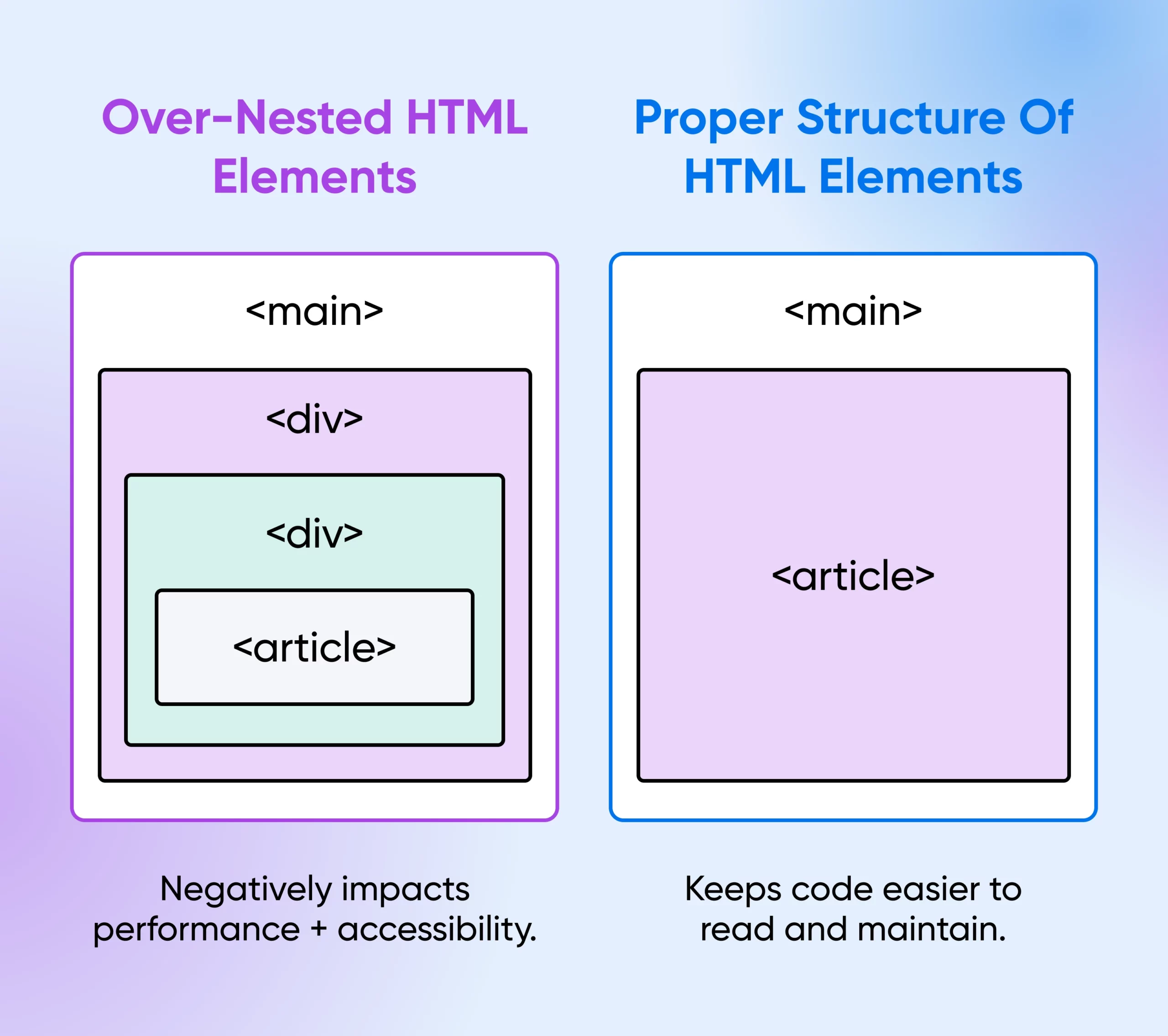
In your previous experience with HTML, you've likely seen or used the <div> tag. It's a generic container, essentially a box with no inherent meaning. While useful, relying solely on <div>s to structure a page leads to what's often called "div soup"—a nested mess of boxes that tells you nothing about the content within.
Modern HTML provides a much better way. Semantic elements are tags that clearly describe their purpose to both the browser and the developer.

To get a quick overview of these new tags and why they were introduced, watch the first few minutes of this video from The Net Ninja.
HTML & CSS Crash Course Tutorial #6 - HTML 5 Semantics
This video provides a concise introduction to the concept of semantic tags and the problem they solve.
Watch the segments from the introduction to understand the "why" behind semantic tags, and then from the overview of tags for a quick description of the most common ones.
As the video explains, using <article> instead of <div> gives the browser crucial context. This has several profound benefits that will resonate with your background in software engineering and quality assurance.
- Maintainability: Semantic code is self-documenting. A
<nav>block is obviously for navigation. This makes codebases easier to read, debug, and for new developers to join. It moves your HTML from just being markup to being a well-defined document structure. - Accessibility (a11y): This is a critical aspect of quality assurance. Users with screen readers rely on semantic tags to understand and navigate a page. The
<main>tag, for example, allows them to skip repetitive navigation and jump directly to the primary content. A well-structured document is the first step to an accessible product. - SEO: Search engines like Google use this semantic structure to better understand the content on your page, which can lead to better search rankings. The
<header>,<main>, and<footer>elements are strong signals about the page's layout and content hierarchy.
Using semantic elements helps you avoid overly complex and nested structures, leading to cleaner and more performant code.
The Core Structural Elements
Now, let's explore the primary elements you'll use to define the skeleton of any modern webpage. We'll examine what each tag is for and, just as importantly, when to use it. The MDN Web Docs are the gold standard for web development documentation, and their guide on structuring documents is an excellent reference.
Structuring documents - Learn web development | MDN
This resource from MDN provides a canonical overview of the standard components of a webpage and the HTML elements used to represent them.
First, read the section on the basic sections of a document. This will familiarize you with the conceptual blocks of a typical website. Then, continue to the next section, HTML for structuring content, which explains why using the correct semantic element is so important, especially for accessibility.
As you've just read, every well-structured page can be broken down into a few key areas. Let's practice applying these tags. The following video by Dave Gray provides a fantastic, practical walkthrough of refactoring a simple page to use proper semantic HTML.
Semantic HTML Tags | HTML5 Semantic Elements Tutorial
This video demonstrates how to apply semantic tags to a document and check the resulting structure.
First, watch the segment on the three main areas. Pay close attention to how <header>, <main>, and <footer> are used to wrap the primary page sections. Note the rule that a page should only have one <main> element. Next, watch from Section vs. Article. This is a crucial part of the lesson. The distinction between <section> and <article> can be confusing, and this segment clarifies it well by refactoring generic sections into more appropriate article tags, and then nesting sections within an article. Finally, watch how you can check your work. The video introduces the "HTML5 Outliner" browser extension. This is a powerful tool for visualizing the document outline your code creates. As a QA engineer, you'll appreciate having a tool to instantly validate that your structure is logical and correctly interpreted by the browser.
To summarize the key distinctions you've just seen:
<header>: Contains introductory content or navigational aids. You can have a main page<header>, but also a<header>for an<article>or<section>.<nav>: Specifically for major navigation blocks. If you have a list of links that isn't the primary site navigation (e.g., a list of links in a footer), you don't necessarily need to wrap it in a<nav>.<main>: The dominant, unique content of the document. There can be only one<main>element per page.<article>: A self-contained piece of content that could be distributed on its own, like a blog post, forum post, or news story.<section>: A thematic grouping of content, typically with a heading. Think of it as a chapter in a book. A homepage might have sections for "About Us," "Services," and "Testimonials."<footer>: Contains information about its enclosing section, such as the author, copyright information, or links to related documents. Like<header>, you can have a<footer>for the whole page or for an individual<article>.
When Semantics Don't Fit: <div> and <span>
Sometimes, you need to group elements purely for styling purposes, and no semantic element seems appropriate. This is where <div> (a block-level container) and <span> (an inline container) are still useful. For example, you might use a <div> to wrap a hero section on your landing page to apply a specific background image. The key is to reach for these after you've determined that no semantic element fits the bill.
The MDN article you looked at earlier has a good explanation of this.
Structuring documents - Learn web development | MDN
It's important to know when to use non-semantic wrappers without overusing them.
In the "Structuring documents" article, find the heading Non-semantic wrappers and read that brief section. It provides clear examples of appropriate use cases for <div> and <span>.
Conclusion
In this lesson, you've taken a significant step beyond basic HTML. You've learned how to build a document's skeleton not with generic boxes, but with a meaningful, semantic structure.
Here are the key takeaways:
- Semantic HTML uses tags that describe the meaning of their content (e.g.,
<nav>,<article>). - This practice is crucial for accessibility, SEO, and code maintainability—all hallmarks of a professional, high-quality product.
- A typical webpage is structured with a
<header>,<nav>,<main>, and<footer>. <article>is for standalone, distributable content, while<section>is for thematically grouping content within a document.- Tools like the HTML5 Outliner can help you validate your document's structure, ensuring it's logical and accessible.
You now have the foundational knowledge to create well-structured web pages. In our next lesson, we will build on this by focusing on another critical component of any website: accessible forms. You'll learn how to use the correct HTML elements to build forms that are usable for everyone.