Hello! Welcome to the final lesson in our introductory module on Large Language Models.
In our last lesson, you learned how to get structured, machine-readable output from LLMs using Pydantic. This skill transformed the LLM from a generator of prose into a predictable component you can integrate into your software.
Now, as you prepare to build applications, you face a new question: which LLM should you use? The landscape has exploded with options from providers like OpenAI, Google, Anthropic, and a vibrant open-source community. Choosing the right one is a critical engineering decision.
This lesson will equip you with a practical framework to evaluate and select LLM providers and models based on the crucial trade-offs of cost, latency (speed), and capability. Mastering this will allow you to make informed decisions that align with your project's technical requirements and budget.
The Core Trade-offs in LLM Selection
Choosing an LLM is a balancing act. For any given project, you'll need to weigh three primary factors against each other:
- Capability (Performance): How "smart" or effective is the model for your specific task? This includes its reasoning, coding ability, creativity, and knowledge.
- Cost: What is the price per API call? What are the infrastructure costs if you host it yourself?
- Latency (Speed): How quickly does the model return a response? This is critical for real-time applications like chatbots.
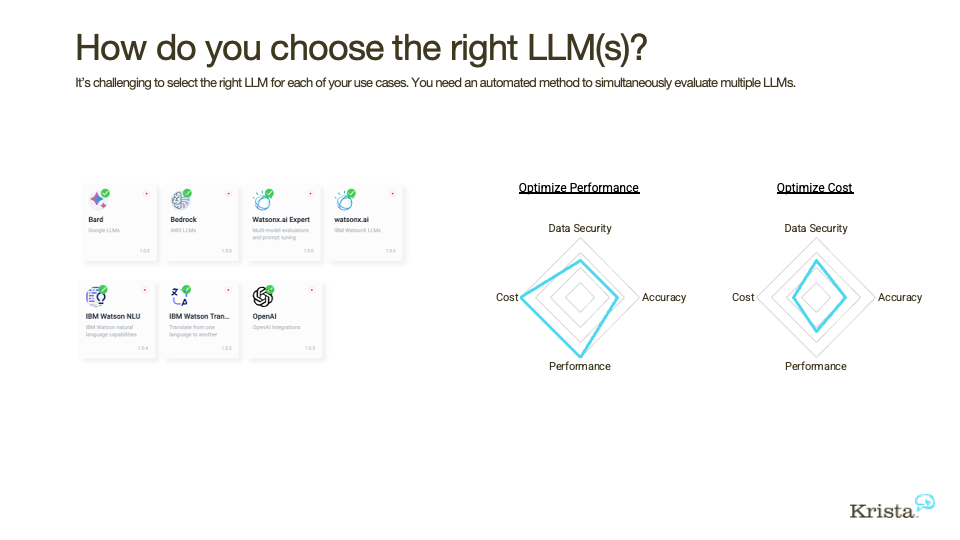
To get a comprehensive overview of these trade-offs and the factors you should consider, let's start with a methodical guide.
How to Choose the BEST LLM for YOUR Project: A Methodical Guide
The video 'How to Choose the BEST LLM for YOUR Project' by pookie provides an excellent, structured walk-through of the model selection process from a developer's perspective.
Please watch the following sections. They provide the foundation for our entire lesson: Define Your Use Case (02:45 - 03:48): The presenter emphasizes that the task you want to solve is the most important starting point. Judging 'Intelligence' (03:48 - 12:19): Pay attention to the two ways of measuring capability: quantitative benchmarks (like MMLU) and their limitations, and qualitative human evaluations (like LLM Arena). Pricing (12:19 - 15:56): This section covers API pricing and, crucially, debunks the myth that self-hosting is always cheaper by calculating the cost of running a large model. Speed and Latency (15:56 - 17:20): Understand the relationship between model size, cost, and speed. Privacy (17:20 - 19:36): Learn about the trade-offs between using a public API, a service like Azure OpenAI, and self-hosting for maximum privacy. Qualitative Evaluation (19:36 - 23:09): This revisits the idea of human preference and introduces OpenRouter rankings to see which models are popular for specific tasks like coding. Test for Yourself (24:14 - 25:35): This is a key takeaway—always validate a model's performance on your specific task.
Now, let's break down these factors further and see how to apply them using practical tools and tables.
1. Capability: Measuring "Smarter"
As the video explained, "capability" isn't a single number. It depends on the task.
- Quantitative Benchmarks: These are standardized tests. For example,
HumanEvalmeasures coding ability, whileMMLUassesses broad knowledge. They are useful for a rough comparison but can be misleading if models are "trained to the test." - Qualitative/Human Preference: Platforms like the LMSYS Chatbot Arena have users blindly vote on which of two anonymous models gives a better response. This "vibe check" or ELO score is often a better predictor of real-world user satisfaction.
- Use-Case Specificity: Some models excel at specific tasks. Anthropic's Claude models are often praised for handling long documents and writing, while OpenAI's models are strong generalists.
The "LLM Comparison Guide" resource offers a fantastic example of a table that consolidates these benchmarks. Looking at a table like this allows you to quickly see which model leads in a category relevant to you (e.g., SWE-bench for coding).
2. Cost: From Pennies to Thousands
Cost is a major driver in any real-world application.
API Pricing: Most providers charge per token (roughly ¾ of a word), with different rates for input (your prompt) and output (the model's response). Prices are usually listed per 1 million tokens.
The Cost of "Free" (Open-Source): As the video demonstrated, running a large open-source model like Llama 3.1 isn't free. It requires powerful and expensive GPUs. For many scenarios, especially at the start, using a commercial API is significantly cheaper than paying for the cloud infrastructure to self-host.
Cost Trend: The good news is that model costs are plummeting. What was state-of-the-art and expensive a year ago is now a cheap, fast commodity model.

3. Latency: The Need for Speed
For interactive applications, speed is a feature. A user won't wait 10 seconds for a chatbot response. Key metrics include:
- Time to First Token (TTFT): How long it takes for the first word of the response to appear. A low TTFT makes the application feel responsive, even if the full response takes time.
- Tokens/Second: How quickly the rest of the response is generated after the first token.
Generally, smaller models are faster and have lower latency. This is why a common strategy is to use a smaller, faster model for most tasks and only call a larger, slower model when high-level reasoning is required.
Putting It All Together: A Practical Framework
Now, let's consolidate this into an actionable workflow. The following article provides an excellent, no-nonsense set of tables and checklists for engineers.
The Practical Comparison Table (Specs, Cost, Latency, Compatibility)
The article 'Choosing an LLM in 2026: The Practical Comparison Table' by Dechun Wang offers a fantastic, developer-centric approach to model selection. It focuses on the practical knobs you can turn.
Read through this article. It's concise and packed with useful tables. Pay close attention to: Section 1 & 2: The 'four knobs' and the model positioning table. This helps you understand the different 'families' of models. Section 3: The pricing tables. Notice how different providers structure their costs. Section 4: The advice on benchmarking latency yourself, rather than trusting generic tables. Section 5 & 6: The 'Decision Checklist' and the final scenario-based comparison table. This is a great blueprint for making a decision.
This article gives you the "how-to," and the "LLM Comparison Guide" (ID=[LINK](https://www.digitalapplied.com/blog/llm-comparison-guide-december-2025)) provides the "what-for." Its "When NOT to Use Each Model" and "Use Case-Specific Model Recommendations" sections are invaluable for avoiding common pitfalls. For example, using a slow, expensive model like Claude Opus for a simple, high-volume classification task would be a poor engineering choice, while using the cheap and fast DeepSeek model would be ideal.
Your Decision-Making Checklist
Based on these resources, here is the process you should follow when choosing an LLM for a project:
- Classify Your Task: What are you building? (e.g., customer support chatbot, code generator, document summarizer). What are the stakes? (high-volume/low-stakes vs. low-volume/high-stakes).
- Define Your Primary Constraint: What matters most? Is it real-time speed (latency), budget (cost), or top-tier accuracy (capability)? Do you have strict data privacy needs that push you toward self-hosting?
- Create a Shortlist: Using resources like Artificial Analysis, the Open LLM Leaderboard, and the tables in the provided articles, identify 2-3 candidate models. A common strategy is the "2-3 model rule":
- A fast, cheap model for the majority of simple tasks.
- A strong, smart model for complex reasoning, which you escalate to when needed.
- Optionally, a specialized model for a unique capability (e.g., a vision model).
- Benchmark and Test: Never trust marketing claims or benchmark scores alone. Set up a small test script to run a representative sample of your actual task on your shortlisted models. Measure cost, latency, and the quality of the output for your specific use case.
- Decide with Data: Make your final selection based on the results of your own testing.
Conclusion
You are now equipped to navigate the complex and fast-moving world of LLMs. You've moved beyond simply using a default model to making strategic engineering decisions based on a clear set of trade-offs.
Key Takeaways:
- The "Iron Triangle": Model selection is a balance between Capability, Cost, and Latency.
- Define Your Use Case First: The best model is always the "best model for the task."
- A Multi-Model Strategy is Often Best: Use a cheap, fast model for simple tasks and escalate to a powerful, slower model only when necessary. This is a common pattern for cost and performance optimization.
- Test, Don't Trust: Always validate models on your specific workload. A model that wins on a public benchmark may not be the best for your unique problem.
- The Landscape is Dynamic: Costs are falling and capabilities are rising. The "best" model today might be different in three months, so it's important to have a solid evaluation framework.
This lesson concludes our first module on the fundamentals of LLMs. You now know what they are, how to prompt them effectively, how to get structured data from them, and how to choose the right one for a job.
In our next lesson, we will officially begin Module 2, "Foundations of LLM-based Agents." We will start by defining what an AI agent is and what distinguishes a true agent from a simple chatbot, setting the stage for you to build your first one.