Hello! In our last lesson, you successfully implemented the DELETE operation, completing the full set of CRUD (Create, Read, Update, Delete) functionalities for our API. You now have a solid foundation for managing data.
Today, we'll turn our attention to a critical aspect of API development: security and data privacy. Specifically, we'll focus on how to prevent sensitive information from being accidentally sent to the client in an API response. You will learn how to use FastAPI's response_model and its parameters, like response_model_exclude, to precisely control what data your API returns.
The Problem: Accidental Data Leakage
When building an API, it's common to have a single data model that represents a resource in your database. For example, a User model might store a username, email, and a hashed password.
A common mistake is to use this same model for both reading data from a request and sending data back in a response. This can lead to a serious security vulnerability: unintentionally exposing sensitive data, like a user's password hash, to any client that calls the endpoint.
Response Model - Return Type - FastAPI
The official FastAPI documentation has a great section that introduces this exact problem. Start by reading about why data filtering is so important.
Read the introduction and the section titled "Return the same input data". Pay close attention to the code example with UserIn and the "Danger" warning. This highlights the risk we're about to solve.
As the documentation points out, even if you're just returning the data to the user who provided it, this pattern is risky. The same model might be reused in another endpoint (e.g., an admin-only list of all users), leading to a much wider data breach.
Solution 1 (Best Practice): Separate Input and Output Models
The most robust and recommended way to solve this problem is to maintain a clear separation between the data your API accepts and the data it returns. You can achieve this by creating two distinct Pydantic models:
- Input Model (e.g.,
UserCreate): Defines the structure of the data you expect from the client. This model can include sensitive fields likepassword. - Output Model (e.g.,
UserRead): Defines the structure of the data you send back to the client. This model omits any sensitive fields.
FastAPI then uses the output model, specified in the response_model parameter of the path operation decorator, to filter the data before sending the response.
Fast API Tutorial, Part 13: Response Model
This video clip demonstrates the concept of using separate input (UserIn) and output (UserOut) models. It's a very common and powerful pattern.
Watch from 05:03 to 08:04. The presenter refactors the code to use a UserBase model and then creates UserIn and UserOut by inheriting from it. Notice how FastAPI automatically filters the response based on the UserOut model.
Let's look at how you'd implement this pattern.
from pydantic import BaseModel, EmailStr


# 1. Base model with shared fields
class UserBase(BaseModel):
    username: str
    email: EmailStr
    full_name: str | None = None


# 2. Input model that includes the password
class UserIn(UserBase):
    password: str


# 3. Output model that omits the password
class UserOut(UserBase):
    pass # Inherits all fields from UserBase, but not 'password' from UserIn


# A mock database for demonstration
fake_users_db = {}

@app.post("/users/", response_model=UserOut)
async def create_user(user: UserIn):


    # In a real app, you would hash the password before saving
    # user_data = user.model_dump()
    # hashed_password = get_password_hash(user_data.pop("password"))
    # db_user = models.User(**user_data, hashed_password=hashed_password)
    # ... save to db ...


    # For this example, we just return the input user object
    # FastAPI will filter it based on UserOut
    return user
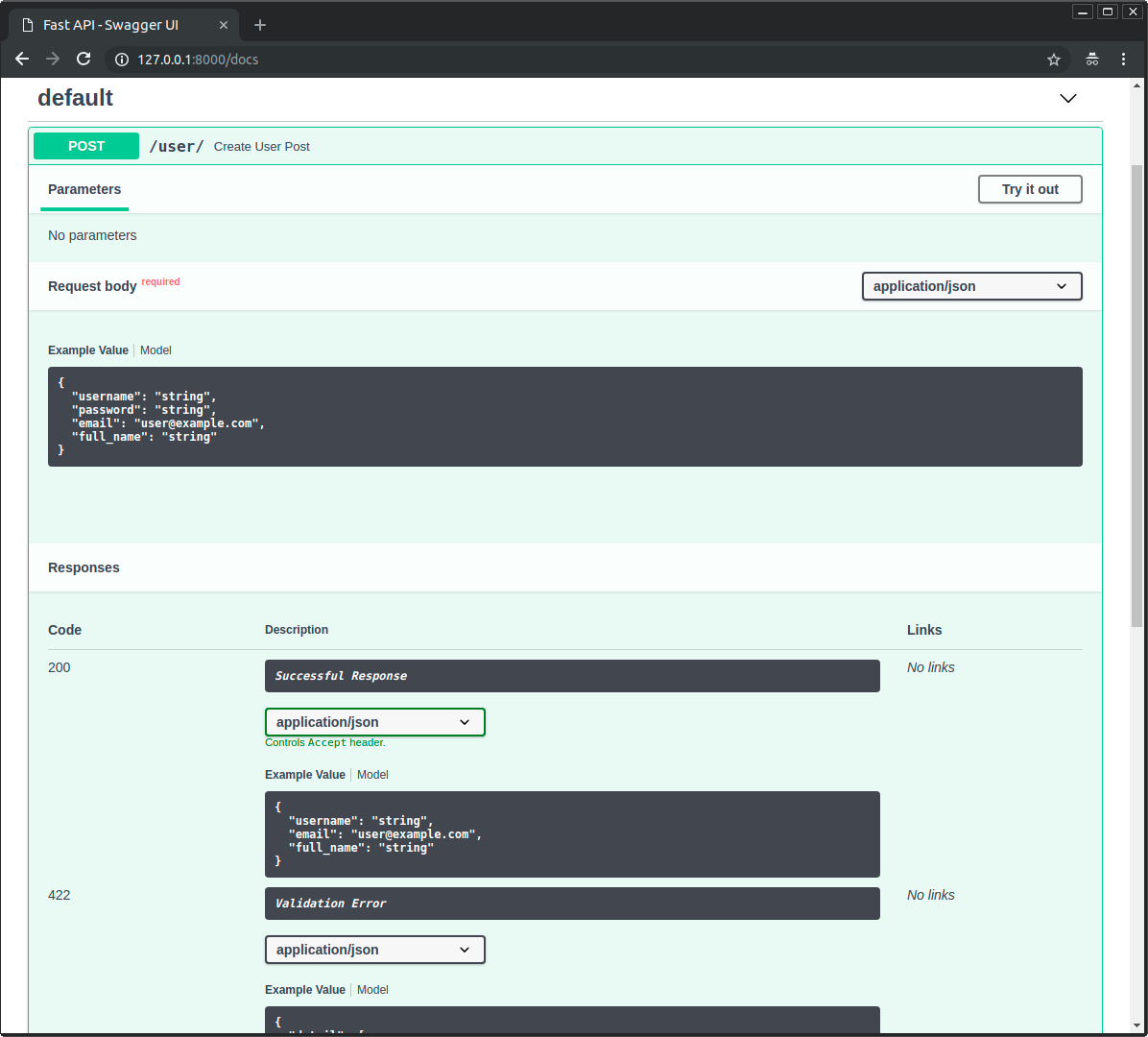
In this example, even though the create_user function returns the full user object (which is of type UserIn and contains a password), FastAPI intercepts it. Because we've set response_model=UserOut, FastAPI ensures that only the fields defined in UserOut (username, email, full_name) are included in the final JSON response sent to the client.
The result is exactly what we want:
Solution 2 (Shortcut): Using response_model_exclude
Sometimes, creating separate input and output models can feel like overkill, especially if you only need to hide one or two fields for a specific endpoint. For these cases, FastAPI provides a convenient shortcut: the response_model_exclude parameter.
This parameter lets you use a single Pydantic model as your response_model but dynamically exclude a set of fields from the response.
Pydantic Response Models in FastAPI: A Detailed Tutorial
This article provides a very direct and clear example of using response_model_exclude.
Read the section "Excluding Fields from Responses". It provides a concise code snippet showing exactly how to use response_model_exclude to hide a password.
Here is how you would use it. Let's assume you only have a single User model that includes the password.
from pydantic import BaseModel

class User(BaseModel):
    username: str
    email: EmailStr
    full_name: str | None = None
    password: str  # This model contains the sensitive field

@app.post("/users/v2", response_model=User, response_model_exclude={"password"})
async def create_user_v2(user: User):


    # The response will be based on the User model, but the 'password' field will be excluded.
    return user
In this code:
response_model=Usertells FastAPI to validate the output against theUsermodel.response_model_exclude={"password"}tells FastAPI to remove thepasswordfield before sending the response. The value must be asetof strings, where each string is a field name to exclude.
This is a quick and effective way to achieve the goal. However, the official FastAPI documentation advises that using separate models (Solution 1) is generally better because it ensures the OpenAPI schema (which powers the /docs) accurately reflects what the endpoint returns. When you use response_model_exclude, the documentation will still show the password field in the response schema, which can be misleading.

Additional Parameters
Besides response_model_exclude, there are other useful parameters for controlling the response:
response_model_include: The opposite ofexclude. It takes a set of fields to include, omitting all others.response_model_exclude_unset=True: This is very useful. It excludes any fields that were not explicitly provided in the data, even if they have default values in the Pydantic model. This helps keep responses clean and minimal.
For a deeper dive into all these options, the official documentation is the best resource.
Response Model - Return Type - FastAPI
To see all the available parameters in action, refer back to the official documentation.
Skim through the section "Response Model encoding parameters" and its subsections. This will give you a good overview of response_model_exclude_unset, response_model_include, and response_model_exclude.
Try It Yourself
Now, let's put this into practice. Imagine you are adding user management to your API.
- Define a new Pydantic model named
Userin aschemas.pyfile. It should containusername,email, andpassword. - In your
main.py, create a newPOST /users/endpoint that takes aUserobject. - For now, just have the endpoint return the
Userobject it received. - Run your app and check the
/docs. Try creating a user. You will see the password returned in the response. - Now, modify the endpoint decorator by adding
response_model_exclude={"password"}. - Restart the app and try again. The password should now be gone from the response body!
This exercise will solidify your understanding of how to protect sensitive data in your API responses.
Conclusion
You've just learned a vital skill for building secure and professional APIs. Controlling the data you return is just as important as validating the data you receive.
Key Takeaways:
- Never expose sensitive data like passwords or secret keys in your API responses.
- The best practice is to use separate Pydantic models for input and output, ensuring your response model (
response_model) only contains safe-to-share fields. - For a quick solution on a specific endpoint, you can use the
response_model_excludedecorator parameter to filter out specific fields on the fly. - FastAPI provides other parameters like
response_model_includeandresponse_model_exclude_unsetfor fine-grained control over response content.
In our next module, we will dive deeper into security by tackling user authentication. You'll learn how to create login and registration endpoints and protect certain routes so that only authenticated users can access them, using an industry-standard technique called JSON Web Tokens (JWT).