Hello! Welcome to the next lesson in your FastAPI journey.
In our previous session, we learned how to use HTTPException to send clear, standard-compliant error responses from our API. This is a crucial skill, but as you add more endpoints and logic, you've probably noticed that our main.py file is starting to get a bit crowded.
This lesson tackles that exact problem, focusing on the learning outcome: Organize API endpoints into multiple files using APIRouter for better modularity. We'll refactor our application to make it more organized, scalable, and easier to maintain—an essential practice for any real-world project, especially complex ones like serving AI/ML models.
1. The Problem: The Monolithic main.py
As an application grows, keeping all your API logic in a single file becomes a significant bottleneck.
- Navigation: Finding a specific endpoint requires scrolling through a potentially huge file.
- Maintenance: A small change in one part of the API could inadvertently affect another.
- Collaboration: It's difficult for multiple developers to work on the same file without creating merge conflicts.
FastAPI provides an elegant solution for this: APIRouter.
Let's watch the beginning of a video that perfectly introduces this problem and sets the stage for using routers.
Python FastAPI Tutorial (Part 8): Routers - Organizing Routes into Modules with APIRouter
In this segment from his popular FastAPI series, Corey Schafer explains why a growing main.py file becomes unmanageable and introduces APIRouter as the solution for modularization.
Watch from the beginning until 02:28. Pay attention to how he frames the problem and gives a high-level overview of what an APIRouter does.
As the video explains, APIRouter acts like a "mini" FastAPI application. You can define a group of related endpoints on a router and then "include" that router in your main application.
2. Refactoring with APIRouter
Let's walk through the process of refactoring our code. The core idea is to move logically related endpoints into their own dedicated files.
Step 1: Create a Router File Structure
First, we'll create a new directory to hold our router files. A common convention is to name this directory routers.
- Create a new folder named
routersin your project's root directory. - Inside
routers, create an empty file named__init__.py. This file tells Python to treat theroutersdirectory as a package, which allows you to import modules from it. - Inside
routers, create a new Python file for a specific resource. For our house prediction API, let's call itpredictions.py.
Your project structure should now look something like this:
.
├── main.py
└── routers/
    ├── __init__.py
    └── predictions.py
This structure is explained in the official FastAPI documentation, which provides a great reference for how to lay out bigger applications.
Bigger Applications - Multiple Files - FastAPI
The official FastAPI documentation provides a clear example of a recommended file structure for larger projects. This will help you visualize how routers fit into a scalable application.
Quickly scan the section 'An example file structure'. You don't need to read it in depth, but notice the use of the routers directory and __init__.py files. This is the pattern we are implementing.
Step 2: Define and Use the Router
Now, let's move our prediction logic into the new predictions.py file.
- Cut all the code related to your prediction endpoint from
main.py—this includes the@app.post(...)decorator, thepredict_house_pricefunction, and the Pydantic models (HousePredictionInput,HousePredictionOutput). - Paste this code into your new
routers/predictions.pyfile. - In
routers/predictions.py, importAPIRouterfromfastapiand create an instance of it:from fastapi import APIRouter, HTTPException # ... other necessary imports like Pydantic models router = APIRouter() - Change the path operation decorator from
@app.post(...)to@router.post(...).
This is the key step: you are now registering the endpoint with the router object instead of the main app object.
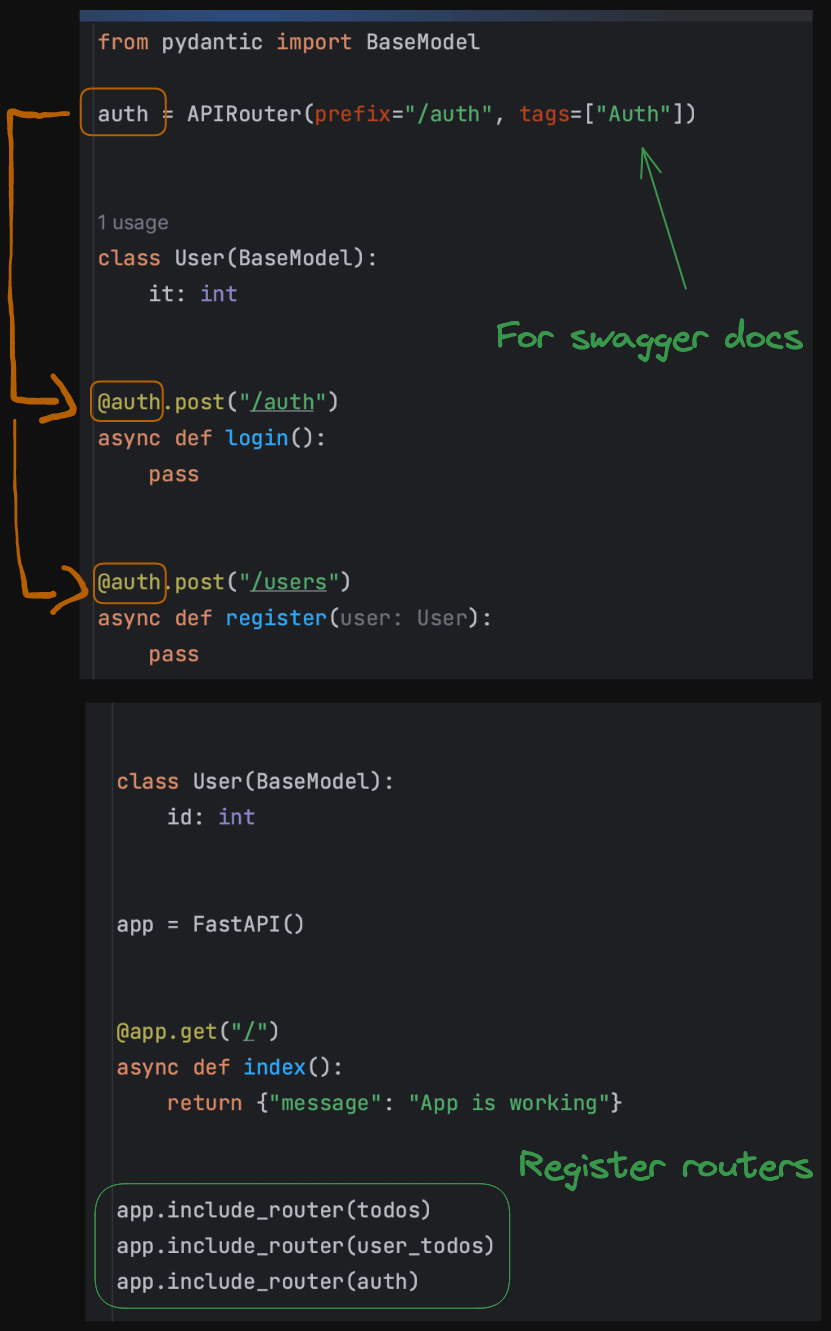
Step 3: Include the Router in the Main Application
Your main.py file is now much cleaner, but it doesn't know about the new router yet. We need to explicitly include it.
- In
main.py, remove the Pydantic models and endpoint code you moved out. - Import the router object from your new module:
from routers import predictions. - Use
app.include_router()to connect it:# In main.py from fastapi import FastAPI from routers import predictions app = FastAPI() app.include_router(predictions.router) # You can still have root endpoints or other general endpoints here @app.get("/") async def root(): return {"message": "Welcome to the House Price Prediction API"}
FastAPI now knows to route requests to the endpoints defined in predictions.router.
The following video provides a complete, step-by-step walkthrough of this entire process, from creating the files to including the router.
Python FastAPI Tutorial (Part 8): Routers - Organizing Routes into Modules with APIRouter
Let's continue with Corey Schafer's tutorial. He will now implement everything we just discussed, moving user and post routes into separate router files.
Watch from 02:28 to 14:14. Follow along as he: Creates the routers directory and files. Moves the endpoint logic to the new files. Changes @app decorators to @router. Imports and includes the routers in main.py.
3. Better Organization with Prefixes and Tags
Including a router is powerful, but app.include_router() offers two optional parameters that make your API even cleaner and more user-friendly.
prefix: A string that gets added to the beginning of all paths in that router. For example, if you setprefix="/predict", an endpoint defined with@router.post("/house-price")will be available at/predict/house-price. This avoids repeating/predictin every single path decorator inside your router file.tags: A list of strings used to group endpoints in the interactive API documentation (/docs). This is incredibly useful for organizing the UI.
Let's update our main.py to use these parameters:
# In main.py
app.include_router(
    predictions.router,
    prefix="/predict",
    tags=["Predictions"],
)
Now, in routers/predictions.py, you can simplify your endpoint's path:
# In routers/predictions.py
# The full path will be /predict/house-price thanks to the prefix
@router.post("/house-price", response_model=HousePredictionOutput)
async def predict_house_price(...):


    # ... logic ...
This textual resource provides a fantastic explanation of this concept, complete with a helpful diagram.
Organizing FastAPI Projects with Routers - ApX Machine Learning
This article from ApX Machine Learning clearly explains how to use prefixes and tags, framing it in the context of an ML-focused API, which is directly relevant to your goals.
Read the sections 'Introducing APIRouter', 'Including the Router in Your Main Application', and 'Organizing URLs with Prefixes and Tags'. Pay close attention to the code examples and the diagram showing how the prefix and tags are applied.
4. Hands-On Practice
It's time to apply what you've learned to your own project.
Task:
- If you haven't already, create the
routersdirectory with an__init__.pyfile and apredictions.pyfile. - Move the
HousePredictionInputandHousePredictionOutputPydantic models frommain.pytorouters/predictions.py. - Move the
predict_house_priceendpoint logic frommain.pytorouters/predictions.py. - In
routers/predictions.py:- Import
APIRouterfromfastapi, along with any other necessary modules (HTTPException,BaseModel, etc.). - Create an instance:
router = APIRouter(). - Change the decorator from
@app.post(...)to@router.post(...). - Simplify the path in the decorator. If your original path was
/predict/{client_id}/house-price, it should now just be/{client_id}/house-price.
- Import
- In
main.py:- Remove the code you just moved.
- Import the
predictionsrouter:from routers import predictions. - Include the router with a prefix and tags:
app.include_router(
    predictions.router,
    prefix="/predict",
    tags=["House Price Predictions"]
)
- Run your app with
uvicornand open the docs athttp://127.0.0.1:8000/docs. You should see your endpoint neatly organized under the "House Price Predictions" tag. Test it to make sure it still works as expected.
Click here for the solution code
routers/predictions.py:
from fastapi import APIRouter, HTTPException
from pydantic import BaseModel, Field


# Create a router object
router = APIRouter()


# Pydantic models moved here
class HousePredictionInput(BaseModel):
    area_sqft: float = Field(..., gt=0, description="Area of the house in square feet")
    num_bedrooms: int = Field(..., gt=0, description="Number of bedrooms")
    has_garage: bool

class HousePredictionOutput(BaseModel):
    predicted_price: float
    client_id: str
    model_version_used: str | None


# Endpoint using the router
@router.post(
    "/{client_id}/house-price",
    response_model=HousePredictionOutput
)
async def predict_house_price(
    client_id: str,
    house_data: HousePredictionInput,
    model_version: str | None = "v1"
):
    available_models = ["v1", "v2"]
    if model_version not in available_models:
        raise HTTPException(
            status_code=404,
            detail=f"Model version '{model_version}' not found. Available versions: {available_models}"
        )

    price_factor = 150
    if model_version == "v2":
        price_factor = 175

    predicted_price = 150_000 + (house_data.area_sqft * price_factor) + (house_data.num_bedrooms * 20_000)
    if house_data.has_garage:
        predicted_price += 25_000

    return {
        "predicted_price": predicted_price,
        "client_id": client_id,
        "model_version_used": model_version
    }
main.py:
from fastapi import FastAPI
from routers import predictions

app = FastAPI(
    title="House Price Prediction API",
    description="API to predict house prices using a simple model.",
    version="0.2.0"
)


# Include the router
app.include_router(
    predictions.router,
    prefix="/predict",
    tags=["House Price Predictions"]
)


# Main root endpoint
@app.get("/")
async def root():
    return {"message": "Welcome to the House Price Prediction API"}
Conclusion
Great job! You have successfully refactored your application, making it more modular and scalable. This is a fundamental skill that separates toy projects from production-ready applications.
Key Takeaways:
APIRouterallows you to group related endpoints into separate files (modules).- Endpoints are defined on a router instance with
@router.get,@router.post, etc. - The main
FastAPIapp integrates these modules usingapp.include_router(). - The
prefixparameter simplifies URL paths, and thetagsparameter organizes the API documentation. - This structure improves code organization, maintainability, and collaboration.
In our next lesson, we will explore another powerful feature for structuring code and avoiding repetition: dependency injection. We will learn how to create and use simple dependency functions with Depends to share common logic across multiple endpoints.