Hello! Welcome to the next lesson in our module on CI/CD and Scalability.
In our last lesson, we focused on scaling the "compute" layer of our backend by using a load balancer to distribute traffic across multiple application servers. We established that this horizontal scaling strategy is key to building resilient, high-traffic applications.
However, even with a dozen application servers, if they all point to a single database, that database will inevitably become a performance bottleneck. Today, we shift our focus from the application layer to the data layer. We'll explore a fundamental strategy for database scaling that specifically targets one of the most common workloads: reading data.
This lesson addresses the learning outcome: Explain database read replication (master-slave) as a strategy for scaling database reads. We will cover what replication is, why it's necessary, the critical trade-offs involved, and how this pattern can be implemented in a Django application.
1. The Database Bottleneck
For most web applications—from social media feeds and blogs to e-commerce sites—the number of read operations (e.g., SELECT queries) vastly outnumbers write operations (e.g., INSERT, UPDATE, DELETE). A user might write one post but read hundreds. This read-heavy pattern means that even if writes are fast, the sheer volume of reads can overwhelm a single database server, leading to slow query times and a poor user experience.
The architecture below illustrates the problem. We've successfully scaled our application layer, but all traffic still converges on a single primary database, making it a single point of failure and a performance bottleneck.
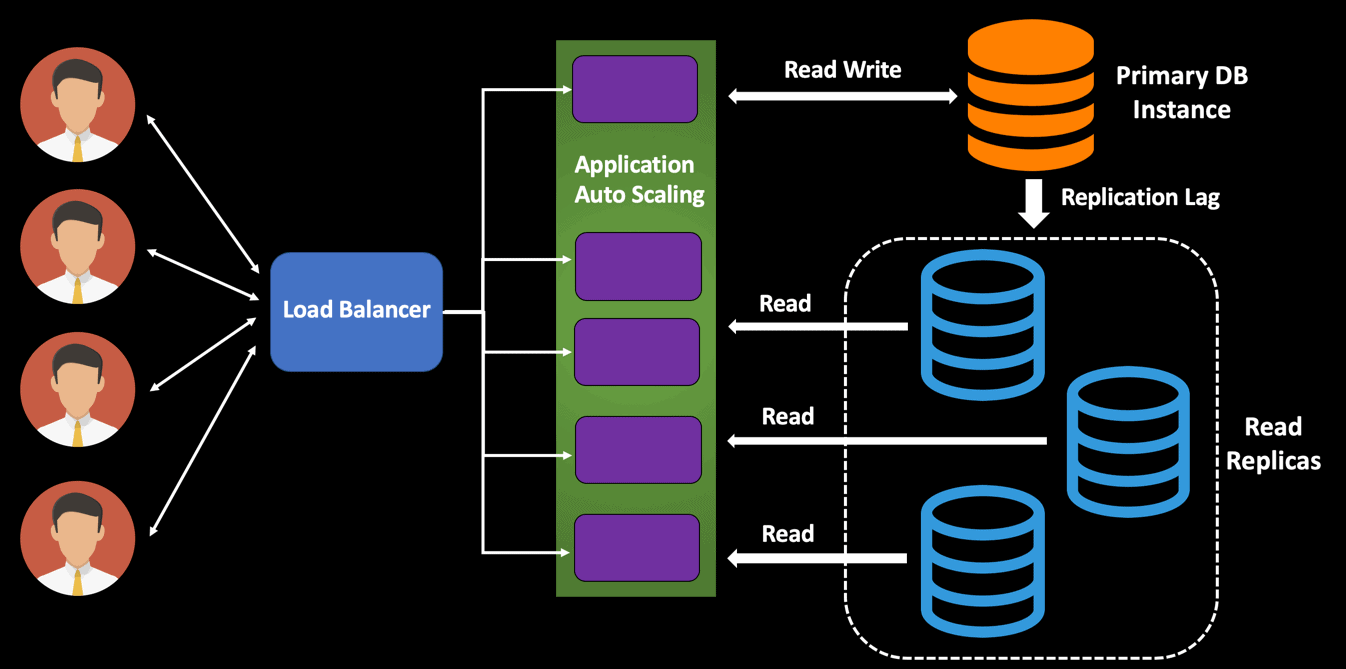
The core idea to solve this is simple: if reads are the problem, let's create dedicated copies of the database just for handling reads.
2. The Solution: Master-Slave Read Replication
This strategy is formally known as read replication, and the most common architectural pattern to implement it is called master-slave or primary-secondary. Here's how it works:
- Primary (Master) Database: A single, authoritative database server that handles all write operations. Any time data is created, updated, or deleted, it happens on the primary.
- Secondary (Slave/Replica) Databases: One or more database servers that are read-only copies of the primary. Their sole job is to serve read queries.
The primary database is responsible for replicating any changes it receives to all of its secondary databases, ensuring they stay in sync over time.
To get a clear overview of this concept, let's watch a short video.
All Types of Database Replication Discussed
This clip from the Hussein Nasser channel introduces the core problem of an overworked database and presents replication as the solution by separating read and write workloads.
Watch from 02:02 to 05:04. Focus on the central idea of having one database for writes and another for reads, and how this process is called replication.
By directing all read traffic to the replicas, you free up the primary database to focus exclusively on handling writes efficiently. You can scale your read capacity horizontally by simply adding more replicas to the pool.
3. The "Under the Hood" Mechanics
Since you're interested in the underlying mechanisms, it's worth briefly touching on how the primary replicates its changes. There isn't just one way, and different database systems use different methods. At a high level, they fall into a few categories:
- Statement-Based Replication: The primary sends the exact SQL statements (e.g.,
UPDATE users SET name = 'X' WHERE id = 1) to the replicas, which then execute the same statements. This is simple but can be problematic if a statement is non-deterministic (e.g., containsNOW(), which would yield different timestamps on different machines). - Row-Based/Binary Replication: The primary executes the statement and then sends the binary changes that resulted (e.g., "this specific row at this position changed in this way") to the replicas. This is more precise and deterministic but can generate more network traffic if a single statement updates millions of rows.
- Logical Replication: A higher-level approach where the primary sends a stream of logical changes (e.g., "a row was inserted into the
userstable with these values"). This method is more flexible and less tied to the underlying storage format, allowing for replication between different major versions of a database.
This next clip provides a quick overview of these different methods.
All Types of Database Replication Discussed
Continuing with the same video, this segment explains the different ways changes can be synced from the primary to the replicas, touching on the pros and cons of each method.
Watch from 05:04 to 11:55. You don't need to memorize the specifics, but try to grasp the conceptual difference between sending the SQL statement itself versus sending the resulting binary or logical changes.
4. The Critical Trade-off: Consistency vs. Performance
This leads us to the most important concept in database replication: the trade-off between data consistency and write performance. This is determined by whether the replication is synchronous or asynchronous.
-
Synchronous Replication: When a client sends a write request to the primary, the primary will not confirm the write is "complete" until all replicas have confirmed they have received and applied the change.
- Pro: Guarantees strong consistency. After a write is confirmed, any subsequent read from any replica is guaranteed to see that new data.
- Con: Slows down writes significantly. The application has to wait for the slowest replica, which increases latency and reduces write throughput.
-
Asynchronous Replication: When a client sends a write request, the primary applies the change and immediately confirms the write as complete to the client. The replication to the secondary servers happens in the background.
- Pro: Fast writes. The application's performance is not impacted by the replication process. This is the most common setup for web applications.
- Con: Leads to eventual consistency. There is a delay, known as replication lag, between when data is written to the primary and when it appears on the replicas. This lag can be milliseconds or, in some cases, seconds.
This distinction is crucial. Let's watch the final segment of the video, which explains this trade-off using a great, practical example.
All Types of Database Replication Discussed
This part of the video is critical. It differentiates between synchronous and asynchronous replication and introduces the concept of 'eventual consistency' as a consequence of replication lag.
Watch from 11:55 to 16:35. Pay close attention to the example of updating a profile and not seeing the change on refresh. This is a classic symptom of asynchronous replication.
The diagram below visualizes the flow of asynchronous replication. Notice how the client gets the "Write Complete" acknowledgement before the replicas have finished their work.

Test your understanding!
You're designing a backend for a financial application that processes stock trades. Data integrity and consistency are the absolute highest priorities; it must be impossible for one part of the system to read a stale stock price immediately after a trade has been executed. Which replication strategy (synchronous or asynchronous) would you choose and why? What is the main drawback you'd have to accept?
Show answer
For this financial application, you would choose synchronous replication.
Why: The requirement for absolute data consistency is non-negotiable. Synchronous replication guarantees that once a trade (a write operation) is confirmed, the updated stock price is present on all replicas. This prevents any part of the system from acting on stale data.
Drawback: The main drawback is higher write latency. Every trade processed will take longer because the system must wait for confirmation from all database replicas. This reduces the overall throughput of how many trades can be processed per second, but it is a necessary trade-off for the required level of consistency.
5. Practical Implementation in Django
Now, let's connect this theory to practice within your chosen framework, Django. How do you tell your application to send writes to the primary database but reads to the replicas?
Django has built-in support for multiple databases, which makes this pattern surprisingly straightforward to implement. The key component is a Database Router. A router is a Python class that you create to programmatically control database behavior. It has two key methods:
db_for_read(model, **hints): This method is called whenever Django needs to read data. You can tell it to choose one of your read replicas.db_for_write(model, **hints): This method is called for write operations. You will direct it to always use the primary database.
The following article provides a simple and clean example of setting this up.
When and How to Configure a Read Replica Database in ...
This article, 'When and How to Configure a Read Replica Database in Django', demonstrates the practical steps for implementing this pattern. It shows how to configure the databases and write a simple router.
Please read from the heading 'Replicas in Databases' to the end of the article. Focus on two key parts: the DATABASES dictionary in the settings file, where multiple databases are defined, and the simple CustomRouter class that directs read and write queries.
To summarize the process from the article:
- Configure Databases in
settings.py: You define yourdefaultdatabase (the primary/master) and then add entries for each of your read replicas (e.g.,replica_1,replica_2). - Create a Database Router: You create a class (e.g.,
CustomRouter) withdb_for_readanddb_for_writemethods. Thedb_for_writemethod simply returns the alias of your primary database ('default'). Thedb_for_readmethod can contain logic to pick a replica, for instance, by randomly choosing from a list of replica aliases. - Enable the Router in
settings.py: You add the path to your router class to theDATABASE_ROUTERSsetting.
With this in place, Django's ORM automatically handles the routing for you. A standard MyModel.objects.all() query will be sent to a replica, while a my_model_instance.save() call will be sent to the primary.
Conclusion
Today we've taken a major step in understanding how to build scalable backend systems by tackling the database bottleneck. Read replication is a foundational technique used by nearly all large-scale web applications.
Key Takeaways:
- Read replication (master-slave) is a pattern used to scale database read capacity by creating read-only copies (replicas) of a primary database.
- All writes go to the primary (master), while reads are distributed across the replicas.
- The choice between synchronous and asynchronous replication is a fundamental trade-off between strong consistency and write performance.
- Asynchronous replication, the most common approach for web apps, results in eventual consistency and introduces replication lag, a delay that developers must account for in their application logic.
- Django natively supports this pattern through its multi-database support and database routers, allowing you to separate read and write traffic with configuration rather than complex application code.
Preview of the Next Lesson:
We've now discussed strategies for scaling both the application layer and the data layer. A common thread in both discussions is the need to avoid relying on a single, stateful component. In our next lesson, we will formalize this concept by exploring what it means to design a web application to be stateless and why this architectural principle is a prerequisite for effective horizontal scaling.