Welcome back! In our previous lesson, we established the theoretical foundation of relational databases, covering concepts like tables, rows, columns, and keys. We ended with a question: How do we bridge the gap between our Python application and this structured, relational world of data?
This lesson answers that question directly. Our learning outcome is to explain how the Django ORM maps Python classes to database tables. We will explore Django's Object-Relational Mapper (ORM), a powerful abstraction that lets you interact with your database using familiar Python code, eliminating the need to write raw SQL.
For someone with your experience in ML frameworks, you can think of the ORM as an abstraction layer analogous to Keras or PyTorch's high-level APIs. Just as those frameworks allow you to define complex neural network architectures with Python classes without writing low-level CUDA code, Django's ORM lets you define your database schema with Python classes without writing low-level SQL.
1. What is an Object-Relational Mapper (ORM)?
At its core, an ORM is a programming technique for converting data between incompatible type systems. In our case, it's a bridge between the object-oriented world of Python (with classes and objects) and the relational world of a database (with tables and rows).
Instead of writing a SQL query like SELECT * FROM student;, you write a Python expression like Student.objects.all(). The ORM acts as a translator, converting your Python code into the appropriate SQL for the database, and then converting the database's response back into Python objects you can work with.
To get a clearer picture of this translation process, let's watch a short introductory video.
This video from Very Academy provides an excellent conceptual overview of what an ORM is and the problem it solves.
Please watch from the beginning until 04:24. Focus on how the ORM acts as a mapping layer between a Python expression and its equivalent SQL query.
As the video highlighted, the main benefits of using an ORM are:
- Productivity: You can write database logic in Python, which is often faster and more intuitive than switching contexts to write SQL.
- Database Independence: Django's ORM can work with various database backends (like PostgreSQL, MySQL, SQLite). You can switch databases with minimal code changes because the ORM handles the translation to the specific SQL dialect of each database.
- Security: It helps prevent SQL injection attacks by using parameterized queries, a topic we'll cover in a later module.
2. The Core Mapping: Python Classes to Database Tables
Now, let's get to the heart of the matter. How exactly does this mapping work in Django? The answer lies in Django Models.
A Django Model is simply a Python class that you define. This class has three key characteristics:
- It inherits from
django.db.models.Model. - Each class represents a single database table.
- Each attribute of the class represents a column in that table.
The official Django documentation provides the most direct explanation of this concept.
The official Django documentation provides the definitive guide to models. This section gives a clear, concise example of the mapping.
Read the introductory paragraphs and the 'Quick example' section. Pay close attention to the side-by-side comparison of the Python Person model and the resulting CREATE TABLE SQL statement.
The example from the documentation is powerful because it shows the direct translation. Let's break it down:
1. You write a Python class in models.py:
from django.db import models

class Person(models.Model):
    first_name = models.CharField(max_length=30)
    last_name = models.CharField(max_length=30)
- The class
Personwill map to a table. - The attribute
first_namewill map to a column. - The attribute
last_namewill also map to a column.
2. The ORM generates the corresponding SQL:
CREATE TABLE myapp_person (
    "id" bigint NOT NULL PRIMARY KEY GENERATED BY DEFAULT AS IDENTITY,
    "first_name" varchar(30) NOT NULL,
    "last_name" varchar(30) NOT NULL
);
Notice two important details here:
- Table Naming: Django automatically creates the table name by combining the app's name and the model's name in lowercase (e.g.,
myapp_person). - Automatic Primary Key: Recalling our last lesson, every table needs a primary key. Django handles this for you by automatically adding an
idfield that is an auto-incrementing integer.
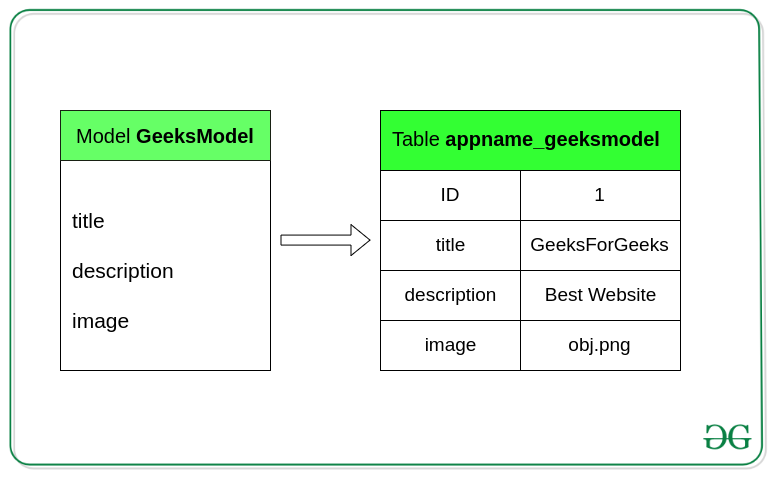
This visual representation further clarifies the mapping from a model to a table structure.
3. Model Fields: Defining Your Columns
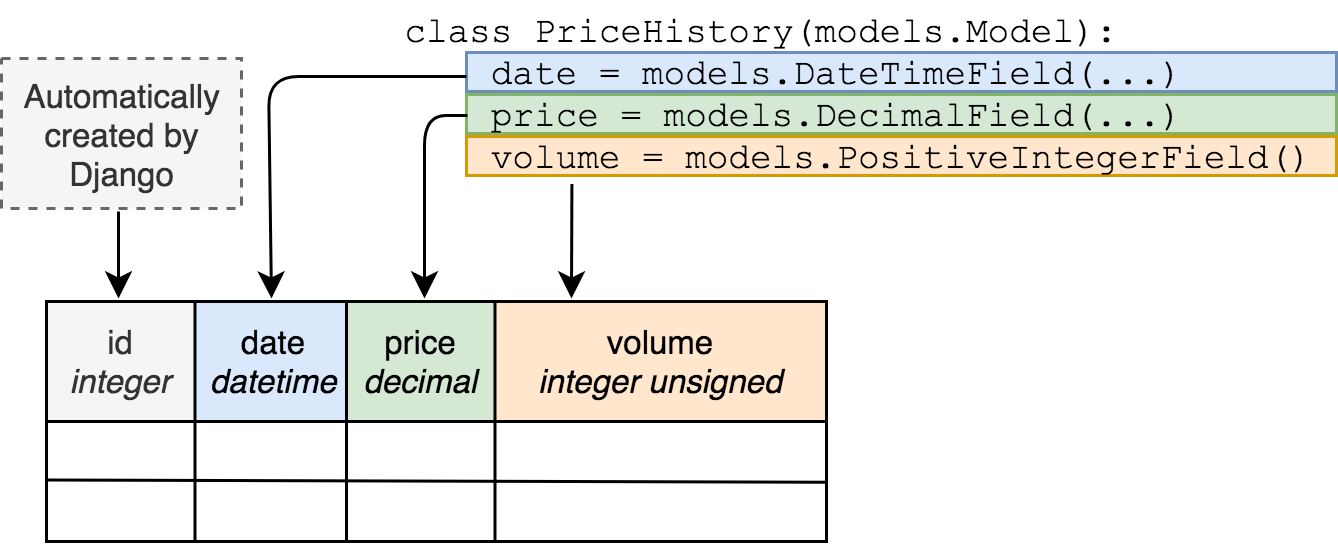
The attributes you define in your model class are called fields. The type of field you choose is crucial, as it tells Django several things:
- The data type of the database column (e.g.,
INTEGER,VARCHAR,TEXT). - The default HTML widget to use when rendering a form for this model.
- Basic validation rules.
The following image shows how different Django field types are translated into specific database column types.
The MDN documentation provides a great primer on common field types and their options.
Django Tutorial Part 3: Using models
The Mozilla Developer Network (MDN) has an excellent guide that breaks down the components of a model. This section focuses on fields.
Read the sections 'Model definition' and 'Fields'. Skim through the 'Common field arguments' and 'Common field types' to get a feel for the options available, like CharField, TextField, and DateField.
4. From Code to Schema: The Migration Process
Simply writing a model class in a Python file doesn't magically create a table in your database. You need to explicitly tell Django to inspect your models and apply those changes to the database schema. This is handled by a two-step process called migrations.
-
makemigrations: This command scans yourmodels.pyfiles, compares them to the current state of your database as recorded in previous migration files, and generates a new Python file inside amigrations/directory. This file contains the code needed to enact your changes (e.g., create a new table, add a column). It's like creating a blueprint for the database changes. -
migrate: This command takes the unapplied migration files and executes them against the database, running the necessary SQL commands to synchronize your database schema with your models. This is the step that actually builds or alters the tables.
The following video provides a clear, practical demonstration of defining a model and then running migrations to create the corresponding database table.
Python Django Models and Migrations
Let's watch a practical demonstration by Dave Gray on how to create a model and then use the migration commands to apply it to the database.
Watch from 01:43 to 07:43. The first part shows the creation of a Post model in models.py. The second part walks through running makemigrations and migrate to create the table in the database.
Test your understanding!
Imagine you're building a backend for a service similar to your "AI Career Coach" project. You need to store user queries and the AI's responses.
Based on what you've learned, write a simple Django model named Interaction in the code block below. It should have the following fields:
user_query: A field to store potentially long questions from the user.ai_response: A field to also store long text, representing the AI's answer.timestamp: A field that automatically records when the interaction was created.
from django.db import models

# Write your model class here
Show answer
A good implementation would look like this:
from django.db import models

class Interaction(models.Model):
    user_query = models.TextField()
    ai_response = models.TextField()
    timestamp = models.DateTimeField(auto_now_add=True)
Explanation:
class Interaction(models.Model):defines the model, which will create a table likely namedappname_interaction.models.TextField()is used for bothuser_queryandai_responsebecause the text could be of variable and potentially large length.models.DateTimeField(auto_now_add=True)is perfect for a timestamp. Theauto_now_add=Trueargument tells Django to automatically set this field to the current date and time when a newInteractionobject is first created, and it won't be updated later.
Conclusion
In this lesson, you've grasped the fundamental mechanism that makes database work in Django so efficient and Pythonic. The ORM is a powerful abstraction that handles the complex translation between your object-oriented code and the relational database.
Key Takeaways:
- The Django ORM (Object-Relational Mapper) acts as a translator between Python objects and database tables.
- A Django Model is a Python class that inherits from
models.Modeland represents a single database table. - Model Fields are class attributes that represent table columns, and their type determines the column's data type and behavior.
- The two-step migration process (
makemigrationsandmigrate) is how you translate your Python model definitions into an actual database schema.
Preview of the Next Lesson:
We've seen how a model maps to a table. In the next lesson, we will define Django models with appropriate field types and constraints. We'll take a much deeper dive into the rich variety of fields Django offers, exploring options for validation, default values, and setting specific rules (constraints) to ensure the integrity of your data right at the database level.