Hello! Welcome to the ninth module of our course.
In the previous module, we dove deep into optimizing database performance, culminating in our lesson on implementing efficient full-text search with PostgreSQL. We learned that how you interact with your database is critical for a fast application. Now, we're shifting our focus from database-centric performance to application-level performance, tackling a different kind of bottleneck: long-running tasks.
This lesson addresses the learning outcome: Explain the role of asynchronous task queues for offloading long-running operations. We'll explore why making a user wait for a slow process is detrimental and how we can architect our application to be more responsive, scalable, and resilient by delegating these tasks to run in the background.
1. The Problem: The Synchronous World
In a typical web application, when a client sends a request, the server process handles it synchronously. This means the server starts working on the request and doesn't send a response until every single step is complete. For quick operations like fetching data from a database, this is perfectly fine. But what happens when a task takes a long time?
Consider these common scenarios:
- A user registers, and you need to send them a beautifully formatted welcome email.
- A user uploads a high-resolution video that needs to be processed and transcoded into different formats.
- A user requests a complex, data-heavy PDF report that takes 30 seconds to generate.
In a synchronous model, the user's browser would spin, waiting for the entire process to finish. The server process handling that request is also tied up, unable to serve anyone else. This leads to a poor user experience and severely limits your application's ability to handle multiple users.
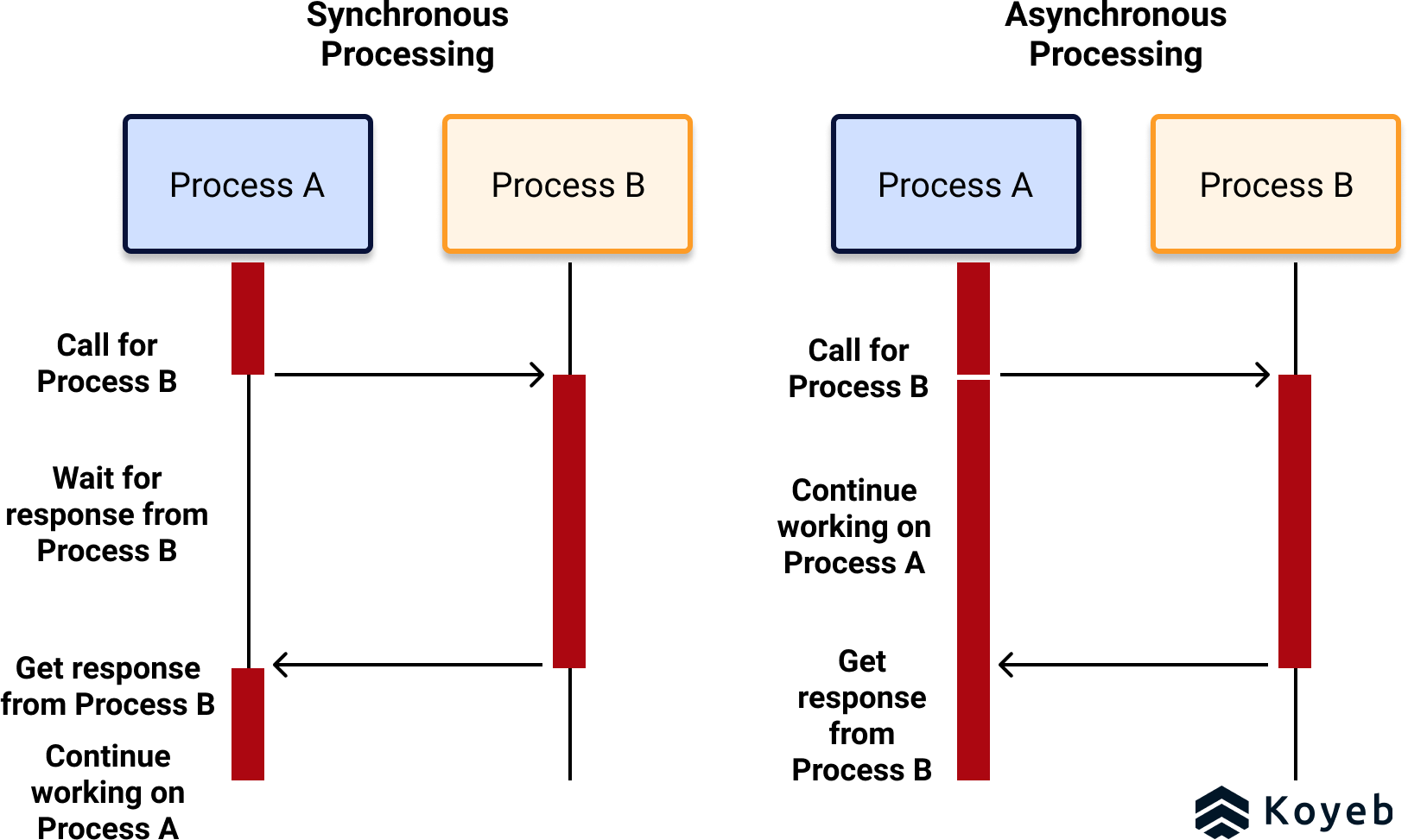
To better understand the issues with synchronous processing, the following video explains how bottlenecks in external calls (like to a database or a third-party API) can slow down your entire application.
Understanding queues & background processing
This clip from the video 'Understanding queues & background processing' explains the drawbacks of the standard synchronous request-response cycle, such as slow response times and brittle failure handling.
Watch from 00:40 to 02:21. The speaker uses the example of calling an external API (like Twilio for SMS) to illustrate how a slow or failing synchronous operation impacts the user.
2. The Solution: Offloading Work with Asynchronous Task Queues
The solution is to decouple the long-running task from the main request-response cycle. This is where asynchronous task queues come in.
A task queue is a system designed to manage and execute tasks outside of the main application flow. It acts as a middleman, or a buffer, between the part of your application that creates a task (the producer) and the process that executes it (the consumer or worker).
The core components of this architecture are:
- Task Producer (Your Django App): When a request comes in that requires a long-running job, your Django application doesn't do the work itself. Instead, it creates a "task"—a message describing the job to be done (e.g., "send welcome email to user_id=123")—and adds it to the queue. It then immediately sends a response back to the user, like "Registration successful!".
- Message Broker (The Queue): This is a database-like service optimized for storing and distributing messages. Popular choices include Redis and RabbitMQ. It holds the list of tasks waiting to be processed.
- Task Consumer (The Worker): This is a completely separate process (or many processes) that is constantly watching the queue for new tasks. When a task appears, a worker picks it up, executes the job (sends the email, processes the video), and then reports the result.
This workflow ensures your main application is never blocked and can remain responsive to user requests.
This article from GeeksforGeeks provides a concise definition of task queues and their role in system design.
Read the first section, 'What Are Task Queues?'. It clearly defines the concept of a task queue as a bridge between task creators and consumers.
The video below offers a great visual explanation of this architecture.
Understanding queues & background processing
Let's visualize the components of a queue system. This clip illustrates the relationship between the application (producer), the queue (storage device), and the worker (consumer).
Watch from 04:42 to 05:32. Pay attention to the simple diagram showing how an application pushes a job to a queue, and a worker picks it up asynchronously.
Here is a more detailed sequence diagram showing how these components interact in a typical Django project using Celery (a popular task queue framework) and Redis (a message broker).

3. Key Benefits of Using Task Queues
Adopting this asynchronous pattern provides several powerful advantages that are crucial for building robust, scalable backend systems.
- Improved User Experience: Your application feels much faster because users don't have to wait for background jobs to complete. The web server responds almost instantly.
- Increased Scalability: Your web servers are freed up to handle more incoming requests. If the number of background tasks increases, you can scale the number of workers independently of your web servers. This horizontal scaling is a cornerstone of modern application architecture.
- Enhanced Reliability and Fault Tolerance: What happens if the email server is temporarily down? In a synchronous model, the user sees an error. With a task queue, the worker can simply retry the task a few minutes later. The task remains safely in the queue until it can be successfully completed, making your system more resilient to transient failures.
The following clips discuss these benefits in more detail.
Understanding queues & background processing
Let's hear a summary of the primary benefits you gain from using asynchronous queues.
Watch the video from 03:07 to 04:50 and then from 05:32 to 07:06. These sections cover faster responses, better failure management, processing large tasks, and ease of scaling.
Test your understanding!
You are designing a feature for a social media application. Which of the following operations are good candidates for being offloaded to a task queue?
- Validating a user's password format during registration.
- Fetching the user's profile information to display on their dashboard.
- Generating a thumbnail for a newly uploaded video.
- Compressing a user's entire photo gallery into a ZIP file for download.
- Checking if a username is already taken.
- Sending a "new follower" notification email to a user.
Show answer
The best candidates are 3, 4, and 6.
- 3. Generating a thumbnail: This is I/O and CPU-intensive and can take time. It doesn't need to block the user's upload response.
- 4. Compressing a ZIP file: This is a very long-running, resource-intensive task. The user should be able to trigger this and get an email with a download link later.
- 6. Sending a notification email: This involves an external network call to an SMTP server, which can be slow or fail. It's a classic asynchronous task.
Operations 1, 2, and 5 are poor candidates. They are quick, and the user needs an immediate, synchronous response to proceed. For example, the user must know instantly if their password format is wrong or if a username is unavailable.
4. Task Queues in the Python World: Introducing Celery
While you could theoretically build your own system for managing tasks, the problem has been solved very effectively by existing frameworks. In the Python ecosystem, the most widely used and powerful task queue framework is Celery.
Celery provides all the necessary components to define tasks, send them to a message broker, and run workers to process them. It integrates seamlessly with Django and is the tool we will be using to implement this pattern in our project.
The following video provides an excellent introduction to why a tool like Celery is valuable.
Python Celery Distributed Task Queue | End to End Application with Celery
This video explains the concept of message queues and introduces Celery as a pure-Python solution that fits naturally into the Python ecosystem.
Watch the first four and a half minutes (00:00 - 04:29). The speaker provides great real-world examples (like banking transactions and SMS notifications) to motivate the need for offloading tasks and explains why Celery is a great choice for Python developers.
Conclusion
In this lesson, we've established the fundamental concept of asynchronous task processing. You now understand why the synchronous request-response model has limitations and how task queues provide a robust, scalable, and responsive alternative for handling long-running operations.
Key Takeaways:
- Synchronous processing blocks the application, harms user experience, and limits scalability.
- Asynchronous task queues decouple long-running jobs from the main application flow.
- The core architecture consists of a Producer (your Django app), a Message Broker (like Redis), and one or more Consumers (Workers).
- The main benefits are improved responsiveness, scalability, and reliability.
- Celery is the standard framework for implementing task queues in Python and Django projects.
Preview of the Next Lesson:
Now that we've covered the "why," it's time for the "how." In our next lesson, we will get our hands dirty by integrating Celery into our Django project. You will learn how to configure Celery to use Redis as a message broker and write and execute your very first background task.