Hello! Welcome back.
In our last lesson, we saw how to use Django's group system to implement Role-Based Access Control (RBAC), which is a powerful and scalable way to manage permissions. However, Django's built-in permissions operate at the model level. They answer questions like, "Can this user edit any article?"
Today, we'll address a more fine-grained and common requirement in API design: object-level permissions. We need to answer questions like, "Can this user edit this specific article that they created?" This is crucial for building secure, multi-user applications where users should only have control over their own data.
This lesson will teach you how to create custom permission classes in Django REST Framework (DRF). By writing your own permission logic, you can enforce any business rule you can imagine, securing your API endpoints with precision.
1. The Core Idea: View-Level vs. Object-Level Permissions
When securing an API endpoint, DRF allows for two layers of checks:
-
View-Level Permission (
has_permission): This is a general check that runs as soon as a request hits an endpoint. It determines if a user is allowed to access the view at all. For example, "Is the user logged in?" or "Is the user a staff member?" This check is applied to both list views (e.g.,/api/posts/) and detail views (e.g.,/api/posts/123/). -
Object-Level Permission (
has_object_permission): This is a specific check that runs only for detail views, after the view-level permission has passed. It determines if a user can perform an action on a specific database object. For example, "Is the user the author of the post with ID 123?"
The following flowchart illustrates this two-step process perfectly.
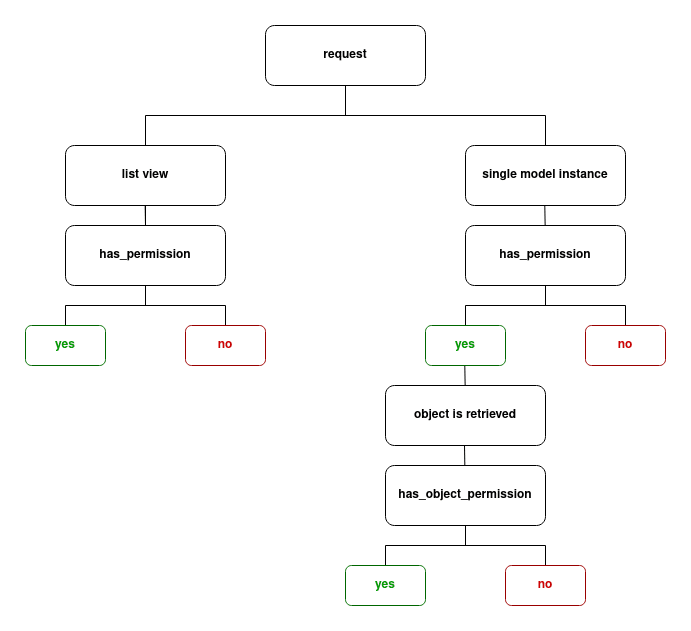
To create our own permissions, we create a Python class that inherits from DRF's BasePermission and override one or both of these methods.
Custom Permission Classes in Django REST Framework
The official DRF documentation and the excellent TestDriven.io blog both provide a solid introduction to the structure of custom permissions. Let's review these foundational concepts.
Please read the 'Custom Permission Classes' section. It introduces the BasePermission class and its two methods, has_permission and has_object_permission, explaining that by default, they both return True.
As the article mentions, a good convention is to place these custom classes in a permissions.py file within your Django app.
2. Implementing Your First Custom Permission: IsOwnerOrReadOnly
Let's tackle the most common custom permission requirement: allowing any user to view data, but restricting edit and delete actions to the owner of the object.
We will build a class called IsOwnerOrReadOnly. The logic is:
- If the request is a "safe" method (GET, HEAD, OPTIONS), allow it.
- If it's a "write" method (POST, PUT, PATCH, DELETE), only allow it if the requesting user is the owner of the object.
The following video provides a step-by-step walkthrough of creating a nearly identical permission class, PostUserWritePermission.
Django Rest Framework Series - Permissions and Custom Permissions - Part-2
This video from Very Academy is an excellent, practical guide to building and applying a custom permission class to enforce object ownership.
Please watch from 18:20 to 24:54. The presenter will guide you through creating a new file for permissions, defining a custom class, and implementing the has_object_permission method. Pay close attention to how SAFE_METHODS are used and how the object's author is compared to the request's user.
Let's break down the key piece of code from the video, which you would place in a file like blog/permissions.py:
# blog/permissions.py
from rest_framework import permissions

class IsOwnerOrReadOnly(permissions.BasePermission):
    """
    Custom permission to only allow owners of an object to edit it.
    """
    def has_object_permission(self, request, view, obj):
        # Read permissions are allowed to any request,
        # so we'll always allow GET, HEAD or OPTIONS requests.
        if request.method in permissions.SAFE_METHODS:
            return True

        # Write permissions are only allowed to the owner of the object.
        # We assume the model instance has an `author` attribute.
        return obj.author == request.user
Key Points:
- The check is done in
has_object_permissionbecause we need access to the database object (obj) to check itsauthorfield. permissions.SAFE_METHODSis a convenient tuple containing('GET', 'HEAD', 'OPTIONS').- The final line,
return obj.author == request.user, is a boolean expression that elegantly grants permission if the authors match and denies it otherwise.
3. Applying and Testing the Custom Permission
Now that we have our custom class, we need to tell DRF to use it. You apply it to a view by adding it to the permission_classes list. Since this is an object-level permission, it makes sense to apply it to a detail view.
Django Rest Framework Series - Permissions and Custom Permissions - Part-2
Let's continue with the same video to see how to apply this new permission class to a view and test that it works as expected.
Watch from 24:54 to 29:30. The presenter applies the custom permission to the PostDetail view and then demonstrates how a user can edit their own post but is blocked from editing a post owned by another user.
Here's how the code in your views.py would look:
# blog/views.py
from .permissions import IsOwnerOrReadOnly
from rest_framework.generics import RetrieveUpdateDestroyAPIView

class PostDetail(RetrieveUpdateDestroyAPIView):
    # ... other view attributes like queryset and serializer_class
    permission_classes = [IsOwnerOrReadOnly]
Test your understanding!
Why did we implement our logic in has_object_permission instead of has_permission? What would happen if we tried to check obj.author == request.user inside has_permission?
Show answer
We used has_object_permission because it is the only method that receives the specific database object (obj) as an argument. The has_permission method is called before the object is retrieved from the database, so the obj parameter is not available to it. Trying to access obj within has_permission would result in an error.
4. Providing Clearer Feedback with Custom Messages
By default, when a permission is denied, DRF returns a generic "You do not have permission to perform this action." message. We can make our API more user-friendly by providing a specific reason.
You can do this by simply adding a message attribute to your permission class.
Custom Permission Classes in Django REST Framework
The TestDriven.io article provides a clear example of how to add a custom error message, which is a best practice for API design.
Read the subsections 'Object Properties' and 'Combining and Excluding Permission Classes'. Focus on the part where they add a message attribute to the ExpiredObjectSuperuserOnly class to provide a more descriptive error.
Applying this to our class:
# blog/permissions.py
from rest_framework import permissions

class IsOwnerOrReadOnly(permissions.BasePermission):
    message = 'Editing posts is restricted to the author only.' # Custom message

    def has_object_permission(self, request, view, obj):
        # ... same logic as before
        if request.method in permissions.SAFE_METHODS:
            return True
        return obj.author == request.user
Now, when a non-owner tries to edit a post, they will receive our custom message, which is much more helpful.
5. Advanced Logic: Composing Permission Classes
What if your rule is more complex? For example: "A post can be edited by its author OR by any admin user."
You could cram this logic into your IsOwnerOrReadOnly class:return obj.author == request.user or request.user.is_staff
However, a more modular and reusable approach is to create small, single-purpose permission classes and combine them using logical operators. DRF supports & (AND), | (OR), and ~ (NOT) for composing permissions.
# views.py
from rest_framework.permissions import IsAdminUser
from .permissions import IsOwnerOrReadOnly

class PostDetail(RetrieveUpdateDestroyAPIView):
    # ...
    # Grants access if the user is the owner OR if they are an admin.
    permission_classes = [IsOwnerOrReadOnly | IsAdminUser]
This approach is powerful because you can mix and match your custom permissions with DRF's built-in ones (IsAuthenticated, IsAdminUser, etc.) to create flexible and readable access rules without writing large, monolithic permission classes.
Test your understanding!
You are building an API for a Q&A platform. You have a Comment model and a Post model. Design the logic for a custom permission that enforces the following rule for deleting a comment:
"A comment can be deleted by its author, OR by the author of the post the comment belongs to."
Assume a Comment instance obj has obj.author (the user who wrote the comment) and obj.post.author (the user who wrote the post).
Write down the has_object_permission method for this scenario.
Show answer
Here is one way to implement the has_object_permission method:
from rest_framework import permissions

class CanDeleteCommentPermission(permissions.BasePermission):
    message = 'You do not have permission to delete this comment.'

    def has_object_permission(self, request, view, obj):
        # The user who wrote the comment can delete it.
        is_comment_author = (obj.author == request.user)

        # The user who wrote the post can also delete comments on it.
        is_post_author = (obj.post.author == request.user)

        # Permission is granted if either condition is true.
        return is_comment_author or is_post_author
This logic correctly checks both conditions and grants access if the user is either the comment's author or the post's author.
Conclusion
Today you've unlocked one of the most powerful features of Django REST Framework. By creating custom permission classes, you can move beyond simple model-level checks and implement the precise, object-level business rules your application requires.
Key Takeaways:
- Custom permissions are classes inheriting from
rest_framework.permissions.BasePermission. has_permissionis used for view-level checks and is always run first.has_object_permissionis used for object-level checks and only runs on detail views afterhas_permissionhas passed.- The
requestobject gives you the user, and theobjobject gives you the database instance to perform your checks. - You can create small, reusable permission classes and combine them with logical operators (
|,&,~) for clean and flexible access control.
Preview of the Next Lesson:
Now that you know how to use built-in permissions and create your own, we will put it all together. In the next lessons, we'll focus on applying these tools systematically to secure different API endpoints based on a user's authentication status and their role, solidifying the authorization layer of our backend.