Welcome back to our course on Domain-Driven Design. In our last session, we took our first concrete step into implementation by translating the nouns of our Ubiquitous Language—terms like Subscription and CustomerID—into placeholder Go types. We now have a basic static structure for our domain model.
Today, we shift our focus from the static structure to the dynamic behavior of our system. The goal of this lesson is to discover and map out the business processes that drive our domain. To do this, we will conduct a simulated Event Storming session focused on the lifecycle of a subscription. This powerful technique will help us uncover the "verbs" of our domain: the key events that mark significant changes of state and trigger business logic. By the end of this lesson, you will have a clear, event-driven view of the subscription process, which will serve as a blueprint for the logic we will build in the upcoming modules.
What is Event Storming?
Before we dive in, let's establish what Event Storming is. At its core, Event Storming is a collaborative workshop format designed to rapidly explore and understand complex business domains. It was created by Alberto Brandolini and is a cornerstone of modern DDD practice because it excels at bridging the communication gap between technical and business stakeholders.
The core idea is simple yet profound: you explore a business process by focusing on the Domain Events—things of business significance that have occurred in the past.
To get a quick and clear overview of the concept, please watch the following video.
Event Storming - what it is and why you should use it with Domain-Driven Design
This video by Amichai Mantinband provides an excellent introduction to Event Storming, explaining its purpose and the different levels at which it can be applied.
Watch the first three minutes to understand the core problem Event Storming solves and to learn about the three main types: what it is, and the three types. For our exercise today, we will be focusing on a mix of Process Modeling and Software Design.
As you saw, Event Storming isn't a single activity but a spectrum. We will be operating in the middle ground, using it to model the subscription process and begin thinking about how that model will translate into our software design.
The Language of Event Storming
Event Storming uses a simple, color-coded visual language of sticky notes to represent different elements of a business process. While there are slight variations, the most common conventions are what we'll use today.
Event Storming - IBM Automation - Sharing knowledge
This article from IBM provides formal definitions for the core concepts used in an Event Storming workshop.
Please read the "Concepts" section to familiarize yourself with the main artifacts. You can find it by searching for the heading Concepts. Pay close attention to the descriptions of: Domain Events (typically orange/yellow): Something that happened in the past. Commands (blue): The intent or action that causes an event. Actors (often small yellow stickies or icons): The person or role who issues a command. Policies (lilac): Automated reactions to an event (e.g., "Whenever X happens, then do Y"). External Systems: Other systems that we interact with.
To see how these concepts are used in a live, collaborative setting, the following video provides a practical demonstration.
DDD, Event Storming & Clean Architecture (Oliver Zihler & Alina Liburkina)
In this recording, Oliver Zihler and Alina Liburkina conduct a live Event Storming session for a fictional application. It's a great example of the discovery process.
First, watch how they begin by brainstorming Domain Events using orange stickies, making sure they are in the past tense (identifying events). Then, see how they add Commands (blue), Actors (yellow), and Policies (lilac) to build out the process flow (adding commands and policies). This back-and-forth discovery is the essence of the technique.
A Simulated Session: The Subscription Lifecycle
Now, let's apply this to our B2B SaaS subscription billing system. I will act as the facilitator. Our goal is to map the journey of a subscription from its creation to its eventual termination. We'll start with the "happy path" and then explore more complex scenarios.
Step 1: Brainstorming the Core Events (The Happy Path)
The first step is always to "storm" the domain events. We'll place them on a timeline from left to right. Remember, events are written in the past tense.
Let's imagine the primary flow for a customer signing up for a paid plan:
- A user decides to sign up for our service.
- They confirm their email address.
- They choose a plan and enter their payment details.
- The system bills them successfully.
- Their subscription becomes active.
... and so on.
Translating this into domain events (our orange stickies), we get a timeline that looks something like this:
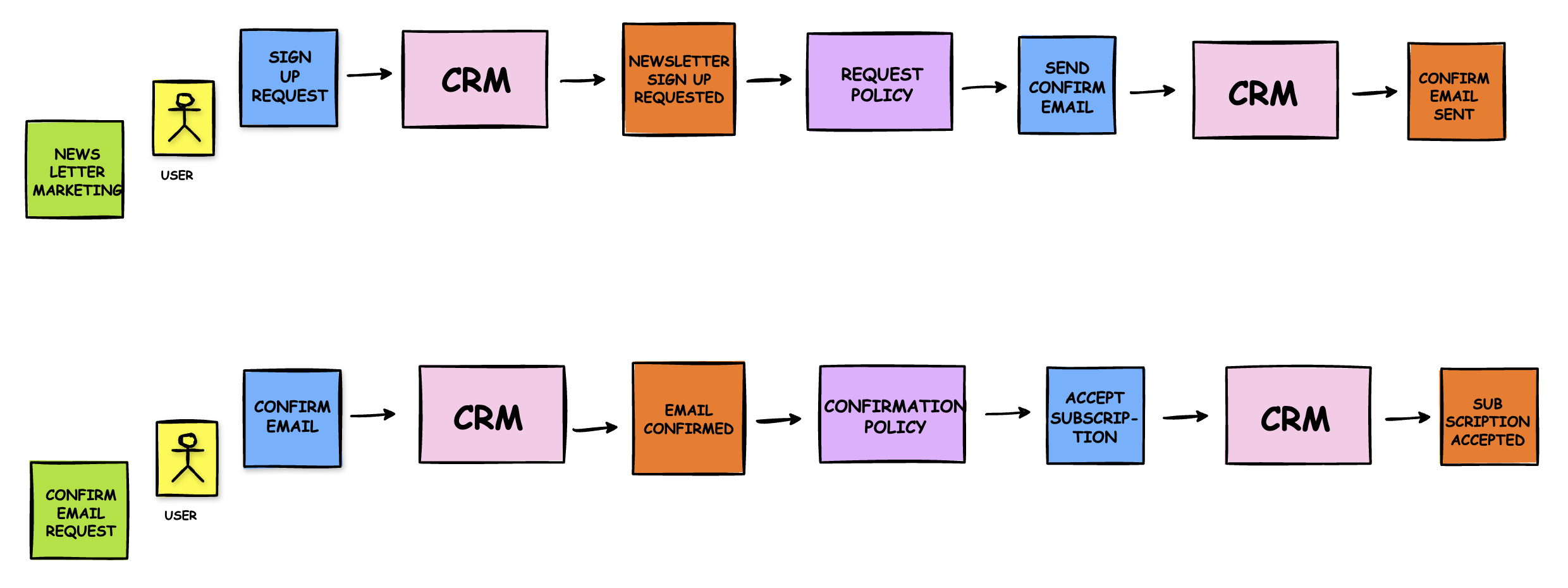
NewsletterSignUpRequested -> EmailConfirmationSent -> EmailConfirmed -> SubscriptionPlanSelected -> PaymentDetailsSubmitted -> InitialChargeSucceeded -> SubscriptionActivated -> ... SubscriptionRenewed -> ... SubscriptionCanceled -> SubscriptionTerminated
This simple sequence already gives us a powerful narrative of our core business process. The image below shows a similar linear process for a newsletter signup.
Step 2: Adding Commands, Actors, and Policies
Now, let's enrich our timeline by asking "Why?" for each event. What caused SubscriptionActivated to happen?
- Event:
SubscriptionActivated - Cause: It was triggered by a
InitialChargeSucceededevent. - Logic: This sounds like an automated reaction. "Whenever an initial charge succeeds, then activate the subscription." This is a Policy (lilac sticky).
What caused the InitialChargeSucceeded event?
- Event:
InitialChargeSucceeded - Cause: The
Payment Gateway(an External System) told us it succeeded. This was in response to us sending a charge request. - Command: The system issued a command:
ChargeInitialAmount. - Trigger: This command was likely part of the policy that fired when payment details were submitted: "Whenever
PaymentDetailsSubmitted, thenChargeInitialAmount."
By working backward from each event, we layer in the commands, actors, and policies that drive the process.
Step 3: Exploring the "Unhappy Paths"
Business logic truly reveals its complexity in the edge cases and failure modes. What happens if the renewal charge fails?
This introduces a new branch in our process. The Payment Gateway (External System) would trigger a RenewalChargeFailed event instead of RenewalChargeSucceeded.
This RenewalChargeFailed event is critical. It's a "pivotal event" that changes the course of the subscription's life. What should our system do? This is where we define more policies:
- Policy 1: "Whenever
RenewalChargeFailed, thenMarkSubscriptionAsPastDue."- This policy issues a command, which results in a
SubscriptionMarkedAsPastDueevent.
- This policy issues a command, which results in a
- Policy 2: "Whenever
RenewalChargeFailed, thenNotifyCustomerOfFailedPayment."- This policy issues a command that tells an
Email Service(External System) to send an email, resulting in aCustomerNotifiedOfFailedPaymentevent.
- This policy issues a command that tells an
This kind of branching logic based on the outcome of an event is common. The diagram below shows a similar concept where an Invoice Received event triggers different policies based on the context.
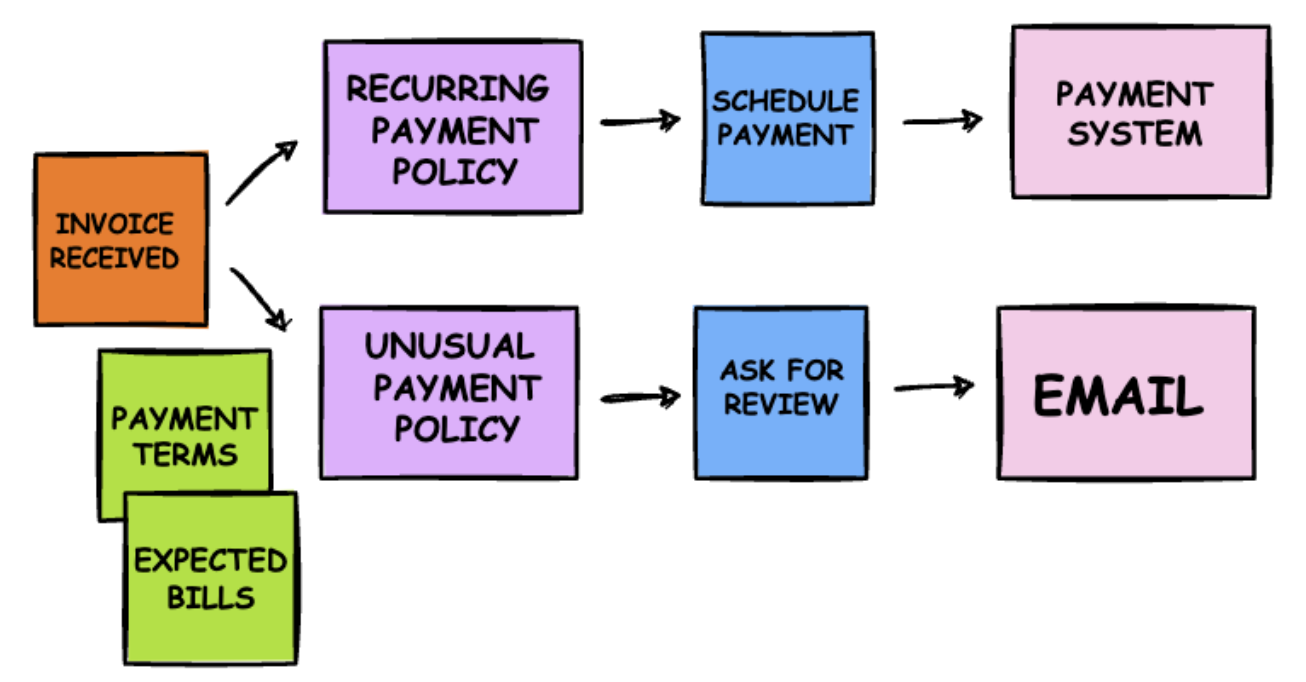
We can continue this exploration: What happens if the customer updates their payment info? What happens if they don't, and the subscription remains "past due" for 30 days? Each question reveals more events, commands, and policies, giving us a comprehensive map of the business domain.
Understanding Your Stakeholder Journeys with Event Storming | #77
This article provides a fantastic, step-by-step guide to facilitating an Event Storming session. It's a great summary of the process we've just simulated.
Please read the section under the heading Event Storming Workshop Instructions. It breaks down a session into timed segments, covering the exact steps we've discussed: creating events, identifying triggers (commands), and exploring reactions (policies) and pain points.
Conclusion
In this lesson, we moved from the static view of our domain to a dynamic one. We conducted a simulated Event Storming session to discover the key events that define the subscription lifecycle in our B2B SaaS application.
Here are the key takeaways from today's session:
- Event Storming is a collaborative technique for exploring business processes by focusing on Domain Events (things that have happened).
- The core artifacts are Events (orange), caused by Commands (blue), initiated by Actors (yellow), with automated logic handled by Policies (lilac).
- Mapping events on a timeline reveals the narrative of your business, including both "happy" and "unhappy" paths.
- The discovered events, such as
SubscriptionActivated,PaymentFailed, andSubscriptionCanceled, are not just notes on a board. They are first-class citizens of our domain.
We now have a much richer understanding of our domain's behavior. The events we've uncovered will become the backbone of our system's logic. They will be modeled as explicit Go structs and will be the primary mechanism for communication between different parts of our application.
In our next lesson, we will zoom out and enter the world of Strategic Design. We'll learn how to break down a large, complex domain like "billing" into smaller, more manageable pieces called Subdomains and Bounded Contexts. The event map we've started building today will be an invaluable guide in helping us see where the natural seams in our business lie.