Welcome to the next lesson in our journey through Azure's core infrastructure. In our last session, we focused on securing access to PaaS services from within your virtual network using Azure Private Link, establishing a foundation for true network isolation. We concluded by noting that these private endpoints are also accessible from on-premises networks, which perfectly sets the stage for today's topic.
This lesson addresses a fundamental architectural decision in any hybrid cloud strategy: how to connect your on-premises datacenters to Azure. Your goal is to compare Azure's two primary hybrid connectivity options, VPN Gateway and ExpressRoute. As a Principal Engineer, your role isn't just to know how to connect them, but why you would choose one over the other. We will dissect this decision by evaluating the trade-offs across bandwidth, latency, security, reliability, and cost—the core dimensions that drive enterprise architecture.
Connecting to Azure: The Foundational Choice
At its core, a hybrid connection extends your corporate network into Azure, making your cloud resources feel like a natural extension of your own datacenter. This is crucial for everything from "lift-and-shift" migrations to building sophisticated applications that span both environments. Azure provides two distinct models to achieve this.
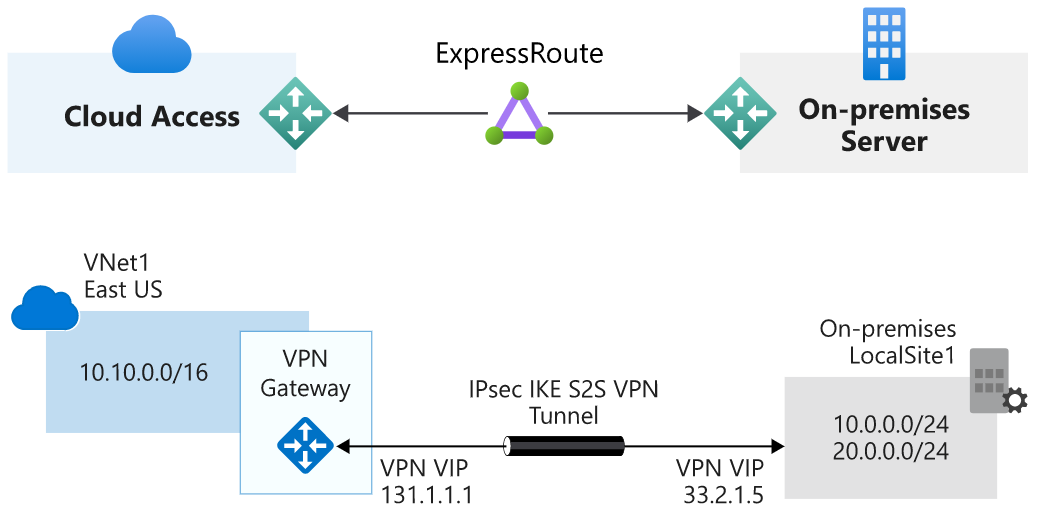
The first model, Azure VPN Gateway, uses the public internet as its transport medium. The second, Azure ExpressRoute, establishes a private, dedicated link through a connectivity partner. Let's examine each in turn.
Azure VPN Gateway: Secure Connectivity Over the Internet
A VPN Gateway is a type of virtual network gateway that sends encrypted traffic between an Azure virtual network and an on-premises location across the public internet. This is typically achieved using a Site-to-Site (S2S) VPN, which creates an IPsec/IKE tunnel from a VPN device in your datacenter to the Azure VPN Gateway.
This concept should be familiar, as it's a standard method for securing communications over an untrusted network. The video below provides a clear, conceptual walkthrough of how it works.
Explain By Example: VPN Gateway or ExpressRoute
This video from "Explain By Example" breaks down the core concepts of Azure VPN Gateway.
Watch the segments that explain what a VPN Gateway is and how a site-to-site connection is established. The analogy of encryption as a disguise is a useful mental model for why this approach is secure despite using a public channel.
The key characteristics of a VPN Gateway are:
- Connectivity: Uses the public internet. This makes it universally available but also subject to the unpredictability of internet traffic (variable latency and packet loss).
- Security: Traffic is encrypted by default using industry-standard IPsec protocols. The connection is secure, but the transport path is public.
- Bandwidth & Performance: Performance is "moderate and variable." Throughput is limited by the gateway SKU (up to 10 Gbps aggregate) and constrained by the end-to-end internet path.
- Setup Time: Relatively fast, typically configurable in minutes to hours. It doesn't require coordination with external telecommunication providers.
- Cost: Generally lower, with costs driven by gateway uptime and data transfer egress.
A VPN Gateway is an excellent choice for development/testing, small-scale production workloads, or situations where speed of deployment and lower cost are paramount.
Azure ExpressRoute: Private, Enterprise-Grade Connectivity
ExpressRoute represents a fundamentally different architectural approach. Instead of using the public internet, it lets you extend your on-premises networks into the Microsoft cloud over a private connection facilitated by a connectivity provider (like a major telco or exchange provider).
Think of it less like a tunnel and more like a private, leased line that plugs your network directly into Microsoft's global backbone. This is not just a VPN with more bandwidth; it's a different class of service.
This guide from DevOps School provides a solid technical overview of ExpressRoute, its components, and its role in the Azure ecosystem.
First, read the Introduction to understand the core concept of a private "network cable" to Azure. Then, review the section "What is Azure ExpressRoute?" to familiarize yourself with the major components like circuits, peerings, and gateways.
The key characteristics of ExpressRoute are:
- Connectivity: A private, dedicated link to the Microsoft network edge. Traffic does not traverse the public internet.
- Security: The connection is private by default. While traffic is not encrypted by default at Layer 3 (unlike VPN), you can add MACsec encryption at Layer 2 or use application-level encryption if required. The primary security benefit comes from network isolation.
- Bandwidth & Performance: "High and consistent." Bandwidth is dedicated and predictable, with options ranging from 50 Mbps to 100 Gbps (with ExpressRoute Direct). Latency is lower and more consistent than an internet-based connection.
- Setup Time: Slower, typically taking days to weeks. It requires provisioning a circuit with a third-party partner.
- Cost: Significantly higher, involving recurring monthly charges from both Azure (for the circuit and gateway) and the connectivity provider.
ExpressRoute is built for enterprise-class and mission-critical workloads. Its capabilities extend to connecting global sites with ExpressRoute Global Reach, which leverages the Microsoft backbone as a transit network for your own WAN traffic.
The following video from Microsoft Mechanics demonstrates the scale and power of these advanced features.
Hybrid networking in Microsoft Azure
This video showcases the enterprise capabilities of ExpressRoute.
Watch the segment from the overview of ExpressRoute. Pay attention to the demonstration of ExpressRoute Direct for high-throughput data ingestion and the explanation of ExpressRoute Global Reach for connecting multi-site environments.
The Architectural Decision: A Comparative Framework
Choosing between VPN Gateway and ExpressRoute is a classic architectural trade-off. Your decision will be driven by the specific requirements of your workload and business. The table below provides a high-level summary.

For a more detailed breakdown and a robust decision framework, the following resources are invaluable.
This resource offers an excellent decision framework and a detailed comparison table.
First, read the section "Why use Azure ExpressRoute?" focusing on the subsections When to choose and When not to choose. This gives you clear, scenario-based guidance. Next, in the "Comparison with Alternatives" section, study the comparison table that contrasts ExpressRoute with VPN Gateway.
To synthesize this information, here is a decision framework to guide your thinking:
| Dimension | Choose VPN Gateway when... | Choose ExpressRoute when... |
|---|---|---|
| Workload | Dev/test, small to medium production, non-critical applications. | Mission-critical apps (SAP, Oracle), large-scale production. |
| Performance | Latency and throughput variations are acceptable. | You need predictable low latency and high, consistent bandwidth. |
| Data Volume | You have moderate data transfer needs. | You are moving large volumes of data (backups, DR, big data analytics). |
| Security/Compliance | IPsec encryption over the internet meets your security policy. | Your policy mandates private connectivity and avoiding the public internet. |
| Reliability | You can tolerate potential internet-related outages. | You need a connection with a financially-backed SLA for high availability. |
| Cost | You are cost-sensitive and prefer a pay-as-you-go model. | The cost is justified by the performance, reliability, and security needs. |
| Agility | You need to establish connectivity quickly (hours). | You can accommodate a longer provisioning lead time (weeks). |
Finally, it's important to note that this is not always an "either/or" choice. A common enterprise pattern is to use ExpressRoute as the primary connection and a Site-to-Site VPN as a cost-effective backup path. This provides the best of both worlds: high performance for normal operations and resiliency in case of a failure on the primary link.
Conclusion
In this lesson, we compared Azure's primary hybrid connectivity options to help you make informed architectural decisions.
Here are your key takeaways:
- Azure VPN Gateway provides a secure, encrypted tunnel over the public internet. It is ideal for scenarios where cost and speed of deployment are priorities, and where variable performance is acceptable.
- Azure ExpressRoute provides a private, dedicated connection to the Microsoft network through a partner. It is the choice for enterprise-grade workloads that demand high performance, predictable latency, and isolation from the public internet.
- The decision is a strategic trade-off. You are balancing the agility and lower cost of a VPN against the performance, reliability, and security posture of ExpressRoute.
- For maximum resilience, these services can be used together in a primary/failover configuration.
Now that we have established a robust connection between your on-premises network and Azure, the next logical challenge is name resolution. In our next lesson, we will evaluate DNS resolution strategies for hybrid environments, exploring how to make services in Azure and on-premises discoverable to each other seamlessly. This will tie together the DNS concepts from our Private Link lesson with the connectivity we've established today.