Welcome back. In our previous lessons, we explored Azure Service Bus for reliable enterprise messaging and Azure Event Grid for building reactive, event-driven architectures. We established a critical distinction between a message (a command with intent) and an event (a notification of a state change).
Today, we delve into the third and final pillar of Azure's core messaging services: Azure Event Hubs. Your learning outcome is to explain Azure Event Hubs for high-throughput data streaming and compare its positioning relative to Apache Kafka. This topic is central to modern data architectures, covering scenarios like IoT telemetry, application logging, and real-time analytics pipelines. For your goal of architectural design, understanding the trade-offs between a managed PaaS solution like Event Hubs and the open-source standard, Kafka, is a fundamental skill.
What is Azure Event Hubs? The "Front Door" for Big Data
At its core, Azure Event Hubs is a fully managed, massively scalable data streaming platform and event ingestion service. It is designed to be the "front door" for data streams, capable of receiving and processing millions of events per second. While Service Bus handles discrete, high-value messages and Event Grid distributes notifications, Event Hubs is built to handle a continuous, high-volume flow of event data—a stream.
To understand how it achieves this scale, we need to look at its fundamental components.
Azure Event Hub Tutorial | Big data message streaming service
The video "Azure Event Hub Tutorial" from Adam Marczak provides an excellent breakdown of the core concepts of Event Hubs.
Please watch the following segments: Key Characteristics: This gives a concise overview of Event Hubs' purpose and capabilities. Basics: Pay close attention to the explanation of event producers, partitions, and namespaces. The concept of a partitioned log is the key to its scalability. Event Consumers: This part is crucial. Focus on understanding consumer groups, offsets, and checkpointing. This explains how multiple applications can read the stream independently and reliably.
Let's distill those core concepts:
- Partitions: An Event Hub is not a single queue; it is a partitioned log. Think of it as a set of parallel logs. All events are appended to these logs, where they are ordered and immutable. An incoming event is sent to a specific partition, either based on a partition key you provide or via a round-robin distribution. This partitioning is the primary mechanism that enables massive horizontal scale, for both ingestion and consumption.
- Consumer Groups: A consumer group represents a specific view of the entire event stream. Each consumer group maintains its own set of pointers (offsets) into the partitions, allowing it to read the stream independently of other consumer groups. This is a powerful feature: one consumer group might be for real-time analytics, while another archives the same data to a data lake, and a third performs anomaly detection—all without interfering with each other.
- Offset and Checkpointing: Within a partition, each event has a unique identifier called an offset. As a consumer application reads from a partition, it tracks the offset of the last event it processed. The act of persisting this offset (typically to Azure Storage) is called checkpointing. If the consumer process fails and restarts, it can resume reading from its last checkpoint, ensuring it doesn't miss data or reprocess the entire stream. This process provides the at-least-once delivery guarantee.
With this, we can now place Event Hubs in context with the services we've already covered:
| Service | Primary Purpose | Key Abstraction | Analogy |
|---|---|---|---|
| Service Bus | Enterprise Messaging | Message (Command) | A reliable postal service for business letters. |
| Event Grid | Event Routing | Event (Notification) | A newspaper subscription service for headlines. |
| Event Hubs | Data Streaming | Event Stream (Telemetry) | A high-volume, replayable broadcast feed (like a stock ticker). |
The Elephant in the Room: Apache Kafka
It's impossible to discuss event streaming without mentioning Apache Kafka. Kafka is the open-source platform that pioneered the distributed, partitioned log model and has become the de facto standard for building real-time data pipelines.
As an architect, the decision is rarely about whether the pattern is right, but rather which implementation to choose. The fundamental choice is between a fully managed PaaS offering like Azure Event Hubs and a self-managed (or third-party managed) open-source platform like Kafka.
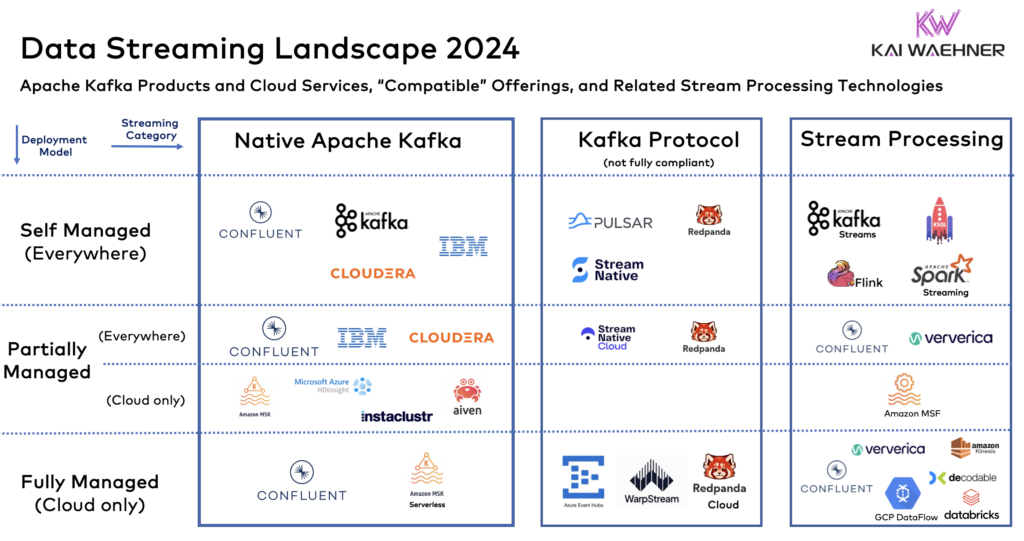
The diagram above perfectly frames the discussion. You have native Kafka, which you can manage yourself on VMs or Kubernetes. Then you have various managed offerings. Notice Azure Event Hubs sits in the "Kafka Protocol" column, which is a critical point we will return to.

A Deep-Dive Comparison: Event Hubs vs. Kafka
Your experience with managed services like AWS SQS versus potentially running your own messaging systems provides a good parallel. The trade-offs between a managed service and self-hosting are similar here, but with the added complexity of a distributed system like Kafka.
Let's break down the comparison from an architectural perspective.
Azure Event Hubs vs Apache Kafka: Key Differences
This article from Critical Cloud provides a direct, feature-by-feature comparison that is excellent for architectural decision-making.
Read through the article, focusing on the following sections and the tables within them: Architecture Fundamentals, which compares the management models, partitioning, and storage. Platform Connectivity, which discusses the Azure-native vs. platform-agnostic integration approaches. Speed and Scale, which contrasts the automated scaling of Event Hubs with the manual scaling of Kafka. SMB Cost Analysis, which frames the Total Cost of Ownership (TCO) discussion. Security Features, which contrasts built-in Azure security with Kafka's manual configuration. Best-Fit Scenarios, which provides concrete use case examples.
This comparison highlights a central theme: operational simplicity vs. ultimate control.
- Management: With Event Hubs, Azure manages the underlying cluster, broker health, patching, and scaling infrastructure. With Kafka, this is your responsibility. This includes managing Zookeeper (for cluster coordination in older versions) or KRaft, monitoring brokers, and handling disk space.
- Scaling: Event Hubs scales through Throughput Units (TUs) or Processing Units (PUs), which can be set to auto-inflate based on load. Scaling Kafka involves adding brokers to the cluster and manually rebalancing partitions, a non-trivial operation.
- Ecosystem: Kafka boasts a massive, mature open-source ecosystem (Kafka Connect, Kafka Streams, ksqlDB, Schema Registry). Event Hubs offers deep, seamless integration with the Azure ecosystem (Azure Functions, Stream Analytics, Azure Data Lake Storage).
Event Hubs for Kafka: A Hybrid Approach
This is where the story gets interesting. Microsoft recognized that many organizations have existing investments in the Kafka ecosystem. To ease migration and provide flexibility, Azure Event Hubs provides a Kafka-compatible API endpoint.
This is a powerful architectural pattern you'll see elsewhere in Azure, such as Cosmos DB providing a MongoDB-compatible API. It allows you to get the benefits of a managed PaaS backend while using a familiar open-source frontend API.
Azure Event Hubs for Apache Kafka | Azure Friday
This Azure Friday video, "Azure Event Hubs for Apache Kafka," demonstrates this concept perfectly.
Watch these key segments: It's "and", not "or": The presenter makes the analogy to Cosmos DB's Mongo API, explaining that you can use Kafka clients with Event Hubs without code changes. Live Demo: This section shows a standard Java Kafka producer and consumer connecting to an Event Hubs namespace by simply changing the connection string. This is the practical proof of the concept. Summary of Benefits: This wraps up why you would use this feature: you get the PaaS experience (no Zookeeper, no cluster management) with access to both the Kafka and Azure ecosystems.
What this means in practice is that you can take an existing application built with standard Kafka libraries, change the bootstrap.servers configuration to point to your Event Hubs namespace, and it will work. This allows you to migrate from a self-managed Kafka cluster to a fully managed Azure service without a costly rewrite, dramatically lowering your operational burden and TCO.
Architectural Decision Framework
As a Principal Engineer, you'll be making or guiding these platform choices. Here is a framework to structure that decision:
| Choose... | If... |
|---|---|
| Azure Event Hubs (with Kafka API) | You are building on Azure and want to minimize operational overhead. You want to migrate an existing Kafka workload to a managed service. You require tight integration with other Azure services and built-in security features like Microsoft Entra ID and Private Link. |
| Self-Managed Apache Kafka (on VMs/AKS) | You require absolute control over every configuration knob and Kafka version. You are building a multi-cloud or hybrid solution and want to avoid any vendor-specific implementation. You have a dedicated platform engineering team with deep Kafka expertise. |
| Managed Kafka (e.g., Confluent Cloud) | You want a managed Kafka experience but need features beyond the Event Hubs compatibility layer or want to remain cloud-agnostic. This offers a middle ground between full self-management and a native PaaS service. |
Conclusion
In this lesson, we have positioned Azure Event Hubs as Azure's premier service for high-throughput data streaming. You now understand its core architecture based on a partitioned log, and how it differs from Service Bus and Event Grid.
Your key takeaways are:
- Event Hubs is for Streams: It's designed to ingest massive, continuous streams of event data from sources like IoT devices, logs, and clickstreams.
- Partitioning is Key to Scale: The partitioned log model allows for immense parallelism in both writing and reading data.
- Event Hubs vs. Kafka is a PaaS vs. IaaS/Self-Managed Trade-off: The primary decision point revolves around operational overhead, control, cost (TCO), and ecosystem integration.
- Event Hubs for Kafka Offers the Best of Both Worlds: By providing a Kafka-compatible endpoint, Event Hubs allows you to leverage the vast Kafka ecosystem while benefiting from a fully managed, scalable, and secure Azure service.
In our next and final lesson of this module, we will synthesize everything we've learned about Service Bus, Event Grid, and Event Hubs. You will be asked to design a high-level event-driven architecture, selecting the appropriate combination of these services to meet a given set of complex requirements, solidifying your ability to make these critical architectural decisions.