Hello! Welcome to the third module of our course, "Advanced OOP Concepts." In the last lesson, we wrapped up our fundamentals module by looking at static properties and methods, which belong to a class as a whole.
Today, we take a major step forward by exploring inheritance. This is a cornerstone of object-oriented programming that allows you to create new classes that reuse, extend, and modify the behavior defined in other classes. Where statics are about sharing code at the class level, inheritance is about creating relationships between classes.
By the end of this lesson, you will be able to implement class inheritance using the extends keyword to build more specialized classes from general ones, a technique essential for writing efficient and organized code in any large application.
1. What is Inheritance?
At its core, inheritance is a mechanism for creating a parent-child relationship between classes.
- The parent class (also known as a base class or superclass) is the class being inherited from. It contains common properties and methods.
- The child class (also known as a subclass or derived class) is the class that inherits. It receives all
publicandprotectedproperties and methods from the parent, can add its own unique features, and can even change the implementation of the methods it inherits.
The key principle behind inheritance is the "is-a" relationship. For example, in a web application:
- An
AdminUseris a type ofUser. - A
BlogPostis a type ofContent. - A
Caris a type ofVehicle.
This hierarchical structure allows you to avoid duplicating code. Instead of writing the same properties (username, email) in both a User class and an AdminUser class, you define them once in the User class and let AdminUser inherit them.
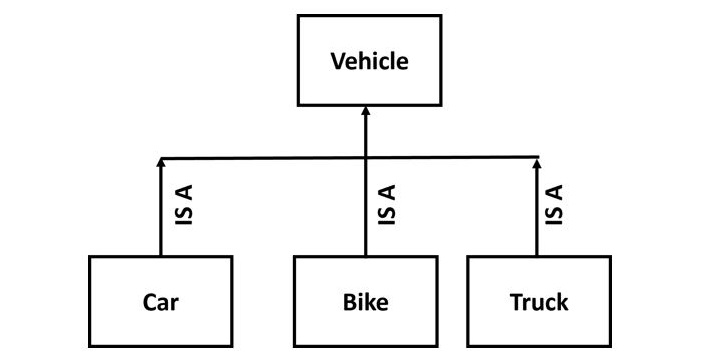
To establish this relationship in PHP, we use the extends keyword.
// Parent Class
class User {
    // ... properties and methods
}

// Child Class
class AdminUser extends User {
    // This class now has everything from User, plus its own additions.
}
Let's watch a short video that introduces this concept clearly.
Object Oriented PHP #7 - Inheritance
The video 'Object Oriented PHP #7 - Inheritance' from the Net Ninja channel provides a great conceptual overview of why inheritance is useful and how it helps prevent code duplication.
Watch the first 3 minutes of the video (00:01 - 03:07). Focus on understanding the 'is-a' relationship and the benefit of not having to rewrite code for similar classes.
2. Implementing Inheritance with extends
Now let's see inheritance in action. When a child class extends a parent, it immediately has access to the parent's public methods. If the child class doesn't define its own constructor, PHP will even automatically call the parent's constructor when you create a new object of the child class.
Object Oriented PHP #7 - Inheritance
Continuing with the same video, let's see how to create an AdminUser class that extends User and how it automatically inherits the parent's constructor and methods.
Watch from 03:07 to 06:04. Notice how you can instantiate AdminUser and pass arguments for username and email, even though the constructor is only defined in the User parent class.
As you saw, even without any code inside the AdminUser class, we were able to create an AdminUser object that behaved just like a User object. This is the power of code reuse in action.
3. Adding to and Overriding the Parent
Inheritance wouldn't be very useful if child classes were just exact copies. The real power comes from:
- Adding new properties and methods specific to the child class.
- Overriding parent methods to provide a specialized implementation.
When you add a new property to a child class (e.g., an $adminLevel for our AdminUser), you typically need to initialize it in a constructor. This means you must create a __construct() method in the child class.
However, once you define a constructor in the child class, the parent's constructor is no longer called automatically. You must do it yourself. This is a critical rule.
You can explicitly call the parent's constructor using the syntax parent::__construct().
Let's see exactly how this works.
Object Oriented PHP #7 - Inheritance
This final clip from the Net Ninja video demonstrates how to add a new property to the child class, create a constructor for it, and correctly call the parent constructor to ensure all properties are initialized.
Watch from 06:04 to 11:11. This is the most important part of the lesson. Pay close attention to: Why a constructor is needed in AdminUser once the $level property is added. The error that occurs when parent::__construct() is not called. The correct syntax parent::__construct($username, $email); to forward the relevant arguments to the parent.
4. Visibility Modifiers and Inheritance
In our previous module, you learned about public, private, and protected. Inheritance is where the protected modifier becomes essential.
Let's review their roles in the context of inheritance:
public: Public members are inherited by the child class and can be accessed from anywhere (inside the child class, or from outside code).private: Private members are not inherited. They can only be accessed by the class that defines them. A child class cannot access its parent's private members.protected: Protected members are inherited. They can be accessed within the parent class and within any child classes, but not from outside. This is perfect for sharing data or methods between related classes while keeping them hidden from the rest of the application.
PHP - Inheritance Explained - Is Inheritance Good? - Full PHP 8 Tutorial
The video 'PHP - Inheritance Explained' by Program With Gio offers a concise explanation of how visibility affects what a child class can access and override.
Watch the segment from 05:32 to 07:31. Focus on the difference between trying to access private versus protected properties from the child class.
Hands-on Practice
Let's apply these concepts. You are building a content management system. You have a general Post class, but you want a more specific Article class for news articles that must include an author.
-
Create the Parent
PostClass:- Create a class named
Post. - Give it two
protectedproperties:$titleand$content. - Create a
publicconstructor that accepts$titleand$contentand assigns them to the properties. - Add a
publicmethoddisplay()thatechos the title and content in a simple format.
- Create a class named
-
Create the Child
ArticleClass:- Create a class named
Articlethatextends Post. - Add a new
publicproperty:$author. - Create a
publicconstructor forArticlethat accepts$title,$content, and$author. - Inside the
Articleconstructor, call theparent's constructor to handle the$titleand$content. - Assign the
$authorto its property.
- Create a class named
-
Instantiate and Test:
- Create a new
Articleobject with a title, some content, and an author. - Call the
display()method on your new object. - Echo the
authorproperty to confirm it was set.
- Create a new
Click to see a possible solution
<?php

// 1. Parent Class
class Post
{
    protected string $title;
    protected string $content;

    public function __construct(string $title, string $content)
    {
        $this->title = $title;
        $this->content = $content;
    }

    public function display(): void
    {
        echo "<h2>{$this->title}</h2>";
        echo "<p>{$this->content}</p>";
    }
}

// 2. Child Class
class Article extends Post
{
    public string $author;

    public function __construct(string $title, string $content, string $author)
    {
        // Call the parent constructor
        parent::__construct($title, $content);

        // Handle the new property
        $this->author = $author;
    }
}

// 3. Instantiate and Test
$myArticle = new Article(
    'PHP Inheritance Explained',
    'Inheritance is a key feature of OOP...',
    'Alex'
);

// Call the inherited display() method
$myArticle->display();

// Access the child's public property
echo "<p><em>By: {$myArticle->author}</em></p>";

?>
Expected Output:
PHP Inheritance Explained
Inheritance is a key feature of OOP...
By: Alex
Conclusion
Great work today! You've just learned one of the most powerful concepts in object-oriented programming. By using inheritance, you can build complex and logical class hierarchies that are easy to maintain and extend, which is fundamental to building professional web applications.
Key Takeaways:
- Inheritance creates a parent-child relationship between classes using the
extendskeyword. - It models an "is-a" relationship, allowing you to create specialized versions of a general class.
- Child classes inherit all
publicandprotectedmembers from their parent. - If a child class defines its own constructor, it must explicitly call
parent::__construct()to run the parent's constructor logic. - The
protectedvisibility modifier allows members to be shared with child classes while remaining inaccessible to the outside world.
Preview of the Next Lesson:
We've seen that a child class can have its own constructor, which effectively overrides the parent's. In the next lesson, we will explore this concept of method overriding in more detail. You'll learn how to replace any parent method with a new implementation in the child class and how to use parent:: to call the original parent method from within the overridden one.