Hello! Welcome back to your course on PHP mastery.
In our last lesson, you learned how to perform INSERT, UPDATE, and DELETE operations using secure prepared statements. We focused on the "happy path," where every query executes perfectly. But in real-world web development, things can and do go wrong.
This lesson addresses that reality. We'll explore what happens when your code encounters problems like a failed database connection, an invalid SQL query, or a database constraint violation. Your goal for this lesson is to learn how to handle database connection and query errors using PDO exceptions, a cornerstone of building robust and secure applications.
1. The Foundation: Understanding Exceptions in PHP
Before we can handle PDO's specific errors, we need to understand the underlying mechanism PHP uses for error handling: exceptions.
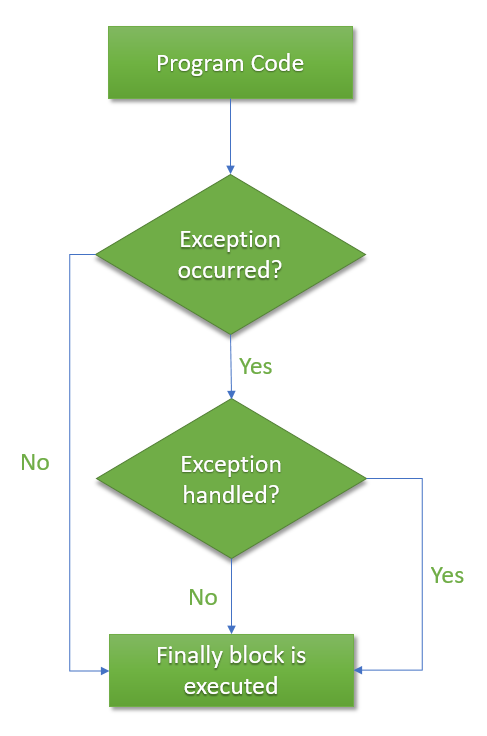
An exception is an object that is "thrown" when a runtime error occurs. This act of throwing disrupts the normal top-to-bottom flow of your script and signals that something has gone wrong. If the exception isn't "caught," it results in a fatal error, and your script stops.
The mechanism to manage this is the try...catch block:
try: You wrap the code that might throw an exception in atryblock.catch: If an exception is thrown inside thetryblock, the code inside the correspondingcatchblock is executed. This is where you handle the error.finally: An optionalfinallyblock contains code that will run regardless of whether an exception was thrown or caught. This is useful for cleanup tasks, like closing a file handle.
To see this concept in action, let's watch a brief segment on the fundamentals of exception handling in PHP.
OOP Error Handling In PHP - Exceptions & Try Catch Finally Blocks - Full PHP 8 Tutorial
The video 'OOP Error Handling In PHP' by Program With Gio provides an excellent, clear introduction to the try-catch mechanism. We'll focus on the part that explains how to catch exceptions.
Watch the segment from 07:11 to 09:20. Focus on understanding the syntax of the try-catch block and how it intercepts a thrown exception, preventing a fatal error and allowing your script to handle the issue gracefully.
2. Activating and Handling PDO Exceptions
By default, PDO does not throw exceptions. It has several error-handling modes, but for modern, professional PHP, there is only one you should use: PDO::ERRMODE_EXCEPTION.
When you enable this mode, PDO will throw a PDOException object whenever a database error occurs. This allows you to use the try...catch blocks we just learned about to handle these database-specific errors.
Step 1: Set the Error Mode
You must configure your PDO connection to throw exceptions. This is the most important step. You can do this by setting an attribute right after connecting.
<?php
$host = '127.0.0.1';
$db   = 'pdo_posts';
$user = 'root';
$pass = 'your_password';
$charset = 'utf8mb4';

$dsn = "mysql:host=$host;dbname=$db;charset=$charset";
$options = [
    PDO::ATTR_ERRMODE            => PDO::ERRMODE_EXCEPTION, // This is the key!
    PDO::ATTR_DEFAULT_FETCH_MODE => PDO::FETCH_ASSOC,
    PDO::ATTR_EMULATE_PREPARES   => false,
];

// Connection code goes here...
?>
The article from PHP Delusions explains this clearly and advocates strongly for this approach.
(The only proper) PDO tutorial
The article '(The only proper) PDO tutorial' is a highly-regarded resource in the PHP community. We'll read the short section that introduces PDO's exception-based error handling.
Read the section titled 'Error handling. Exceptions'. It's very brief but makes a crucial point: you should always set PDO::ERRMODE_EXCEPTION.
Step 2: Handling Connection Errors
The very first place an error can occur is when you try to connect to the database. What if the password is wrong, or the database server is down? If this happens, your new PDO(...) call will throw a PDOException.
This is a special case where using try...catch is always recommended. Why? Because if the connection fails, the uncaught exception's stack trace could expose your database username and password. By catching it, you can log the real error for yourself and show the user a generic, safe error message.

Here is how to implement it:
<?php
// Your variables ($dsn, $user, $pass, $options) from before...

try {
     $pdo = new PDO($dsn, $user, $pass, $options);
     // If you get here, the connection was successful
} catch (PDOException $e) {
     // If you get here, the connection failed
     // For security, you shouldn't display the detailed error to the user.
     // Instead, you should log it and show a generic message.
     error_log("Database connection failed: " . $e->getMessage());
     die("Sorry, we're having trouble connecting to the database. Please try again later.");
}
3. The Professional Approach to Query Errors
Now that we're connected, what about errors in our queries? For example, a typo in an SQL SELECT statement, or trying to INSERT data that violates a database rule.
Since we set PDO::ERRMODE_EXCEPTION, these errors will also throw a PDOException. The common beginner instinct is to wrap every single query in a try...catch block.
// The common (but often incorrect) approach
try {
    $stmt = $pdo->query('SELECT * FROM users');
} catch (PDOException $e) {
    die("Query failed: " . $e->getMessage());
}
This is generally not the best practice. Most query errors (like syntax errors) are programming mistakes that make your script's current task impossible to complete. They are fatal to that operation. Instead of catching them everywhere, it's better to let PHP's global error handling mechanism take over.
The professional strategy is to:
- In a development environment: Configure PHP to display all errors on the screen so you can see them immediately, including the full stack trace which tells you exactly where the error occurred.
- In a production (live) environment: Configure PHP to never display errors to the user. Instead, log them to a file where you can review them later. Show the user a generic, friendly error page.
This is done with PHP's configuration settings, not with try...catch blocks.
// In a central configuration file or at the top of your script

// For DEVELOPMENT
ini_set('display_errors', 1);
ini_set('log_errors', 1);
error_reporting(E_ALL);

// For PRODUCTION
// ini_set('display_errors', 0);
// ini_set('log_errors', 1);
The following article explains this crucial concept in detail. It's a slightly more advanced read, but it's fundamental to your goal of becoming a professional developer.
The (im)proper use of try..catch.
Let's read 'The (im)proper use of try..catch.' from PHP Delusions. It argues against wrapping every query in try-catch and explains how to properly configure PHP for development and production error reporting.
Read the sections 'Disclosure', 'Clarification', and the part of 'Example' that discusses production environments. Focus on why simply killing the script with die($e->getMessage()) is bad, and how default PHP error handling (when configured correctly) is actually more powerful.
4. When You Should Use try...catch for Queries
So, if we don't wrap every query, when do we use try...catch?
You use it when you can meaningfully handle or recover from a specific error. You have a plan other than just stopping the script.
Scenario 1: Handling a Duplicate Entry
Imagine a user trying to register with an email that's already in your database. If your email column has a UNIQUE constraint, the INSERT query will fail and throw a PDOException. This isn't a fatal programming bug; it's a predictable user action. Instead of crashing, you want to show a friendly error message like "This email is already taken."
This is a perfect use case for try...catch. You can catch the PDOException, check if it's the specific error for a duplicate entry, and handle it.
<?php
// Assumes $pdo is a connected PDO object with ERRMODE_EXCEPTION set

$email = 'user@example.com'; // This email already exists in the 'users' table
$password_hash = password_hash('some_password', PASSWORD_DEFAULT);
$name = 'Test User';

$sql = "INSERT INTO users (email, password, name) VALUES (?, ?, ?)";

try {
    $stmt = $pdo->prepare($sql);
    $stmt->execute([$email, $password_hash, $name]);
    echo "User registered successfully!";
} catch (PDOException $e) {
    // SQLSTATE '23000' is the standard code for an integrity constraint violation (like a duplicate key)
    if ($e->getCode() == 23000) {
        echo "This email address is already registered. Please use a different one.";
    } else {
        // If it's a different error, we don't know how to handle it,
        // so we re-throw it to let the global error handler deal with it.
        throw $e;
    }
}
Scenario 2: Database Transactions
Another common use case is with database transactions, where you perform several queries that must all succeed or all fail together. You wrap the entire transaction in a try...catch block. If any query fails, you catch the exception and issue a rollBack() command to undo all the changes from that transaction. We won't dive deep into transactions now, but it's important to know this is a key scenario for try...catch.
Conclusion
You've now learned how to handle database errors like a professional. This moves you beyond just writing code that works on the "happy path" and into building applications that are robust, secure, and user-friendly even when things go wrong.
Key Takeaways:
- Always set
PDO::ATTR_ERRMODE => PDO::ERRMODE_EXCEPTIONon your database connection. - Wrap the
new PDO(...)connection call in atry...catchblock to handle connection failures securely without exposing credentials. - For most query errors, avoid littering your code with
try...catch. Instead, rely on PHP's global error handler, configuringdisplay_errorsfor development andlog_errorsfor production. - Use
try...catchfor queries only when you have a specific, recoverable error to handle, such as a duplicate key violation during user registration.
Preview of the Next Lesson:
With a solid foundation in secure database communication and error handling, we are now ready to broaden our focus. In the next module, we will dive into Web Application Security Essentials. Our first topic will be validating all incoming data from users with functions like filter_var(), ensuring that only safe and correctly formatted data ever makes it to your application's logic.