Hello! Welcome back to our course on PHP mastery.
In the last lesson, we completed the authentication cycle by building a secure logout mechanism. Your application can now register users, verify their credentials to log them in, and securely destroy their session when they log out.
However, our "protected" pages are still open to anyone who knows the URL. This lesson closes that critical security gap. We will learn how to restrict access to specific pages based on a user's authentication status. This is the final and most important piece of the user authentication puzzle, ensuring that only logged-in users can access member-only content.
The Core Principle: Checking the Session
The foundation of access control in a session-based system is simple: on any page that needs protection, we must first check the $_SESSION superglobal for proof of authentication. This "proof" is the session variable we created during login (e.g., $_SESSION['user_id']).
- If the session variable exists, the user is authenticated, and we can show them the page.
- If it doesn't exist, the user is a "guest," and we must deny access, typically by redirecting them to the login page.
This works both ways. We can also prevent authenticated users from accessing guest-only pages, like the registration or login forms.
1. The Direct Approach: Page-by-Page Protection
The most straightforward way to protect a page is to add a small block of PHP code at the very top of the script.
PHP Session Management – Full Stack Web Development
Let's start with a resource that explains this fundamental concept. This text will show you how a session variable acts as a 'flag' to grant or deny access.
Read the sections titled 'Authentication and Session Management' and 'Do It Yourself'. Pay attention to how the example code checks for the existence of $_SESSION["userid"] to control what the user sees. This is the core logic we're about to implement.
As the resource demonstrates, the logic is placed at the beginning of any file you want to protect. If a user is not logged in, we redirect them and, crucially, stop the script from executing any further.
Here is the essential code pattern for a members-only page (e.g., dashboard.php):
<?php
session_start();

// Check if the user is not logged in
if (!isset($_SESSION['user_id'])) {
    // Redirect to the login page
    header('Location: login.php');
    // Stop script execution
    exit;
}

// If the script reaches this point, the user is authenticated.
// You can now display the protected content.
echo "Welcome to your dashboard, user #" . $_SESSION['user_id'];
?>
It's vital to call exit; immediately after the header() redirect. Without it, the PHP script would continue to run and could potentially expose protected information to the unauthenticated user before the browser processes the redirect.
This same logic can be inverted for a guest-only page like register.php:
<?php
session_start();

// Check if the user is already logged in
if (isset($_SESSION['user_id'])) {
    // Redirect them to the dashboard
    header('Location: dashboard.php');
    exit;
}

// If the script reaches here, the user is a guest.
// Show the registration form.
?>
This prevents a logged-in user from nonsensically trying to access the registration page again.
2. The Problem with the Direct Approach: Duplication
The direct approach is simple and effective for one or two pages. But what happens when your application grows? If you have 10, 20, or 50 pages that require authentication, you would have to copy and paste that same block of code into every single file.
This violates a core software engineering principle: Don't Repeat Yourself (DRY). If you ever need to change the logic (e.g., redirect to a different page or add a log entry), you'd have to find and update every single copy. This is inefficient and prone to errors.
Your goal is to build professional applications, so we need a more scalable and maintainable solution.
3. A Modern Solution: Centralizing Logic with Middleware
A more advanced and organized approach is to handle access control in a central location before the request even reaches the target page script. This concept is often called middleware. Middleware acts as a gatekeeper that inspects incoming requests and can decide whether to let them pass, modify them, or reject them.
The following video from Laracasts, a highly respected source for professional PHP training, walks through the process of building a simple middleware system from scratch. This is a powerful concept used in all modern PHP frameworks.
PHP For Beginners, Ep 39 - Write Your First Middleware
This video will demonstrate how to refactor scattered access-control logic into a clean, reusable middleware system that works with a router. This directly addresses the duplication problem and elevates your application architecture.
Watch the entire video (about 22 minutes). It's dense, but it progressively builds the solution: (00:00 - 02:49): The video first defines the problem (the same one we just discussed) and shows the simple but non-scalable page-by-page check. (02:49 - 06:07): It introduces the idea of defining access rules at the router level (e.g., only('guest') or only('auth')). This is the conceptual leap. (08:30 - 11:36): The core authorization logic is implemented directly inside the router to check for 'guest' or 'auth' status. (11:36 - 21:59): The logic is extracted into dedicated Auth and Guest middleware classes, and a dynamic resolver is built to make the system clean and extensible. Pay close attention to this refactoring process.
Let's recap the powerful architecture you just saw:
- Centralized Rules: Instead of adding PHP code to every view/controller file, you declare the access rule once in your routes file (e.g.,
$router->get('/notes', 'controllers/notes/index.php')->only('auth');). - Separation of Concerns: The router is responsible for mapping a URL to a controller, and the middleware is responsible only for authorization. The controller itself doesn't need to worry about whether the user is logged in; it can assume the middleware has already done its job.
- Reusability and Maintainability: You have a single
AuthMiddlewareclass and a singleGuestMiddlewareclass. If you need to change your authentication logic, you only change it in one place.
This middleware pattern is fundamental to building robust, modern web applications and is a significant step toward your goal of PHP mastery.
4. Security Spotlight: Why This Matters
Properly restricting access is the primary defense for user data. A valid session is effectively a key that unlocks the protected parts of your application. This makes the session itself a valuable target for attackers. Given your interest in cybersecurity, it's important to understand the threat.
One of the most common attacks against session-based systems is Session Hijacking.
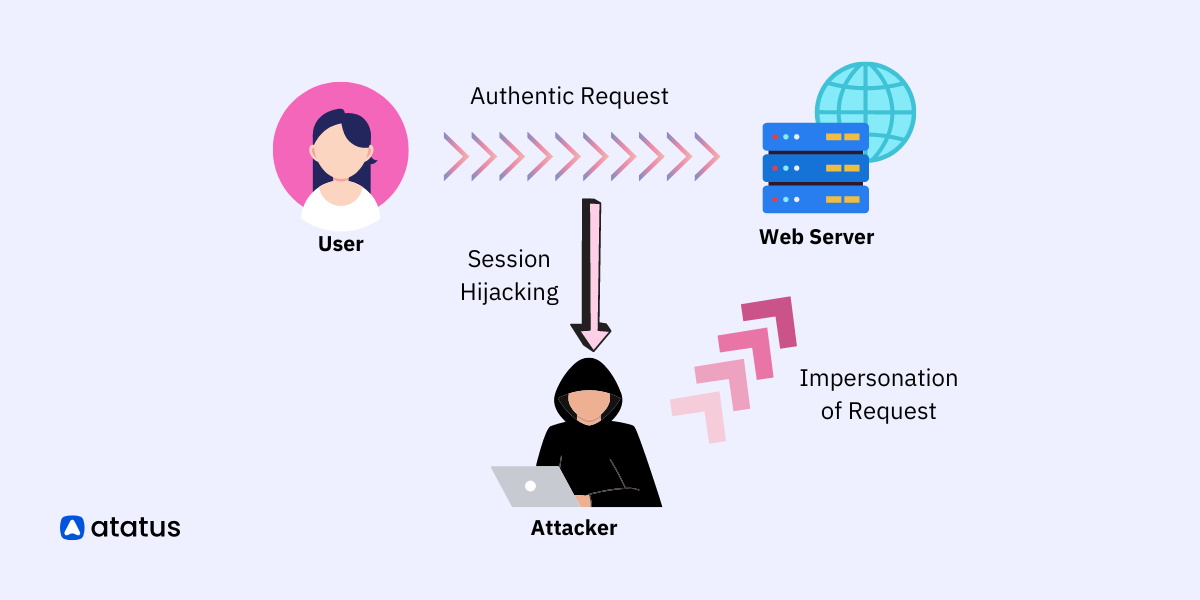
When an attacker steals a user's active session ID (e.g., by intercepting network traffic or tricking the user into clicking a malicious link), they can present that ID to your server and gain full access to the user's account.
This is why the techniques from our previous lessons are so important:
- Using
HttpOnlycookies (as seen in thelogout.phpscript) prevents client-side scripts from accessing the session cookie. - Using HTTPS encrypts all traffic, preventing attackers from "sniffing" the session ID from the network.
- Regenerating the session ID upon login (
session_regenerate_id(true)) ensures that even if an attacker had an old session ID for that user, it becomes invalid the moment the legitimate user logs in.
Your access control logic is only as strong as the session it relies on.
Conclusion
You have now mastered the complete user authentication workflow. You can register users, log them in, log them out, and most importantly, enforce access rules to protect your application's pages.
Key Takeaways:
- The fundamental way to protect a page is to check for a session variable (e.g.,
$_SESSION['user_id']) at the top of the script and redirect if the user is not authorized. - This direct method leads to code duplication and is not scalable for larger applications.
- A professional, modern solution is to use middleware to centralize access control logic at the routing layer, keeping your controllers clean and your code DRY.
- A valid session is a powerful key; understanding threats like session hijacking highlights the importance of securing the session itself.
Preview of the Next Lesson:
With the user authentication module complete, we are ready to explore a new and essential area of web development: APIs. In the next lesson, we will begin Module 9 by learning the principles of REST and the use of HTTP methods (GET, POST, PUT, DELETE). This will lay the foundation for you to build applications that can communicate with other services and provide data to front-end frameworks.