Hello! Welcome back to the PHP Fundamentals Refresher.
In our last lesson, we learned how to organize our code into reusable blocks called functions. Functions are essential for writing clean, efficient code, and they often need data to work with. This brings us to a fundamental question: how do we manage collections of related data, like a list of user comments, products in a shopping cart, or settings for our web application? The answer is arrays.
This lesson will teach you how to work with indexed and associative arrays. Arrays are one of the most powerful and commonly used data types in PHP. Mastering them is crucial for handling almost any data-driven task in web development, from processing user input to displaying data from a database.
1. What is an Array?
An array is a special variable that can hold more than one value at a time in an ordered collection. PHP supports two main types of arrays that we will cover:
- Indexed Arrays: Use numeric keys (indices) to identify elements.
- Associative Arrays: Use named (string) keys to identify elements.
Let's start with the most straightforward type: indexed arrays.
2. Indexed Arrays: Ordered Lists
Think of an indexed array as a simple, numbered list. The first item is at position 0, the second at 1, and so on. This "zero-based" indexing is a standard convention in many programming languages.
Creating and Accessing Indexed Arrays
You can create an array using the array() constructor or, more commonly, with the shorthand square bracket [] syntax.
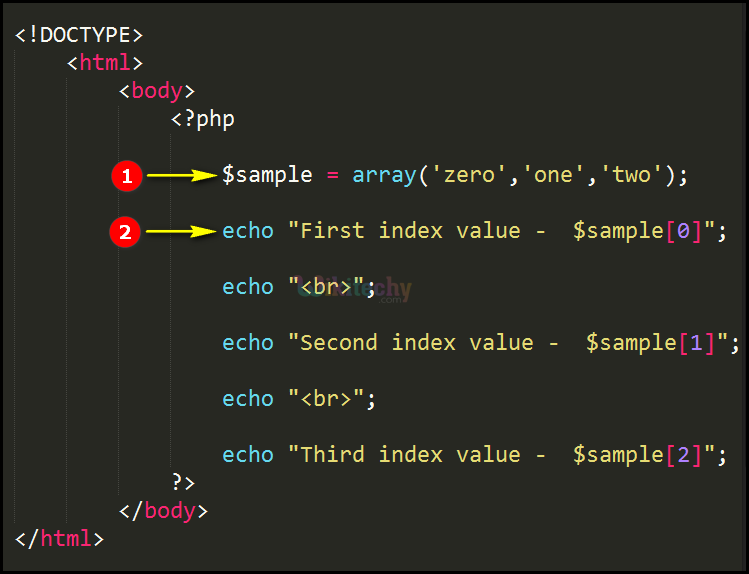
To get a practical demonstration of creating, accessing, and modifying indexed arrays, let's watch a video.
PHP Array Data Type - Indexed, Associative & Multi-Dimensional Arrays - Full PHP 8 Tutorial
The following segments from the video 'Full PHP 8 Tutorial' by Program With Gio will walk you through the basics of indexed arrays.
Watch from 00:36 to 04:31. Pay close attention to: The two ways to declare an array ([] and array()). How to access elements using their zero-based index. How to modify an element at a specific index. Using isset() to check if an element exists before trying to access it, which helps prevent errors.
As you saw, you can check the number of elements in an array using the count() function. This is extremely useful, especially when you need to loop through an array.
Adding and Displaying Array Contents
You'll often need to add new elements to an array that already exists. The simplest way is to use empty square brackets [].
$languages = ['PHP', 'Java', 'Python'];
$languages[] = 'C++'; // Adds 'C++' to the end of the array
A common task during development is inspecting the contents of an array. A simple echo won't work as you expect. Instead, you should use print_r() or var_dump() for a human-readable output.
print_r($array): Displays the array's structure and content in a readable format.var_dump($array): Provides more detailed information, including the data type and length of each element.
PHP Array Data Type - Indexed, Associative & Multi-Dimensional Arrays - Full PHP 8 Tutorial
This next clip from the same video demonstrates how to add elements to an array and how print_r() displays the array's contents.
Watch from 04:50 to 06:06. Note the difference between using $array[] = 'value' for one element and array_push() for adding multiple elements.
Test your understanding!
- Create an indexed array named
$taskscontaining three string values: 'Backup database', 'Update dependencies', 'Run tests'. - Add a new task, 'Deploy to production', to the end of the array.
- Change the second task (at index 1) to 'Update Composer dependencies'.
- Print the final array to the screen in a readable format.
Show answer
<?php

// 1. Create the array
$tasks = ['Backup database', 'Update dependencies', 'Run tests'];

// 2. Add a new task
$tasks[] = 'Deploy to production';

// 3. Change the second task
$tasks[1] = 'Update Composer dependencies';

// 4. Print the array
print_r($tasks);

/* Expected Output:
Array
(
    [0] => Backup database
    [1] => Update Composer dependencies
    [2] => Run tests
    [3] => Deploy to production
)
*/
?>
3. Associative Arrays: Named Keys
While indexed arrays are great for simple lists, their numeric indices aren't very descriptive. If you store user data like ['John', 'Doe', 'john.doe@example.com'], you have to remember that the first name is at index 0, last name at 1, and so on. This is fragile and hard to read.
Associative arrays solve this by letting you use descriptive strings as keys.
$user = [
    'firstName' => 'John',
    'lastName'  => 'Doe',
    'email'     => 'john.doe@example.com'
];

echo $user['firstName']; // Outputs: John
This is much clearer and more robust. Accessing, modifying, and adding elements works just like with indexed arrays, but you use the string keys instead of numbers.
PHP Array Data Type - Indexed, Associative & Multi-Dimensional Arrays - Full PHP 8 Tutorial
Let's see how associative arrays are defined and used. This video segment demonstrates the key-value syntax.
Watch from 06:06 to 07:41. Notice the => syntax used to associate a key with a value.
For a detailed textual explanation and comparison, the following resource is excellent.
This article from Codeguage provides a solid recap of array basics and offers a clear explanation of associative arrays and why they are so useful.
Read the section titled 'Associative arrays'. It does a great job of showing why associative arrays are often a better choice than indexed arrays for storing structured data.
4. Multi-dimensional Arrays: Arrays within Arrays
Real-world data is often structured hierarchically. For example, you might have a list of users, where each user is an associative array of their details. This is where multi-dimensional arrays come in. They are simply arrays that contain other arrays as values.
This structure is extremely common when working with data from a database, where you might fetch a list of rows, and each row is itself a collection of fields.
PHP Array Data Type - Indexed, Associative & Multi-Dimensional Arrays - Full PHP 8 Tutorial
The next clip provides an excellent example of building a multi-dimensional array to store complex, structured information.
Watch from 07:41 to 09:58. Focus on how you can chain the square brackets ([]) to access elements deep inside the nested structure, like $programmingLanguages['php']['versions'][0]['releaseDate'].
Test your understanding!
Given the following multi-dimensional array, write a line of PHP code to echo the email address of the second user (Jane Smith).
$users = [
    [
        'id' => 1,
        'name' => 'John Doe',
        'email' => 'john.doe@example.com'
    ],
    [
        'id' => 2,
        'name' => 'Jane Smith',
        'email' => 'jane.smith@example.com'
    ]
];
Show answer
<?php
$users = [
    [
        'id' => 1,
        'name' => 'John Doe',
        'email' => 'john.doe@example.com'
    ],
    [
        'id' => 2,
        'name' => 'Jane Smith',
        'email' => 'jane.smith@example.com'
    ]
];

// The second user is at index 1 of the outer array.
// Their email is at the key 'email' of the inner array.
echo $users[1]['email'];

// Expected Output: jane.smith@example.com
?>
5. Essential Array Manipulation
PHP provides a rich set of functions to work with arrays. Here are some of the most critical ones for everyday tasks.
Removing Elements
array_pop($array): Removes and returns the last element.array_shift($array): Removes and returns the first element. Importantly, this will re-index the numeric keys of an indexed array.unset($array['key']): Removes a specific element by its key. For indexed arrays, this does not re-index the array, which can leave gaps in the numeric indices.
The distinction between array_shift and unset regarding re-indexing is a crucial detail to understand.
PHP Array Data Type - Indexed, Associative & Multi-Dimensional Arrays - Full PHP 8 Tutorial
This video segment covers array_pop, array_shift, and unset, clearly explaining how each one affects the array and its keys.
Watch from 12:00 to 15:08. Pay special attention to the part explaining what happens to the array's indices after using array_shift versus unset. This is a common point of confusion.
Checking for Keys and Values
When working with data, you can't always assume a key or value will be present. Checking first prevents errors.
array_key_exists('key', $array): Returnstrueif the key exists, even if its value isnull.isset($array['key']): Returnstrueonly if the key exists AND its value is notnull.in_array('value', $array): Returnstrueif the value exists anywhere in the array.
The difference between array_key_exists() and isset() is subtle but very important, especially when dealing with form data or API responses where a field might be present but empty.
PHP Array Data Type - Indexed, Associative & Multi-Dimensional Arrays - Full PHP 8 Tutorial
This final clip explains the critical difference between isset() and array_key_exists(). Understanding this will help you avoid subtle bugs in your code.
Watch from 15:26 to 16:44. The example with a key having a null value perfectly illustrates when you would need to use one function over the other.
Conclusion
You've now covered the essentials of PHP arrays, the primary tool for managing collections of data. They are versatile, powerful, and you will use them in every PHP project you build.
Key Takeaways:
- Indexed arrays are ordered lists with numeric keys, perfect for simple sequences of data.
- Associative arrays use descriptive string keys, making your code more readable and less error-prone when handling structured data.
- Multi-dimensional arrays can contain other arrays, allowing you to represent complex, hierarchical data structures.
- Always use
print_r()orvar_dump()to inspect array contents during development. - Be mindful of the differences between functions that modify arrays, especially how they affect keys (e.g.,
unsetvs.array_shift). - Know when to use
isset()versusarray_key_exists()to correctly check for the presence of data.
In our next lesson, we'll see arrays in action in a very practical context: handling form data using $_GET and $_POST. You'll discover that when a user submits an HTML form, PHP automatically organizes that data into special associative arrays, making this lesson a direct and essential prerequisite.