Hello! Welcome to our third lesson.
In our last session, we contrasted useState and useReducer, establishing how to choose the right tool for managing component state based on its complexity. We saw that state and props determine what a component renders. Now, we'll turn our attention to useEffect, the hook that lets your components interact with the world outside of the React rendering cycle.
This lesson is crucial for your goal of understanding React Native's "under-the-hood" mechanics. Properly managing side effects is a cornerstone of performant and bug-free applications. We will dive into how to implement useEffect with correct dependency arrays, which is one of the most common sources of confusion and bugs for developers.
What is a Side Effect?
In a pure functional component, the output (JSX) should depend only on its inputs (props and state). However, applications are rarely that simple. They need to interact with external systems: fetching data from an API, setting up timers or subscriptions, or even manually manipulating the browser DOM. These interactions are called side effects.
Placing side effects directly inside the component body is a problem, as it can lead to unpredictable behavior and performance issues, like infinite re-render loops. useEffect provides a safe, declarative way to run side effects after rendering.
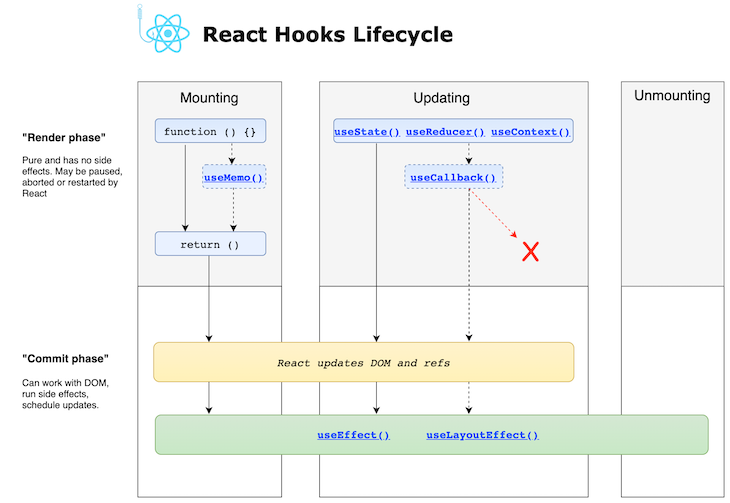
To start, let's see a classic example of what goes wrong without useEffect and how it provides the solution.
useEffect in depth | React JS Advanced Concepts
The video 'useEffect in depth' by Web Tech Talk provides a great initial demonstration of the problems useEffect solves, starting with the infinite loop caused by fetching data directly in a component's render body.
Watch from the beginning to 02:30. Pay close attention to the network tab in the developer tools. You'll see how a simple data fetch without useEffect triggers a cascade of re-renders and how adding useEffect with an empty dependency array ([]) immediately fixes it.
The Core Idea: Synchronization, Not Lifecycle
The key to mastering useEffect is to shift your mental model. Instead of thinking in terms of class lifecycle methods like componentDidMount or componentDidUpdate, think of useEffect as a way to synchronize your component with an external system.
The function you pass to useEffect will run after every render by default. The optional second argument, the dependency array, lets you optimize this by telling React to skip the effect if certain values haven't changed between renders.
The foundational article "A Complete Guide to useEffect" by Dan Abramov (one of the creators of React Hooks) explains this mental model perfectly. It's a detailed read, but your physics background and interest in deep mechanics will make the core concepts resonate.
A Complete Guide to useEffect - Overreacted.io
Let's read a few key sections from 'A Complete Guide to useEffect'. This will establish the fundamental principle that every render has its own unique props, state, and effect functions.
Please read the following sections: 'Each Render Has Its Own Effects': This explains that the effect function itself is different on every render, capturing the values from the render it belongs to. 'Each Render Has Its Own… Everything': This reinforces the concept with a setTimeout example, showing how closures capture state at a specific point in time. 'Teaching React to Diff Your Effects': This introduces the dependency array as an optimization, allowing React to compare dependencies and decide whether to re-run an effect. 'Don’t Lie to React About Dependencies': This section is critical. It explains the consequences of omitting dependencies.
The Golden Rule of the Dependency Array
As you just read, the rule is simple but strict:
Every reactive value from your component's scope (props, state, or functions defined in the component) that is used inside the useEffect callback must be included in the dependency array.
If you omit a dependency, your effect will "close over" a stale value from a previous render, leading to bugs that can be very difficult to trace.
Let's look at the classic setInterval example. This is a common scenario where stale closures cause problems.
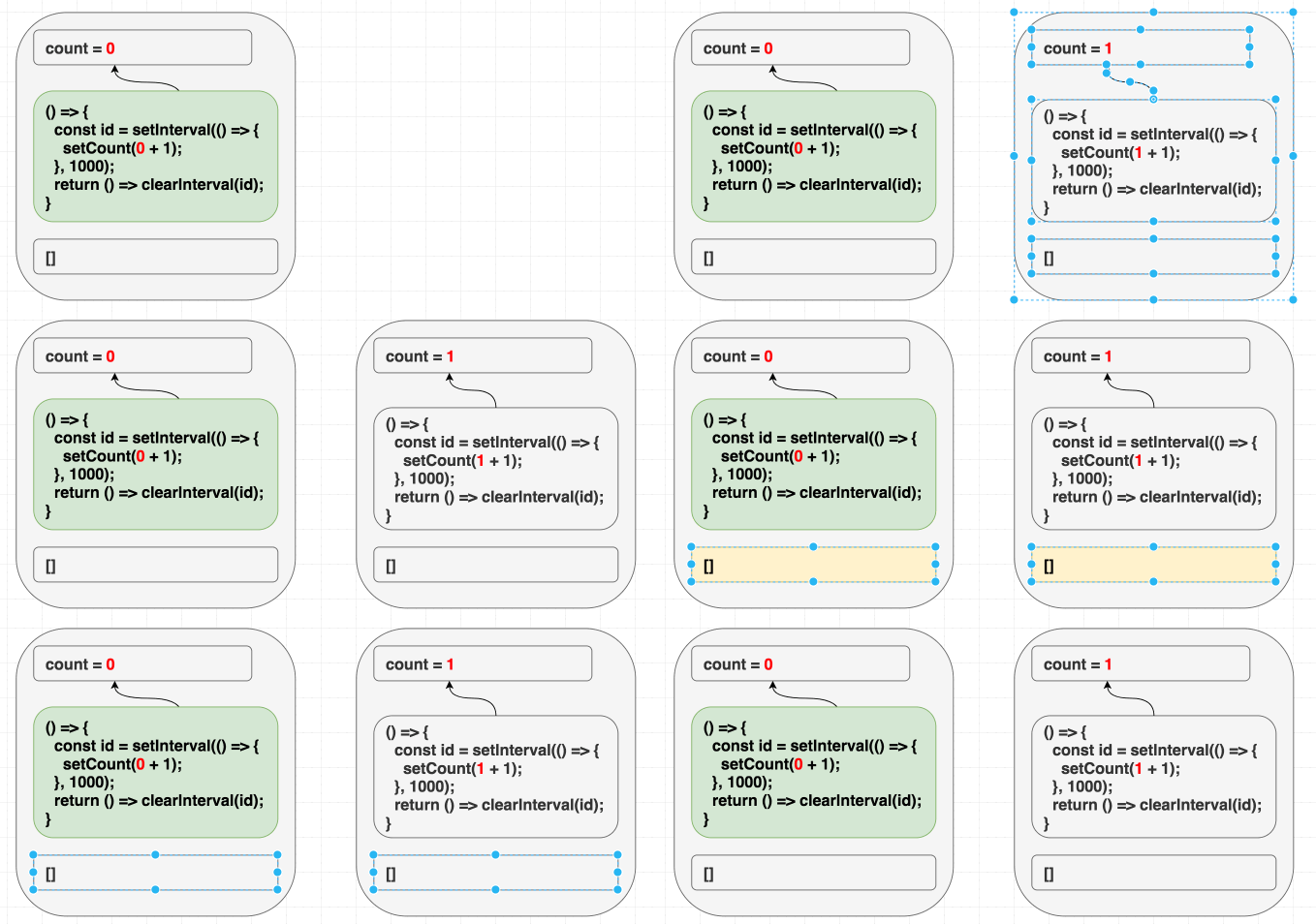
The following video provides a live demonstration of this exact bug and two ways to fix it: one that is technically correct but not ideal, and another that is the preferred solution.
All 12 useState & useEffect Mistakes Junior React Developers Still Make in 2026
Let's watch a segment from 'All 12 useState & useEffect Mistakes Junior React Developers Still Make'. This clip on 'stale closure' is one of the clearest explanations of this common useEffect pitfall.
Watch from 33:08 to 38:02. Notice how: An empty dependency array [] causes the interval to get stuck on 1. Adding count to the dependency array [count] fixes the incrementing but causes other issues (the interval is cleared and re-created on every single tick). The final solution involves a cleanup function, which we will cover in the next lesson.
Strategies for Correct Dependency Management
So, if we must always declare our dependencies, how do we prevent effects from running too often? The solution isn't to lie about dependencies, but to change our code so the effect needs fewer of them.
1. Functional Updates for State
In the setInterval example, we only need count to calculate the next state. We can remove this dependency by using the functional update form of setState, which you may recall from our useState lesson.
Instead of setCount(count + 1), we write setCount(c => c + 1).
This tells React "give me the current state, and I'll tell you how to change it". Because we are no longer referencing the count variable from the component's scope inside our effect, we can safely remove it from the dependency array.
useEffect(() => {
  const intervalId = setInterval(() => {
    // We're not using the 'count' variable from the render scope here.
    setCount(c => c + 1);
  }, 1000);

  return () => clearInterval(intervalId);
}, []); // ✅ Now the dependency array is correct.
The official React documentation has a concise example of this pattern. You can find it in the useEffect reference under the section "Updating state based on previous state from an Effect".
2. Handling Objects and Functions
Objects and functions created inside the component body are a major source of unnecessary effect runs.
function MyComponent({ user }) {
  // `options` is a new object on every render
  const options = { id: user.id, setting: 'dark' };

  useEffect(() => {
    connect(options);
  }, [options]); // 🔴 This will run on EVERY render
}
This is because options is a new object in memory on every render. Even if user.id is the same, the options object has a new reference, so React sees it as "changed".
The solution is often to create the object inside the effect. This way, the effect only depends on the primitive values that the object is built from.
function MyComponent({ user }) {
  useEffect(() => {
    // `options` is now created inside the effect
    const options = { id: user.id, setting: 'dark' };
    connect(options);
  }, [user.id]); // ✅ Effect now only depends on the primitive `user.id`
}
The same principle applies to functions defined inside the component. If a function is only used by one effect, define it inside that effect.
The official React documentation provides clear, interactive examples for these exact scenarios.
Let's review the official React documentation on useEffect. It provides clear, actionable patterns for handling dependencies correctly.
Read the following sections from the documentation page: 'Specifying reactive dependencies': This reinforces the 'golden rule'. 'Removing unnecessary object dependencies': This shows the exact pattern we just discussed for handling object dependencies. 'Removing unnecessary function dependencies': This shows the corresponding pattern for functions.
3. Data Fetching and Cleanup
A common use for useEffect is fetching data when a component mounts or when a prop (like an ID) changes. This is a perfect demonstration of the dependency array in action.
However, a new problem can arise: what if the ID changes quickly? You might fire off a new request before the previous one has finished. The old request might return after the new one, causing your UI to show incorrect data. This is called a race condition.
The solution is to use the useEffect cleanup function to cancel the previous request. This is an advanced but essential pattern for robust applications.
All 12 useState & useEffect Mistakes Junior React Developers Still Make in 2026
Let's return to the ByteGrad video for a fantastic real-world example of data fetching with useEffect, including how to handle race conditions with a cleanup function.
Watch from 38:47 to 45:11. This is a dense but valuable segment. Focus on: How passing an id as a dependency triggers a refetch. The UI bug (flashing content) that occurs when you click the button rapidly. How the AbortController API is used within the effect's cleanup function to cancel the now-obsolete previous fetch request.
Key Takeaways
useEffectis for synchronizing your component with an external system (APIs, timers, etc.).- The dependency array is not for "choosing when the effect runs," but for telling React what reactive values the effect depends on.
- The Golden Rule: If you use a prop, state, or component-scoped function inside an effect, it must be in the dependency array.
- Omitting dependencies leads to stale closures, where your effect uses outdated values from a previous render.
- To prevent effects from running too often, don't lie about dependencies. Instead, refactor your code to reduce dependencies:
- Use the functional update form of
setState(e.g.,setCount(c => c + 1)). - Move object and function definitions inside the effect if they are only used there.
- Use the functional update form of
Mastering the useEffect dependency array is a huge step toward writing professional, reliable React code. It moves you from simply making things work to understanding why they work and how to prevent subtle bugs.
In our next lesson, we will focus exclusively on the useEffect cleanup function, expanding on the AbortController and setInterval examples to cover how to prevent memory leaks from subscriptions and event listeners.