Hello! Welcome back to our exploration of AI agent development.
In our last lesson, we established the fundamental operating principle of any agent: the agent loop. We saw how this cycle of perceiving the environment, reasoning with an LLM, and taking action allows an agent to work autonomously toward a goal.
We identified the "Action" phase as the point where the agent interacts with the world. Today, we'll dive deep into exactly how that happens. This lesson focuses on tool use, the mechanism that gives an agent its hands and ears, enabling it to break out of the purely digital realm of text and interact with external systems and APIs. This capability is what transforms a language model from a simple chatbot into a powerful actor.
Why Do Agents Need Tools?
A Large Language Model, despite its impressive reasoning abilities, is fundamentally isolated. Its knowledge is static, limited to the data it was trained on, and it has no built-in way to affect the outside world.
To understand why this is a critical limitation, let's watch the beginning of a video from Google for Developers that frames the problem perfectly.
This clip from 'Connecting LLMs to tools' clearly explains the inherent limitations of standalone LLMs and motivates the need for tools.
Watch the first minute of the video (00:00 - 01:00). Pay attention to the two main limitations identified: lack of real-time information and the inability to take actions.
As the video highlighted, if we want an agent to answer "What's the weather in Austin tomorrow?" or to actually "book a flight," it needs a way to connect to external systems. Tools provide this bridge.
Let's look at a more structured breakdown of the rationale for integrating external tools.
LLM Agent Tool Usage & Function Calling
This article, 'LLM Agent Tool Usage & Function Calling,' provides a concise list of reasons why tool integration is essential. It formalizes the concepts introduced in the video.
Read the section 'The Rationale for External Tool Integration.' This will give you a clear, itemized list of the problems that tools solve, from accessing current data to interacting with proprietary enterprise systems.
By enabling tool use, we transform an agent from a cognitive entity into a practical problem-solver capable of sophisticated interactions.

The Core Mechanism: Function Calling
So, how does an agent actually use a tool? The most common and powerful mechanism is known as function calling (or simply "tool calling").
This isn't about the LLM executing code itself. Instead, the LLM is fine-tuned to act as a router or a dispatcher. When it determines that a tool is needed, it outputs a structured message—typically a JSON object—that specifies which function to call and what arguments to use. Your application code then takes this structured message, executes the corresponding function, and feeds the result back to the LLM.
This video provides an excellent, developer-focused deep dive into how modern function calling works.
LLM Function Calling - AI Tools Deep Dive
The video 'LLM Function Calling - AI Tools Deep Dive' by Adam Lucek is a superb walkthrough of the entire function calling process. We'll start with the high-level sequence.
Watch from 01:07 to 03:04. This section details the standard sequence of function calling, highlighting that the LLM's role is to generate a structured, parsable response, not to execute the function itself.
Let's recap that crucial sequence, which is a key part of the agent loop we learned about previously:
- User Query & Tool Definitions: The application sends the user's request to the LLM, along with a list of available tools (functions) and their definitions.
- LLM Decides: The LLM analyzes the query and the available tools. It reasons whether a tool is necessary to fulfill the request.
- LLM Responds with a Tool Call: If a tool is needed, the LLM's response is a structured object (e.g., JSON) containing the name of the function to call and the arguments it has extracted from the user's query.
- Orchestrator Executes: Your application code (the "orchestrator") parses this object, finds the corresponding function in your codebase (e.g.,
get_weather), and executes it with the provided arguments. - Result is Fed Back: The output from the function (e.g., the weather data from an API) is formatted into a special "tool message" and sent back to the LLM in the next turn of the conversation.
- LLM Synthesizes Final Answer: The LLM receives the tool's output, now has the factual information it needed, and generates a natural language response for the user (e.g., "The weather in Austin tomorrow will be sunny with a high of 95°F.").
This entire process can be seen clearly in the UI of a tool like Google's Agent Development Kit (ADK).
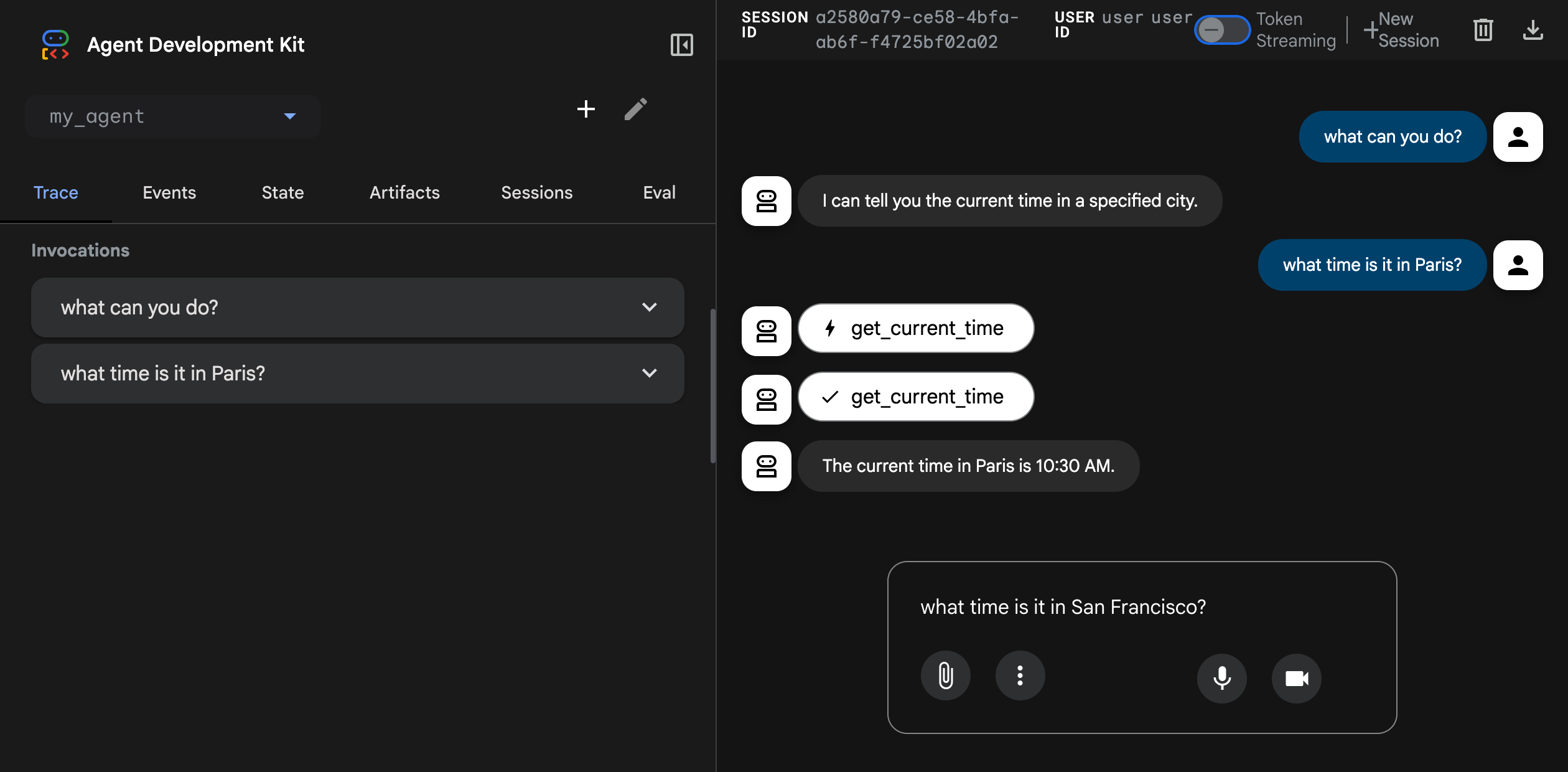
Defining and Using Tools in Practice
For this mechanism to work, the LLM needs to know what tools are available and how to use them. Your job as the developer is to provide clear and precise tool definitions.
A typical tool definition includes:
- Name: The name of the function (e.g.,
get_exchange_rate). - Description: A clear, natural language description of what the tool does and when it should be used. This is the most critical part, as the LLM relies on this description to make its decision.
- Parameters: A schema defining the inputs the function expects, including their names, data types (string, integer, boolean), descriptions, and whether they are required or optional.
Let's see what this looks like in practice.
LLM Function Calling - AI Tools Deep Dive
Let's return to Adam Lucek's 'LLM Function Calling' video to see how tools are defined using a JSON schema, a common industry standard.
Watch from 03:04 to 05:50. Notice how the JSON schema for the 'get_exchange_rate' tool clearly defines its name, a detailed description, and the properties of its parameters (base_currency, target_currency, date).
The quality of your tool definitions directly impacts the agent's reliability. The following article provides some excellent best practices for designing them.
LLM Agent Tool Usage & Function Calling
The 'LLM Agent Tool Usage & Function Calling' article offers practical guidelines for creating effective tool interfaces.
Read the section 'Designing Effective Tool Interfaces.' Focus on the principles of clarity in descriptions, well-defined parameters, and atomicity (tools that do one thing well).
Now, let's put it all together and see the complete cycle from user query to final answer in a code-centric example.
LLM Function Calling - AI Tools Deep Dive
This final clip from Adam Lucek's video demonstrates the full end-to-end flow: making the initial call, parsing the tool call response, executing the function, and feeding the result back to the model for the final summary.
Watch from 05:50 to 12:53. Follow the multi-step process for handling a complex query that requires multiple tool calls. This demonstrates the orchestration logic your application needs to implement.
Test your understanding!
You are building a music agent. You've defined a tool with the following JSON schema:
{
  "name": "play_song",
  "description": "Plays a song by a specific artist. Use this tool when a user explicitly asks to play music.",
  "parameters": {
    "type": "object",
    "properties": {
      "song_title": {
        "type": "string",
        "description": "The title of the song to play."
      },
      "artist_name": {
        "type": "string",
        "description": "The name of the artist who performs the song."
      }
    },
    "required": ["song_title", "artist_name"]
  }
}
A user sends the query: "Can you put on 'Bohemian Rhapsody' by Queen?"
What structured JSON output would you expect the LLM to generate?
Show answer
You would expect the LLM to return a tool call object similar to this:
{
  "tool_calls": [
    {
      "id": "call_abc123",
      "type": "function",
      "function": {
        "name": "play_song",
        "arguments": "{\"song_title\":\"Bohemian Rhapsody\",\"artist_name\":\"Queen\"}"
      }
    }
  ]
}
(Note: The exact format can vary slightly between models like OpenAI, Google, and Anthropic, but the core components—the function name and the arguments as a JSON string—are standard.)
Production Considerations for API Tools
Since you're an experienced software engineer, it's worth noting that when a tool's action is to call an external API, several familiar engineering challenges come into play. Your agent's orchestration layer is responsible for handling these.
LLM Agent Tool Usage & Function Calling
Let's revisit our article on tool usage to review key considerations for production-grade API integration.
Read the section 'Integrating with External APIs.' This highlights crucial aspects like authentication, rate limiting, error handling, and data parsing—all of which must be managed by your application's tool-execution code.
Conclusion
In this lesson, we connected the agent loop to the outside world. We've seen how tools are the essential bridge that allows an LLM's reasoning to translate into tangible actions.
Key Takeaways:
- Tools Overcome LLM Limitations: They provide access to real-time data, proprietary systems, and the ability to execute actions, solving the "frozen in time" and "no hands" problems of LLMs.
- Function Calling is the Core Mechanism: Modern agents use function calling, where the LLM generates a structured JSON object specifying a function and its arguments, rather than executing code directly.
- The Orchestrator is Key: Your application code acts as an orchestrator, responsible for parsing the LLM's tool call, executing the function, and feeding the results back to the LLM.
- Clear Definitions are Crucial: The reliability of a tool-using agent depends heavily on how well you define your tools, especially the natural language descriptions that guide the LLM's choices.
We now have two of the three core components of an agent: the agent loop (the engine) and tool use (the hands). However, for an agent to perform complex, multi-step tasks, it needs to remember what has happened across different turns of the loop. In our next lesson, we will explore the third crucial component: memory systems, and how they provide agents with the context needed to maintain coherent, long-running conversations and tasks.