Hello! Welcome back.
In our last lesson, we deconstructed the ReAct pattern into its fundamental building blocks: Thought, Action, and Observation. We saw how these components allow an agent to "think out loud" and interact with its environment.
Today, we'll put those pieces together. The goal of this lesson is to illustrate how the ReAct pattern orchestrates the agent's core functions—the agent loop, tool use, and memory—to solve a task from start to finish. Think of the last lesson as learning about individual software components (functions, classes). Today, we'll see how the main execution loop calls those components and manages state to run the entire application.
By the end of this lesson, you will see how a simple Thought -> Action -> Observation sequence is the engine that drives the entire agentic system.
The ReAct Cycle as an Orchestration Engine
At its core, the ReAct pattern is the practical implementation of the agent loop we discussed two lessons ago. The sequence of Thought, Action, and Observation directly maps to the cycle of Perception, Reasoning, and Action.
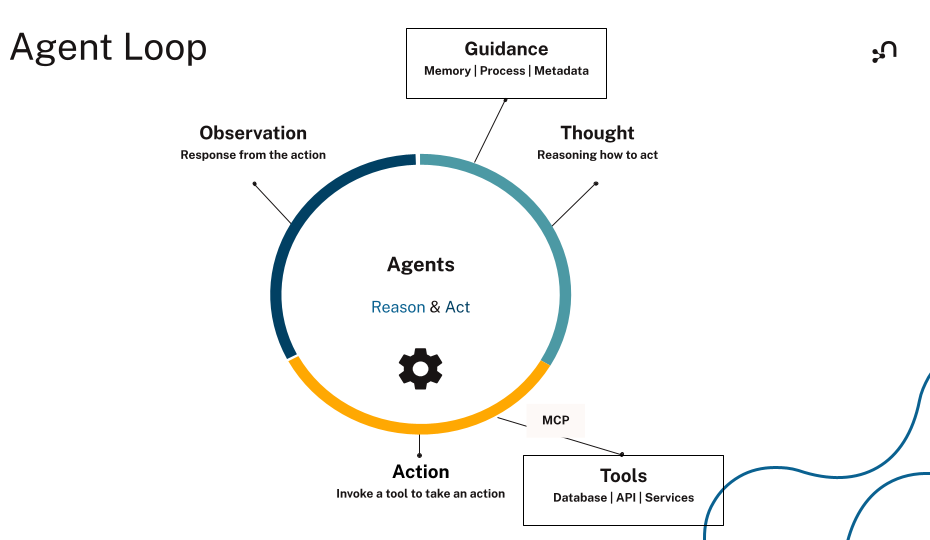
Let's break down this mapping:
- Perception: The agent's cycle begins with perception—either the initial user query or the Observation from a previous step. This is the new information the agent receives.
- Reasoning: The agent takes this new information and processes it in the Thought step. Here, the LLM analyzes the current state, checks it against the goal, and plans the next move.
- Action: Based on the plan from the Thought step, the agent takes an Action, which is typically a tool call. This is how the agent affects its environment.
The cycle then repeats, with the result of the Action becoming the next Observation.
Now, let's look at a more detailed architectural diagram to see where each component fits.

This diagram clearly shows how ReAct orchestrates the system's components:
- The Agent Loop: The cyclical flow from LLM -> Action -> Tool -> Observation -> LLM is the agent loop in action.
- Tool Use: The
Actionstep is the explicit point where the agent decides to use a tool. The LLM'sThoughtdetermines which tool to use based on the task and the tool descriptions provided. - Memory: The "Traces" box (3) is crucial. It represents the agent's short-term memory, often called a "scratchpad." It's a running log of all previous
Thought,Action, andObservationsteps. The LLM reviews this entire history on each iteration to decide what to do next.
To see this orchestration with a simple, real-world example, watch this short clip.
ReAct AI Agents, clearly explained!
The video 'ReAct AI Agents, clearly explained!' by Akshay Pachaar provides a clear, real-world example of the ReAct flow.
Watch from 01:47 to 02:37. Notice how the agent takes the user query, reasons about the location and intent, selects the weather API tool, gets an observation, and then formulates the final answer.
A Step-by-Step Trace of Orchestration
Diagrams are helpful, but as a software engineer, seeing the execution trace is often the most illuminating part. Let's examine how the agent's state evolves through a multi-step task.
The following video from the creators of LangChain demonstrates building a ReAct agent using LangGraph, a library for creating agentic workflows. It provides an excellent, code-level view of orchestration.
Building Effective Agents with LangGraph
In this segment from 'Building Effective Agents with LangGraph', we'll see a ReAct agent built from scratch. This clearly shows how the components we've discussed are wired together.
Watch from 25:23 to 29:02. As you watch, focus on three key aspects: State Management: Notice the messages key in the agent's state. This is the 'scratchpad' or memory, accumulating the T-A-O trace. Tool Execution: The tool node is the component that executes the Action and returns the Observation (what the video calls 'environmental feedback'). The Loop: Observe how the output of the tool node is appended to the messages state and fed back to the LLM, which then decides on the next step.
Let's formalize the example from the video ("add 3 and 4, then take the output and multiply by 4") to make the orchestration crystal clear. The state object, containing the list of messages, is the agent's memory.
| Step | State (messages in memory) |
Agent Action | Role in Orchestration |
|---|---|---|---|
| 1 | [Human: "add 3 and 4..."] |
The LLM receives the initial state. | Perception: Gets user input. |
| 2 | [Human: "..."] |
LLM generates Thought: I need to add 3 and 4. |
Reasoning: Plans the first step. |
| 3 | [Human: "..."] |
LLM generates Action: tool_call(add, {x:3, y:4}) |
Action: Decides to use the add tool. |
| 4 | [Human: "...", AI: tool_call(add)] |
The tool_node executes the action. |
Tool Use: Invokes external code. |
| 5 | [Human: "...", AI: tool_call(add), Tool: "7"] |
The tool_node returns the result, which is added to state. |
Observation: Perceives the result (7). Memory is updated. |
| 6 | State from Step 5 is sent back to LLM. | LLM generates Thought: The result is 7. Now I need to multiply by 4. |
Reasoning: Plans next step based on updated memory. |
| 7 | State from Step 5 is sent back to LLM. | LLM generates Action: tool_call(multiply, {x:7, y:4}) |
Action: Decides to use the multiply tool. |
| 8 | [..., Tool: "7", AI: tool_call(multiply)] |
The tool_node executes the new action. |
Tool Use: Invokes external code again. |
| 9 | [..., Tool: "7", AI: tool_call(multiply), Tool: "28"] |
The tool_node returns the result. |
Observation: Perceives the new result (28). Memory is updated. |
| 10 | State from Step 9 is sent back to LLM. | LLM generates Thought: I have the final answer. |
Reasoning: Determines the task is complete. |
| 11 | State from Step 9 is sent back to LLM. | LLM generates Action: Finish("The final result is 28.") |
Action: Produces the final response. |
This step-by-step process shows the ReAct pattern in its role as the central conductor, directing the flow of data between the LLM (reasoning), the tools (action), and the state object (memory).
Enforcing Orchestration via Prompting
This intricate dance isn't magic; it's a direct result of structured prompting. As we touched on in the last lesson, the LLM is guided by examples. Agent Development Kits (ADKs) make this easier by providing a clear structure for these instructions.
Let's look at an example from a blog post discussing design patterns with Google's ADK, a framework you expressed interest in.
Design Patterns for Building AI Agents with code samples ...
The article 'Design Patterns for Building AI Agents with code samples using Google ADK' provides practical implementations of common agent patterns. We will focus on its ReAct example.
Read the first major section titled '1. ReACT (Reasoning and Acting)'. Pay close attention to the Python code block for the 'Google ADK Implementation'. Specifically, read the text assigned to the instruction parameter.
In the code snippet, you can see the orchestration logic is explicitly defined in the prompt:
instruction = """You are a helpful assistant using the ReACT framework. For each user request:
1. REASON: Think step-by-step about what information you need
2. ACT: Use available tools to gather information
3. OBSERVE: Review the results from tools
4. Repeat until you can provide a complete response
..."""
This instruction serves as the "source code" for the agent's behavior. It forces the LLM to follow the ReAct cycle, ensuring that reasoning, acting (tool use), and observing are performed in the correct sequence. The agent's memory is the cumulative log of these steps, which it reviews before each new REASON step.
Test your understanding!
An agent is asked: "Who directed the movie Inception, and what year was it released?" The agent has two tools: find_director[movie_title] and get_release_year[movie_title].
Describe how the ReAct pattern would orchestrate the agent's memory (the 'scratchpad') and tool use to solve this. What might the final content of the scratchpad look like before the agent gives its final answer?
Show answer
The agent would orchestrate the task in a sequence of loops, updating its memory (scratchpad) at each step.
-
Loop 1:
- Thought: I need to find the director of Inception first.
- Action:
find_director[Inception] - Observation:
Christopher Nolan - Scratchpad now contains the trace of this first loop.
-
Loop 2:
- Thought: I have the director. Now I need the release year for Inception.
- Action:
get_release_year[Inception] - Observation:
2010 - Scratchpad is updated with the trace of the second loop.
-
Final Step:
- Thought: I have both pieces of information: the director is Christopher Nolan and the release year is 2010. I can now provide the final answer.
- Action:
Finish[The movie Inception was directed by Christopher Nolan and was released in 2010.]
The final scratchpad before the Finish action would look something like this:
Thought: I need to find the director of the movie "Inception".
Action: find_director[Inception]
Observation: Christopher Nolan
Thought: Now that I have the director, I need to find the release year of "Inception".
Action: get_release_year[Inception]
Observation: 2010
Conclusion
Today we connected all the dots from this module. We've seen that the ReAct pattern is more than just a prompting technique; it's the fundamental operating system for a simple agent.
Key Takeaways:
- ReAct is the Conductor: It orchestrates the agent loop, tool use, and memory into a cohesive, problem-solving system.
- The T-A-O Cycle IS the Agent Loop: This simple, iterative cycle is how the agent perceives, reasons, and acts.
- Memory is the Narrative: The "scratchpad," which logs the history of Thoughts, Actions, and Observations, provides the context the agent needs to carry out multi-step plans and self-correct.
- Orchestration is Engineered: This entire process is controlled through carefully constructed system prompts that define the agent's rules of engagement.
We've now seen how to build an agent conceptually. However, managing the state, parsing the LLM output, calling tools, and handling errors can be a significant amount of boilerplate code. In our next module, we'll start exploring The Case for Agent Development Kits (ADKs). We will identify the common challenges in building agents from scratch and see how frameworks like LangChain and Google's ADK are designed to abstract away this complexity, letting you focus on the agent's logic instead of the plumbing.