Hello! In our previous lesson, we designed a crucial safety net for our agents: a human-in-the-loop (HITL) fallback mechanism. This ensures that for high-stakes or ambiguous situations, a human has the final say, making our agents safer and more trustworthy.
But this raises a fundamental question: How do we know if our agent is performing well in the first place? Before we can even decide where to put a HITL checkpoint, we need to measure the agent's performance. Is it successfully completing its tasks? Is it efficient? Is it correct?
Today, we'll tackle this challenge head-on. This lesson will teach you how to define and apply evaluation metrics for agent performance, such as task success rate and token cost. As a software engineer, you're familiar with unit tests and integration tests for deterministic code. You'll soon see that evaluating non-deterministic, probabilistic systems like AI agents requires a new way of thinking and a different set of tools.
1. Why Agent Evaluation is a Unique Challenge
Traditional software testing relies on predictability: given the same input, you expect the same output. AI agents break this paradigm. They are probabilistic and can take different valid (or invalid) paths to a solution even with the same starting prompt.
To understand the core challenges and the scope of agent evaluation, let's start with a foundational video from Google Cloud.
The agent evaluation revolution
This video, 'The agent evaluation revolution,' explains why traditional testing methods are insufficient for AI agents and outlines what a comprehensive, system-level evaluation should cover.
Please watch from 01:31 to 05:17. Pay close attention to: The contrast between deterministic software and probabilistic agents. The definition of agent evaluation as a 'whole stack' or 'system-level' test. The four key areas to measure: Final Output, Planning & Reasoning, Tool Use, and Memory & Context.
As the video highlighted, we aren't just checking a final string output. We need to evaluate the entire process. This brings us to two core dimensions of agent evaluation:
- Trajectory Evaluation: Did the agent follow the correct process? Did it call the right tools, in the right order, with the correct parameters? Think of this as grading the agent's "work" or logic.
- Final Response Evaluation: Is the final answer given to the user correct, well-formatted, safe, and helpful? This is grading the final "essay."
A failure in either dimension can lead to a failed task. An agent might produce a factually correct answer (good response) but get it by hallucinating instead of using the required tool (bad trajectory), which is an unreliable behavior you'd want to catch.
2. A Systematic Framework for Evaluation
Given the complexity, we need a structured process. A highly effective approach in software development is an iterative cycle, and the same applies here. We can think of agent improvement as a continuous loop: Analyze -> Measure -> Improve.
The "Measure" phase is where we apply our metrics. There are different levels of evaluation, each with its own trade-offs in terms of cost, effort, and speed.
How to Systematically Setup LLM Evals (Metrics, Unit Tests, LLM-as-a-Judge)
The video 'How to Systematically Setup LLM Evals' by Dave Ebbelaar provides an excellent, practical breakdown of this iterative lifecycle and the different levels of evaluation.
Please watch from 09:53 to 14:36. This segment introduces the 'Analyze, Measure, Improve' lifecycle and then details the three levels of evaluation. Focus on understanding the purpose and trade-offs of Level 1 (Unit Tests), Level 2 (Human/Model Evals), and Level 3 (A/B Testing).
Let's summarize these levels:
- Level 1: Unit Tests: These are fast, automated checks, similar to what you're used to. For agents, they are perfect for verifying structured output, simple tool calls, or checking for format compliance.
- Level 2: Human & Model Evaluation: This is for assessing qualitative aspects like helpfulness, tone, and factual accuracy where there isn't a single "correct" string answer. It often starts with humans creating a "Golden Dataset"—a set of ideal agent interactions that serve as the ground truth.
- Level 3: A/B Testing: This is the most complex level, where you test different versions of your agent with real users to measure impact on business metrics like user satisfaction or conversion rates.
For the rest of this lesson, we'll focus on the practical application of Level 1 and Level 2 evaluations, as they form the backbone of your development and CI/CD process.
3. Defining and Applying Core Metrics
Now let's get concrete. How do we translate concepts like "task success" and "cost" into specific, measurable metrics that an Agent Development Kit (ADK) can use?
Task Success Rate
Task success is often a composite measure. Did the agent achieve the goal? We can measure this by evaluating both the trajectory and the final response against a "golden" example.
The Google ADK Codelab provides a great framework for this. It involves creating a test suite with assertions about both the tool calls and the final text.
The 'Evaluating Agents with ADK' Codelab shows how to formalize evaluation. We'll look at how it defines metrics and test cases.
Please read sections 3, 5, and 7. Section 3 ('Generating the Golden Dataset'): Understand what a Golden Dataset is and what it captures (Query, Trajectory, Response). Section 5 ('The Evaluation Files'): Focus on the 'Decoding the Metrics' part, which defines tool_trajectory_avg_score and response_match_score. Section 7 ('Create Your Own Customized Test'): Skim the JSON to see the structure of a test case, then read 'Deconstructing the Test Types' to see how these tests apply the metrics to verify different agent capabilities (single tool use, context extraction, and trajectory).
Let's break down the key metrics from that reading:
tool_trajectory_avg_score: This directly measures the correctness of the agent's process. It compares the sequence of tool calls made by the agent against the "golden" sequence defined in your test case. A score of 1.0 means a perfect match. A score below your threshold (e.g., 0.8) fails the test, indicating a logic error. This is a powerful proxy for task success in multi-step tasks.response_match_score: This measures the similarity of the agent's final text response to the golden response. The default metric, ROUGE-1, simply checks for word overlap. It's fast and cheap but can be brittle—it might fail if the agent conveys the same meaning with different words. For more nuanced checks, you can use an "LLM-as-a-judge."
Test your understanding!
You are testing a customer service agent that should first check a customer's order status (check_order) and then issue a refund (issue_refund). In your test run, the agent directly calls issue_refund without checking the order first.
Which of the two metrics we just discussed (tool_trajectory_avg_score or response_match_score) would most likely fail, and why?
Show answer
The tool_trajectory_avg_score would fail. Your golden test case would specify the trajectory as [check_order, issue_refund]. The agent's actual trajectory was just [issue_refund]. Since the sequence and composition of tool calls do not match, the trajectory score would be low, causing the test to fail. The response_match_score might still pass if the final text looks correct, which is why evaluating the trajectory is so critical for catching logic errors.
Token Cost
LLM calls are not free. A key part of production readiness is monitoring and controlling costs. An inefficient agent that uses too many tokens can become prohibitively expensive.
Tracking token cost isn't typically part of a standard testing framework like pytest. Instead, it's a monitoring concern, handled by collecting operational metrics. Google Cloud's documentation on monitoring agents shows exactly how to implement this.
Monitor an agent | Vertex AI Agent Builder
The 'Monitor an agent' documentation for Vertex AI Agent Builder explains how to create custom metrics. This is directly applicable to tracking costs like token consumption.
Please read the section 'Create custom metrics for an agent'. You don't need to memorize the API calls. Instead, focus on understanding the two methods presented: Log-based metrics: Understand the concept of creating a metric by filtering and counting log entries. User-defined metrics: Follow the example for creating a token_count metric. Notice how you define the metric's structure first (e.g., cumulative value with 'model' and 'agent' labels) and then write data points to it programmatically from your application.
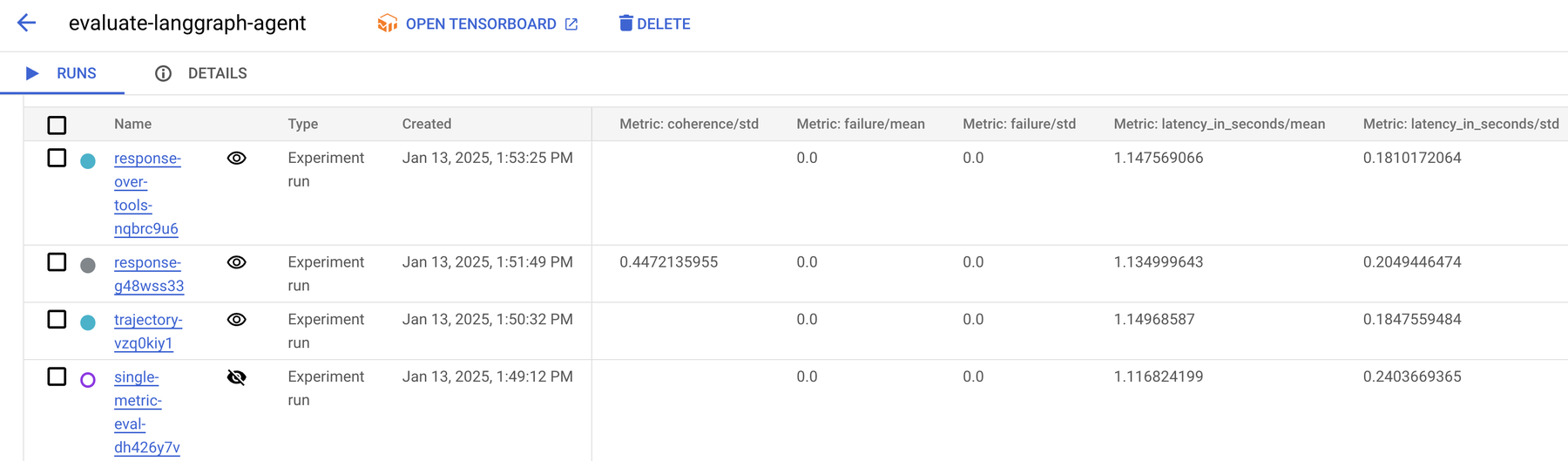
As you saw, you can create a custom token_count metric within your cloud's monitoring system. Your agent application would then be responsible for counting the tokens used in each LLM call (most LLM APIs return this in the response) and periodically sending this data to the monitoring service.
This allows you to create dashboards and alerts to answer critical questions:
- What is our total token consumption per day?
- Which agent is the most expensive?
- Did a recent change to a prompt cause a spike in token usage?
4. The Human Element: LLM-as-a-Judge
For complex, qualitative evaluations (e.g., "Is this response helpful and empathetic?"), simple metrics like ROUGE are not enough. This is where we use an LLM-as-a-judge. The idea is to use a powerful LLM (like GPT-4 or Gemini 1.5 Pro) to evaluate the agent's output based on a rubric you provide.
However, there's a critical catch: you cannot trust the judge blindly. You must first ensure the LLM judge is aligned with your own human judgment.
How to Systematically Setup LLM Evals (Metrics, Unit Tests, LLM-as-a-Judge)
This final video segment from Dave Ebbelaar provides a brilliant, step-by-step walkthrough of how to align an LLM-as-a-judge with human evaluators. This is an industry best practice for robust qualitative evaluation.
Please watch from 17:55 to 31:46. This is a longer segment, but it's the most practical guide you'll find on this topic. Focus on: The principle: Human-in-the-loop first. You must have human evaluations before you can automate with an LLM judge. The process shown in the Excel sheet: collecting input/output pairs, getting a model critique, getting a parallel human critique, and then comparing them to calculate an 'agreement score'. The iterative loop: Using the disagreements to refine the prompt for the LLM judge until its judgments align with the human expert's.
This process of aligning an LLM judge is fundamental to creating reliable, automated evaluations for the subtle qualities of your agent's performance that go beyond simple pass/fail tests.
Conclusion
You've now learned that evaluating an AI agent is a discipline in its own right, blending principles from software testing with data science. It's not a one-off task but a continuous cycle of analysis, measurement, and improvement that is vital for building production-ready systems.
Key Takeaways:
- Agent evaluation is a system-level challenge, assessing both the trajectory (process) and the final response (output).
- A tiered approach provides structure: start with fast Unit Tests, move to qualitative Human and Model-based Evals using Golden Datasets, and finally use A/B Tests for business impact.
- Task Success Rate can be measured using metrics like
tool_trajectory_avg_scoreto validate the agent's logic andresponse_match_scoreor an LLM-as-a-judge to validate the output. - Token Cost is a critical operational metric tracked via custom monitoring systems, allowing you to manage the economic efficiency of your agent.
- Reliable evaluation is an iterative process. You must continuously analyze failures, refine your metrics, and improve your agent.
In our recent lessons, we've covered reliability, human oversight, and evaluation. We are now well-equipped to build and validate a single, robust agent. In our final lesson, we will address one of the most critical aspects of deployment: security and safety, covering topics like prompt injection, data leakage, and preventing your agent from causing unintended harm.