Hello! Welcome to the final lesson in our module on data formats. Over the past few lessons, you've developed the skills to read and interpret both JSON and XML payloads. You've seen how JSON uses key-value pairs and arrays, and how XML builds hierarchies with elements and attributes.
Today, we'll synthesize that knowledge. Our goal is to compare and contrast JSON and XML, not just as abstract formats, but in the context of real-world APIs you'll encounter as an Integration Support Engineer. We will explore why a modern mobile app might use one format, while a legacy hotel booking system uses another. Understanding these differences will help you quickly assess an integration's architecture and anticipate potential points of failure.
Let's begin by looking at how the same data appears in both formats.
Syntax and Verbosity: A Visual Comparison
The most immediate difference between JSON and XML is their syntax. XML uses a tag-based structure with start and end tags for every piece of data, while JSON uses key-value pairs.
Look at the image below. It shows the same database inventory information represented in XML on the left and JSON on the right.

As you can see, the XML version is significantly more verbose due to the repeated opening and closing tags (e.g., <DatabaseName> and </DatabaseName>). The JSON version is more compact, using braces {} for objects, brackets [] for arrays, and colons to separate keys from values. This difference in verbosity isn't just cosmetic; it has direct implications for performance, as smaller payloads require less bandwidth and can be parsed more quickly.
For a more structured breakdown of their differences, let's turn to a resource from Amazon Web Services (AWS).
JSON vs XML - Difference Between Data Representations - AWS
This article provides a clear, high-level comparison of the two formats. As you read, focus on how their fundamental design choices lead to different strengths and weaknesses.
First, review the side-by-side examples under the heading Data representation. This reinforces the visual comparison we just made. Next, read the section Key differences. Pay close attention to the subsections on Syntax, Parsing, and Ease of use. Finally, look at the Summary of differences table. This is a great, concise recap of the core distinctions.
Why Are They So Different? Design Philosophy Matters
Now that we've seen what makes JSON and XML different, let's explore why. Their differences stem from their origins and design goals. XML was developed in the late 1990s as a flexible way to create structured documents for the web, similar to HTML. JSON emerged in the early 2000s directly from JavaScript as a way to represent programming objects.
This distinction is crucial. An API's primary job is to exchange data structures (objects) between systems, not to format documents. The following video by Erik Wilde explains this history and why JSON's object-native approach gave it a significant advantage in the world of APIs.
API Formats: Why JSON won over XML
In this video, the speaker explains the "conceptual mismatch" of using a document format (XML) for data exchange and why JSON's design was a more natural fit for developers.
Please watch the segment from this portion of the video. The speaker clearly explains: How XML was designed to represent structured documents as a "tree" of nodes. How this required developers to perform a complex mapping from the XML "tree" to the "objects" used in their code. How JSON, being literally JavaScript Object Notation, eliminated this complexity by directly representing the objects themselves.
As the video explains, using XML for APIs meant developers had to constantly translate between the XML document tree and the objects in their programming language. JSON simplified this immensely, as parsing a JSON string in JavaScript (and most other modern languages) can directly produce a native data object. This is a primary reason why JSON has become the dominant format for modern REST APIs.
The Right Tool for the Job: Real-World Use Cases
While JSON is more popular for new APIs, XML is far from obsolete. As an Integration Support Engineer, you'll work with both. The choice between them depends on the context: the industry, the age of the system, and the specific requirements of the integration.
In your work with hotel PMS systems, you will frequently encounter XML. Many foundational standards in the travel industry, like those from the OpenTravel Alliance (OTA) you saw in the previous lesson, were built on XML. Furthermore, a specific type of web service called SOAP, common in enterprise environments, exclusively uses XML.
Difference Between REST API vs Web API vs SOAP API Explained
This short clip highlights a critical distinction between SOAP and REST APIs that you will frequently encounter.
Watch these two brief moments in the video: The first point at this timestamp states that SOAP APIs use XML for sending and receiving data. The second point at this timestamp reiterates that SOAP uses XML as its data format.
This is a non-negotiable rule: if you're troubleshooting a SOAP API, you are troubleshooting XML. REST APIs, on the other hand, are more flexible, but the vast majority use JSON.
Let's dive into an article that provides excellent practical guidance on when and why each format is chosen.
JSON Vs. XML for Web APIs: The Format Showdown - Zuplo
This article moves from theory to practice, detailing the specific scenarios where each format excels. This is the kind of thinking that will help you quickly understand the "why" behind an integration's design.
Focus on these two key sections: Start with Battle of the Formats. This section covers performance and how the choice of format often aligns with the age of the tech stack (modern vs. traditional). Next, read Real-World Showdown. This is the most important part. It gives concrete examples of when to use JSON (mobile apps, REST APIs) versus when XML is preferred (enterprise applications, SOAP, legacy systems, document workflows). This will directly map to the kinds of systems you'll be supporting.
To bring all these points together, here is a summary table that provides a great at-a-glance comparison of the two formats.
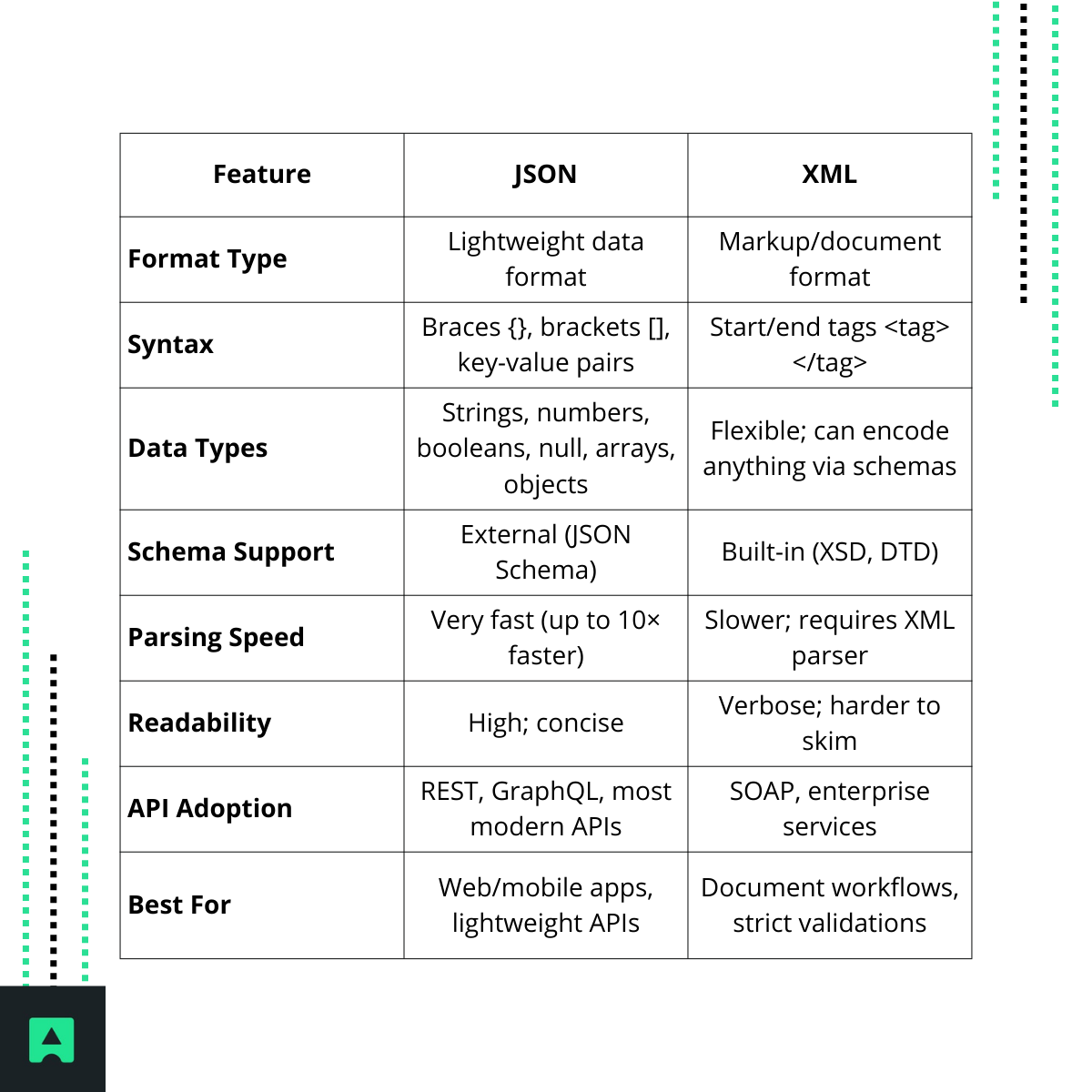
Key Takeaways
This lesson concludes our exploration of data formats. You are now equipped to work with the two most common formats in the world of APIs.
- JSON (JavaScript Object Notation): Lightweight, concise, and easy for machines to parse and humans to read. It's the standard for modern RESTful APIs, web applications, and mobile apps due to its performance and close relationship with JavaScript.
- XML (eXtensible Markup Language): Verbose, highly structured, and powerful. It excels at representing complex documents and enforcing strict data validation with schemas. You will find it in legacy systems, enterprise SOAP web services, and in industries with long-established data standards, such as finance and travel.
- Context is King: The choice isn't about which format is "better" overall, but which is the right tool for the job. As a support engineer, understanding their respective strengths and historical context will allow you to work effectively with any system, new or old.
With this foundation in place, we are ready to move from analyzing the data to analyzing the transaction. In the next module, "Advanced REST API Troubleshooting," we'll broaden our focus to the entire API request-response cycle. We'll start by learning to differentiate between client-side (4xx) and server-side (5xx) errors, a fundamental skill for quickly diagnosing where an API integration is failing.