Welcome to your first lesson! We'll begin by building the most important foundation for any successful project: understanding and defining what the project is supposed to achieve. In a fast-paced role, you'll constantly receive requests that are often vague or rushed. This lesson is about learning to translate those requests into a clear, agreed-upon plan.
Specifically, we'll focus on how to create a project scope statement. This document acts as your project's official guide, detailing its objectives, the work that will be done, and—just as importantly—the work that will not be done. Mastering this will be the first step toward building the robust trackers you need, ensuring you're tracking the right things from the very beginning and protecting you from unexpected changes down the line.
Let's get started.
What is Project Scope and Why Does It Matter?
Before you can build a tracker, dashboard, or report, you need to know exactly what you're building it for. A project's scope defines its boundaries. It's the agreement between you and your stakeholders on the project's goals, what the final result will look like, and the specific work required to get there.
A well-defined scope is your best defense against "scope creep"—the slow, unmanaged expansion of a project's goals. In a fast-paced job, scope creep is a constant risk. A simple request for a "PO tracker" can quickly balloon into requests for inventory management, supplier payment tracking, and budget forecasting, pulling you in multiple directions and delaying your original goal. A formal scope statement prevents this by setting clear expectations for everyone involved.
To get a solid grasp of these foundational ideas, please read the following sections from the article "Project scope: definition, scope statement" from Asana.
How to Write a Project Scope in 8 Easy Steps [2025]
This reading introduces the core concepts of project scope, the scope statement, and the common problem of scope creep.
Please read the first few sections of the article, starting from the beginning down to the end of the section on scope creep. Focus on these key definitions: Project scope: Understand what elements this definition includes. Project scope statement: Note its function as a formal document. Scope creep: Pay close attention to the example provided, as it's a very common scenario.
The Key Components of a Scope Statement
A strong scope statement isn't just a paragraph of text; it's a structured document with several key ingredients that work together to provide clarity. While formats can vary, nearly all effective scope statements include a common set of components.
This diagram provides a great overview of what goes into a Project Scope Statement.

To see how these components are defined and used in practice, the following video provides a concise and practical walkthrough.
Writing a Project Scope Statement in 10 Minutes! (FREE Template!)
The video "Writing a Project Scope Statement in 10 Minutes!" by Alvin the PM breaks down the essential parts of a scope statement with clear, practical examples.
Please watch the following segments of the video. As you watch, think about how each component helps clarify a project. Introduction: Watch from the beginning to the five components to understand the core purpose and the list of key sections. Project Purpose: Watch this segment on defining project goals and objectives. Scope Description: This is the most critical part. Watch from this explanation of "In Scope" and "Out of Scope" carefully. Note the advice on how to prevent stakeholders from taking advantage of ambiguity. Deliverables: Watch the segment explaining project deliverables. These are the tangible outputs of your project. Assumptions & Constraints: Finally, watch the explanation of assumptions and constraints. These define the conditions and limitations your project must operate within.
From a Vague Request to a Clear Scope
Now, let's apply this to a scenario you're likely to encounter. Imagine your manager says:
"We need a way to track our Purchase Orders. I feel like things are constantly falling through the cracks, and we don't know the status of parts we've ordered. Can you build something in Excel?"
This is a classic project request. It's a real problem but lacks the detail needed to start working. Your job is to translate this into a structured scope statement. Here’s how you could break it down using the components we just learned about.
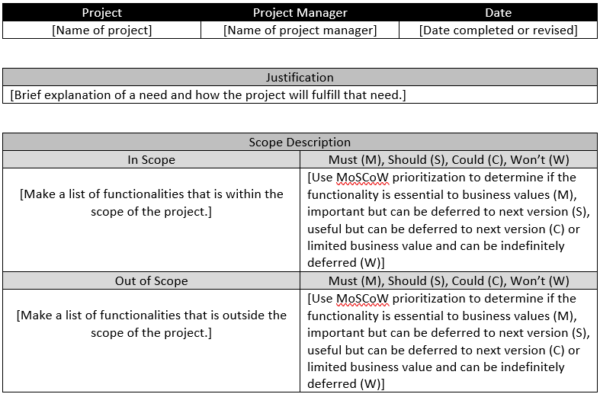
Here is how you would fill out a scope statement for the PO tracker request:
-
Project Objective: To develop and implement a centralized Excel-based Purchase Order tracker to provide real-time visibility into PO status, reducing the time spent searching for information and minimizing order delays.
-
Scope Description:
- In Scope:
- Tracking core PO data: PO number, vendor, order date, item description, quantity, price.
- Tracking key status points: "Ordered," "Shipped," "Delivered."
- Defining a clear owner for each PO.
- A dashboard view summarizing total open POs and POs by status.
- Out of Scope:
- Tracking parts inventory after a delivery is received.
- Managing supplier invoices and payments.
- Forecasting future budget needs based on PO data.
- Integrating with any other software (e.g., accounting systems).
- In Scope:
-
Key Deliverables:
- A multi-sheet Excel workbook containing the PO tracker, input form, and summary dashboard.
- A one-page PDF guide on how to use the tracker.
- A 15-minute training session for the team.
-
Constraints:
- The solution must be built entirely within Microsoft Excel.
- The project budget is limited to the hours required to build the tool (no software purchases).
- The tracker must be completed and launched within three weeks.
-
Assumptions:
- All necessary PO data is accessible and can be provided in a consistent format.
- Team members have basic Excel knowledge and will use the tracker as intended after training.
By documenting these points, you transform a vague request into a well-defined project. If someone later asks, "Can you make the tracker also manage our inventory?", you can point to the "Out of Scope" section and explain that it's a separate project.
Using AI as Your Co-Pilot
You don't have to write a scope statement from scratch every time. Given your familiarity with AI tools, you can use them to generate a solid first draft. The key is to provide a well-structured prompt. Vague prompts lead to vague outputs.
The article "ChatGPT for Construction" offers excellent, universally applicable advice for prompting an AI to create professional documents. The techniques are just as relevant for a PO tracker as they are for a construction site.
ChatGPT for Construction: 5 Proven Prompting Techniques for RFIs, Scopes & Change Orders
This article provides field-tested prompts for getting better results from AI assistants when drafting documents. We will focus on the principles, not the construction-specific content.
Please read the following three sections to learn how to create effective prompts: Prompt Template 1: This teaches the AI to ask clarifying questions instead of making risky assumptions. Prompt Template 4: This shows how to set clear boundaries and quality standards by specifying "Requirements" and what to "Avoid." Prompt Template 5: This focuses the AI on the desired outcome and lets it handle the structure, which is often more effective than micromanaging the process.
Your Turn: Prompting for a Scope Statement
Now, try it yourself. Open ChatGPT or Gemini and use the following prompt, which incorporates the principles you just read about.
Prompt to copy and paste:
Act as an expert project manager. I need to draft a project scope statement for a new internal project.

**Project Context:** My manager has asked me to "build a way to track our Purchase Orders in Excel because we are losing track of order status."

**Your Task:** Create a draft project scope statement based on this context. The statement must be structured with the following sections:
1.  **Project Objective:** A single, clear sentence.
2.  **Key Deliverables:** A bulleted list of 2-3 tangible outputs.
3.  **Scope Description (In Scope / Out of Scope):** A bulleted list for each, clearly defining the project's boundaries.
4.  **Assumptions:** A bulleted list of 2-3 likely assumptions for a project like this.
5.  **Constraints:** A bulleted list of 2-3 typical project limitations.

**Instructions:**
- For sections where you need more information from me (e.g., specific budget, timeline), use placeholders like "[Specify timeline]" or "[Confirm budget]" and list the questions you need answered.
- Avoid making up specific numerical details.
- Focus the "Out of Scope" section on items that are commonly confused with a PO tracking project to prevent scope creep.
Run this prompt and review the output. Notice how it provides a structured, professional-looking document that is already 80% of the way there. You just need to fill in the specifics.
Conclusion
In this lesson, you've taken the first critical step in formalizing a project. You now understand that a clear project scope statement is not bureaucratic overhead; it's an essential tool for focus, alignment, and success, especially in a fast-moving environment.
Here are the key takeaways:
- A scope statement defines your project's boundaries, objectives, and deliverables.
- Clearly defining what is "in scope" and "out of scope" is your primary defense against scope creep.
- The main components are the objective, deliverables, boundaries, constraints, and assumptions.
- You can leverage AI assistants to quickly draft a comprehensive scope statement, provided you give them a detailed and well-structured prompt.
With a clear scope defined, you now have a solid foundation. In our next lesson, we will take the "in scope" items and learn how to break them down into an actionable task list. This process, known as creating a Work Breakdown Structure (WBS), will form the backbone of the Excel tracker you're going to build.