Welcome to the next stage of your training. In our previous lesson, you mastered the critical reconnaissance phase of a UNION attack: determining the exact number of columns returned by a vulnerable query. This was the foundational step, akin to finding the dimensions of a keyhole before forging the key.
Today, you will forge that key. This lesson moves from reconnaissance to active exfiltration. You will learn how to use the information about column count to craft a complete UNION SELECT statement that retrieves data from tables the application was never intended to expose. We will cover how to identify which columns are suitable for displaying data and then construct the final payload to extract sensitive information, like usernames and passwords.
Step 1: Finding Columns with a Useful Data Type
You've successfully determined the number of columns required for a UNION query. Now, we must address the second requirement: the data types in each corresponding column must be compatible. Our goal is typically to extract text data (usernames, credentials, PII), so we need to find at least one column in the original query's result set that can display string values.
The methodology is a direct extension of what you learned previously. Having found the correct number of columns, you will now inject a series of UNION SELECT payloads, systematically replacing one NULL value at a time with a test string.
For a query that returns two columns, the payloads would look like this:
' UNION SELECT 'a', NULL--' UNION SELECT NULL, 'a'--
When you inject one of these payloads:
- If the application responds without error and you see your test string (
'a') reflected in the output, you have successfully identified a column that accepts string data. - If the database returns an error (e.g., a conversion error), that column's data type is incompatible with strings (it might be an integer, date, or other type).
The PortSwigger Web Security Academy provides a clear explanation of this process.
SQL injection UNION attacks | Web Security Academy
This guide explains the technical details of probing columns for compatible data types.
Please read the section titled Finding useful columns. Focus on the logic behind substituting NULL with a string value to test each column's compatibility.
Now, let's observe this technique in a practical demonstration. The following video shows how to find string-compatible columns after determining the column count.
SQL Injection - Lab #5 SQL injection UNION attack, retrieving data from other tables
In this segment of the lab from security researcher Rana Khalil, she demonstrates how to identify which of the two discovered columns can hold string data.
Watch the clip from determining data types. Observe how she injects a test string 'a' first into one column, then the other, and confirms that both are of a string data type because the application renders the injected values without error.
Step 2: Retrieving Data from Other Tables
Once you have identified the number of columns and which of them can hold string data, you are ready to perform the exfiltration. At this point, you must make an educated guess about the names of other tables and columns in the database. Common names like users, accounts, username, and password are excellent starting points. (In the next lesson, we will cover how to enumerate these names systematically).
Assuming the database contains a users table with username and password columns, and the original query returns two string-compatible columns, you can construct the following payload:
' UNION SELECT username, password FROM users--
Let's break this down:
'closes the string parameter in the originalWHEREclause.UNION SELECT username, passwordis your injected query. You select the two columns you want to exfiltrate.FROM usersspecifies the target table.--comments out the remainder of the original query to prevent syntax errors.
When executed, the database will return the results of the original query first, followed by all the usernames and passwords from the users table. These will typically appear on the web page where the legitimate results are displayed.
The following image shows an example of a successful UNION attack. The injected payload is visible in the URL, and the resulting credit card number (retrieved from a different table) is displayed on the page.

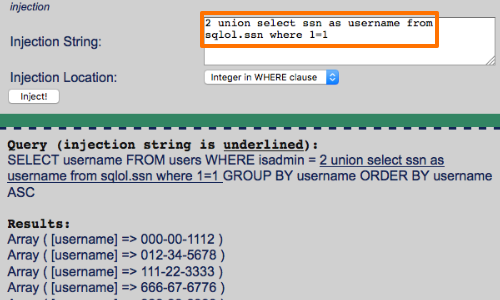
This next image provides a more detailed view, showing the injection string, the full query constructed on the backend, and the resulting list of social security numbers exfiltrated from the sqlnol.ssn table.
For a formal walkthrough, let's return to the PortSwigger guide.
SQL injection UNION attacks | Web Security Academy
This section explains how to put all the pieces together to retrieve the data you want.
Read the section Using a UNION attack. It provides a concise example of crafting the final payload to extract usernames and passwords.
A Complete Demonstration
Now, let's see the full attack sequence demonstrated in a lab environment. The video will show the final step of injecting the UNION SELECT statement to retrieve credentials and then using them to log in.
SQL Injection - Lab #5 SQL injection UNION attack, retrieving data from other tables
Rana Khalil completes the attack by crafting a query to extract usernames and passwords from the 'users' table.
Watch from the final extraction. Notice how she maps the username and password columns from her malicious query to the two string-compatible columns she identified earlier. This results in a complete dump of the user credentials, which she then uses to compromise the administrator account.
To reinforce the entire process, this second video provides a very quick and clear summary of all the steps involved in a typical UNION attack.
UNION SQL Injection to Extract Data From Other Tables!
The channel Intigriti provides a concise summary of the end-to-end UNION injection process.
Watch the recap from the summary. This will help consolidate your understanding of the flow: probing with a quote, finding the column count, testing data types, and finally, extracting the data.
What if There Aren't Enough Columns?
You might encounter a situation where you need to extract two pieces of data (e.g., username and password) but have only found one string-compatible column. In this case, you can use the database's string concatenation function to combine multiple data points into a single column.
For example, on PostgreSQL or Oracle, you could use:' UNION SELECT username || '~' || password FROM users--
On MySQL, the syntax would be:' UNION SELECT CONCAT(username, '~', password) FROM users--
This technique combines the username and password, separated by a ~, into a single string that can be exfiltrated via the one available column.
Conclusion
You have now executed a complete UNION-based SQL injection attack, from initial reconnaissance to final data exfiltration. This is one of the most powerful and direct forms of SQL injection, allowing an attacker to read arbitrary data from the database.
Key Takeaways:
- Data Type Probing: After finding the column count, you must identify which columns are compatible with string data by injecting test strings (
'a') in place ofNULLs. - Payload Construction: The final payload combines your knowledge of column count and data types with guessed or known table/column names (e.g.,
UNION SELECT username, password FROM users--). - Exfiltration: The results of your injected query are appended to the legitimate results and displayed within the application's response.
- Concatenation: If you have fewer useful columns than the data you want to extract, use database-specific concatenation functions (e.g.,
||orCONCAT()) to merge data into a single column.
In this lesson, we assumed you knew the names of the tables and columns to target. In a true black-box test, this information is unknown. Our next lesson will address this exact challenge, teaching you how to query the database's own metadata schema (information_schema) to systematically discover all tables, columns, and their data types.