In our previous lesson on the HAVING clause, you saw how we can construct powerful analytical queries by filtering aggregated data. As these queries grow to include more calculations and, soon, multiple tables, they can become long and difficult to read. This is a practical problem that can slow down analysis and make code harder to maintain.
This lesson introduces a simple but essential SQL feature to manage this complexity: aliasing. You will learn how to use the AS keyword to assign temporary, more readable names to columns and tables within your queries. Mastering this technique is crucial for writing clean, professional SQL, especially as we prepare to combine data from multiple sources in our upcoming lessons.
What is Aliasing?
An alias is a temporary, alternative name given to a column or a table in a SQL query. Its sole purpose is to improve the readability and manageability of your script. It doesn't change the underlying data or schema; it only affects how columns are labeled in your results and how tables are referenced within that specific query.
There are two main types of aliases: column aliases and table aliases.
1. Column Aliases
A column alias renames a column in the final result set. This is particularly useful in a few key scenarios relevant to security analysis:
- Naming Aggregate Function Results: When you use a function like
COUNT(*), the resulting column often has a generic or unhelpful name. An alias lets you give it a meaningful name, likefailed_login_attempts. - Naming Calculated Columns: If you perform calculations or use string functions (like concatenating a first and last name), an alias provides a clean name for the new, derived column.
- Improving Readability: You can shorten long or technical column names (e.g.,
authentication_log_event_id) to something simpler (e.g.,event_id) in your output.
The syntax is straightforward:
SELECT column_name AS alias_name
FROM table_name;
If your alias contains spaces, you must enclose it in double quotes (or brackets [] in SQL Server). For example: AS "Error Count".
2. Table Aliases
A table alias assigns a short, temporary name to a table in the FROM or JOIN clause. As you start writing queries that pull data from multiple tables, this becomes indispensable. Imagine joining web_server_access_logs with user_authentication_events and firewall_denial_logs. Referencing these full names repeatedly would make the query nearly unreadable.
By using aliases like al, uae, and fw, you can make your query dramatically cleaner. This also prevents ambiguity when two tables have columns with the same name (e.g., id or timestamp).
The syntax is similar:
SELECT alias.column
FROM table_name AS alias;
In both column and table aliasing, the AS keyword is technically optional in most SQL dialects, but using it is a widely-accepted best practice for clarity.
This annotated image breaks down a query that uses both types of aliases, showing how they make the code cleaner and more explicit.
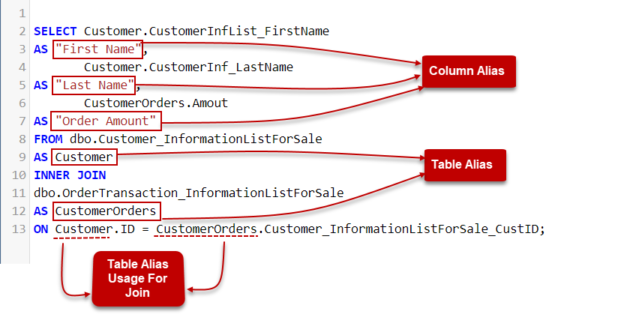
Aliasing in Practice
The following video provides an excellent, concise walkthrough of creating and using both column and table aliases. Pay close attention to the best practices mentioned at the end.
Intermediate SQL Tutorial | Aliasing
This tutorial from "Alex The Analyst" covers the fundamentals of aliasing, from basic syntax to practical use cases and important best practices.
Please watch the following segments: Column Aliasing: This section demonstrates how to alias regular columns, concatenated fields (like creating a full name), and the output of aggregate functions like AVG(). Table Aliasing: Here, you'll see how table aliases are used to shorten queries, particularly in the context of a JOIN. This is a direct preview of what we will cover in the next module. Best Practices: This part discusses why you should use meaningful aliases instead of arbitrary single letters (a, b, c), which is crucial for writing maintainable code.
To reinforce these concepts, the following article provides clear syntax examples and shows how to combine column and table aliases in a single query.
How to Use a SQL Alias to Simplify Your Queries
This DataCamp tutorial provides clear, text-based examples of alias syntax and usage.
Focus on these sections: First, review the syntax under "Using the AS Keyword". This provides a quick reference for both column and table alias syntax. Next, look at the examples under "SQL Alias Examples and Use Cases." Pay attention to the query that joins the Products and Suppliers tables (table alias example), as it perfectly illustrates how aliases simplify multi-table queries. Finally, examine the query under "Applying more than one SQL alias". This demonstrates how both alias types are used together in a more complex query involving a subquery, showing how the techniques stack.
From Complex to Clean: A Practical Example
Let's revisit the query from our last lesson on HAVING, which identifies IP addresses with excessive "Not Found" errors. Without aliases, it looks like this:
SELECT
    access_logs.ip_address,
    COUNT(*)
FROM
    access_logs
WHERE
    access_logs.status_code = 404
GROUP BY
    access_logs.ip_address
HAVING
    COUNT(*) > 100
ORDER BY
    COUNT(*) DESC;
This is already becoming repetitive. Now, let's clean it up with aliases:
SELECT
    al.ip_address,
    COUNT(*) AS error_count
FROM
    access_logs AS al
WHERE
    al.status_code = 404
GROUP BY
    al.ip_address
HAVING
    COUNT(*) > 100 -- Note: We repeat the function here for compatibility
ORDER BY
    error_count DESC;
The "after" version is shorter, eliminates redundancy, and the SELECT and ORDER BY clauses are more readable. You can immediately see the output column will be named error_count.
A quick note on compatibility: some SQL versions (like MySQL) would let you use HAVING error_count > 100. However, the SQL standard and other versions (like SQL Server) do not allow using a column alias in the HAVING clause because of the logical query processing order. To write the most portable code, it's safest to repeat the aggregate function in the HAVING clause as shown above.
Conclusion
In this lesson, you've learned how to use AS to create column and table aliases. While a simple concept, it is fundamental to writing clean, readable, and maintainable SQL. As a security professional, you will often deal with complex data correlation, and clear queries are essential for efficient analysis and for sharing your work with colleagues.
Key Takeaways:
- Aliases create temporary, readable names for columns and tables using the
ASkeyword. - Column aliases are used to name the output of aggregate functions and calculations, making results easier to interpret.
- Table aliases shorten table names, which is critical for simplifying queries that involve multiple tables.
- Using descriptive aliases (e.g.,
logsinstead ofa) is a best practice that greatly improves code clarity.
The skill you've just acquired is not just for tidiness—it's a prerequisite for the next major topic. In our next lesson, we will begin combining data from multiple tables using JOINs. You will find that table aliases are not just helpful but practically essential for that task.