Welcome to your first lesson in the "SQL for Cyber Security" course. Your goal is to move from the fundamentals of SQL to its application in security, particularly in understanding and executing SQL injection attacks. This course is designed to be fast-paced and practical, aligning with your preference for hands-on learning.
In this introductory lesson, we will focus on the most fundamental command in SQL: the SELECT statement. You will learn how to retrieve data from a database, which is the foundational skill for everything that follows. Mastering this will be your first step toward both querying databases for legitimate purposes and, eventually, understanding how to probe them for vulnerabilities.
What is SQL?
SQL, or Structured Query Language, is the standard language for managing and manipulating relational databases. As a security analyst, you'll encounter databases everywhere, storing everything from user credentials and financial records to application logs. Understanding SQL is crucial because it's the language used to talk to these databases.
To get a better sense of why SQL is so central, especially in a security context, let's start with a brief reading.
Intro to Data Analytics Using SQL - Black Hills Information Security, Inc.
This reading from Black Hills Information Security provides a great overview of SQL and immediately connects it to cybersecurity by mentioning SQL injection.
Read the introduction of the article, starting from "And without further ado, let’s get into talking about SQL" and ending just before the section on "Why would you want to use SQL...". Focus on how the text breaks SQL down into different sub-languages, with a primary focus on Data Query Language (DQL), which is essentially the SELECT statement.
As you read, notice that while SQL can be used for many things (like creating tables), our initial focus is on querying—asking the database for information. This is the skill you'll use most, whether you're analyzing logs or performing reconnaissance on a target system.
The Anatomy of a Basic Query
Data in a relational database is stored in tables, which are structured like spreadsheets with rows and columns.
- Columns represent the fields or attributes of the data (e.g.,
username,email,password_hash). - Rows represent individual records (e.g., a specific user's account information).
To retrieve data from a table, you use a SELECT statement. The most basic form of this statement has two parts:
SELECT: Specifies which columns you want to see.FROM: Specifies which table to get them from.
The general syntax is: SELECT <columns> FROM <table>;
Retrieving All Columns from a Table
Often, the first step in examining a table is to see everything it contains. To do this, you can use the asterisk (*), which is a wildcard character that means "all columns".
The query looks like this:
SELECT * FROM users;
This command would return every column and every row from the users table. In a security context, running this query on a newly discovered table is a common reconnaissance technique to quickly understand what data it holds.
Let's watch a short video that demonstrates this. The speaker frames it for a cybersecurity audience, which should be right up your alley.
The basics of SQL for Cybersecurity Professionals
This clip from Ryan McBeth's "The basics of SQL for Cybersecurity Professionals" shows how to use SELECT *.
Watch from the SELECT * command. Notice how this single command retrieves the entire contents of the employee table.
Retrieving Specific Columns
While SELECT * is useful for an initial look, it's often inefficient and can return a lot of unnecessary data. More commonly, you'll want to retrieve only specific columns. To do this, you simply list the names of the columns you want, separated by commas, after the SELECT keyword.
For example, if you've identified that a users table contains user_id, username, password_hash, and last_login, but you are only interested in the usernames and their password hashes, you would write:
SELECT username, password_hash FROM users;
This is much more targeted. It reduces noise and gets you the exact information you're after—a key principle in any kind of analysis.
The image below shows a clear visual of this process. A query asks for the first_name and last_name columns from a Customers table, and the result is a new, smaller table containing only that data.
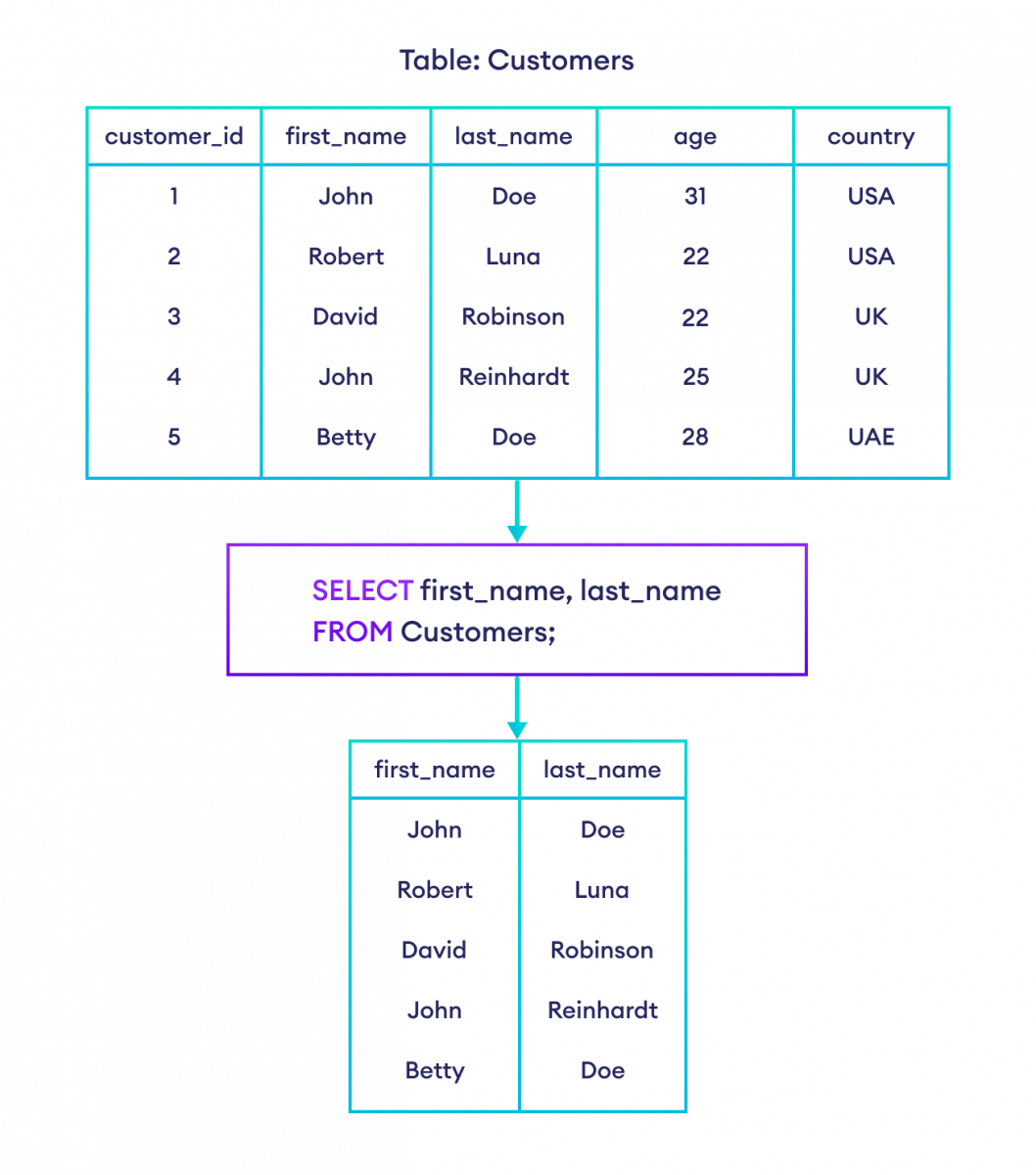
Now, watch another quick video that demonstrates selecting specific columns. This one also shows how the order in which you list the columns in your query determines the order they appear in the output.
MySQL: How to SELECT data from a TABLE
This video from Bro Code, titled "MySQL: How to SELECT data from a TABLE", gives a clear and concise demonstration of selecting specific columns.
Watch the section from selecting specific columns. Pay attention to how you can specify columns by name and even change their display order in the result.
Hands-On Practice
You've seen the theory; now it's time to apply it. Your preference for hands-on learning is key to mastering SQL quickly. The following resource provides an interactive environment where you can write and run SQL queries directly in your browser.
Learn SQL Online Free - Interactive SQL Tutorial for ...
This interactive tutorial lets you practice SELECT statements against a real database. It's the most effective way to solidify your understanding.
Go to the page and scroll down to the "Quick Start" section. Click on the first lesson, "SELECT basics", and complete the interactive exercise. This covers SELECT *. Return to the "Quick Start" menu and click on the second lesson, "SELECT specific columns", and complete that exercise as well. These exercises will give you immediate feedback and are the perfect way to start building muscle memory for writing queries.
Conclusion
In this lesson, you took your first step into SQL by learning its most important command, SELECT. This is the foundation upon which all your future SQL skills, including those for cybersecurity, will be built.
Here are the key takeaways:
- SQL is the language used to communicate with relational databases.
- Data is stored in tables made of columns and rows.
- The
SELECTstatement is used to retrieve data from a table. SELECT * FROM table_name;retrieves all columns from a table.SELECT column1, column2 FROM table_name;retrieves only the specified columns.
You now have the fundamental ability to extract information from a database. In the next lesson, we will build directly on this by learning how to filter that information. Instead of just selecting columns, you'll learn to use the WHERE clause to select specific rows that match conditions you define, allowing you to ask much more precise questions of the data.