Introduction
In our last lesson, you practiced managing user data with INSERT, UPDATE, and DELETE. We concluded by highlighting how an attacker, with knowledge of your database structure, could abuse these same commands through SQL injection. This raises a critical question: how does an attacker gain that knowledge in the first place? They don't have access to your database design documents. This is where reconnaissance comes in.
This lesson introduces the first and most fundamental step in database reconnaissance: enumerating the database schema. You will learn how attackers and penetration testers query a database's own internal metadata to discover its structure. We will focus on the INFORMATION_SCHEMA, a standardized set of views that acts as a built-in map of the database, revealing tables, columns, and their properties. Mastering this technique is essential for understanding how attackers identify their targets before launching an attack.
What is the INFORMATION_SCHEMA?
Nearly every modern relational database needs a way to keep track of its own structure—what tables exist, what columns are in those tables, their data types, and so on. Many popular database management systems (DBMS) like MySQL, PostgreSQL, and Microsoft SQL Server adhere to the SQL standard, which provides a special schema named INFORMATION_SCHEMA for this purpose.
You can think of INFORMATION_SCHEMA as a "database about the database." It contains a collection of read-only views that you can query just like any other table. For a security professional, this is a treasure trove. If you can inject queries, you can ask the database to describe itself.
Let's start by exploring how to list the tables within a database.
Enumerating Tables
The first objective in database reconnaissance is to discover the names of the tables. An attacker is always looking for tables with interesting names like users, accounts, credit_cards, or sessions.
The view used for this is INFORMATION_SCHEMA.TABLES. It contains information about every table in the database. The most useful columns in this view for our purposes are:
TABLE_SCHEMA: The name of the database (or schema) the table belongs to.TABLE_NAME: The name of the table.TABLE_TYPE: Indicates whether the object is aBASE TABLE(a regular table) or aVIEW(a virtual table based on a query).
To get a list of all tables in a specific database, you would run a query like this:
SELECT table_name
FROM information_schema.tables
WHERE table_schema = 'your_database_name' AND table_type = 'BASE TABLE';
The following video demonstrates querying information_schema.tables in a live environment. Pay close attention to how the queries are built to filter down from all database objects to a specific, useful list of tables.
Information Schema: How to use INFORMATION_SCHEMA to reverse engineer your PostgreSQL Database.
This video from Software Nuggets, "Information Schema," provides a practical demonstration of querying the metadata tables in PostgreSQL.
Watch the segment from the beginning to the discussion on tables. Notice how the demonstrator first gets a wide view and then uses WHERE clauses to filter by table_catalog (another name for the database), table_type, and table_schema to narrow the results to a manageable list of user-created tables.
Enumerating Columns
Once you've identified a promising table name, the next logical step is to find out what columns it contains. For example, if you find a users table, you'll want to know if it has columns like username, password, email, or session_token.
This is accomplished by querying the INFORMATION_SCHEMA.COLUMNS view. This view lists every column in every table. The key fields here are:
TABLE_SCHEMA: The database name.TABLE_NAME: The table the column belongs to.COLUMN_NAME: The name of the column.DATA_TYPE: The column's data type (e.g.,varchar,int,decimal).CHARACTER_MAXIMUM_LENGTH: For text-based columns, this shows the maximum number of characters.
To find all the columns in a users table, the query would be:
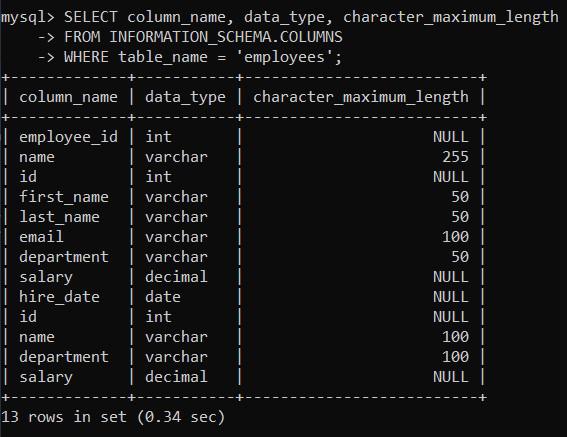
SELECT column_name, data_type, character_maximum_length
FROM information_schema.columns
WHERE table_name = 'users';
The image below shows the output of a similar query against an employees table.
Now, let's tie this directly to the context of an SQL injection attack.
Examining the Database in SQL Injection Attacks - DEV Community
The article "Examining the Database in SQL Injection Attacks" from OnyxWizard on dev.to provides an excellent walkthrough of this reconnaissance process from an attacker's perspective.
Please read the sections on listing tables and columns. Start at Section 4, which shows how to use information_schema.tables. Then, continue to Section 5, which does the same for information_schema.columns. Crucially, notice how each section provides both the standard SQL query and an "Example Payload" that uses a UNION statement. This is how these queries are injected into a vulnerable application.
As you saw in the article, the key is the UNION operator. You learned about UNION in a previous module as a way to combine result sets. In an attack, it's used to append the results of the attacker's metadata query to the result of the application's original, legitimate query.
For example, if a vulnerable page displays product names from a query like SELECT name, description FROM products WHERE id = 1, an attacker could inject a payload to discover table names:
1' UNION SELECT table_name, table_schema FROM information_schema.tables--
The database would execute something like:
SELECT name, description FROM products WHERE id = '1'
UNION
SELECT table_name, table_schema FROM information_schema.tables--';
The application would then display its normal output, followed by a list of all tables in the database, effectively handing the database map over to the attacker.
Database-Specific Variations
While INFORMATION_SCHEMA is part of the SQL standard, not all database systems implement it, and some have their own proprietary metadata views. As a security professional, you must be aware of these differences.
The article "SQL enumeration" provides a concise reference for different systems. You don't need to memorize it, but you should be aware that the techniques differ.
This article from one2bla.me is a useful cheat sheet for enumeration queries across different database systems.
Quickly scan the sections for MySQL, Microsoft SQL Server, PostgreSQL, and Oracle. Note that the first three all use INFORMATION_SCHEMA. In contrast, Oracle does not and requires queries against different views like all_tables and all_tab_columns.
Here is a summary of the most common views for enumeration:
| DBMS | Tables View | Columns View |
|---|---|---|
| MySQL/MariaDB | information_schema.tables |
information_schema.columns |
| PostgreSQL | information_schema.tables |
information_schema.columns |
| MS SQL Server | information_schema.tables |
information_schema.columns |
| Oracle | all_tables |
all_tab_columns |
| SQLite | sqlite_master |
sqlite_master (via sql column) |
Knowing these variations is crucial for successfully profiling a target system during a penetration test.
Conclusion
In this lesson, you've taken your first step into database reconnaissance. You now understand the role of metadata schemas and how to query them to discover the hidden structure of a database. This is the foundational skill upon which most SQL injection attacks are built.
Key Takeaways:
INFORMATION_SCHEMAis a standard set of views that contains metadata about the database itself.- You can query
information_schema.tablesto discover the names of all tables in a database. - You can query
information_schema.columnsto find the names and data types of columns within a specific table. - Attackers use
UNION-based SQL injection to exfiltrate this metadata from a vulnerable application. - Different database systems may have different metadata views (e.g., Oracle's
all_tables), requiring adjustments to your enumeration queries.
You have learned how to find the "what"—what tables and columns exist. In our next lesson, we will dig deeper into the database schema to understand the "how"—how columns are constrained (e.g., as primary keys) and how user permissions are defined. This will further refine your ability to map out a database for both defensive auditing and offensive security testing.