Introduction
In our previous lesson, we established a crucial principle for any serious AI engineer: LLM families are not interchangeable. A prompt that works brilliantly with GPT-4o might fall flat with Claude 3.5, due to differences in training data, alignment, and underlying architecture. This raises a critical engineering challenge: how do you manage this complexity in a real-world application without your codebase devolving into a chaotic mess of hardcoded strings and if model == 'anthropic' statements?
Today, we address this challenge head-on by introducing the discipline of prompt management. This lesson moves beyond crafting individual prompts to the systematic process of building and maintaining a prompt library. You will learn to treat prompts as first-class citizens in your software projects—versionable, reusable, and standardized assets that are crucial for building scalable and maintainable LLM applications. This is the bridge from prompt craft to prompt engineering.
This lesson directly targets the learning outcome of creating and managing a library of prompt templates for reusable and standardized task patterns, a cornerstone of production-grade LLM development.
1. The "Why": The Perils of Ad-Hoc Prompting
Before building a solution, it's essential to understand the problem. As you start building more complex LLM applications, you'll quickly encounter the limitations of embedding prompts directly in your code. These limitations are not just inconvenient; they are sources of technical debt and production risk.
To get a clear, engineer-focused overview of these pitfalls, let's watch the beginning of a guide on prompt management.
Prompt Management 101 - Full Guide for AI Engineers
The video 'Prompt Management 101' by AI engineer Dave Ebbelaar clearly outlines why treating prompts as simple strings is a recipe for failure in growing projects.
Please watch the segment from 01:16 to 07:43. As you watch, focus on the six common mistakes he identifies: Prompts scattered across the project. Limited version control. Lack of standardization. No evaluation framework. Prompt redundancy. No metadata. Think about how these issues would manifest in a production system you are responsible for maintaining.
As the video highlights, your prompts are often more critical to the output quality than the surrounding code. A disorganized approach leads to a system that is difficult to update, debug, and scale, especially when working in a team.
2. The "What": Anatomy of a Reusable Prompt Template
To solve these problems, we need to move from simple strings to prompt templates. A template is a blueprint for a prompt that combines static instructions with dynamic placeholders for variables. This allows for standardization and reusability.
A well-structured template generally contains four key components.
The article 'What is Prompt Management?' provides a clean breakdown of the essential components that make up an effective prompt.
Please read the section titled 'The Anatomy of a Prompt'. This will give you a mental model for structuring your templates around these four parts: Context/Background, Instruction/s, Input Data, and Output Indicator.
These components can be arranged into standardized patterns. While you'll develop your own, studying existing patterns can be a great starting point.
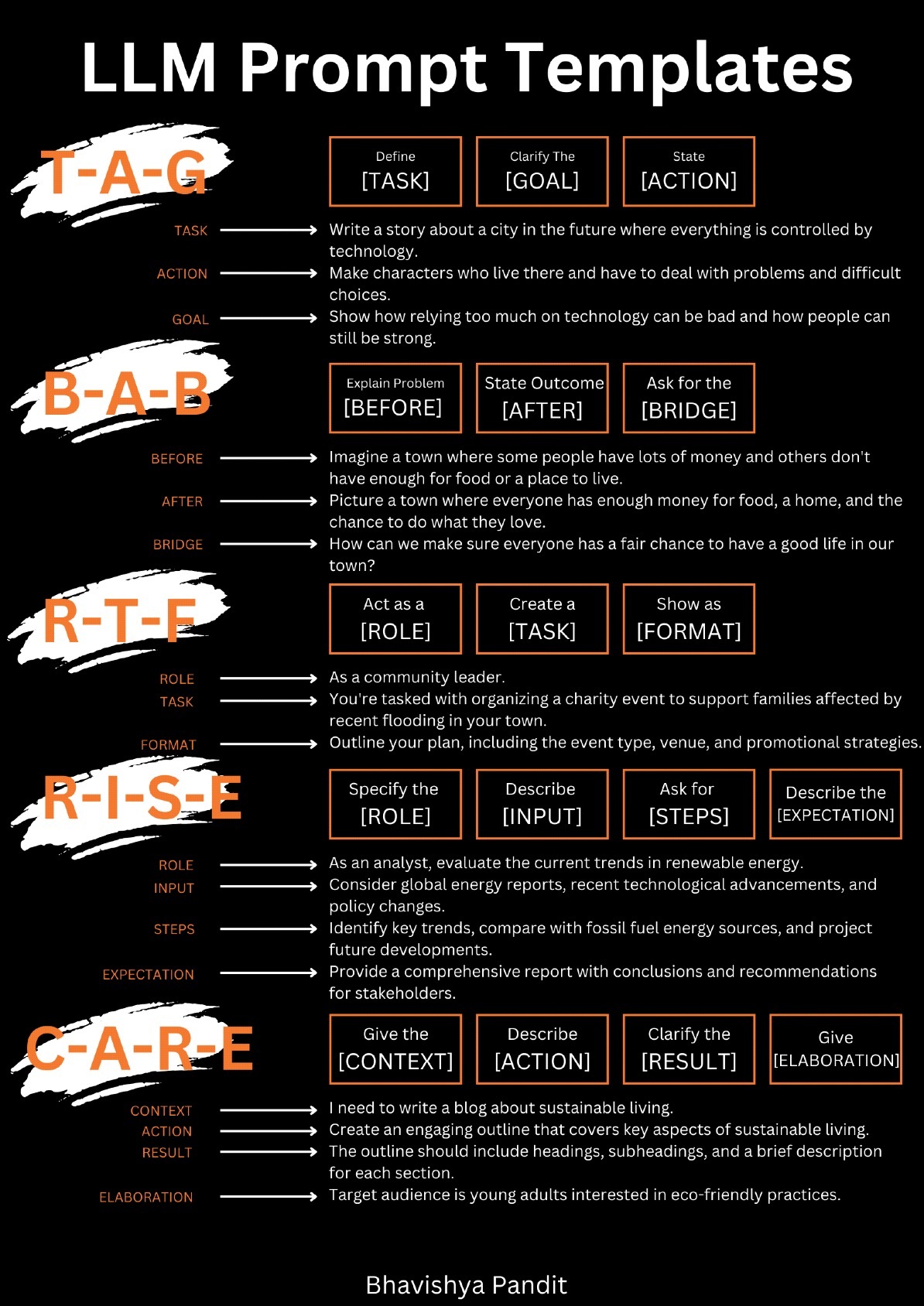
The core idea is to separate the fixed parts of a prompt (like the role or the desired output format) from the variable parts (like the user's query or retrieved documents).
3. The "How": A Maturity Model for Prompt Management
Now that we know why we need prompt management and what a template looks like, let's explore how to implement it. There isn't a single right answer; the best approach depends on your project's scale and complexity.
The "Prompt Management 101" video provides an excellent maturity model, outlining five levels of sophistication. This framework will help you choose the right strategy for your needs and understand the trade-offs at each stage.
Prompt Management 101 - Full Guide for AI Engineers
Let's return to 'Prompt Management 101' to explore the five methods of managing prompts.
Please watch the segment from 07:43 to 17:37. This section details a five-level progression for prompt management. Pay attention to the pros and cons of each: Inline Prompts: The baseline, embedding prompts in code. Centralized Storage: Storing prompts in a separate folder (e.g., as .txt files). Structured Centralized Storage: Using templating engines (e.g., LangChain, Jinja). External Tools: Using a 'Prompt CMS' like Langfuse or LangSmith. Custom Database Storage: Building your own prompt management system.
For most developers and small to medium-sized teams, Level 3: Structured Centralized Storage represents the sweet spot, offering a great balance of organization, power, and simplicity. Let's dive deeper into how to implement this.
4. Implementation Deep Dive: Templating Frameworks
At Level 3, we use a templating engine to create dynamic prompts from template files. This decouples the prompt's content from the application logic that uses it.
Option A: LangChain PromptTemplate
LangChain is a popular framework for building LLM applications, and it provides a straightforward way to manage prompt templates.
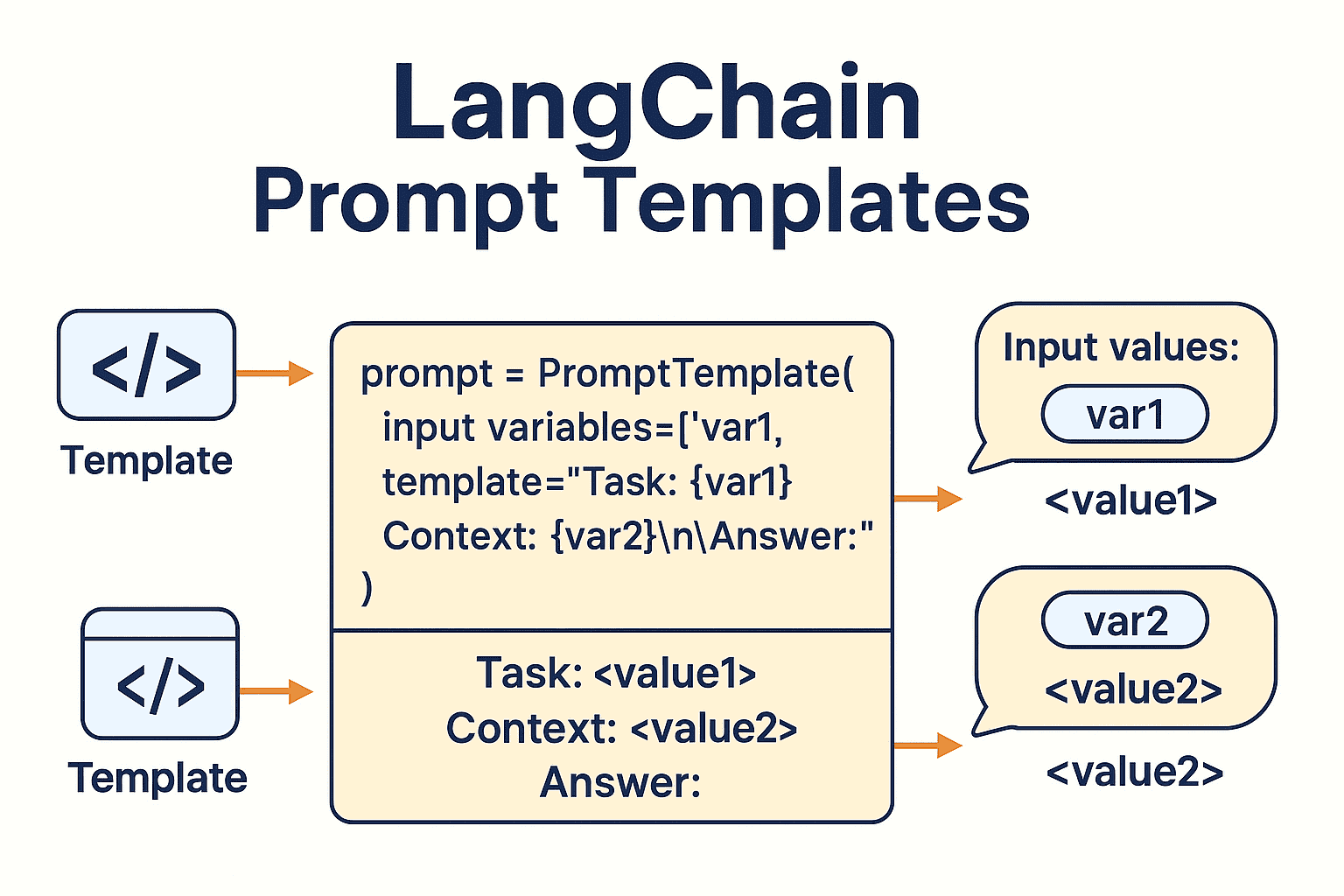
For a quick demonstration of this in action, the following video shows how to create and use a PromptTemplate in a few lines of Python code.
LangChain Series: Prompt Tools 101 - Simple Prompt Templates
The video 'LangChain Series: Prompt Tools 101' provides a concise, practical introduction to using LangChain's PromptTemplate.
Watch from 03:01 to 07:14. This will show you how to: Define a template with placeholders. Format the template with single or multiple input variables. Integrate the formatted prompt into a LangChain LLMChain.
LangChain templates are excellent for quick integration and benefit from being part of a larger ecosystem. However, for maximum flexibility and control, you might consider a more general-purpose templating engine.
Option B: Jinja for Maximum Flexibility
Jinja is a powerful and widely-used templating engine for Python, known for its performance and feature-rich syntax. Using Jinja for prompt management gives you fine-grained control and keeps your solution framework-agnostic. Its real power lies in its support for logic within the templates themselves.
Prompt Management 101 - Full Guide for AI Engineers
Let's revisit 'Prompt Management 101' one last time for a deep dive into using Jinja.
Watch the segment from 17:37 to 27:24. This is a masterclass in building a robust, custom prompt management system. Focus on: Why Jinja?: Unique file extension (.jinja2), metadata support, and input validation. Conditional Logic: The use of {% if ... %} blocks to create adaptive prompts that change their content based on input variables. This is a powerful technique. The PromptManager Class: A simple, elegant Python class to abstract away file loading and rendering, providing a clean interface to your prompt library.
The ability to use conditional logic directly within a template is a significant advantage. It allows you to handle different cases (e.g., different target audiences, different source languages, or even different target LLMs) within a single, organized template file, drastically reducing redundancy. This directly addresses the challenge we identified in the last lesson about prompt variance between models.
Test your understanding!
Imagine you are building a system that summarizes customer support tickets. You want to create a single Jinja prompt template named ticket_summary.jinja2 that behaves differently based on the ticket's priority.
The template should accept two variables: ticket_text (the content of the ticket) and priority (a string that can be "High" or "Normal").
Your Task: Write the content of the ticket_summary.jinja2 template.
- The prompt should always start with "Summarize the following support ticket:".
- It should then include the
{{ ticket_text }}. - If the
priorityis "High", it should append the instruction: "Focus on the immediate action required and any user-reported outage." - If the priority is anything else, it should append: "Provide a concise, neutral summary of the user's issue."
Show answer
Here is the content for ticket_summary.jinja2:
Summarize the following support ticket:
{{ ticket_text }}

{% if priority == "High" %}
Focus on the immediate action required and any user-reported outage.
{% else %}
Provide a concise, neutral summary of the user's issue.
{% endif %}
This single template can now generate two different prompts based on the input, making your system more adaptive and your prompt library cleaner.
5. Best Practices for Your Prompt Library
As you build out your library, adhering to software engineering best practices is key to maintaining a scalable and collaborative system.
LangChain Prompt Templates: Complete Guide with Examples
The following article provides a concise set of best practices for managing prompts in a production environment.
Please read the sections 'Best Practices and Advanced Prompt Patterns' and 'Template Versioning and Testing'. These sections consolidate key advice on: Modular Design: Breaking prompts into reusable parts. Token Optimization: Writing concise templates to save costs. Versioning: The importance of tracking changes to prompts just like code.
Synthesizing from our resources, here is a checklist for your prompt library:
- Centralize: Store all prompts in a dedicated directory (e.g.,
/prompts). - Decouple: Use a
PromptManagerclass or a framework's functions to load prompts, keeping file I/O out of your main application logic. - Use a Templating Engine: Start with LangChain's
PromptTemplatefor simplicity or use Jinja for advanced control and logic. - Version Control: Commit your prompt files to Git. Use descriptive commit messages for changes (e.g., "feat(prompts): refine summarizer prompt for clarity").
- Add Metadata: Use YAML front matter in your Jinja files or a separate JSON file to store metadata:
version,author,date,purpose,target_model. - Standardize Structure: Adopt a consistent naming convention (e.g.,
[domain]_[task]_[version].jinja2) and a clear folder structure.
Conclusion
Today, you've learned the engineering discipline of prompt management. We've moved from treating prompts as disposable strings to managing them as critical, version-controlled assets. By applying these principles, you can build LLM applications that are more robust, scalable, and easier to maintain.
Key Takeaways:
- Prompt Management is Essential: Ad-hoc prompting leads to technical debt. A systematic approach is necessary for production systems.
- Templates are the Foundation: They separate static instructions from dynamic data, enabling reuse and standardization.
- Choose the Right Level of Abstraction: The five-level maturity model helps you select a strategy—from simple file organization to a full-fledged external service—that matches your project's needs.
- Templating Engines are Powerful Tools: LangChain offers easy integration, while Jinja provides ultimate flexibility with features like conditional logic for creating adaptive prompts.
- Treat Prompts Like Code: Apply software engineering best practices: version control, modular design, documentation (metadata), and standardization.
What's Next?
With a solid engineering foundation for managing your prompts, you are now equipped to explore more powerful and complex prompting frameworks. In the next lesson, we will begin our journey into advanced prompting techniques by dissecting the Tree-of-Thoughts (ToT) framework. This method moves beyond the linear reasoning of Chain-of-Thought, enabling an LLM to explore, evaluate, and self-correct across multiple lines of reasoning—a significant step toward more sophisticated problem-solving.