Introduction
In our last lesson on Chain-of-Thought (CoT) prompting, you learned a powerful technique to guide a model's reasoning process, significantly boosting its performance on complex, multi-step tasks. We saw how prompting a model to "think step-by-step" provides a crucial window into its logic, which is invaluable for debugging.
While CoT is a specific tool for a specific job (eliciting reasoning), today we zoom out to establish a universal framework for constructing high-quality prompts. For you as an applied AI engineer, having a systematic and repeatable process for prompt design is essential for building reliable and predictable systems.
This lesson introduces a foundational framework for prompt design. You will learn how to structure your prompts by explicitly defining four key components: Role, Context, Task, and desired output Format. Mastering this "RCTF" framework will serve as your mental checklist for moving from vague requests to precise, machine-interpretable instructions.
1. The Core Components of a Structured Prompt
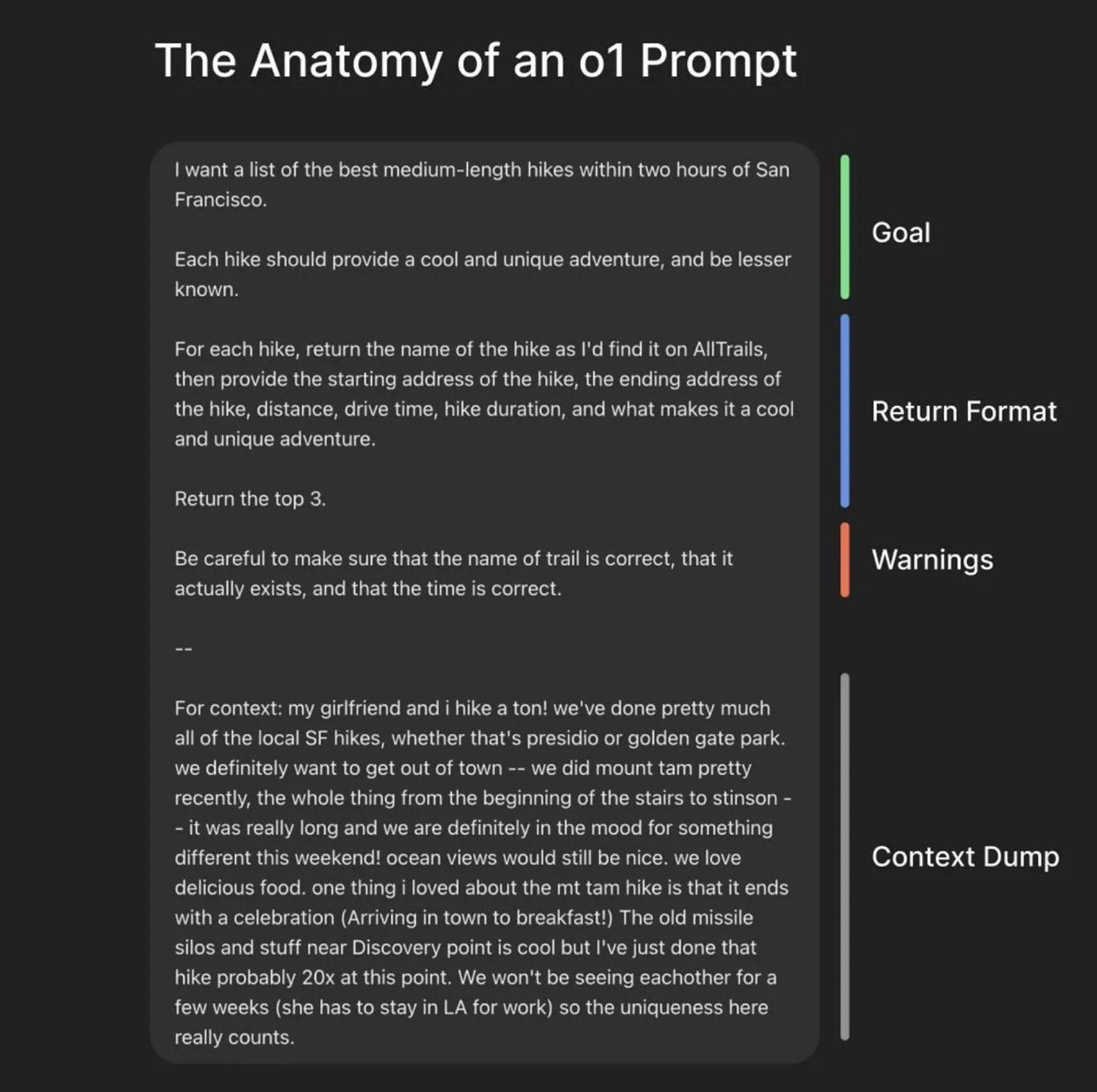
An effective prompt is more than just a question; it's a carefully crafted set of instructions that leaves as little as possible to chance. While different practitioners use slightly different names, the most effective prompts almost always contain a variation of the same core components.
To get a quick, high-level overview of these building blocks, let's watch a short segment from a popular guide on prompt engineering.
Master the Perfect ChatGPT Prompt Formula (in just 8 minutes)!
In this video, 'Master the Perfect ChatGPT Prompt Formula', Jeff Su breaks down a prompt into six key components. We'll focus on the four that are most critical for building robust applications: Task, Context, Persona (which we'll call Role), and Format.
Watch from the beginning to 01:34. Pay attention to the hierarchy he proposes, where the 'Task' is mandatory, but adding the other components significantly improves the output quality.
As the video highlights, simply providing a task might get you an answer, but to get the right answer consistently, we need to be more deliberate. Let's break down each of the four pillars of our RCTF framework.
a) Role (or Persona)
The Role sets the stage by defining the persona the LLM should adopt. This influences the model's tone, style, knowledge base, and point of view. Assigning a role is like casting an expert for a specific part.
- Why it's important: It focuses the model on a specific domain of its training data. An "expert economist" will respond differently to a question about inflation than a "concerned parent."
- Example:
- Vague:
Explain what an API is. - With Role:
You are a senior software architect explaining an API to a new product manager. Use an analogy they would understand.
- Vague:
This video clip provides another clear example of how adding a persona elevates a prompt.
Google's 9 Hour AI Prompt Engineering Course In 20 Minutes
This clip from Tina Huang's summary of Google's AI course demonstrates the immediate impact of adding a 'Persona' to a simple request.
Watch from 01:14 to 01:40. Notice how the response changes from generic to specific once the role of 'anime expert' is assigned.
b) Context
Context is the background information the model needs to execute the task successfully. This is where you provide relevant data, constraints, user information, or the scope of the problem. Your experience in data science with GLMs has surely taught you that the quality of your input data dictates the quality of your model's output; the same principle applies here.
- Why it's important: Context constrains the LLM's vast possibility space, guiding it toward an answer that is relevant to your specific situation.
- Example:
- Vague:
Write a summary. - With Context:
Based on the following user support transcript, write a summary: [Transcript text here...]
- Vague:
c) Task (or Instruction)
The Task is the clear, direct, and actionable instruction telling the model what to do. This is the verb of your prompt.
- Why it's important: This is the core directive. It must be unambiguous. Using strong action verbs helps.
- Example:
- Vague:
What about this data? - With Task:
Analyze the provided sales data and identify the top 3 performing products by revenue.
- Vague:
d) Format (or Output Constraints)
The Format specifies the exact structure of the desired output. For an engineer building automated systems, this is arguably the most critical component for reliability. A correctly formatted output can be directly parsed and used by another piece of software.
- Why it's important: It ensures the output is predictable, machine-readable, and ready for use in downstream processes, eliminating the need for fragile post-processing scripts.
- Example:
- Vague:
Tell me the issues from the meeting notes. - With Format:
Extract the action items from the meeting notes and provide them as a JSON array. Each object in the array should have three keys: "action_item" (string), "owner" (string), and "due_date" (YYYY-MM-DD).
- Vague:
This systematic approach prevents the model from adding conversational fluff like "Sure, here is the JSON you requested..." which would break a JSON parser.

2. Deep Dive into Prompt Structure
Now that you have an overview of the four pillars, let's solidify this knowledge with a more comprehensive reading. The following guide provides excellent examples and further breaks down these components.
The Ultimate Guide to Prompt Engineering in 2025
The article 'The Ultimate Guide to Prompt Engineering in 2025' from Lakera AI offers a detailed breakdown of prompt components and techniques. It will reinforce what we've just discussed and introduce related concepts.
Please read the following three sections: 'Prompt Components and Input Types': This provides a concise table summarizing the components we've discussed (System message -> Role, Instruction -> Task, etc.). 'Be Clear, Direct, and Specific': This reinforces the importance of a well-defined Task. 'Constrain Format and Length': This section is crucial for you as an engineer. Pay close attention to the JSON example and the tip for excluding conversational fluff.
3. From Theory to Production: The RCTF Framework in Code
As an engineer, you won't just be using web UIs; you'll be building applications that call LLM APIs. The RCTF framework maps directly to the structure of these API calls.
In the OpenAI API, for example:
- The Role is typically placed in the
systemmessage (or thedeveloperrole in the newer model spec). This message sets the overall behavior for the entire conversation. - The Context and Task are usually combined in the
usermessage for a specific turn. - The Format instructions are included within either the
systemorusermessage, often as part of the task description.
This next reading from the official OpenAI documentation explains how these message roles work.
Prompt engineering | OpenAI API
This documentation from OpenAI, 'Prompt engineering', explains how to provide instructions to the model at an API level using message roles and formatting.
Please read the sections: 'Message roles and instruction following': Understand the difference between the instructions parameter and the developer/user/assistant roles. Note the hierarchy of control. 'Message formatting with Markdown and XML': This shows how to structure a prompt programmatically, clearly delineating Identity (Role), Instructions (Task), Examples, and Context.
Test your understanding!
You are building a feature for an internal developer platform. The goal is to take unstructured, natural language descriptions of a bug report and convert them into a structured JSON object that can be fed directly into your ticketing system (like Jira).
Unstructured Input:"The user login is totally broken on the staging server. When I try to sign in with a valid email and password, it just hangs and then gives a 500 internal server error. This is a critical blocker for the new release. It seems to have started after the last deployment. I'm using Chrome on macOS."
Task: Design a complete prompt using the RCTF framework to perform this conversion. Your prompt should produce a JSON object with the following keys: title (a concise summary), priority ("Low", "Medium", "High", or "Critical"), environment ("Development", "Staging", or "Production"), and technical_details (a list of relevant technical facts like browser or OS).
Show answer
Here is an effective prompt designed using the RCTF framework:
[ROLE]
You are an expert software engineering assistant specializing in bug triage. Your task is to parse unstructured bug reports and convert them into a structured JSON format.

[CONTEXT]
The JSON object you generate will be used to automatically create a ticket in our project management system. It is crucial that the output is only the JSON object and nothing else, so it can be parsed programmatically. The priority should be assessed based on the user's language (e.g., 'blocker' implies 'Critical').

[TASK]
Analyze the following bug report and extract the key information.

Bug Report:
"The user login is totally broken on the staging server. When I try to sign in with a valid email and password, it just hangs and then gives a 500 internal server error. This is a critical blocker for the new release. It seems to have started after the last deployment. I'm using Chrome on macOS."

[FORMAT]
Respond with a single JSON object. Do not include any explanatory text before or after the JSON. The JSON object must have the following schema:
{
  "title": "<A concise, descriptive title for the bug>",
  "priority": "<'Low', 'Medium', 'High', or 'Critical'>",
  "environment": "<'Development', 'Staging', or 'Production'>",
  "technical_details": ["<A list of technical details mentioned in the report>"]
}
Expected Output:
{
  "title": "User login fails with 500 error on Staging",
  "priority": "Critical",
  "environment": "Staging",
  "technical_details": [
    "Receiving 500 internal server error",
    "Occurs after last deployment",
    "Browser: Chrome",
    "OS: macOS"
  ]
}
This prompt works well because it clearly defines the persona (Role), the reason for the strict formatting (Context), the specific action to take (Task), and a perfect template for the output (Format).
Conclusion
Today, you've learned a systematic and robust framework for designing prompts. By consciously considering the Role, Context, Task, and Format, you can move from "prompting as an art" to "prompting as an engineering discipline." This structured approach is fundamental to building reliable, scalable, and maintainable applications powered by LLMs.
Key Takeaways:
- The RCTF (Role, Context, Task, Format) framework is a mental checklist for creating effective prompts.
- Role sets the persona, influencing the model's tone and expertise.
- Context provides the necessary background information to constrain the model's response.
- Task is the clear and unambiguous action you want the model to perform.
- Format defines the output structure, making it predictable and machine-readable—a critical requirement for production systems.
- These conceptual components map directly to API structures like
systemandusermessages.
What's Next?
In this lesson, we established the high-level architecture of a great prompt. In our next lesson, we will focus on the syntax that makes this architecture unambiguous to the model. You will learn how to use delimiters and structured text (like Markdown, XML tags, and triple quotes) to clearly separate the different components of your prompt, preventing confusion and improving the model's ability to follow complex instructions.