Introduction
Welcome back! In our last lesson, you implemented the core retrieval mechanism of RAG: semantic search. You learned how to encode a query, compare it to a corpus of document embeddings using cosine similarity, and retrieve the most relevant chunks of text. You've mastered the "R" in RAG.
Today, we'll complete the picture. This lesson focuses on the learning outcome: Build a complete RAG pipeline connecting retrieval and generation using a framework like LangChain or LlamaIndex. We will orchestrate the full workflow, taking the documents you just learned how to retrieve, augmenting a prompt with them, and feeding the result to a Large Language Model to generate a final, contextually grounded answer. This is where retrieval meets generation.
The Full RAG Architecture
At its core, the RAG process is a straightforward but powerful pattern that connects your private data to the reasoning capabilities of an LLM. It transforms a simple query into a rich, context-aware prompt.
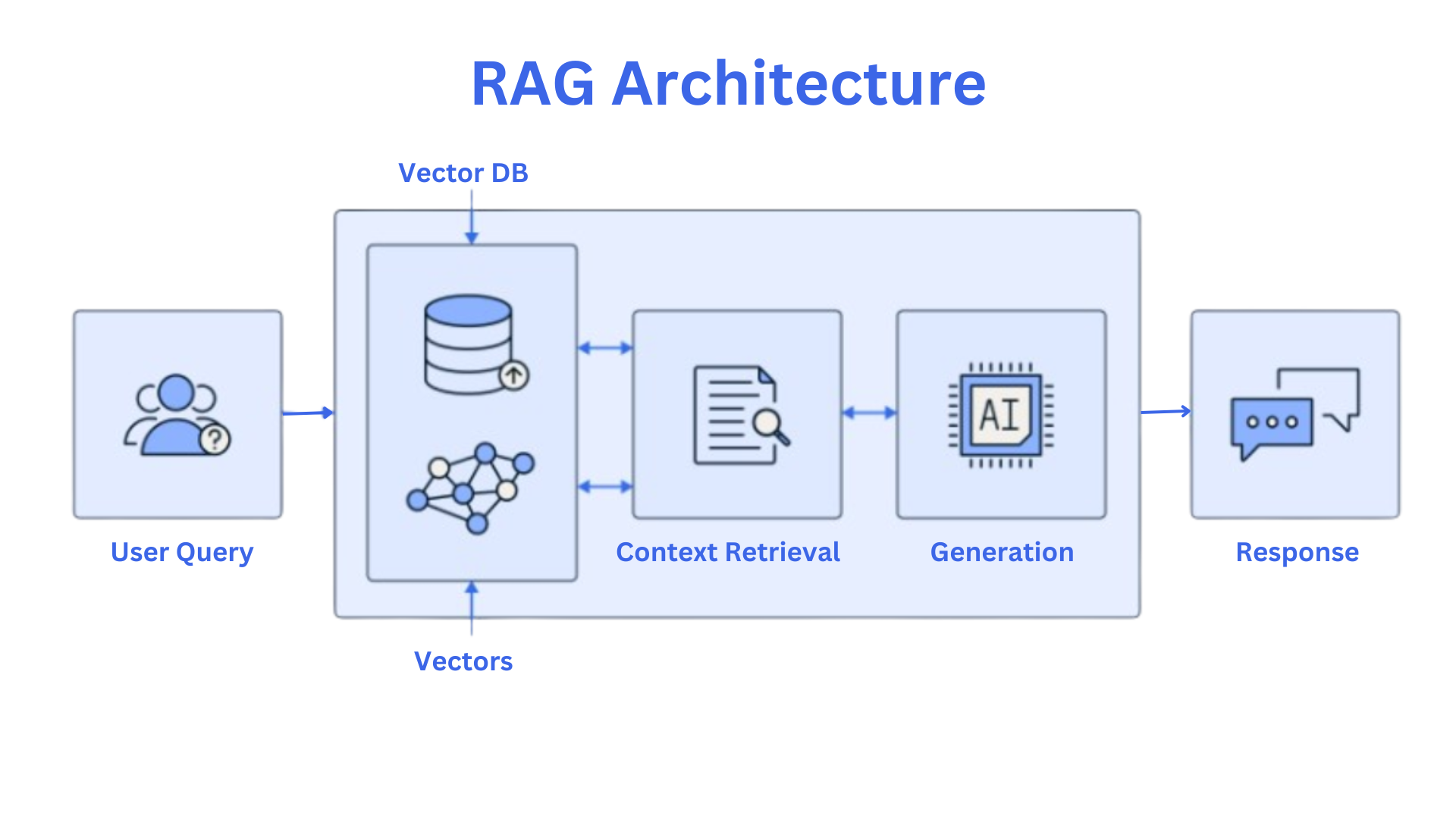
Let's break down this flow into its three canonical steps. The following video provides an excellent conceptual walkthrough of this process.
Don't learn AI Agents without Learning these Fundamentals
The video 'Don't learn AI Agents without Learning these Fundamentals' by KodeKloud clearly explains the Retrieval, Augmentation, and Generation steps that define the RAG pattern.
Watch the segment from 35:06 to 38:10. Pay close attention to how it defines these three stages: Retrieval: Using semantic search to find relevant information. Augmentation: Injecting the retrieved context into the LLM's prompt. Generation: Asking the LLM to generate an answer based on the augmented prompt.
This RAG pattern effectively gives an LLM access to information it wasn't trained on, mitigating issues like knowledge cutoffs and hallucinations by grounding its responses in the data you provide.
Orchestration with Frameworks like LangChain
While you could code this entire pipeline from scratch by connecting APIs for embedding, vector search, and LLM calls, this approach leads to a lot of boilerplate code and becomes difficult to maintain. This is where orchestration frameworks like LangChain and LlamaIndex come in.
These frameworks provide a standardized, modular toolkit for building LLM applications. They offer high-level abstractions for common components, allowing you to easily chain them together and swap them out. For example, you can switch from an OpenAI model to a Mistral model, or from a Chroma vector store to FAISS, often by changing just a single line of code.
Don't learn AI Agents without Learning these Fundamentals
To understand the value proposition of these frameworks, let's return to the KodeKloud video. This segment explains why an abstraction layer like LangChain is so valuable.
Watch the segment from 06:23 to 09:55. Notice how LangChain provides pre-built components for Chat Models, Vector DBs, and Embeddings, simplifying the process of wiring them all together.
For the rest of this lesson, we will use LangChain to build our RAG pipeline, as it provides very intuitive high-level "chains" for this exact purpose.
Building a RAG Pipeline with LangChain
Let's get practical. We will now build a complete RAG system step-by-step. The process involves initializing each component of our architecture and then linking them into a single, invocable chain.
The resource below provides an excellent, concise walkthrough of this entire process. We will follow its structure, and I encourage you to read it alongside this lesson for a complete picture.
LangChain RAG Implementation: Complete Tutorial
The article 'LangChain RAG Implementation: Complete Tutorial' from Latenode.com is a clear, code-first guide to building a standard RAG pipeline. It covers every step we need.
Please read the section titled 'How to Build LangChain RAG Step-by-Step'. Focus on the code blocks and their explanations. This will serve as our primary reference for the implementation.
Here is a breakdown of the key steps, consolidating the logic from the article.
1. Setup and Data Preparation
First, ensure the necessary libraries are installed. For this example, we will also use pypdf to load a PDF document.
pip install langchain langchain-openai langchain-chroma pypdf
Next, we load and split our source document. You're already familiar with this process from previous lessons. Here, we use LangChain's built-in PyPDFLoader and RecursiveCharacterTextSplitter.
from langchain_community.document_loaders import PyPDFLoader
from langchain_text_splitters import RecursiveCharacterTextSplitter

# Load the document
loader = PyPDFLoader("example_document.pdf") # Replace with your PDF
documents = loader.load()

# Split the document into chunks
text_splitter = RecursiveCharacterTextSplitter(chunk_size=1000, chunk_overlap=200)
splits = text_splitter.split_documents(documents)
2. Indexing: Creating the Vector Store
Now, we embed the document chunks and store them in a Chroma vector store. LangChain's integration makes this a one-line command.
from langchain_openai import OpenAIEmbeddings
from langchain_community.vectorstores import Chroma

# Create the vector store
vectorstore = Chroma.from_documents(documents=splits, embedding=OpenAIEmbeddings())
3. Defining the Retrieval and Generation Chain
This is the core of the orchestration. We will create two main parts and then combine them.
a) The Retriever: We expose our vector store as a retriever object. This object handles the semantic search logic we studied in the last lesson.
# Expose the vector store as a retriever
retriever = vectorstore.as_retriever()
b) The Generation Chain: This part takes a question and retrieved context, formats them into a prompt, and sends it to the LLM.
We'll use create_stuff_documents_chain which, as the name implies, "stuffs" all the retrieved document chunks into the prompt's context.
from langchain_openai import ChatOpenAI
from langchain_core.prompts import ChatPromptTemplate
from langchain.chains.combine_documents import create_stuff_documents_chain

llm = ChatOpenAI(model="gpt-3.5-turbo")

# The prompt template is crucial for the "Augmentation" step
prompt = ChatPromptTemplate.from_template("""Answer the following question based only on the provided context:

<context>
{context}
</context>

Question: {input}""")

# Create a chain that combines the prompt and the LLM
document_chain = create_stuff_documents_chain(llm, prompt)
4. Assembling the Full RAG Chain
Finally, we use create_retrieval_chain to link our retriever and our document_chain. This high-level function creates the complete RAG pipeline.

from langchain.chains import create_retrieval_chain

# Create the main retrieval chain
retrieval_chain = create_retrieval_chain(retriever, document_chain)
Now, we can invoke the chain with a question.
response = retrieval_chain.invoke({"input": "What are the key challenges in model deployment?"}) # Use a question relevant to your PDF
print(response["answer"])

# You can also inspect the retrieved context
print("\n--- Retrieved Context ---")
for doc in response["context"]:
    print(doc.page_content)
    print("---")
And that's it! In just a few lines of code, using LangChain's abstractions, you have built a fully functional RAG pipeline. The framework handles the flow of data: input -> retriever -> context + input -> document_chain -> answer.
Test your understanding!
Imagine you want to change the RAG system's behavior to be more creative and less strictly tied to the context. You are also concerned it might be missing relevant documents.
Based on the code above, identify two specific components or parameters you would modify and explain why your changes would produce the desired effect.
Show answer
Here are two possible modifications:
-
Modify the
ChatPromptTemplate: You could relax the instruction "Answer the following question based only on the provided context." A new prompt might be: "You are a helpful assistant. Use the following context to answer the question. If the context is insufficient, use your own knowledge to provide a comprehensive answer."- Why: This change explicitly permits the LLM to go beyond the retrieved documents, allowing for more creative or general responses when the context is sparse.
-
Modify the
retriever: You could adjust the search parameters, for example, by increasing the number of documents it retrieves (thekvalue). The defaultkis often 4.- Why: By retrieving more documents (e.g.,
retriever = vectorstore.as_retriever(search_kwargs={"k": 8})), you increase the chances of finding all relevant context, addressing the concern that some documents might be missed. This provides the LLM with a richer, more diverse set of information to work with.
- Why: By retrieving more documents (e.g.,
A Glimpse into Advanced Pipelines
The create_retrieval_chain is a high-level helper for a common pattern. As you progress, you'll want more control to build more sophisticated RAG systems, such as those that rewrite queries, re-rank results, or decide whether to do retrieval at all.
- LlamaIndex offers a very expressive
QueryPipelineAPI that lets you define your RAG workflow as a Directed Acyclic Graph (DAG), giving you fine-grained control over how data flows between custom components. - LangGraph, an extension of LangChain, allows you to build agentic RAG systems with cycles and conditional logic. For example, you can build a graph where the system first retrieves documents, then uses an LLM to "grade" their relevance. If they are not relevant, the system can loop back, rewrite the query, and try again. The
Build a custom RAG agent with LangGraph(ID LINK) resource provides a tutorial on this advanced technique, which directly connects to our upcoming module on Agentic AI.
These advanced tools are the path from building a simple RAG pipeline to engineering robust, production-grade reasoning systems.
Conclusion
You have successfully bridged the gap between retrieval and generation. Today, you used a powerful framework to orchestrate a complete RAG pipeline, bringing your knowledge base to life.
Key Takeaways:
- RAG is a 3-Step Pattern: The core workflow is Retrieve, Augment, and Generate.
- Frameworks Provide Abstraction: LangChain and LlamaIndex offer modular components (Loaders, Splitters, Embedders, Vector Stores, Retrievers, LLMs, Prompts) that can be chained together to build complex applications with minimal boilerplate code.
create_retrieval_chainis a Powerful Shortcut: This LangChain function encapsulates the most common RAG pattern, connecting a retriever with a generation chain.- The Prompt is Key to Augmentation: The
ChatPromptTemplateis where you instruct the LLM on how to use the retrieved context, giving you control over the final output's tone and factuality.
What's Next?
Our current RAG pipeline relies solely on semantic (dense) retrieval. While powerful, it can sometimes miss keywords or specific terms. In the next lesson, we will address this limitation by exploring sparse retrieval methods (e.g., BM25) and implementing a hybrid search approach that combines the best of both dense and sparse retrievers to make our RAG system even more robust and accurate.