Introduction
In our last lesson, we explored the ReAct framework, which enables an LLM to reason and act in a Thought -> Action -> Observation loop. We saw how the "Action" step could be implemented by having the model generate text that we would then parse to determine which tool to use. While functional, this approach can be brittle.
Today, we'll dive into the modern, robust engineering solution for this problem: function calling, also known as tool use. This lesson directly addresses the learning outcome: Implement tool use (function calling) for an LLM using a standardized API schema. You will learn how major LLM providers like OpenAI have built-in capabilities that allow models to request function executions in a structured, reliable way. This replaces manual text parsing with a standardized API contract, a crucial step in building production-grade agentic systems.
The Function Calling Flow: A Collaborative Dance
First, it's essential to understand a core principle: the LLM does not execute any code itself. Instead, it acts as a reasoning engine that determines when a function should be called and with what arguments. It then generates a structured JSON object describing this intent. Your application code is responsible for receiving this JSON, executing the actual function, and returning the result to the LLM.
This process is a multi-step interaction between your application and the model. The official OpenAI documentation provides a clear diagram illustrating this flow.
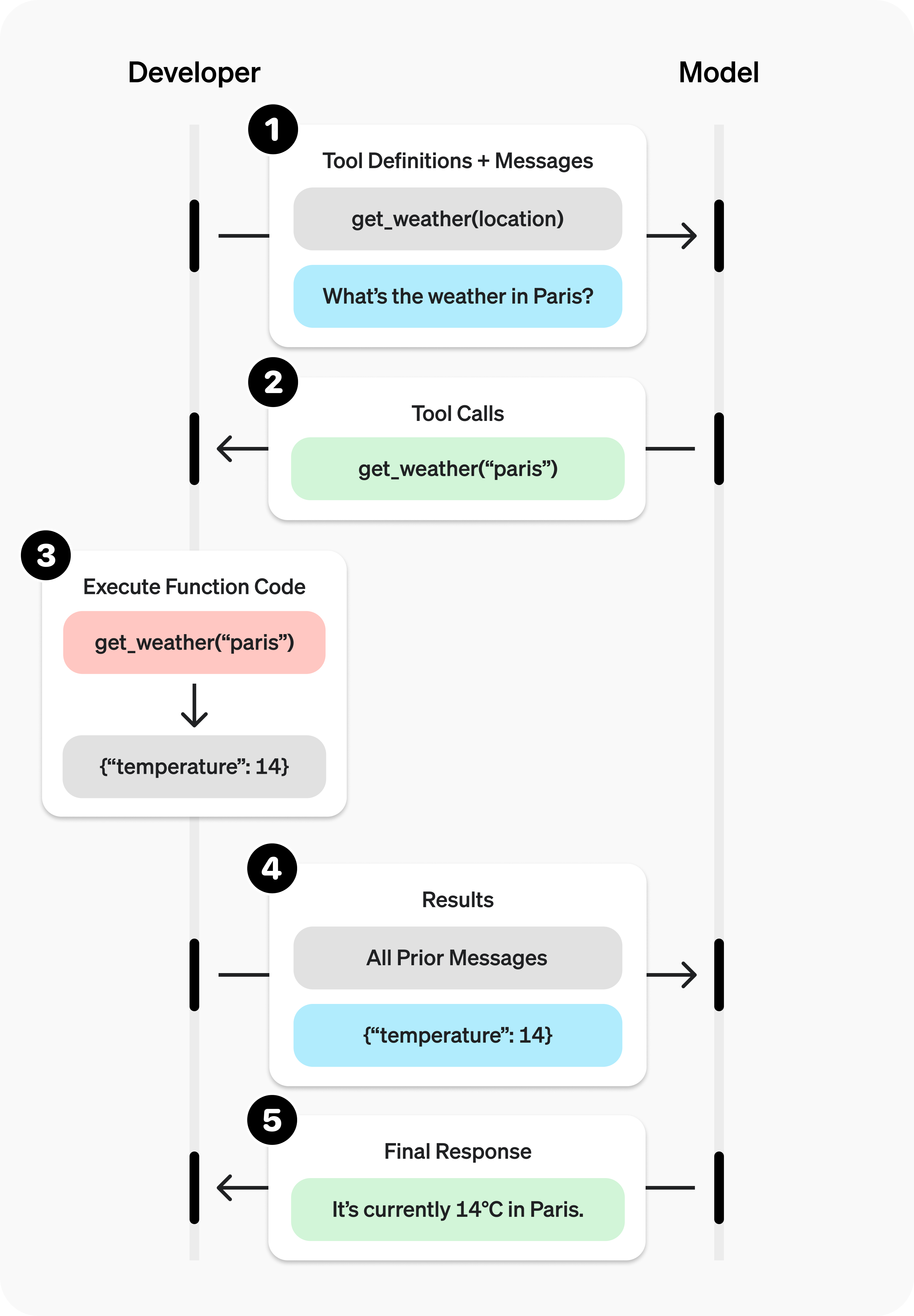
The overall flow can be broken down as follows:
- Define & Request: Your application calls the LLM with the user's prompt and a list of available tools (functions) defined in a specific schema.
- Model Decides: The LLM analyzes the prompt and decides if one of the tools can help answer the request. If so, it returns a
tool_callobject instead of a text message. - Application Executes: Your code parses the
tool_callobject, identifies the function name and arguments, and executes your local/remote function (e.g., calling a weather API). - Return Observation: Your application calls the LLM again, appending the output from your function as a new "observation" message.
- Model Synthesizes: The LLM receives the function's output and uses this new information to generate a final, natural language response to the user.
To see this flow explained with a concrete example, watch the following short segment.
LLM Function Calling - AI Tools Deep Dive
The video 'LLM Function Calling - AI Tools Deep Dive' by Adam Lucek provides a concise summary of this interaction loop.
Watch the segment from 01:57 to 03:04, which walks through the basic sequence of function calling. Notice the clear separation of responsibilities: the model generates the structured JSON, and your code is responsible for parsing and execution.
Defining Tools with a Standardized API Schema
For the model to know what tools are available, you must describe them using a standardized format. The most common standard is JSON Schema. You pass a list of these schemas in the tools parameter of your API call.
Each schema must define:
name: The name of the function.description: A clear, natural language description of what the function does. This is critical—it's the primary information the LLM uses to decide when to use the tool. Think of it as a mini-prompt for the tool itself.parameters: A JSON Schema object detailing the arguments the function accepts, including their types, descriptions, and which are required.
The following article from Martin Fowler's blog provides an excellent, self-contained example of creating schemas for a shopping agent.
In 'Function calling using LLMs', author Kiran Prakash demonstrates how to define tools for a shopping agent. This provides a clear, practical example of the JSON schema structure.
Read the section 'System prompt'. Scroll down slightly to find the three schema definitions: SEARCH_SCHEMA, PRODUCT_DETAILS_SCHEMA, and CLARIFY_SCHEMA. Analyze their structure, paying close attention to how the description and parameters are defined for each.
As you can see, the description fields are written for the model to understand. "Search for products using keywords" is a clear instruction that helps the model map a user query like "show me blue shirts" to the search_products function with keywords: ["blue", "shirts"].
Implementation: A Two-Step API Interaction
Now let's translate this into code. Implementing function calling involves two distinct API calls to the LLM.
Step 1: Get the Tool Call from the Model
First, you call the model with your message history and the list of tool schemas. The model will respond with one or more tool_calls if it deems a function necessary.
import os
import json
from openai import OpenAI

# It's good practice to use environment variables for your API key
# client = OpenAI(api_key=os.environ.get("OPENAI_API_KEY"))
client = OpenAI() # Assumes OPENAI_API_KEY is set in your environment

# 1. Define the tool schema
tools = [
    {
        "type": "function",
        "function": {
            "name": "get_current_weather",
            "description": "Get the current weather in a given location",
            "parameters": {
                "type": "object",
                "properties": {
                    "location": {
                        "type": "string",
                        "description": "The city and state, e.g., San Francisco, CA",
                    },
                    "unit": {"type": "string", "enum": ["celsius", "fahrenheit"]},
                },
                "required": ["location"],
            },
        },
    }
]

messages = [{"role": "user", "content": "What's the weather like in Boston?"}]

# First API call
response = client.chat.completions.create(
    model="gpt-4o",
    messages=messages,
    tools=tools,
    tool_choice="auto",  # auto is default, but we can also force a tool
)

response_message = response.choices[0].message
tool_calls = response_message.tool_calls

print("Model decided to call a tool:")
print(tool_calls)
If you run this, the output tool_calls will be a list containing an object that looks something like this:
[ChatCompletionMessageToolCall(id='call_abc123', function=Function(arguments='{"location":"Boston, MA"}', name='get_current_weather'), type='function')]
Notice the model correctly inferred the location and identified the get_current_weather function to call. The arguments are provided as a JSON string.
Step 2: Execute the Tool and Get the Final Response
Now that the model has requested a tool call, your application must execute it. You'll then append the model's request and your function's result to the message history and call the model again.
# A simple placeholder function for demonstration
def get_current_weather(location, unit="fahrenheit"):
    """Get the current weather in a given location"""
    # In a real application, this would call a weather API
    if "boston" in location.lower():
        return json.dumps({"location": "Boston", "temperature": "72", "unit": unit})
    # ... other locations
    return json.dumps({"location": location, "temperature": "unknown"})

# Check if the model wants to call a function
if tool_calls:
    # Append the model's response to the message history
    messages.append(response_message)

    # This example only handles one tool call, but you should loop through them
    for tool_call in tool_calls:
        function_name = tool_call.function.name
        function_args = json.loads(tool_call.function.arguments)

        # --- This is where you execute your actual function ---
        function_response = get_current_weather(
            location=function_args.get("location"),
            unit=function_args.get("unit"),
        )
        # ----------------------------------------------------

        # Append the function's result to the message history
        messages.append(
            {
                "tool_call_id": tool_call.id,
                "role": "tool",
                "name": function_name,
                "content": function_response,
            }
        )

    # Second API call
    second_response = client.chat.completions.create(
        model="gpt-4o",
        messages=messages,
    )

    final_answer = second_response.choices[0].message.content
    print("\nFinal Answer from model:")
    print(final_answer)

# Expected output:
# Final Answer from model:
# The current weather in Boston is 72°F.
This two-step process ensures that the model's final answer is grounded in the real data returned by your tool. The official OpenAI documentation on "Function calling" is an excellent resource for this flow, which I encourage you to bookmark.
Making it Production-Ready: Pydantic Schemas
As you've seen, writing and maintaining raw JSON schemas can be verbose and error-prone, especially for functions with many complex arguments. As an engineer aiming for robust, maintainable code, you can leverage a library like Pydantic.
Pydantic allows you to define your data structures using standard Python type hints. Not only does this provide data validation, but libraries like instructor or even newer versions of the OpenAI client can automatically convert Pydantic models into the required JSON Schema format. This makes your code cleaner, more Pythonic, and easier to debug.
The following video demonstrates how to define a complex tool schema for an email campaign using a Pydantic class, which is far more readable than the equivalent raw JSON.
LLM Function Calling - AI Tools Deep Dive
The 'LLM Function Calling' video also shows a more advanced technique for defining complex tools.
Watch the segment on Pydantic JSON schemas (14:45 - 17:56). Observe how Python's typing (List, Optional, Dict, enums) is used to create a detailed and validated schema for an 'email_campaign' tool. This is a common pattern in production systems.
Test your understanding!
Imagine you have a Python function get_stock_price(ticker: str) -> float. Using the principles from the video, how would you define a Pydantic BaseModel that could be used to generate the JSON schema for this function?
Show answer
You would create a Pydantic class that inherits from a base schema class (like OpenAISchema from the instructor library, or a similar concept) and defines the ticker field.
from pydantic import BaseModel, Field

class GetStockPrice(BaseModel):
    """Gets the latest stock price for a given ticker symbol."""
    ticker: str = Field(..., description="The stock ticker symbol, e.g., 'AAPL' for Apple.")

    def execute(self):
        # In a real implementation, you'd call a stock API here.
        # This is just a mock for demonstration.
        if self.ticker == "AAPL":
            return 175.50
        else:
            return -1.0 # Or raise an error
This Pydantic class provides the name (from the class name), description (from the docstring), and parameters (from the typed fields) needed to generate the full JSON schema for the LLM.
Function Calling vs. Structured Output: Know Your Tools
Recently, OpenAI and other providers have introduced a related but distinct feature called Structured Output. It's crucial for you as an engineer to know when to use each.
-
Function Calling: Use this when you need the model to interact with an external tool as part of a reasoning process. The goal is to get information from the outside world into the model's context to help it generate a better final answer. This is the core of the ReAct loop.
-
Structured Output: Use this when you want to constrain the model's final response to a specific JSON schema. The goal is not to call a tool, but to get a reliable, parsable data object as the output. This is useful for tasks like data extraction ("Extract the person's name and email from this text into a JSON object") or for internal state management in agentic systems.
The following video provides an excellent summary of this distinction.
OpenAI Structured Output - All You Need to Know
In 'OpenAI Structured Output - All You Need to Know', Dave Ebbelaar clarifies the use cases for these two powerful features.
Watch the segment from 05:07 to 07:12. This provides clear guidelines on when to use function calling (connecting models to tools) versus the structured response format (structuring the model's output).
Conclusion
Today, you've mastered the fundamental engineering pattern for enabling LLMs to use tools. By replacing fragile text parsing with standardized function calling APIs, we can build more reliable and capable agentic systems.
Key Takeaways:
- Standardized "Act" Step: Function calling provides a robust, standardized implementation of the "Action" part of the ReAct framework.
- Two-Step Dance: The process involves a two-step API interaction: first, the model proposes tool calls in a structured JSON format; second, your application executes them and sends the results back for the model to synthesize a final answer.
- Schema is King: The JSON schema (especially the
descriptionfield) is how you "prompt" the model to use your tools correctly. - Production-Ready with Pydantic: For complex tools, using Pydantic classes to define schemas is a best practice that improves code readability, maintainability, and validation.
- Know Your Use Case: Use function calling for external tool interaction and structured output for forcing the model's final response into a specific JSON format.
What's Next?
So far, we've focused on the mechanism of calling a tool that we assume already exists. In the next lesson, we will complete the picture by focusing on the other side of the contract: Design a custom tool API, including a clear description, function signature, and input/output schemas for the LLM to use. You will learn how to design and build a tool from scratch, making it ready for an agent to consume.