Welcome back! In our last lesson, we focused on using JOIN clauses to bring data together from multiple tables, which is the first step in building any meaningful business report. You saw how chaining JOINs allows you to create a single, unified dataset ready for analysis.
Today, we'll build directly on that foundation. This lesson focuses on two powerful SQL features that are essential for every data analyst: CASE statements and Common Table Expressions (CTEs). By the end of our session, you will be able to apply these tools to implement complex business rules and bring structure and clarity to your analytical queries.
CASEstatements act like anif-then-elsestatement directly inside your query, allowing you to create new, conditional columns on the fly. For example, you can use them to categorize customers as 'High-Value' or 'Low-Value' based on their spending.- Common Table Expressions (CTEs), using the
WITHclause, allow you to break down a large, complex query into logical, readable steps. This is crucial for maintaining and debugging the sophisticated queries required in business intelligence.
Mastering these will significantly elevate your ability to move from simply retrieving data to actively transforming and analyzing it within SQL.
Implementing Business Logic with CASE Statements
Think of a CASE statement as a way to apply business rules to your data. It evaluates a list of conditions and returns a value when the first condition is met. Its structure is CASE WHEN condition1 THEN result1 WHEN condition2 THEN result2 ELSE result3 END.
Let's start with a video that clearly explains the syntax and a few practical use cases.
Intermediate SQL Tutorial | Case Statement | Use Cases
This video from Alex The Analyst provides a clear, step-by-step guide to using CASE statements, from basic syntax to a practical business scenario.
Please watch the video from the beginning until 06:59. The first part (00:00 - 03:13) covers the basic syntax, including multiple WHEN conditions and how the order of conditions matters. The second part (03:56 - 06:59) demonstrates a real-world business example: calculating different salary raises based on an employee's job title. Pay close attention to how a calculation is performed within the THEN clause.
As you saw, CASE statements are incredibly versatile. You can use them to:
- Create Categories: Group continuous data, like age or sales value, into discrete buckets (e.g., 'Young', 'Old'; 'Small Order', 'Large Order').
- Apply Conditional Logic: Implement rules like the salary raise example. You might encounter rules like "if a customer is from the USA and has spent over $500, flag them for a premium offer."
- Perform Conditional Aggregation: This is a very common and powerful pattern in BI. Instead of filtering rows with
WHERE, you can useCASEinside an aggregate function likeSUM()orCOUNT()to "pivot" data from rows into columns.
For a great example of this, let's look at a real-world SQL challenge.
8-Week-SQL-Challenge/Case Study #5 - Data Mart
This Data Mart case study on GitHub is an excellent example of professional data analysis using SQL. We will focus on a specific question that uses conditional aggregation.
Scroll down to 'B. Data Exploration' and find Question 6: 'What is the percentage of sales for Retail vs Shopify for each month?'. Examine the SQL query provided. Notice how SUM(sales) is used in the denominator to get the total monthly sales, while the numerators use MAX(CASE WHEN platform = 'Retail' THEN ...) and MAX(CASE WHEN platform = 'Shopify' THEN ...) to isolate the sales for each platform.
This technique lets you calculate percentages for different segments (in this case, 'Retail' and 'Shopify') across a grouped category (in this case, month_number) all within a single query.
Test your understanding!
You have a table named orders with columns order_id, customer_id, and order_value.
Write a SQL query that returns the order_id and a new column named order_priority. This new column should be:
- 'High' for orders with
order_value> 1000. - 'Medium' for orders with
order_valuebetween 500 and 1000 (inclusive). - 'Low' for all other orders.
Show answer
SELECT
  order_id,
  CASE
    WHEN order_value > 1000 THEN 'High'
    WHEN order_value >= 500 AND order_value <= 1000 THEN 'Medium'
    ELSE 'Low'
  END AS order_priority
FROM
  orders;
Note: Because CASE evaluates conditions in order, you could also write the second condition as just WHEN order_value >= 500 THEN 'Medium'. An order value of 1500 would be caught by the first WHEN and never reach the second one.
Structuring Queries with Common Table Expressions (CTEs)
As you saw in the last lesson, queries that join multiple tables can get long and difficult to follow. Common Table Expressions (CTEs) are the solution. A CTE, defined using a WITH clause, creates a temporary, named result set that you can then reference in your main query.
Think of it as creating a temporary view that exists only for the duration of your query. This makes your code more readable, modular, and easier to debug.
This image shows a query rewritten with CTEs. Notice how the logic is broken into clean, understandable blocks.
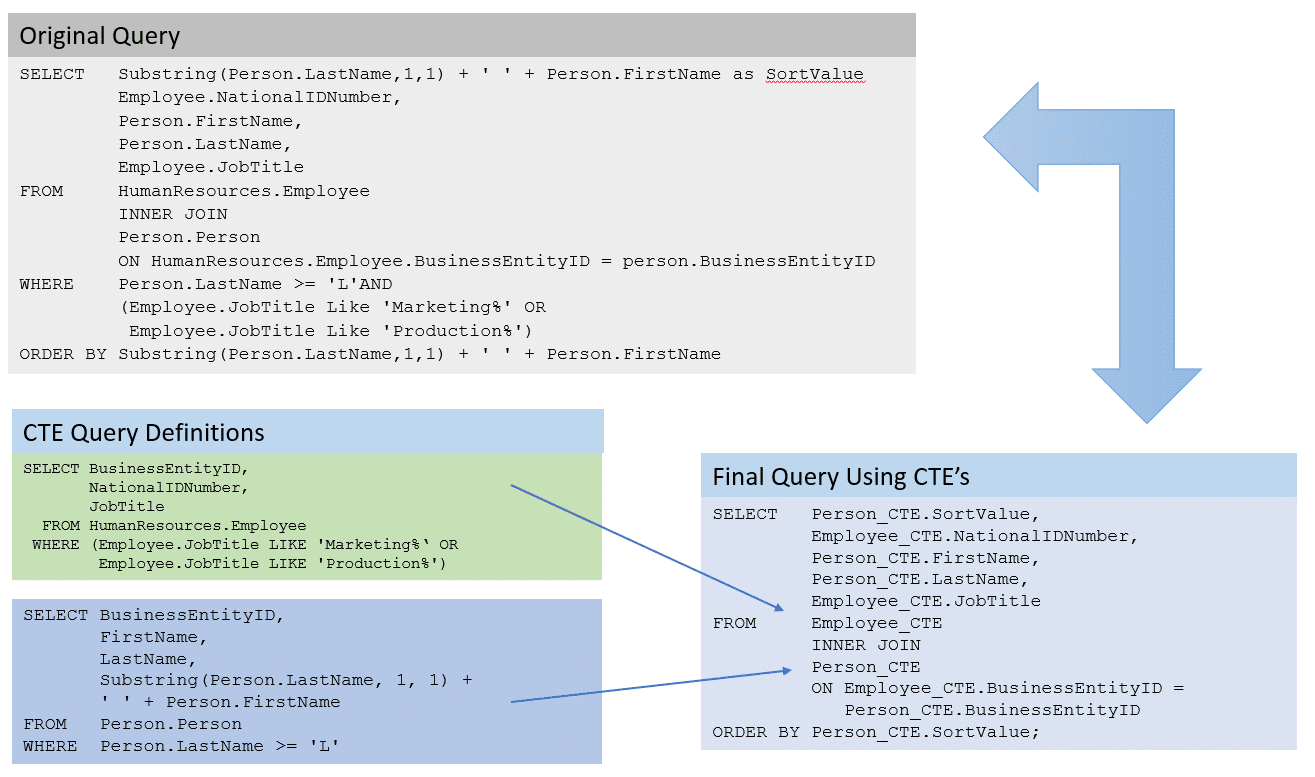
Now, let's watch a video that explains the concept and demonstrates how to refactor a messy query with subqueries into a clean one using CTEs.
SQL WITH Clause | How to write SQL Queries using WITH Clause | SQL CTE (Common Table Expression)
This video from techTFQ gives a thorough explanation of CTEs, starting with the syntax and ending with a brilliant refactoring example that highlights their power.
This is a key video for this lesson, so please watch it carefully from the beginning to 18:37, and then the summary from 20:24 to 24:24. (00:00 - 06:25): This covers the basic syntax (WITH ... AS (...)) and a simple example. Pay attention to how the CTE is defined first and then used in the main SELECT statement like a regular table. (06:25 - 18:37): This is the most important part. The presenter solves a business problem ('find stores with sales better than average') first using nested subqueries, resulting in a confusing query. He then rewrites the exact same logic using multiple CTEs. Observe how much easier the CTE version is to read and understand. (20:24 - 24:24): The presenter summarizes the key advantages of CTEs, such as readability, maintainability, and performance benefits. This reinforces why we use them.
The key takeaway is that CTEs allow you to build your analysis step-by-step. You can have one CTE that joins tables, a second CTE that aggregates data from the first one, and a final SELECT statement that performs a final calculation or filtering.
Combining CTEs and CASE for Advanced Analysis
The true power of these tools becomes apparent when you combine them. A common workflow for a data analyst is:
- Use one or more CTEs to join, filter, and pre-process your raw data into a clean, intermediate table.
- In the final
SELECTstatement, useCASEstatements on the results from your CTE to apply final business logic, create categories, or perform conditional calculations.
Let's look at two practical case studies that use this exact pattern.
Example 1: Danny's Diner Points Calculation
This case study analyzes customer behavior at a small restaurant. In one of the questions, the analyst needs to calculate loyalty points based on a set of rules.
Analyzing Customer Behavior at Danny's Diner: A SQL ...
In this article analyzing 'Danny's Diner' data, the author uses a CASE statement to handle a points calculation with special business rules.
Scroll to find Question 9 and Question 10. In Question 9, notice the CASE statement inside the SUM() function. It checks if product_name = 'sushi' to apply a 2x points multiplier. In Question 10, the CASE statement becomes even more complex, checking for both the product type and whether the purchase was within a special promotion period after the customer joined.
Example 2: Before-and-After Analysis
A very common business request is to analyze the impact of a change—for instance, the launch of a new product feature or a marketing campaign. This requires comparing performance metrics before the change to the metrics after the change. CTEs and CASE statements are perfect for this.
The "Data Mart" case study we looked at earlier has a fantastic section on this.
8-Week-SQL-Challenge/Case Study #5 - Data Mart
Let's revisit the Data Mart case study to see a 'Before & After Analysis' that masterfully combines CTEs and CASE statements.
Scroll down to 'C. Before & After Analysis' and review Question 1. The analyst uses a CTE (packaging_sales) to get the relevant weekly sales data. Then, a second CTE (before_after_changes) uses two SUM(CASE WHEN ...) expressions to split the sales into two buckets: before_packaging_sales and after_packaging_sales. The final query then simply compares these two values.
This pattern is extremely powerful and one you will use frequently as a data analyst.
Test your understanding!
You have two tables: customers (customer_id, name) and orders (order_id, customer_id, order_date, order_value).
Your task is to identify "High-Frequency Shoppers". A high-frequency shopper is defined as a customer who has made more than 5 orders in total.
Write a query that returns the customer_id and name of all high-frequency shoppers. Use a CTE to first count the number of orders for each customer.
Show answer
WITH customer_order_counts AS (
  -- This CTE calculates the total number of orders for each customer
  SELECT
    customer_id,
    COUNT(order_id) AS total_orders
  FROM
    orders
  GROUP BY
    customer_id
)
-- The main query joins the CTE with the customers table to get the names
-- and then filters for customers who meet the 'High-Frequency' criteria.
SELECT
  c.customer_id,
  c.name
FROM
  customers c
JOIN
  customer_order_counts coc ON c.customer_id = coc.customer_id
WHERE
  coc.total_orders > 5;
Conclusion
In this lesson, you've added two of the most important SQL tools for data analysis to your toolkit. They enable you to embed business logic directly into your queries and to manage the complexity of real-world analytical tasks.
Key Takeaways:
CASEStatements: UseCASE WHEN ... THEN ... ENDto apply conditional logic, create categorical variables, and perform conditional aggregations. They are the SQL equivalent of if-then-else logic.- Common Table Expressions (CTEs): Use
WITH ... AS (...)to break down complex queries into logical, readable steps. They dramatically improve the maintainability and clarity of your code, especially when multipleJOINs and aggregations are involved. - Combined Power: The most effective analytical queries often use CTEs to prepare and structure the data, followed by
CASEstatements in the final query to apply business rules and formatting.
Next Lesson Preview:
We've seen how to structure queries and apply conditional logic. However, what if you need to perform calculations that depend on other rows? For example, how would you rank your customers by sales within each country, or calculate a running total of sales over time? These tasks are difficult with standard aggregations.
In our next lesson, we will introduce window functions. These are incredibly powerful functions that allow you to perform calculations across a set of related rows, unlocking a new level of analytical capability right within SQL.