Hello! Welcome to your fourth lesson in the Computer Hardware course.
In our last lesson, we explored motherboard form factors (ATX, Micro-ATX, Mini-ITX), which define the physical size and layout of the board. We learned that while the form factor dictates how many slots and features can fit on a board, it doesn't tell us what kind of CPU or RAM is supported.
That crucial role belongs to the motherboard chipset. Today, we'll dive into what the chipset is, what it does, and how it acts as the ultimate gatekeeper for your system's core components. By the end of this lesson, you will be able to explain the function of the motherboard chipset and its role in determining CPU and RAM compatibility.
1. What is a Motherboard Chipset?
The chipset is a set of integrated circuits on the motherboard that manages the flow of data between the CPU, RAM, storage devices, and expansion slots. Think of it as the motherboard's air traffic control system: it directs all the data to ensure every component can communicate with the CPU and with each other correctly and efficiently. Intel aptly calls it the "silicon backbone" of the motherboard.
Physically, the chipset is a prominent chip on the motherboard, almost always covered by a heatsink to keep it cool.
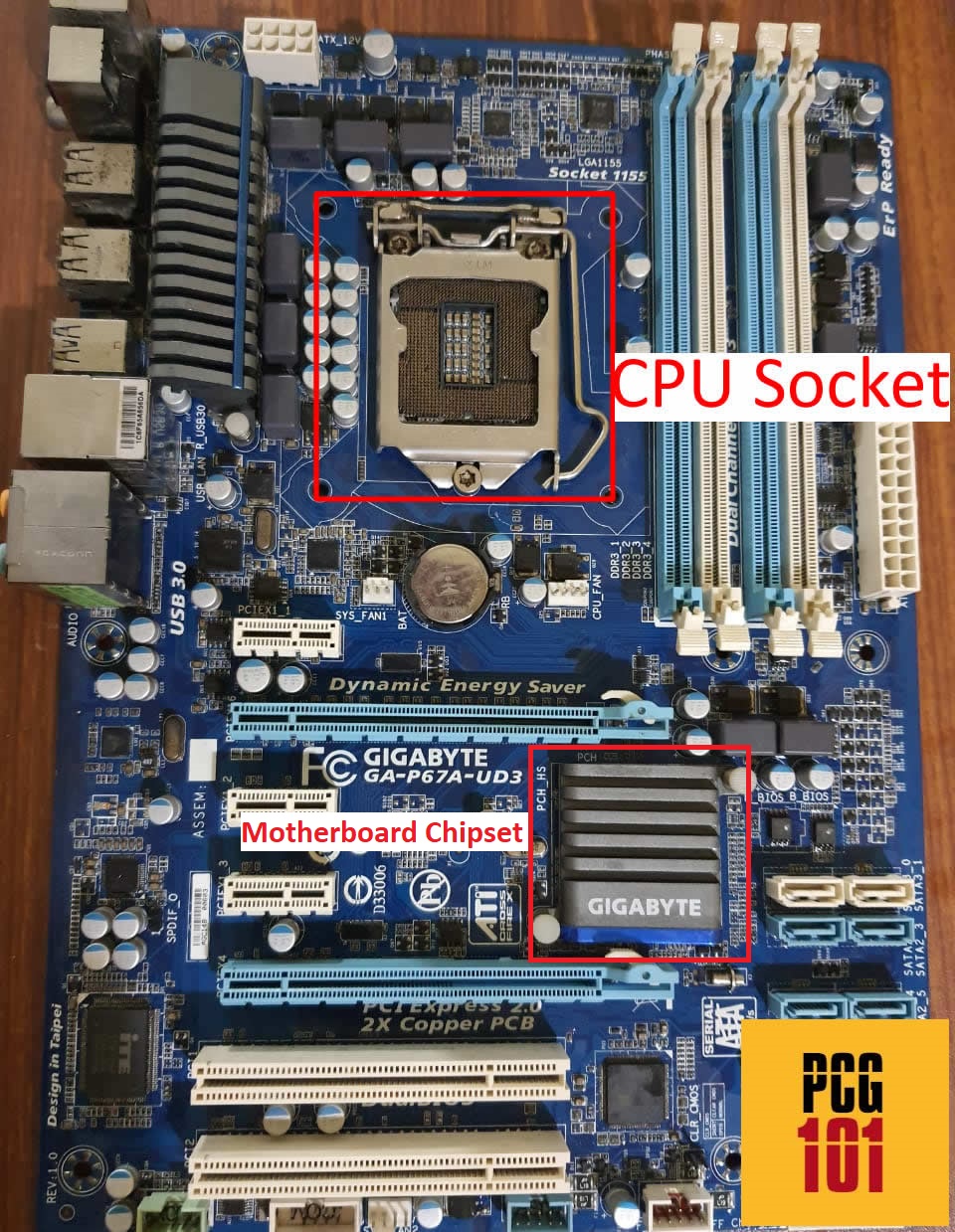
To understand the chipset's function, it's helpful to see how its design has evolved.
From Two Chips to One: Northbridge and Southbridge
Older motherboards used a two-chip system:
- Northbridge: Handled communication with high-speed components. It was the direct link between the CPU, the RAM, and the primary graphics card slot (AGP or PCIe).
- Southbridge: Managed the slower peripheral components, such as USB ports, SATA ports (for hard drives/SSDs), and onboard audio and networking.
For the CPU to talk to a USB device, the signal had to go from the CPU, through the Northbridge, to the Southbridge, and finally to the USB controller.
Modern Architecture: The Platform Controller Hub (PCH)
Over the last decade, CPU manufacturers have integrated the Northbridge's functions—specifically the memory controller and the primary PCIe lanes for the graphics card—directly into the CPU itself. This improves performance by creating a much faster, more direct path between the CPU, RAM, and GPU.
The remaining functions of the old Southbridge have been consolidated into a single, modern chipset, which Intel calls the Platform Controller Hub (PCH). This is the component we refer to as the "chipset" today.
The following video provides an excellent overview of what a chipset is and explains this evolution from the Northbridge/Southbridge architecture to the modern single-chip design.
Explaining Motherboard Chipsets
Let's watch the first part of "Explaining Motherboard Chipsets" from the ExplainingComputers channel. It clearly defines the chipset and illustrates its architectural evolution.
Watch from the beginning to 06:18. Pay close attention to: The definition of the chipset as the 'digital glue'. The explanation of the historical Northbridge/Southbridge architecture. How modern CPUs have integrated the memory controller, leading to the single-chipset (PCH) design.
2. The Chipset's Role in Compatibility
The single most important job of the chipset is to determine compatibility. When you choose a motherboard, you are primarily choosing a chipset, which in turn locks you into a specific ecosystem of components.
Let's break down how the chipset dictates compatibility for the two most important components: the CPU and RAM.
CPU Compatibility
A chipset is designed to work with a specific family and generation of processors from a single manufacturer (either Intel or AMD). This compatibility is based on two main factors:
- CPU Socket: The physical socket on the motherboard must match the CPU. For example, an Intel LGA 1700 socket is physically different from an AMD AM5 socket. The chipset choice dictates the socket type.
- Processor Generation: Even within the same manufacturer, a chipset is typically designed for one or two specific generations of CPUs. For example, an Intel Z690 chipset is designed for Intel's 12th and 13th generation Core processors. It will not work with an older 10th generation CPU, even if you could somehow fit it in the socket.
This is why a motherboard's product name almost always includes the chipset name. For example, a "GIGABYTE B660M GAMING X" motherboard uses the Intel B660 chipset. This name is the key piece of information you need to look up which CPUs are officially supported.
RAM Compatibility
The chipset, working together with the CPU's integrated memory controller, determines:
- RAM Type: Whether the motherboard uses DDR4 or DDR5 memory slots. The two are not physically or electrically compatible. A DDR5-compatible chipset will have DDR5 slots, and you cannot install DDR4 RAM in them.
- RAM Speed: The chipset dictates the officially supported memory speeds (e.g., DDR5 up to 5600 MHz). While you can often go faster using overclocking profiles (like XMP or EXPO), the chipset provides the baseline capability.
To solidify these concepts, let's turn to a couple of short readings.
What Is a Chipset? Computer Motherboard Component ...
The article "What Is a Chipset?" from HP Tech Takes provides a concise explanation of why compatibility is so critical.
Please read the sections titled "Compatibility" and the FAQ entry "Are all chipsets compatible with all CPUs?". These sections directly address how the chipset governs CPU, RAM, and storage interface support.
Motherboard chipset : definition, function and classification - IBE
For a slightly more detailed perspective, this FAQ from the article "Motherboard chipset : definition, function and classification" is also very direct.
Read the FAQ section titled "Does motherboard chipset matter for CPU?". It does an excellent job of summarizing the relationship between the chipset and CPU compatibility, features, and performance.
3. Visualizing the System: Chipset Block Diagrams
A block diagram is a great way to visualize the division of labor between the modern CPU and the chipset (PCH).
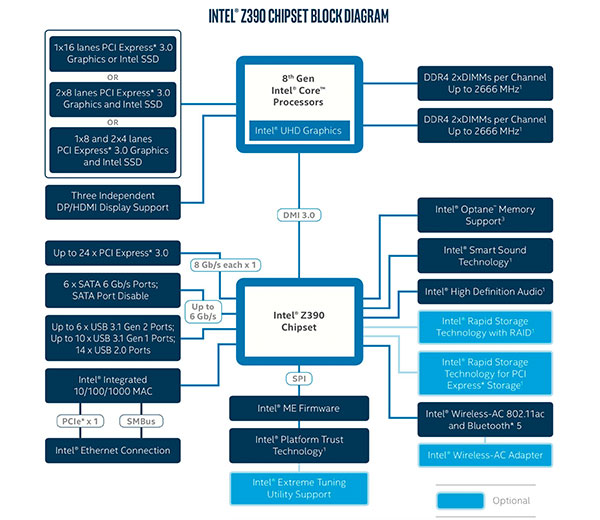
Look closely at the diagram above. You can see two distinct zones of control:
- CPU-Connected: The CPU has direct lines to the DDR4 RAM and a set of PCIe lanes, typically used for the primary graphics card and a high-speed NVMe SSD. This is the legacy of the old Northbridge.
- Chipset-Connected (PCH): The CPU communicates with the Z390 chipset via a link called DMI 3.0. The chipset then fans out to control everything else: USB ports, SATA ports, additional PCIe lanes for other slots, integrated Wi-Fi, and audio. This is the legacy of the old Southbridge.
This diagram clearly shows that if you want to use DDR5 RAM or a CPU from a newer generation, you would need a different CPU and a different chipset designed to support them.
The following video segments will walk you through the specific chipset families for Intel and AMD, which will help you understand how their naming conventions relate to CPU generations and features.
Explaining Motherboard Chipsets
Let's return to the "Explaining Motherboard Chipsets" video. These next sections detail the specific chipset series from Intel and AMD and their compatibility rules.
Watch from 06:18 to 11:36. The video will cover: Intel Chipset Overview (06:18 - 09:38): Focus on the naming convention (e.g., Z690, B660) and how the series number (600-series) corresponds to a CPU generation (12th-gen). AMD Chipset Overview (09:38 - 11:36): Note the similar pattern for AMD (e.g., X570, B550) and how different series support different Ryzen processor generations.
Conclusion
Today we've demystified the motherboard chipset, moving from its physical location on the board to its critical role as the system's central controller. You now understand that choosing a motherboard is fundamentally about choosing a chipset, which dictates the entire ecosystem of your PC.
Here are the key takeaways:
- Function: The chipset is the communication hub of the motherboard, managing data flow between all components.
- Evolution: Modern chipsets (PCH) evolved from an older two-chip (Northbridge/Southbridge) design, with high-speed memory and PCIe control now integrated directly into the CPU.
- CPU Compatibility: The chipset determines which CPU manufacturer (Intel/AMD), socket type, and processor generation the motherboard supports.
- RAM Compatibility: The chipset dictates the type of RAM (e.g., DDR4/DDR5) and the range of supported speeds.
- The Name is the Key: A motherboard's product name almost always includes the chipset name (e.g., B550, Z790), which is the most important piece of information for determining component compatibility.
In this lesson, we saw how the chipset provides the underlying communication pathways, or "lanes," for data. In our next lesson, we will look at the physical interfaces that use these lanes: common expansion slots like PCIe and M.2, and how they allow us to add powerful components like graphics cards and high-speed storage.