Hello! Welcome back to your second lesson in the Computer Hardware course.
In our first lesson, we explored the CPU, the "brain" of the computer. We discussed how its performance is defined by specifications like cores, threads, clock speed, and cache. You learned that a CPU processes data at incredible speeds, but it needs a high-speed workspace to hold the data and instructions it's actively using. That workspace is our topic for today: Random Access Memory (RAM).
This lesson will explain the critical function of RAM and teach you how to identify the key differences between modern RAM types. By the end of our session, you will be able to explain the function of RAM and identify RAM types including DDR3, DDR4, and DDR5 specifications. This knowledge is essential for understanding system performance and ensuring compatibility when building or upgrading a PC.
We will cover:
- The role of RAM as primary, volatile memory.
- The evolution from SDRAM to the modern DDR standard.
- A detailed comparison of DDR3, DDR4, and DDR5 specifications, including speed, voltage, and physical characteristics.
1. The Function of RAM: The Computer's Workbench
RAM, or Random Access Memory, is the computer's short-term memory. It's where the operating system, applications, and data currently in use are kept so they can be quickly reached by the CPU.
Think of it this way:
- Your computer's storage (SSD or HDD) is like a large warehouse where all your programs and files are stored permanently.
- The CPU is the worker who processes these programs and files.
- RAM is the workbench right next to the worker.
To work on something, the CPU retrieves it from the warehouse (storage) and places it on the workbench (RAM). Because the workbench is right there, the CPU can access what it needs almost instantly. If the workbench is too small, the CPU has to constantly go back to the warehouse, which significantly slows down the entire process. This is why having enough RAM is crucial for a responsive and fast computer, especially when multitasking or using demanding software.
RAM is volatile, meaning it requires power to maintain the stored information. When you turn off your computer, everything in RAM is cleared.
To see this relationship in action, let's watch a short, animated explanation.
RAM Explained - Random Access Memory
This video, "RAM Explained" from PowerCert Animated Videos, provides an excellent visual overview of what RAM is and how it interacts with the CPU and storage to affect system performance.
Watch the first part of the video, from the beginning to 02:19. Focus on the analogy of how data moves from the hard drive to RAM so the CPU can access it.
2. The Technology Behind RAM: SDRAM and DDR
Modern RAM is a type of DRAM (Dynamic Random Access Memory). The "dynamic" part means its memory cells, which are tiny capacitors, must be constantly refreshed with electricity to keep from losing the data they hold.
An early form of this was SDRAM (Synchronous DRAM). Its key innovation was being "synchronous"—it synchronized its operations with the system's clock, allowing it to queue up one instruction and prepare for the next, making it much more efficient than older, asynchronous DRAM. SDRAM could perform one data transfer per clock cycle.
The next major leap, and the basis for all modern RAM, was DDR SDRAM. DDR stands for Double Data Rate. It achieved a simple but brilliant improvement: it transfers data on both the rising and falling edges of the clock signal. This allows it to perform two data transfers per clock cycle, effectively doubling the memory's bandwidth without increasing the clock frequency.
RAM Explained - Random Access Memory
Let's return to the "RAM Explained" video to see how DDR technology works.
First, watch from 02:19 to 03:20 to understand the basics of DRAM and SDRAM. Then, skip ahead and watch from 09:00 to 10:20 to see the clear visual explanation of how Double Data Rate (DDR) doubles performance by using both edges of the clock signal.
This DDR principle is the foundation for all subsequent generations of RAM, each one building upon the last to deliver more performance and efficiency.
3. The Evolution of DDR: DDR3, DDR4, and DDR5
Since the original DDR, several new generations have been released. Each generation brings improvements in speed, capacity, and power efficiency. The three most recent and relevant generations are DDR3, DDR4, and DDR5.
A crucial point to understand is that RAM generations are not interchangeable. A motherboard is designed for a specific generation of RAM. You cannot install DDR4 RAM into a DDR3 slot, or DDR5 into a DDR4 slot. This is enforced by physical and electrical differences.
Let's look at the key specifications that differentiate them.
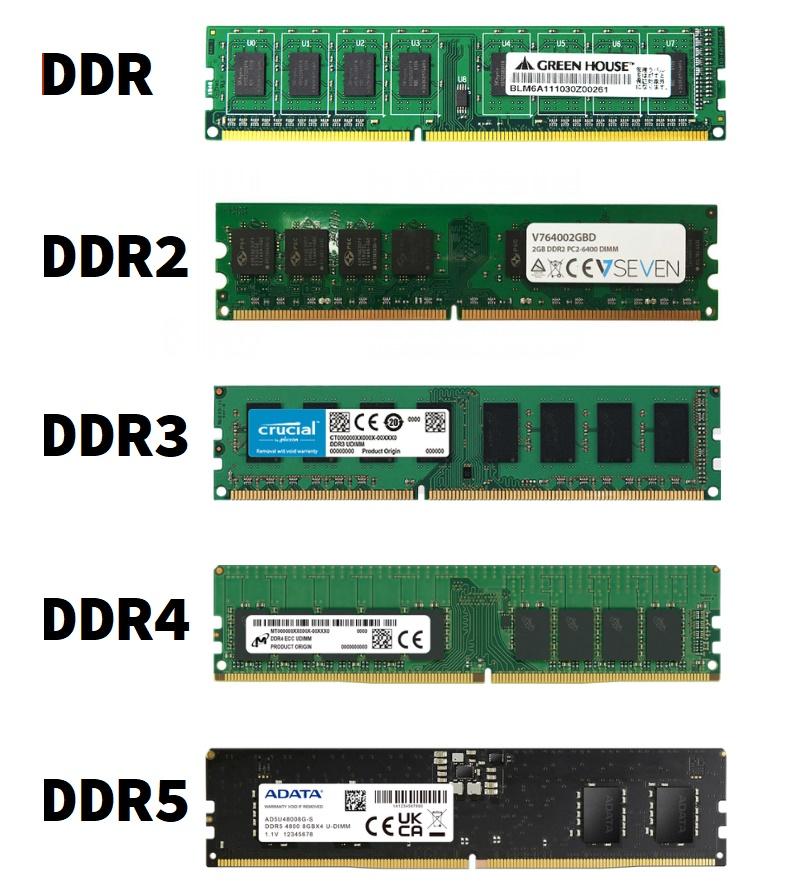
Key Specifications:
- Data Rate (Speed): Measured in Megatransfers per second (MT/s). This indicates how many million data transfers the RAM can perform per second.
- Bandwidth: The theoretical maximum rate of data transfer, measured in Megabytes or Gigabytes per second (MB/s or GB/s).
- Voltage: The amount of power the RAM module consumes. Lower voltage means better power efficiency and less heat.
- Prefetch Buffer: An internal buffer that grabs a certain amount of data in anticipation of it being needed. The size of this buffer doubled with each generation up to DDR3 (DDR: 2-bit, DDR2: 4-bit, DDR3: 8-bit).
- Physical Form: The number of pins and the location of the "key" notch on the connector are different for each generation to prevent incorrect installation.
The following article from Crucial provides an excellent, detailed comparison of the RAM generations.
RAM Generations: DDR2 vs DDR3 vs DDR4 vs DDR5
This article, "RAM Generations: DDR2 vs DDR3 vs DDR4 vs DDR5," clearly lays out the improvements with each new standard and includes helpful comparison tables.
Please read the sections titled "DDR2 vs. DDR3", "DDR3 vs DDR4", and "DDR4 vs DDR5". Pay close attention to the tables comparing their specifications. Finally, read the section "Memory is not compatible across all motherboards" to solidify your understanding of this critical rule.
DDR3 (2007)
- Voltage: 1.5V (with a 1.35V low-power version)
- Pins: 240 (for desktops)
- Typical Speeds: 1066 MT/s to 1866 MT/s
- Key Feature: Doubled the prefetch buffer to 8-bit, enabling higher bandwidth than DDR2.
DDR4 (2014)
- Voltage: 1.2V
- Pins: 288 (for desktops)
- Typical Speeds: 2133 MT/s to 3200 MT/s (and higher with overclocking)
- Key Features:
- Significantly lower power consumption.
- Higher speeds and module densities (larger capacity sticks).
- Introduced bank groups. Instead of doubling the prefetch buffer again (which would increase latency), DDR4 uses multiple independent bank groups. This allows it to process multiple data requests within a single clock cycle, improving efficiency.
DDR5 (2021)
- Voltage: 1.1V
- Pins: 288 (for desktops, but the notch is moved)
- Typical Speeds: 4800 MT/s to 6400 MT/s (and rapidly increasing)
- Key Features:
- New Channel Architecture: A single DDR5 module actually has two independent 32-bit memory channels, improving efficiency and memory access.
- On-Die ECC: Includes basic error correction on the memory chip itself to improve reliability as densities increase.
- Power Management IC (PMIC): Moves voltage regulation from the motherboard directly onto the RAM module, allowing for finer power control and better signal integrity.

To dive deeper into the technical advancements of DDR5, the following article provides a great summary.
The article "DDR3 vs. DDR4 vs. DDR5" from FS.com provides a concise table and explains the specific advantages of DDR5, which is relevant given your interest in hardware specifics.
First, review the large comparison table under the heading "DDR3 vs. DDR4 vs. DDR5". Then, read the section "Advantages of DDR5 over DDR3 & DDR4" to understand the significance of features like On-die ECC and the new power architecture.
Conclusion
In this lesson, we've established the vital role of RAM as the computer's high-speed workspace and traced the evolution of the technology that powers it. You are now able to explain how RAM works with the CPU and identify the key specifications of DDR3, DDR4, and DDR5.
Here are the key takeaways:
- Function: RAM is fast, volatile memory that holds the data and programs the CPU is actively using. More RAM generally leads to better system responsiveness and multitasking performance.
- DDR Standard: Modern RAM uses the Double Data Rate (DDR) standard, which transfers data twice per clock cycle.
- Generational Differences: Each new generation (DDR3, DDR4, DDR5) brings significant improvements in speed, capacity, and power efficiency.
- Incompatibility: RAM generations are physically and electrically incompatible. The motherboard's specifications dictate which type of RAM you can use. Key identifiers are pin count and the position of the notch on the module's connector.
Now that we've covered the CPU and RAM, the next logical step is to look at the component that connects them and everything else: the motherboard. In our next lesson, we will begin by exploring motherboard form factors (ATX, microATX, Mini-ITX) and their common use cases.