Introduction
In our previous lessons, we've built a robust error handling strategy focusing on recording what goes wrong. You learned to configure the logging module, replace print() statements, and, most recently, implement structured JSON logging for machine-readable diagnostics. This gives you visibility into your application's behavior.
Now, we shift our focus from recording errors to signaling them. When your code encounters an unexpected state, how should it react? Python offers two primary mechanisms for this: the assert statement and raising exceptions. Coming from a Java background, you might be tempted to use them interchangeably, but in Python, they serve distinct and non-overlapping purposes.
This lesson directly addresses this critical distinction. Your learning outcome is to distinguish between assert for internal sanity checks during development and exceptions for validating external inputs. Mastering this will make your code more robust, predictable, and easier to debug.
The Role of assert: Guarding Against Your Own Mistakes
The assert statement is a tool for defensive programming. Its purpose is to declare and verify invariants—conditions that you, the programmer, believe must be true at a certain point in your code. If an assert fails, it means there is a bug in your program's logic.
The syntax is straightforward:assert <condition>, "Optional message if condition is false"
If the condition is True, execution continues. If it's False, an AssertionError is raised, halting the program.
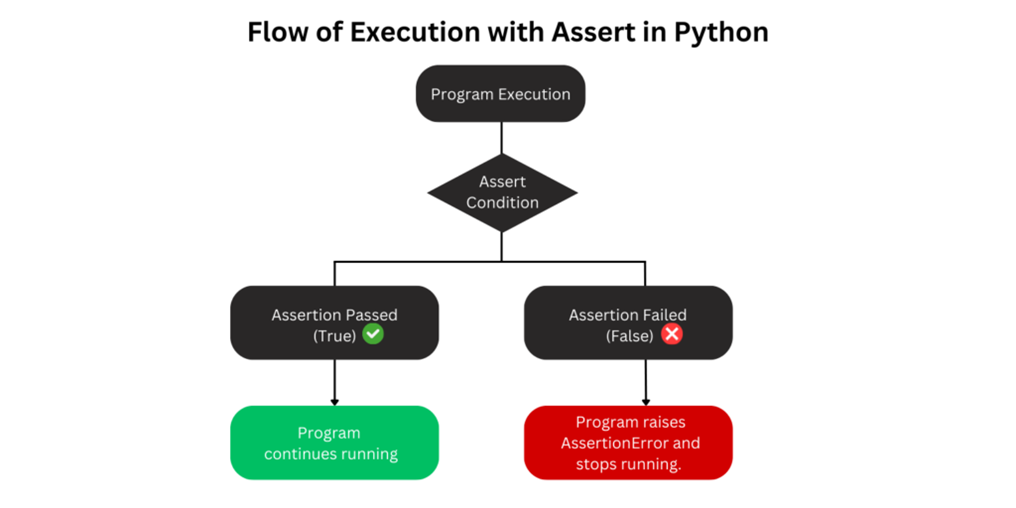
You use assert to catch internal inconsistencies that should never happen in a correctly functioning program.
This article by Stefan Scherfke provides excellent, concise examples of using assert to document and check code invariants.
Read the section 'When do I use assert?'. Pay close attention to the examples. Notice how assert is used to verify the state of internal variables (len(x) == 2) or the logic flow (assert self.button_manual.isChecked()), not to validate external data.
For instance, if you have a function that processes a list and is designed to always return a list of the same size, you might add an assertion to guarantee this invariant:
def process_data(data: list) -> list:


    # ... complex operations on 'data' ...
    # Programmer's invariant: The list size should not change.
    assert len(data) == initial_len, "Data processing changed list size unexpectedly!"
    return data
If this assertion ever fails, it signals a bug in the process_data function itself, not a problem with the input it received.
The Role of Exceptions: Handling External Errors
In contrast, exceptions are used to handle errors that are expected to occur during normal operation, typically due to invalid external conditions. This includes:
- User input that doesn't meet requirements (e.g., entering text into a number field).
- A file that a program tries to open but doesn't exist.
- A network connection that fails during a request.
You signal these conditions using the raise keyword, typically with a specific exception type like ValueError, TypeError, or FileNotFoundError. This is part of your function's public contract—you are telling the caller, "This is something that can go wrong, and you might need to handle it."
The Decisive Factor: Who is the Check For?
The core distinction boils down to this:
assertis for the programmer. It says, "I believe this is true, and if it's not, my logic is flawed."raiseis for the user/caller of your code. It says, "You have provided something invalid or the environment is in an unexpected state."
This short video explains this distinction as a form of defensive programming against yourself versus guarding against external inputs.
python: what is assert? (beginner) anthony explains #240
In this clip, Anthony Sottile clearly frames the distinction between assert for internal, defensive checks and exceptions for handling external inputs.
Watch from 06:03 to 07:42. Focus on the core idea: assert is for guarding your program against itself, not against inputs from a third party.
The Technical Knockout: The -O Flag
As the video mentioned, there is a critical technical reason why assert statements must not be used for validating external data. Python's assert statements can be globally disabled.
When you run a Python script with the -O (optimize) flag, the interpreter will completely ignore all assert statements.
# Assertions are enabled by default
python my_app.py


# Assertions are DISABLED
python -O my_app.py
This is done for performance; in a production environment, you assume your code is bug-free, so you can strip out these internal debugging checks. If you used assert to validate user input, running your application with -O would silently remove all your validation logic, leaving your system vulnerable to invalid data.
This pitfall is so common and critical that it's worth seeing concrete examples of what not to do.
Python's assert: Debug and Test Your Code Like a Pro
The Real Python article 'Python's assert' provides a detailed breakdown of common pitfalls, with excellent 'bad practice' vs. 'best practice' examples that directly address your goal of moving away from Java-isms.
First, read the brief section 'When Not to Use Assertions?'. Then, focus on the 'Common Pitfalls' section, specifically reading the subsections 'Using assert for Data Processing and Validation' and 'Handling Errors With assert'. Note how each incorrect use of assert is refactored into a proper if ... raise block.
Summary: assert vs. raise
Let's consolidate the rules of thumb into a clear table.
| Feature | assert |
raise (with if) |
|---|---|---|
| Purpose | Detect internal programming errors (bugs). | Handle foreseeable runtime/external errors. |
| Audience | The programmer of the code. | The user/caller of the code. |
| When it runs | During development/testing (by default). | Always (unless conditional logic prevents it). |
| Disabled? | Yes, with the python -O flag. |
No. |
| Exception raised | Always AssertionError. |
Specific exceptions (ValueError, TypeError, etc.). |
| Example Use Case | Verifying an algorithm's invariant. | Validating user input or function arguments. |
Exercise: Refactor Invalid assert Usage
Here is a function that calculates a final price after a discount. It incorrectly uses assert to validate the discount argument, which could be supplied by an external user or system.
Your task is to refactor it according to Python best practices.
Starter Code:
def calculate_discounted_price(price: float, discount: float) -> float:
    """
    Calculates the price after applying a discount.
    The discount should be a value between 0.0 and 1.0.
    """


    # BAD: Using assert for input validation.
    assert 0.0 <= discount <= 1.0, "Discount must be between 0 and 1"

    final_price = price * (1 - discount)
    return final_price


# --- Test cases ---
try:
    print(f"Valid price: {calculate_discounted_price(100, 0.2)}")


    # This call should fail gracefully
    print(f"Invalid price: {calculate_discounted_price(100, 1.5)}")
except ValueError as e:
    print(f"Caught expected error: {e}")
except AssertionError:
    print("Caught an AssertionError. This should be a ValueError!")
Instructions:
- Modify the
calculate_discounted_pricefunction. - Replace the
assertstatement with a conditional check (if). - If the validation fails,
raiseaValueErrorwith an appropriate error message. - Run the script. The correct output should show the valid price calculation and then the "Caught expected error: ..." message. It should not print the
AssertionErrormessage.
Solution
def calculate_discounted_price(price: float, discount: float) -> float:
    """
    Calculates the price after applying a discount.
    The discount should be a value between 0.0 and 1.0.
    """


    # GOOD: Using an if-check and raising a specific exception for validation.
    if not (0.0 <= discount <= 1.0):
        raise ValueError("Discount must be a value between 0.0 and 1.0")

    final_price = price * (1 - discount)
    return final_price


# --- Test cases ---
try:
    print(f"Valid price: {calculate_discounted_price(100, 0.2)}")


    # This call will now raise a ValueError, which is caught correctly.
    print(f"Invalid price: {calculate_discounted_price(100, 1.5)}")
except ValueError as e:
    print(f"Caught expected error: {e}")
except AssertionError:
    print("Caught an AssertionError. This should be a ValueError!")


# --- Expected Output ---
# Valid price: 80.0
# Caught expected error: Discount must be a value between 0.0 and 1.0
Conclusion
You have now internalized one of the most important distinctions in Python's error handling philosophy. Using these tools correctly is a hallmark of a proficient Python developer.
Key Takeaways:
assertis for Sanity Checks: Use it to find your own bugs. It checks for conditions that should be impossible in correct code.- Exceptions are for Validation: Use
if ... raiseto handle invalid inputs or environmental failures that are part of the program's interaction with the outside world. - The
-OFlag is Final: Because assertions can be disabled in production, they are fundamentally unreliable for any form of input validation or error handling that must always be present.
So far, we have focused on signaling and recording errors. But what happens after an error is raised? How do we ensure our program cleans up resources like files or network connections, even when things go wrong?
In the next lesson, we will answer that question by exploring Python's mechanisms for guaranteed cleanup, where you will compare the use of finally and context managers (with).