Introduction
Welcome to the next lesson in our journey to master Python's containers. In the previous lessons, we've focused on specialized containers from the collections module, like defaultdict for grouping and deque for efficient queues. These tools help us manage behavior in a Pythonic way.
Today, we shift our focus to the structure of our data. When you have data to represent—like a user, a geographic coordinate, or an inventory item—it's common, especially with a Java background, to write a class with a full __init__ method, a __repr__ for debugging, __eq__ for comparisons, and so on. This involves a lot of repetitive boilerplate code.
This lesson introduces the @dataclass decorator, a powerful tool that automates this process. You will learn how to define clean record types using @dataclass with frozen for immutability, safe default values, and __post_init__ for validation. This will allow you to create robust, readable, and maintainable data-holding classes with minimal effort.
The Boilerplate Problem in Plain Classes
Before we see the solution, let's experience the problem. Imagine you need a simple class to hold a user's comment. It needs an ID, the text, and maybe an author ID. To make this class genuinely useful, you need to implement several special "dunder" methods by hand.
Python dataclasses will save you HOURS, also featuring attrs
The following video from the mCoding channel perfectly illustrates the sheer amount of boilerplate code required to create a robust, but simple, data-holding class in Python without any helpers. Pay close attention to all the methods he has to write manually.
Watch the segment from 00:58 to 03:23. Notice the manual implementation of __init__, __repr__, __eq__, and the complexity of adding immutability and ordering.
As you saw, what starts as a simple idea quickly balloons into dozens of lines of code. Changing anything, like adding a new field, requires updating multiple methods, which is tedious and error-prone. This is the kind of ceremony Python aims to eliminate.
The @dataclass Solution: Less Code, More Intent
Now, let's see how @dataclass solves this problem. By adding a single decorator to your class, you delegate the task of writing __init__, __repr__, __eq__, and other dunder methods to Python itself.
You simply declare the fields you want and their types.
from dataclasses import dataclass

@dataclass
class Position:
    name: str
    lon: float
    lat: float


# Python automatically creates the __init__, __repr__, and __eq__ methods!


# __init__ is created for you
pos = Position('Oslo', 10.8, 59.9)


# __repr__ is created for you
print(pos)


# Output: Position(name='Oslo', lon=10.8, lat=59.9)


# __eq__ is created for you
pos2 = Position('Oslo', 10.8, 59.9)
print(pos == pos2)


# Output: True
This code is shorter, more declarative, and easier to read. The focus is on the data your class holds, not the boilerplate mechanics.
Customizing Fields: Defaults and Immutability
Dataclasses offer powerful customization options. Let's explore the most important ones: default values and immutability.
Handling Default Values Correctly
You can provide default values for fields just like you would for function arguments.
@dataclass
class Position:
    name: str
    lon: float = 0.0
    lat: float = 0.0


# You can omit fields with default values
print(Position('Null Island'))


# Output: Position(name='Null Island', lon=0.0, lat=0.0)
However, a classic Python pitfall is using a mutable type (like a list or dict) as a default value. If you do this, all instances of the class will share the same mutable object, leading to bizarre bugs.
Dataclasses prevent this common mistake and force you to use the correct pattern: default_factory.
Data Classes in Python (Guide)
To understand how to correctly handle both simple and mutable default values, we'll turn to a detailed guide on Real Python. This article explains the default_factory pattern, which is non-negotiable for production-quality dataclasses.
Read the section titled 'Advanced Default Values'. It clearly explains why cards: List[PlayingCard] = make_french_deck() is a problem and how field(default_factory=make_french_deck) solves it. This concept is critical.
To summarize the key takeaway from the reading:
- For immutable defaults (like
0.0,True, or"default"), assign them directly:field: int = 0. - For mutable defaults (like a
listordict), you must usedefault_factoryand provide a zero-argument function that creates a new instance.
Here's a practical example:
from dataclasses import dataclass, field
from typing import List

@dataclass
class InventoryItem:
    name: str
    unit_price: float
    tags: List[str] = field(default_factory=list)


# Each instance gets its own separate list for tags
item1 = InventoryItem("Laptop", 1200.00)
item1.tags.append("electronics")

item2 = InventoryItem("Mouse", 25.00)
item2.tags.append("peripheral")

print(item1) # Output: InventoryItem(name='Laptop', unit_price=1200.0, tags=['electronics'])
print(item2) # Output: InventoryItem(name='Mouse', unit_price=25.0, tags=['peripheral'])
Immutable Records with frozen=True
For many data-holding objects, it's desirable to make them immutable. This means their state cannot be changed after they are created. Immutable objects are more predictable and can be safely used as keys in dictionaries or elements in sets.
To create an immutable dataclass, simply add frozen=True to the decorator.
from dataclasses import dataclass, FrozenInstanceError

@dataclass(frozen=True)
class User:
    user_id: int
    username: str

user = User(101, "alex")

try:
    user.username = "alex_the_great"
except FrozenInstanceError as e:
    print(e)


    # Output: cannot assign to field 'username'
When frozen=True, dataclasses will override attribute setting to raise an error, and they will also generate a __hash__ method, making instances hashable.
Validation and Computed Fields with __post_init__
What if you need to run logic after an object has been initialized? For example, you might want to:
- Validate that the provided values are correct (e.g., price must be positive).
- Compute a new field based on the initial ones (e.g., create a
full_namefromfirst_nameandlast_name).
This is the job of the __post_init__ method. Dataclasses will automatically call this method right after __init__ if you define it.
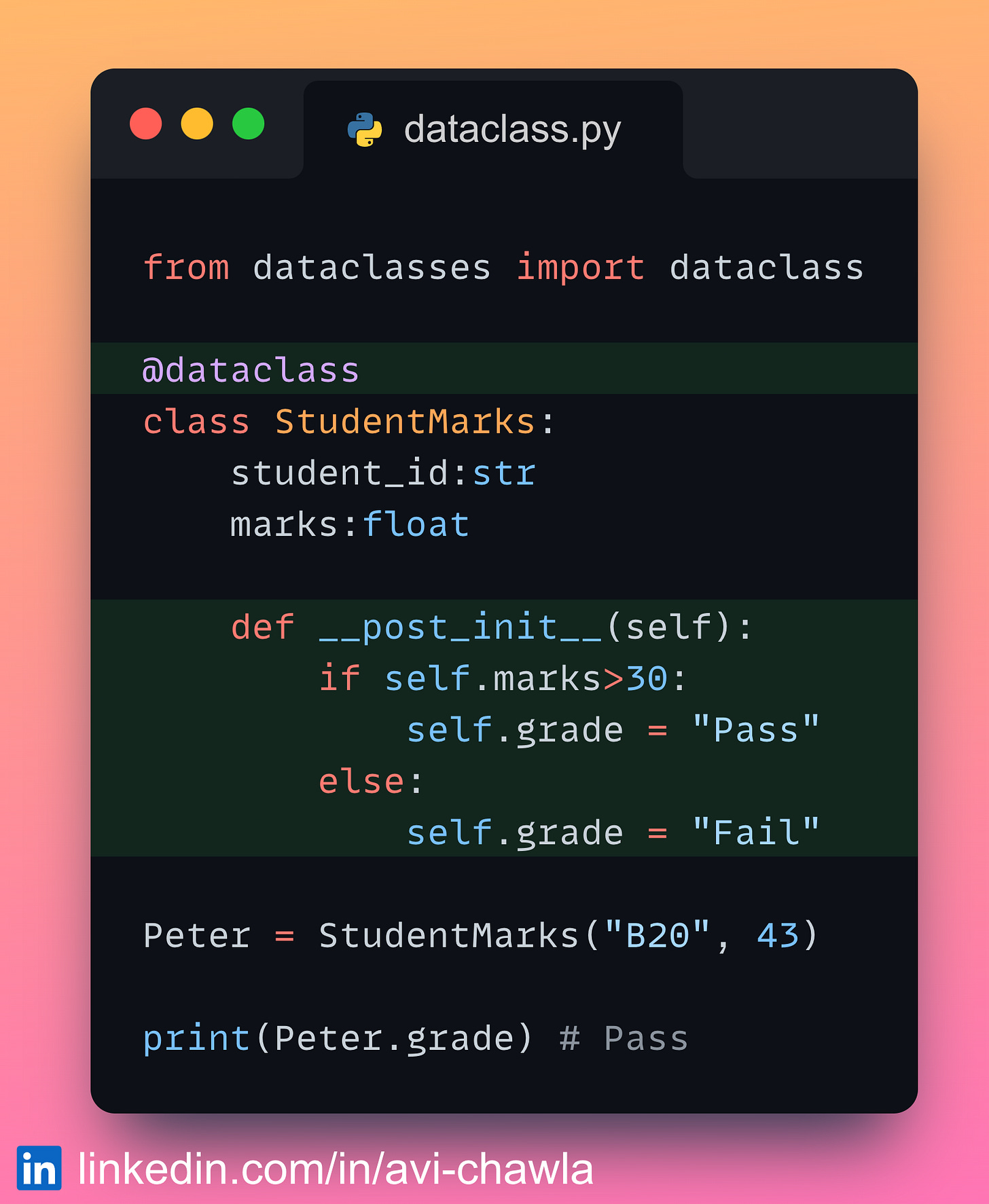
Let's read a more detailed explanation with practical code for validation.
Advanced Dataclass Features – Fields, Metadata, Post-Init, and ...
The article 'Advanced Dataclass Features' provides a clear, focused explanation of using __post_init__ for validation and creating computed fields. This is essential for building robust objects that can't be put into an invalid state.
Read the sections 'Validation After Creation: post_init()' and 'Code Example 3: post_init() for Validation and Computed Fields'. Focus on how __post_init__ raises a ValueError to prevent invalid objects from being created.
Here is a complete example combining validation and a computed field. Notice the use of field(init=False) to tell the dataclass that vat_due is not a parameter to __init__, but will be computed later.
from dataclasses import dataclass, field

@dataclass(frozen=True)
class Order:
    order_id: str
    amount: float
    vat_rate: float = 0.20


    # This field is computed, not passed to __init__
    vat_due: float = field(init=False)

    def __post_init__(self):


        # 1. Validation
        if self.amount < 0:
            raise ValueError("Order amount cannot be negative.")


        # 2. Computed Field
        # Because the class is frozen, we can't just do `self.vat_due = ...`
        # We have to use the special `object.__setattr__` method.
        calculated_vat = self.amount * self.vat_rate
        object.__setattr__(self, 'vat_due', round(calculated_vat, 2))


# This will work
order = Order(order_id="A123", amount=100.0)
print(order) # Output: Order(order_id='A123', amount=100.0, vat_rate=0.2, vat_due=20.0)


# This will fail at creation time
try:
    invalid_order = Order(order_id="B456", amount=-50.0)
except ValueError as e:
    print(e) # Output: Order amount cannot be negative.
By putting validation in __post_init__, you guarantee that it's impossible to create an Order object in an invalid state. This is a powerful pattern for writing self-correcting code.
Exercise: Create a Product Dataclass
Now it's your turn to combine these concepts. Your task is to define a Product dataclass that is immutable, has a safe default for tags, and validates its data upon creation.
Requirements:
- Define a
Productdataclass. - It should be immutable.
- It should have the following fields:
product_id:strname:strprice:floattags:List[str], which should default to an empty list safely.
- Implement
__post_init__to perform the following validation:- Raise a
ValueErrorifpriceis not greater than 0. - Raise a
ValueErrorifnameis an empty or whitespace-only string.
- Raise a
from dataclasses import dataclass, field
from typing import List


# Your code goes here. Define the Product dataclass.
# @dataclass(...)
# class Product:
#     ...
#     ...
#     ... = field(...)
#
#     def __post_init__(self):
#         # Your validation logic here
#         ...


# --- Verification ---
# These should work
try:
    p1 = Product(product_id="sku-123", name="Wireless Mouse", price=29.99)
    print(f"Successfully created: {p1}")
    p2 = Product(product_id="sku-456", name="Keyboard", price=75.00, tags=["mechanical", "rgb"])
    print(f"Successfully created: {p2}")
except Exception as e:
    print(f"Creation failed unexpectedly: {e}")


# These should fail with a ValueError
print("\n--- Testing Invalid Cases ---")
try:
    Product(product_id="sku-789", name="Monitor", price=-10.00)
except ValueError as e:
    print(f"Caught expected error: {e}") # Expected: price must be positive

try:
    Product(product_id="sku-000", name=" ", price=99.99)
except ValueError as e:
    print(f"Caught expected error: {e}") # Expected: name cannot be empty
Solution
from dataclasses import dataclass, field
from typing import List

@dataclass(frozen=True)
class Product:
    product_id: str
    name: str
    price: float
    tags: List[str] = field(default_factory=list, repr=False, compare=False)

    def __post_init__(self):
        if self.price <= 0:
            raise ValueError("Price must be greater than 0.")
        if not self.name or not self.name.strip():
            raise ValueError("Name cannot be empty.")


# --- Verification ---
# These should work
try:
    p1 = Product(product_id="sku-123", name="Wireless Mouse", price=29.99)
    print(f"Successfully created: {p1}")
    p2 = Product(product_id="sku-456", name="Keyboard", price=75.00, tags=["mechanical", "rgb"])
    print(f"Successfully created: {p2}")
except Exception as e:
    print(f"Creation failed unexpectedly: {e}")


# These should fail with a ValueError
print("\n--- Testing Invalid Cases ---")
try:
    Product(product_id="sku-789", name="Monitor", price=-10.00)
except ValueError as e:
    print(f"Caught expected error: {e}")

try:
    Product(product_id="sku-000", name=" ", price=99.99)
except ValueError as e:
    print(f"Caught expected error: {e}")
Conclusion
In this lesson, you've learned how to leverage @dataclass to create clean, powerful, and Pythonic data-holding classes. This is a significant step away from the verbose, Java-style classes that require manual implementation of common dunder methods.
Key Takeaways:
@dataclasseliminates boilerplate: It automatically generates__init__,__repr__,__eq__, and more, allowing you to focus on the data itself.- Immutability is easy: Use
@dataclass(frozen=True)to create immutable value objects that are predictable and hashable. - Handle mutable defaults safely: Always use
field(default_factory=...)for fields that should default to alist,dict, or other mutable type to prevent shared state bugs. - Enforce correctness with
__post_init__: Use this method to perform validation and compute derived fields, ensuring your objects are always created in a valid state.
In our next lesson, we will compare @dataclass to typing.NamedTuple. Both are used to create simple record types, but they have different trade-offs in terms of performance, memory usage, and flexibility. You'll learn the clear guidelines for when to choose one over the other.