Introduction
In the last lesson, we saw how built-in reduction functions like sum() and all() can replace manual for loops, leading to more readable and performant code. This is a core part of the Pythonic philosophy: express what you want to do, and let the language handle the how.
We'll continue this journey by mastering another fundamental and highly expressive feature: tuple unpacking and multiple assignment. Coming from a Java background, you're likely used to assigning variables one by one and accessing sequence elements by index. Python offers a more declarative way to handle this that makes your code cleaner and less error-prone.
In this lesson, you will learn to apply tuple unpacking to bind variables directly from iterables, perform atomic swaps without temporary variables, and replace clumsy index access with self-documenting code.
The Core Idea: Multiple Assignment and Unpacking
At its heart, multiple assignment (also known as iterable unpacking) is a way to assign values from an iterable (like a tuple, list, or string) to multiple variables in a single statement.
Consider this line:
x, y = 10, 20
While this looks like a special syntax, what Python actually does is create a temporary tuple (10, 20) on the right-hand side and then unpacks its values into the variables x and y on the left-hand side.
This works for any iterable, not just tuples.
# Unpacking a list
point = [100, 200]
x, y = point
print(f"x={x}, y={y}")  # Output: x=100, y=200


# Unpacking a string (which is an iterable of characters)
initials = "JS"
first, last = initials
print(f"first='{first}', last='{last}'")  # Output: first='J', last='S'
The article below provides a fantastic introduction to this concept, explaining the mechanics and showing how it applies to various iterables.
Multiple assignment and tuple unpacking improve Python code readability
The article 'Multiple assignment and tuple unpacking improve Python code readability' by Trey Hunner is a definitive guide to this topic. We will be referencing it throughout this lesson.
Read the first two sections, 'How multiple assignment works' and 'Unpacking in a for loop'. Pay attention to how the author explains the underlying tuple creation and how this syntax extends naturally to any iterable.
The Atomic Swap: A Classic Idiom
A common task in many algorithms is swapping the values of two variables. In languages like Java, this requires a third, temporary variable.
The Java-esque Way:
a = 5
b = 10


# Clumsy and requires an extra variable
temp = a
a = b
b = temp

print(f"a={a}, b={b}") # Output: a=10, b=5
With unpacking, this becomes a single, elegant line of code.
The Pythonic Way:
a = 5
b = 10


# Clean, readable, and atomic
a, b = b, a

print(f"a={a}, b={b}") # Output: a=10, b=5
This works because Python fully evaluates the entire right-hand side (b, a) first, creating a new tuple (10, 5). Only then does it assign the values from this new tuple to the variables on the left. This makes the swap "atomic"—it happens as a single, indivisible operation.
Improving Readability: From Indexing to Unpacking
One of the most significant benefits of unpacking is how it improves code readability by replacing "magic numbers" (hard-coded indexes) with descriptive variable names.
Imagine you have a list of tuples, where each tuple represents a person's (name, age, city).
The Indexing Way (less readable):
person = ("Alice", 30, "New York")


# What does person[0] mean? We have to look back at the definition.
# This code is harder to read and review.
print(f"{person[0]} is {person[1]} years old and lives in {person[2]}.")
By using unpacking, you assign meaningful names to the values right at the point of use.
The Pythonic Way (self-documenting):
person = ("Alice", 30, "New York")


# The variables themselves document the data's structure.
name, age, city = person
print(f"{name} is {age} years old and lives in {city}.")
This pattern is especially powerful inside for loops, as you've already seen with enumerate and dict.items().
users = [("Alice", 30), ("Bob", 42)]

for name, age in users:
    print(f"{name} is {age} years old.")
This is far superior to accessing user[0] and user[1] inside the loop.
For another perspective on these core ideas, the following video provides a clear, concise explanation.
Tuples & Tuple Unpacking in Python
The video 'Tuples & Tuple Unpacking in Python' by Academind gives a practical overview of unpacking, reinforcing the concepts we've just discussed.
Watch from the start until 09:45, and then the final example from 13:26 to 14:27. Focus on how unpacking is presented as a convenient alternative to indexing and how a function can return multiple values (as a tuple) that are then cleanly unpacked by the caller.
Strictness as a Feature
A crucial aspect of unpacking is its strictness. The number of variables on the left must exactly match the number of items in the iterable on the right. If they don't, Python will raise a ValueError.
>>> point = (10, 20, 30)
>>> x, y = point
Traceback (most recent call last):
  File "<stdin>", line 1, in <module>
ValueError: too many values to unpack (expected 2)

>>> x, y, z, w = point
Traceback (most recent call last):
  File "<stdin>", line 1, in <module>
ValueError: not enough values to unpack (expected 4, got 3)
Instead of viewing this as a limitation, think of it as a free assertion. It guarantees that the data you are working with has the exact structure you expect. This can prevent subtle bugs that would occur if you were using manual indexing on data with an unexpected length.
If you genuinely don't need a value, the convention is to assign it to the underscore _ variable. This signals to other developers (and code linters) that the value is being intentionally ignored.
record = ("ACME", "2023-10-27", 101.50, "PROCESSED")


# I only need the name and the amount.
company, _, amount, _ = record
print(f"Company: {company}, Amount: {amount}")
Deep Unpacking
Unpacking isn't limited to a single level. You can unpack nested structures by mirroring the structure on the left side of the assignment. This is known as "deep unpacking".
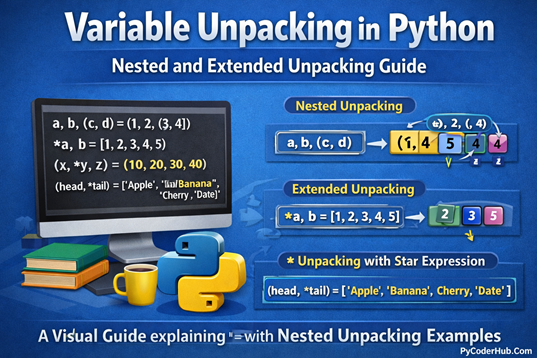
Imagine you are iterating over a list of (coordinates, color) pairs, where coordinates is itself a tuple (x, y).
points = [((10, 20), "red"), ((30, 40), "blue")]


# Using deep unpacking in a for loop
for (x, y), color in points:
    print(f"Point at ({x}, {y}) has color {color}")
This is significantly more readable than doing nested indexing like point[0][0] and point[0][1]. The structure of the for loop line for (x, y), color in points: clearly documents the shape of the data being processed.
Exercise: Refactor to Use Unpacking
Now it's your turn to apply these concepts. Your goal is to refactor the following snippets to use multiple assignment and unpacking, eliminating manual indexing and temporary variables.
Snippet 1: Swapping List Elements
data = [10, 20, 30, 40, 50]
print(f"Original: {data}")


# TODO: Swap the first and last elements using one line of Pythonic code.
# The non-pythonic way would be:
# temp = data[0]
# data[0] = data[-1]
# data[-1] = temp


# Your code here

print(f"Swapped: {data}") # Expected: [50, 20, 30, 40, 10]
Snippet 2: Processing GPS Coordinates
locations = [
    ("New York", (40.7128, -74.0060)),
    ("London", (51.5074, -0.1278)),
    ("Tokyo", (35.6895, 139.6917)),
]

def print_locations_indexed(locations_data):
    print("--- Using Indexing ---")
    for loc in locations_data:


        # TODO: Refactor this print statement and the loop itself.
        print(f"City: {loc[0]}, Lat: {loc[1][0]}, Lon: {loc[1][1]}")

def print_locations_unpacked(locations_data):
    print("--- Using Unpacking ---")


    # TODO: Rewrite the loop and print statement using deep unpacking.
    # Your loop here

print_locations_indexed(locations)
print_locations_unpacked(locations)
Click to see the solution
Snippet 1 Solution:
data = [10, 20, 30, 40, 50]
print(f"Original: {data}")


# Swap the first and last elements using one line of Pythonic code.
data[0], data[-1] = data[-1], data[0]

print(f"Swapped: {data}") # Expected: [50, 20, 30, 40, 10]
Snippet 2 Solution:
locations = [
    ("New York", (40.7128, -74.0060)),
    ("London", (51.5074, -0.1278)),
    ("Tokyo", (35.6895, 139.6917)),
]

def print_locations_indexed(locations_data):
    print("--- Using Indexing ---")
    for loc in locations_data:
        print(f"City: {loc[0]}, Lat: {loc[1][0]}, Lon: {loc[1][1]}")

def print_locations_unpacked(locations_data):
    print("--- Using Unpacking ---")


    # The loop is rewritten using deep unpacking.
    for city, (latitude, longitude) in locations_data:
        print(f"City: {city}, Lat: {latitude}, Lon: {longitude}")

print_locations_indexed(locations)
print_locations_unpacked(locations)
Conclusion
You've now learned one of Python's most ergonomic and expressive features. By embracing multiple assignment and unpacking, you can write code that is not only more concise but also more readable and robust.
Key Takeaways:
- Readability: Unpacking assigns meaningful names to data, replacing opaque index access (
data[0]) with self-documenting variables (name, age, city = data). - Conciseness: The atomic swap
a, b = b, ais a prime example of Python's ability to express complex operations simply. - Robustness: The strictness of unpacking acts as an implicit assertion, ensuring your data conforms to the expected structure and catching errors early.
- Universality: Unpacking works on any iterable and can be used in simple assignments,
forloops, and with nested data structures.
So far, we've assumed we know the exact length of the iterable we're unpacking. But what if we don't? What if we want to grab the first element and then collect all the rest? In the next lesson, we will introduce starred unpacking, which gives us the flexibility to handle variable-length sequences with the same Pythonic elegance.