Introduction
In our last lesson, we mastered enumerate() and zip(), two indispensable tools for handling indexes and parallel sequences in a clean, Pythonic way. We've established that direct iteration is the default, but we now have elegant solutions for when we need more control.
This lesson addresses another common iteration requirement: controlling the order in which you process items. Coming from a language like Java, you might be tempted to get a list of indices, sort or reverse them, and then access the collection. This is cumbersome and un-Pythonic.
Instead, Python provides built-in functions that directly express the intent of ordered iteration without modifying the original data. This lesson will teach you how to use sorted() and reversed() to control the flow of your loops, ensuring your code remains readable and your original data structures remain intact.
Iterating in Sorted Order: sorted()
The most common requirement for ordered iteration is processing items in sorted order. The Pythonic tool for this is the sorted() built-in function.
Key characteristics of sorted():
- It takes any iterable (lists, tuples, strings, sets, etc.) as input.
- It always returns a new, sorted list.
- The original iterable is not modified.
This last point is critical. sorted() is a non-destructive function, which makes it perfect for looping. It contrasts sharply with the list.sort() method, which modifies a list in-place and returns None—a common source of bugs for newcomers.
sorted() vs. list.sort(): The Critical Distinction
Before we go further, it's essential to cement the difference between the sorted() function and the list.sort() method.
How to Order Lists in Python (Visually Explained) | sort(), sorted(), reverse() | #Python Course 28
This video provides a clear, visual explanation of the difference between sorting in-place with .sort() and creating a new sorted list with sorted().
Watch the segment from 00:55 to 01:42, which explains list.sort(). Then, watch from 04:26 to 05:40, which introduces the sorted() function. Notice how .sort() modifies the original list, while sorted() creates a new, sorted one, leaving the original unchanged.
Here's the takeaway in code:
# Using the in-place list.sort() method
data = [3, 1, 4, 1, 5, 9]
print(f"Original data before .sort(): {data}")
data.sort() # Sorts the list in-place, returns None
print(f"Data after .sort(): {data}") # The original list is changed


# Using the sorted() function for iteration
data = [3, 1, 4, 1, 5, 9]
print(f"\nOriginal data before sorted() loop: {data}")
print("Iterating with sorted():")
for item in sorted(data):
    print(item, end=' ')
print(f"\nData after sorted() loop: {data}") # The original list is unchanged
For looping, for item in sorted(iterable): is the clear, idiomatic choice.
Custom Sorting with the key Argument
sorted() becomes incredibly powerful when you use its key argument. Instead of comparing the items directly, Python will call the key function on each item and sort based on the returned values. This is far more efficient and readable than the multi-argument comparison functions used in other languages.
Transforming Code into Beautiful, Idiomatic Python
The real power of sorted() lies in custom sorting using the key argument. In this classic talk, Python core developer Raymond Hettinger explains why using a key function is the modern, efficient, and Pythonic approach.
Watch from 09:41 to 12:10. Pay close attention to the contrast between the old, slow comparison function and the fast, simple key function. This is a core Pythonic principle.
A common use case is sorting complex objects. Imagine you have a list of tuples representing user data (user_id, name, age).
users = [
    (103, "Alice", 34),
    (101, "Bob", 25),
    (102, "Charlie", 25),
]


# Sort by age (the 3rd element, index 2)
# We use a lambda for a simple, one-off key function
for user in sorted(users, key=lambda u: u[2]):
    print(user)


# Output shows sorting by age
# (101, 'Bob', 25)
# (102, 'Charlie', 25)
# (103, 'Alice', 34)


# To sort by age, then by name for ties:
# Python's sort is stable, but a more explicit way is to return a tuple from the key
for user in sorted(users, key=lambda u: (u[2], u[1])):
    print(user)


# Output shows sorting by age, then alphabetically by name
# (101, 'Bob', 25)
# (102, 'Charlie', 25)
# (103, 'Alice', 34)
You can also sort in descending order by adding reverse=True:
# Sort by age, descending
for user in sorted(users, key=lambda u: u[2], reverse=True):
    print(user)
Iterating in Reverse Order: reversed()
To iterate over a sequence from end to start, Python provides the reversed() function.
Key characteristics of reversed():
- It takes a sequence (like a list, tuple, string, or range) or a custom object that defines a
__reversed__()method. It does not work on general iterators or unordered collections like sets. - It returns a reverse iterator, not a list. This is highly memory-efficient, as it doesn't create a copy of the data. Items are yielded one by one as the loop progresses.
- The original sequence is not modified.
reversed() vs. list.reverse() vs. Slicing
Similar to the sorting functions, there's an in-place method, list.reverse(), which you should avoid when you just need to iterate.
How to Order Lists in Python (Visually Explained) | sort(), sorted(), reverse() | #Python Course 28
Just like with sorting, there are two main ways to reverse a list: one that modifies it and one that doesn't. This video clarifies the difference.
Watch from 06:34 to 07:37 to see the in-place list.reverse() method. Then watch from 07:37 to 09:01 to understand the reversed() function, which returns a memory-efficient iterator.
Using reversed() in a loop is the most direct way to express your intent.
Transforming Code into Beautiful, Idiomatic Python
Raymond Hettinger also provides a compelling case for reversed() as the direct, readable replacement for manual backward loops common in other languages.
Watch from 05:41 to 06:42. Note his emphasis on how reversed() is faster, more beautiful, and avoids the error-prone indexing you might be used to from Java or C.
Another common way to get a reversed sequence is with extended slicing: my_list[::-1]. How does this compare to reversed()?
Reverse Python Lists: Beyond .reverse() and reversed()
The reversed() function has important nuances. It's a memory-efficient iterator, not a new list. This article from Real Python delves into these details and compares reversed() with the slicing alternative.
Read the section titled 'Iterating Through Lists in Reverse'. Focus on the two sub-sections: 'The Built-in reversed() Function' and 'The Slicing Operator, [::-1]'. Note the discussion on readability, memory usage, and how each method is affected by changes to the original list.
Summary of reversed() vs. [::-1] for iteration:
| Feature | for item in reversed(seq): |
for item in seq[::-1]: |
|---|---|---|
| Readability | High. Clearly states intent. | Lower. Syntax is more cryptic. |
| Memory Usage | Low. Creates an iterator. | High. Creates a full copy of the list in memory. |
| Flexibility | Works on any object with __reversed__(). |
Works only on sequences that support slicing. |
For looping, reversed() is almost always the superior choice.
Visual Summary
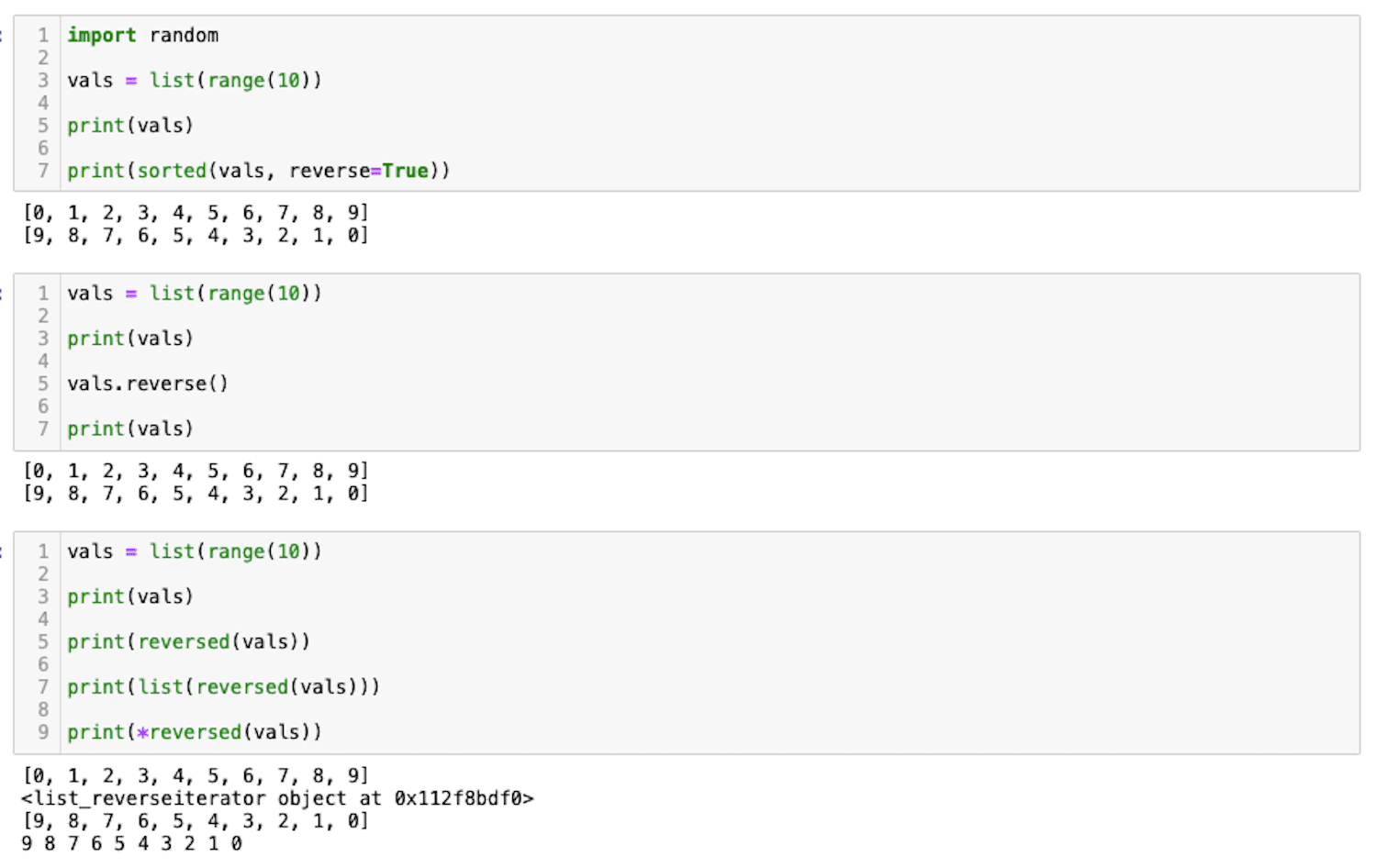
This image provides a quick visual recap of the functions and methods we've discussed.
Exercise: Processing Log Files
You are given a list of log entries. Each entry is a tuple containing a Unix timestamp, a log level string, and a message. The original list of logs must not be modified.
# initial_code.py
import time

logs = [
    (1672531200, 'INFO', 'System startup'),
    (1672531205, 'DEBUG', 'Initializing subsystem A'),
    (1672531210, 'WARNING', 'Disk space is running low'),
    (1672531215, 'INFO', 'User Alice logged in'),
    (1672531220, 'ERROR', 'Failed to connect to database'),
    (1672531225, 'INFO', 'Processing task #123'),
]

def format_log(log_entry):
    """Helper to format a log entry for printing."""
    ts, level, msg = log_entry


    # time.ctime converts a timestamp to a readable string
    return f"{time.ctime(ts)} - [{level}] {msg}"


# --- YOUR TASKS ---


# 1. Print all logs in chronological order (oldest first).
#    The logs are already mostly in order, but you should not assume this.
print("--- Chronological Log Report ---")


# Your code here


# 2. Print only the 'ERROR' and 'WARNING' logs, sorted chronologically.
print("\n--- Critical Issues Report ---")


# Your code here


# 3. Print the 3 most recent log entries, from newest to oldest.
print("\n--- Most Recent Activity ---")


# Your code here
Your goal is to implement the three reporting tasks using sorted() and reversed() appropriately.
Click to see the solution
# solution_code.py
import time

logs = [
    (1672531200, 'INFO', 'System startup'),
    (1672531205, 'DEBUG', 'Initializing subsystem A'),
    (1672531210, 'WARNING', 'Disk space is running low'),
    (1672531215, 'INFO', 'User Alice logged in'),
    (1672531220, 'ERROR', 'Failed to connect to database'),
    (1672531225, 'INFO', 'Processing task #123'),
]

def format_log(log_entry):
    """Helper to format a log entry for printing."""
    ts, level, msg = log_entry
    return f"{time.ctime(ts)} - [{level}] {msg}"


# 1. Print all logs in chronological order (oldest first).
print("--- Chronological Log Report ---")


# Use sorted() with a key to sort by the timestamp (the first element).
for log in sorted(logs, key=lambda entry: entry[0]):
    print(format_log(log))


# 2. Print only the 'ERROR' and 'WARNING' logs, sorted chronologically.
print("\n--- Critical Issues Report ---")


# First, filter the list, then sort the result.
# We will learn comprehensions soon, but a simple loop is fine here.
critical_logs = []
for log in logs:
    if log[1] in ('ERROR', 'WARNING'):
        critical_logs.append(log)


# Now sort the filtered list
for log in sorted(critical_logs, key=lambda entry: entry[0]):
    print(format_log(log))


# 3. Print the 3 most recent log entries, from newest to oldest.
print("\n--- Most Recent Activity ---")


# Sort by timestamp in reverse order to get newest first.
# Then loop through the first 3 items of the sorted list.
sorted_desc = sorted(logs, key=lambda entry: entry[0], reverse=True)
for log in sorted_desc[:3]:
    print(format_log(log))
Conclusion
You have now learned how to control the order of iteration without resorting to manual indexing or destructively modifying your data.
Key Takeaways:
- For Non-Destructive Sorting, use
sorted(): It returns a new sorted list from any iterable. Usekey=for custom sort logic andreverse=Truefor descending order. - For Non-Destructive Reversing, use
reversed(): It returns a memory-efficient reverse iterator from a sequence. It is more readable and performant for looping than slicing ([::-1]). - Distinguish from In-Place Methods:
sorted()andreversed()are functions for iteration. The methodslist.sort()andlist.reverse()modify a list in-place and should be used when your goal is to mutate the list itself, not just loop over it in a different order.
With enumerate, zip, sorted, and reversed in your arsenal, you can handle a vast range of complex looping patterns idiomatically. In our next lesson, we will build on this foundation to learn one of Python's most celebrated features for creating collections: comprehensions.